NDICam

NDICam

Scarica su App Store
Logo di NDICam

NDICam: Telecamera NDI professionale di livello broadcast per iOS

Trasforma il tuo iPhone o iPad in una sorgente video IP ad alte prestazioni. Trasmetti flussi Full NDI o NDI HX3 a bassa latenza direttamente su vMix, OBS e TriCaster con controlli professionali progettati per la produzione live.

Scarica su App Store

Editore

Mark Gilbert

Categoria

Photo & Video

Download

158K+

Valutazione

3.0/5

Valutazioni totali

100

Lingue

1

Controllo professionale a colpo d'occhio

Scopri l'interfaccia usata da 158K+ utenti.
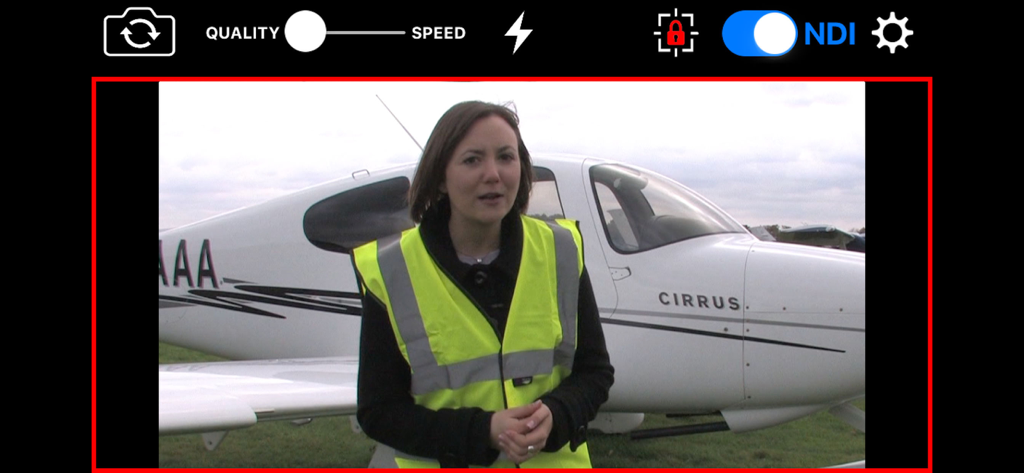
Schermata dell'app NDICam che mostra l'interfaccia dello streaming video professionale con toggle NDI e luce tally live

Schermata dell'app NDICam che mostra l'interfaccia dello streaming video professionale con toggle NDI e luce tally live

Loghi NDI e NDI HX3 con il marchio dello sviluppatore Sienna

Loghi NDI e NDI HX3 con il marchio dello sviluppatore Sienna

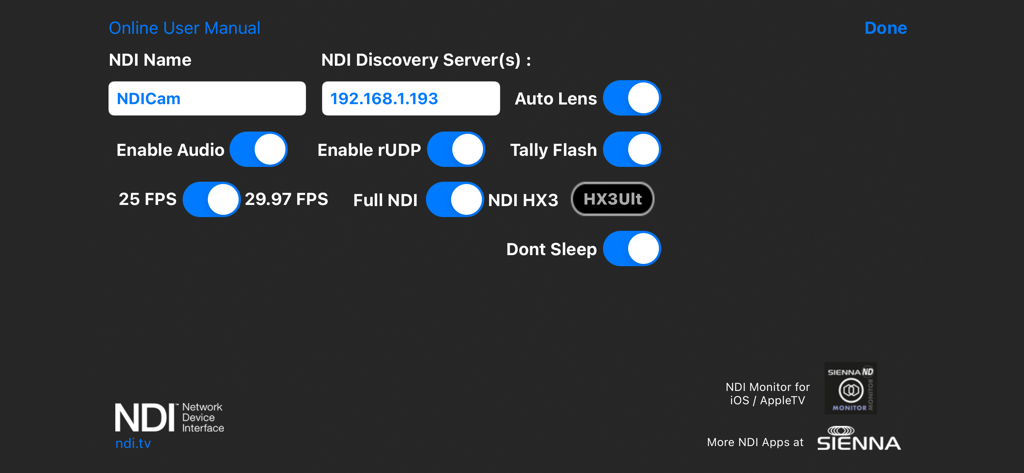
Menu delle impostazioni di NDICam che mostra il server di scoperta NDI e le opzioni di trasmissione video

Menu delle impostazioni di NDICam che mostra il server di scoperta NDI e le opzioni di trasmissione video

Video di livello broadcast a portata di mano

Gli strumenti che rendono questa app unica, scelti da 158K+ utenti.

NDI HX3 a latenza ultra-bassa

Passa tra le modalità Full NDI e NDI HX3 per fornire video 1080p cristallini ottimizzati per la larghezza di banda della tua rete e le prestazioni dell'hardware.

🔴

Tally live e logica professionale

Rimani sincronizzato con gli indicatori tally live/preview sullo schermo e un flash tally opzionale della fotocamera per segnalare ai talenti quando sono in onda.

⚙️

Controllo completo della produzione

Prendi il comando totale della tua inquadratura con blocco AF/AE, denominazione manuale della sorgente, controllo del silenziamento audio e commutazione fluida tra fotocamera anteriore e posteriore durante le trasmissioni.

Info sull'app

Tutto quello che devi sapere su NDICam.

Descrizione

* Special Offer Price * NDICam is the original NDI iOS camera built by the world's leading NDI broadcast infrastructure developers - Sienna. Mature and feature rich, uniquely with both Full NDI and NDI HX3 modes. The NDI (Network Device Interface) protocol connects to professional vision mixers and other devices, and delivers a high quality, low latency connection. NDICam is compatible with All TriCasters, VMix, Wirecast and hundreds of other professional IP video systems, software and hardware, which support NDI. - Simple to use - nothing to configure on your iOS device - Switch between front and rear cameras during broadcast - Auto Focus, AF Lock and Tap to Focus - Auto Exposure, AE Lock and Tap to Expose - Illumination light on/off - Audio Mute Control - Manual Naming of NDI Stream source - 4 quality / performance levels to suit your device and network, plus NDI HX Option - Pinch to zoom (where zoom is supported) - Auto-lens mode for multi-lens cameras - On screen live / preview tally plus optional use of camera flash as talent tally (with red gel cover). - Option to prevent iOS device sleep - Select 25FPS or 29.97FPS standard rate. - Choice of Full NDI or NDI HX3 compression modes (HX2 at 2 to 20 mBit, plus HX3 Ultra) - Rotation support for Portrait or Landscape Video Modes. Front and Rear cameras can be selected at the touch of a button and NDICam features a 4 position quality vs frame rate slider to deliver optimum video suited to the quality of your wifi connection and your iPhone's processing performance. Depending on your iOS device, compression mode selected and Wifi network performance NDICam supports up to 1080 full HD resolution. Control of flashlight, touch to focus, focus lock, pinch to zoom and audio enable are also included. You can even use the phone's torch as a Tally Light, by covering it with a red gel. Note: Depending on the performance of your iOS device and your WIFI network, you may not see full frame rates when operating at maximum 1080 resolution with a full HD camera. Using HX3 mode will help if the bottleneck is your WIFI network. Note: NDI is a high bandwidth protocol designed for local area Gigabit networks. In order to see good results you will need a fast, uncontested wifi connection. If you see slow frame rates, try improving the wifi environment, with a better router, less interference, directional antenna or maybe switch to 5GHz if you are on 2.4GHz. . NB HX3 Ultra will use around 50mBits of bandwidth, so it's lower than full NDI, but still quite high. Use one of the lower bandwidth HX3 modes if your network connection is struggling. NDICam is also compatible with wired ethernet connections to iOS devices which can help deliver smooth video compared to a poor quality Wifi network. Good results have been seen with lightning to ethernet adaptors. You can specify an NDI discovery server in the application settings. Note that you will need to restart the app for any changes to take effect. Specifying a discovery server will disable the standard mDNS (Bonjour) advertisement for the NDI Cam source, so your iOS device must be able to reach the discovery server one the network. If you experience problems - delete the Discovery Server entry and restart the app. NB: NDI HX3 Ultra mode requires a recent NDI compatible receiver.

Ultima versione

7.31

Dimensione

3.0 MB

Data di lancio

31 mar 2016

La produzione NDI® professionale inizia qui

Trasforma il tuo iPhone o iPad in una telecamera pronta per il broadcast con supporto Full NDI e HX3. Integra perfettamente i tuoi dispositivi mobili nei flussi di lavoro vMix, OBS e TriCaster oggi stesso.

Scarica su App Store

App information, icons, screenshots, and descriptions displayed on this page are sourced from the Apple App Store and are the property of their respective developers. Download estimates and rankings are based on MWM's proprietary models and may not reflect actual figures. This page is provided for informational and analytical purposes only.

Believe this page infringes your intellectual property? File a dispute