Notate + Play = music notebook
Scarica su App Store

Questa pagina non è una pagina ufficiale dell'app o del suo sviluppatore, ma una pubblicazione editoriale indipendente creata a scopo informativo e di commento. Salvo espressa indicazione contraria, né l'app né il suo sviluppatore sono affiliati, approvati, sponsorizzati, autorizzati o altrimenti ufficialmente collegati a MWM, Apple, Google Play, all'editore dell'app o allo sviluppatore dell'app, e nulla in questa pagina implica che l'app sia stata sviluppata utilizzando i servizi di MWM. Tutti i marchi, loghi, screenshot e altri contenuti rimangono di proprietà dei rispettivi proprietari.

Logo di Notate + Play = music notebook
Scarica su App Store

Notate + Play = music notebook

Smetti di passare da un'app all'altra. Sincronizza la tua musica da Apple Music o le registrazioni direttamente col pentagramma, rallenta la riproduzione e trascrivi con precisione usando input separati per ritmo e intonazione.

Numeri Chiave

Download

3K+

Valutazione

1.0/5

Valutazioni totali

0

Editore

Kunio Arai

Categoria

Music

Lingue

2

Ultima versione

3.50

Dimensione

12.7 MB

Data di lancio

7 lug 2023
Funzioni

Padroneggia il tuo flusso di lavoro di trascrizione

Colma il divario tra il tuo orecchio e la pagina. Notate + Play fornisce uno spazio di lavoro di livello professionale per trascrivere registrazioni, registrare sessioni di pratica e costruire la tua libreria digitale di spartiti su iPad.

Audio e notazione unificati

Elimina il cambio di app. Visualizza i tuoi spartiti e l'audio di riferimento da Apple Music o registrazioni dal vivo su un unico schermo sincronizzato.

Metodo di input basato sulla teoria

Inserisci ritmo e intonazione separatamente per rispecchiare la formazione dei conservatori professionali, riducendo gli errori e aiutandoti a trascrivere facilmente assoli complessi.

Gli screenshot e la descrizione seguenti provengono direttamente dall'elenco ufficiale dello store dell'app e sono di proprietà dello sviluppatore.

App Store

Screenshot
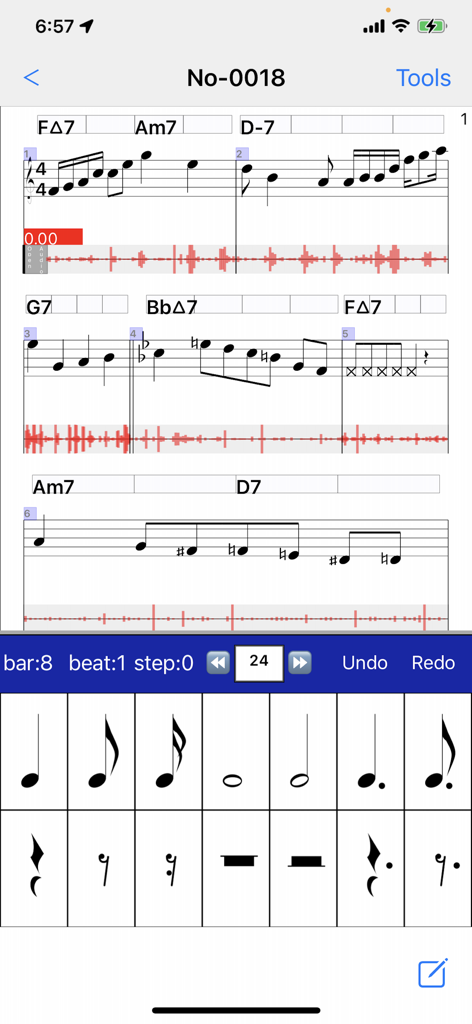
Notate + Play = music notebook - Interfaccia del quaderno musicale che mostra spartiti sincronizzati con forme d'onda audio e una tastiera per l'input del ritmo.
Interfaccia del quaderno musicale che mostra spartiti sincronizzati con forme d'onda audio e una tastiera per l'input del ritmo.

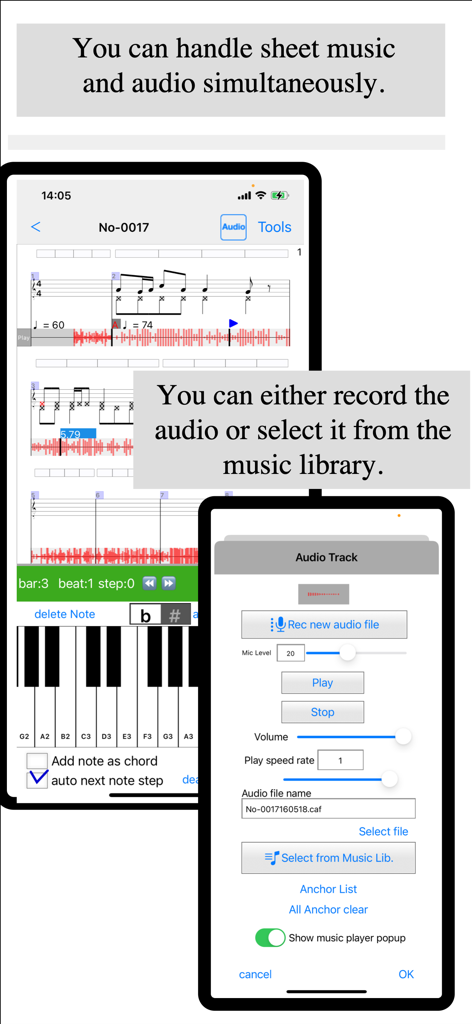
Notate + Play = music notebook - Interfaccia di notazione musicale che mostra spartiti sincronizzati con forme d'onda audio e un menu di registrazione della traccia
Interfaccia di notazione musicale che mostra spartiti sincronizzati con forme d'onda audio e un menu di registrazione della traccia

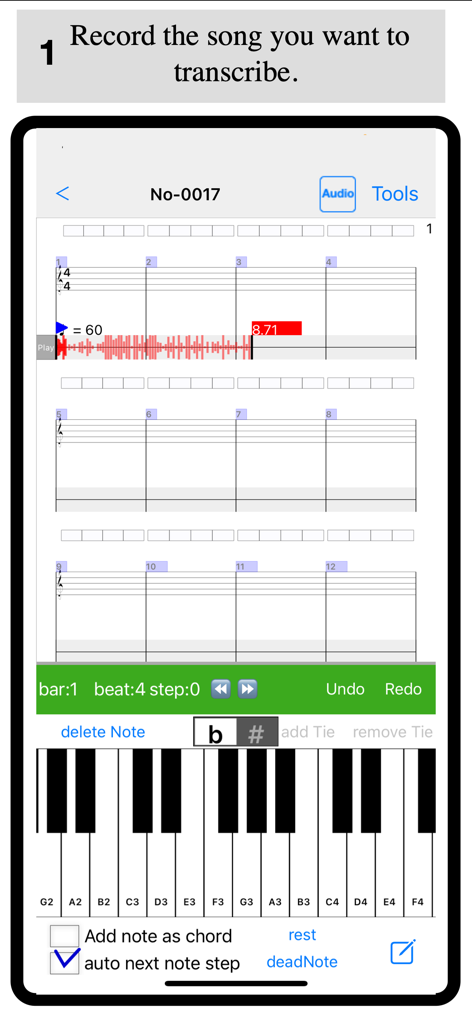
Notate + Play = music notebook - Un'interfaccia di trascrizione musicale che mostra una forma d'onda audio registrata sopra un pentagramma vuoto e una tastiera di pianoforte virtuale.
Un'interfaccia di trascrizione musicale che mostra una forma d'onda audio registrata sopra un pentagramma vuoto e una tastiera di pianoforte virtuale.

Notate + Play = music notebook - Interfaccia per aggiungere un ancoraggio di battuta per sincronizzare l'audio con la notazione musicale nell'app Notate Play.
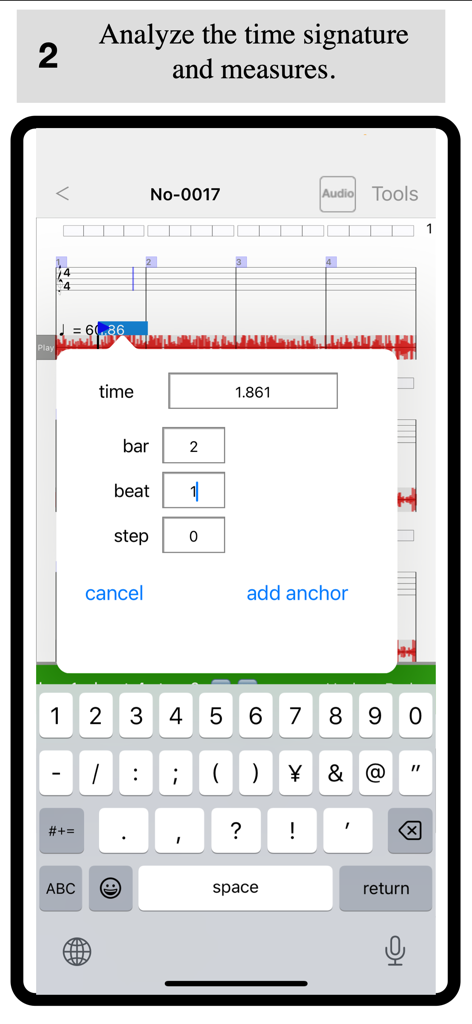
Interfaccia per aggiungere un ancoraggio di battuta per sincronizzare l'audio con la notazione musicale nell'app Notate Play.

Notate + Play = music notebook - Interfaccia dell'app Notate and Play per analizzare e inserire il ritmo musicale con una forma d'onda audio e un pentagramma
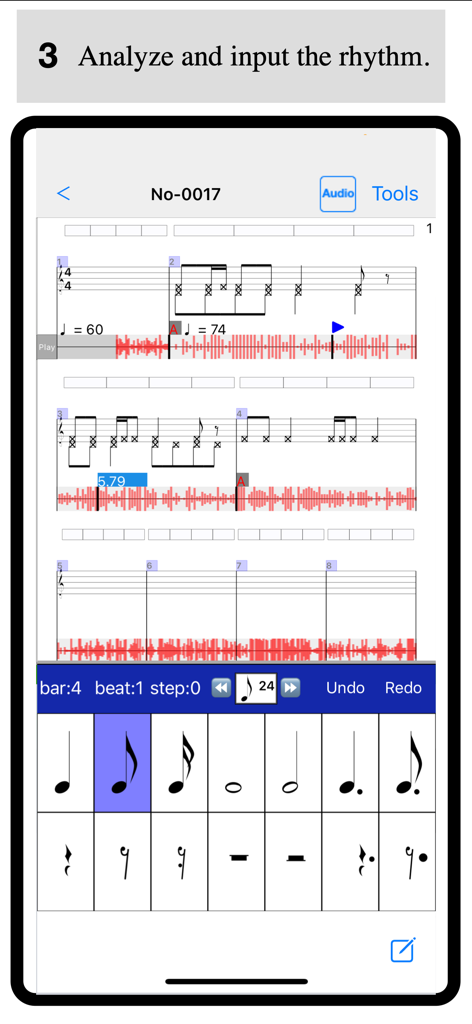
Interfaccia dell'app Notate and Play per analizzare e inserire il ritmo musicale con una forma d'onda audio e un pentagramma

Notate + Play = music notebook - Interfaccia dell'app di trascrizione musicale con una tastiera di pianoforte per l'input dell'intonazione e spartiti con forme d'onda audio
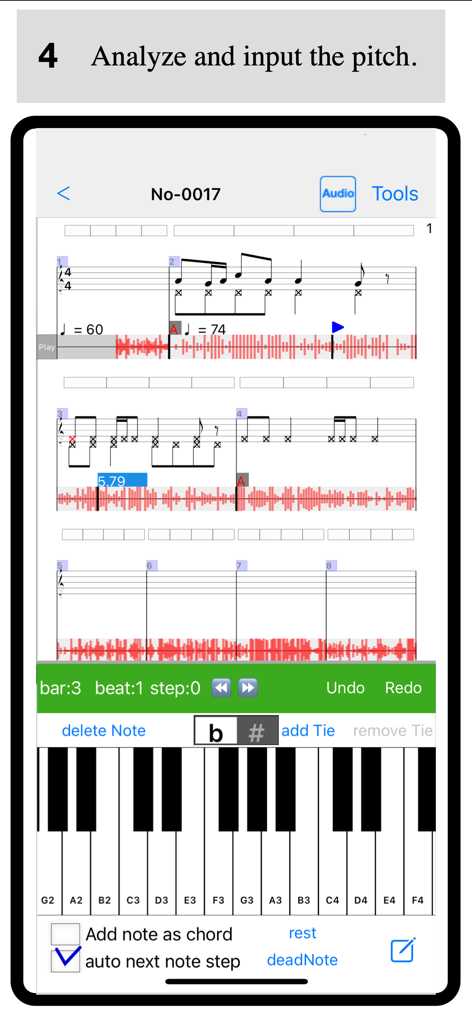
Interfaccia dell'app di trascrizione musicale con una tastiera di pianoforte per l'input dell'intonazione e spartiti con forme d'onda audio

Notate + Play = music notebook - Interfaccia di un'app di notazione musicale che mostra spartiti sincronizzati con una forma d'onda audio e una tastiera di pianoforte virtuale per la trascrizione
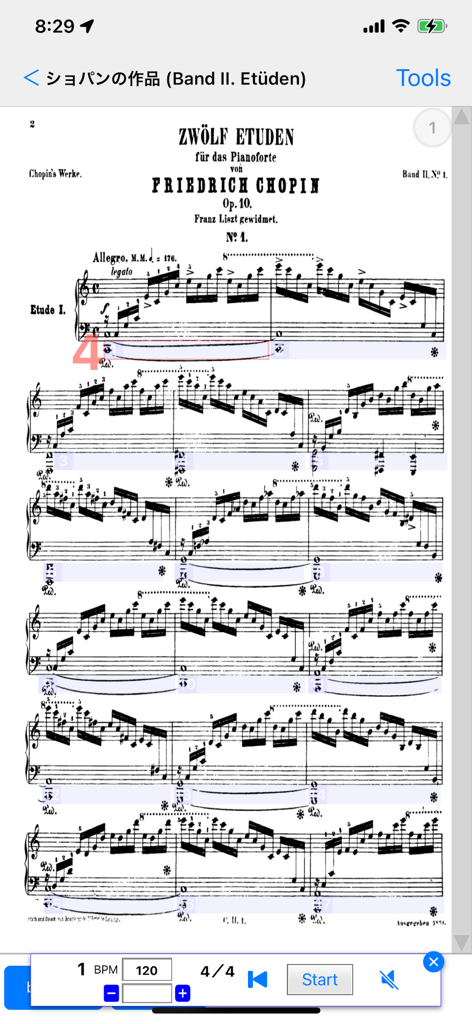
Interfaccia di un'app di notazione musicale che mostra spartiti sincronizzati con una forma d'onda audio e una tastiera di pianoforte virtuale per la trascrizione

Notate + Play = music notebook - Spartiti per pianoforte di Chopin visualizzati nell'app Notate and Play con metronomo integrato e impostazioni di riproduzione

Spartiti per pianoforte di Chopin visualizzati nell'app Notate and Play con metronomo integrato e impostazioni di riproduzione

Descrizione

About This App This app is designed to support musical instrument practice.
It allows you to view and listen to both a reference audio file (such as a recording or a track from your music library) and sheet music on the same screen. By listening to the reference performance while writing or reviewing sheet music, you can strengthen the connection between the music and the notation, helping you achieve a more ideal performance.
Ultimately, you may even be able to reproduce the music in your head through your instrument. Selecting Audio There are two ways to choose a reference audio file: 1 Selecting from the Music Library
You can select a song from your Apple Music library. 2 Recording with a Microphone
You can record using the microphone on your iPad or iPhone. If no audio track is selected, tapping the track will open the recording screen. Press "Rec new audio file" to start recording.
To stop recording, tap the audio track and select "Stop Recording" from the dialog. The audio track functions as a player. You can tap any position on the track to start playback from that point. The player controls appear above the sheet music input dialog at the bottom of the screen, allowing you to play, stop, and adjust playback speed. Creating Sheet Music While using pre-existing sheet music is convenient, transcribing it yourself is a great way to improve your skills. 1 Setting the Time Signature and Tempo
First, determine the time signature and tempo of the piece. Since many popular songs use a 4/4 time signature, this is set as the default. The default tempo is 60 BPM, but you can adjust it using the "Tempo Change Dialog." 2 Synchronizing Sheet Music and Audio
While playing the audio, identify the starting points of measures. If the measure positions and the audio are misaligned, use the "Beat Anchor" feature to adjust them. By adding anchors, you can link playback time with measure positions, creating a more precise score.
Adding multiple anchors will allow the app to calculate the tempo automatically. If the time signature changes during the piece, you can add a time signature mark to any measure. Main Features 1 Linking Audio and Sheet Music
You can select a song from your music library or use a recorded audio file and link it to your sheet music. Setting anchors helps streamline the transcription process. 2 Separate Input for Rhythm and Pitch
The app supports a training-based approach by allowing users to input rhythm and pitch separately. Entering rhythm first and then pitch ensures more accurate transcription. 3 Vertical Scrolling for Sheet Music
The sheet music can be scrolled vertically for easier viewing. This option can be enabled in the settings. 4 Adding and Editing Tracks
You can freely add and edit tracks, including chords, notes, text, and audio. 5 Audio Playback Speed Adjustment
Adjust the playback speed to make transcription and practice easier. 6 Sheet Music Viewer
Import sheet music from PDF or images and view them easily within the app. 7 Metronome Feature
The built-in metronome automatically scrolls the sheet music according to the tempo and time signature set in the score. 8 Second Voice Part Notation
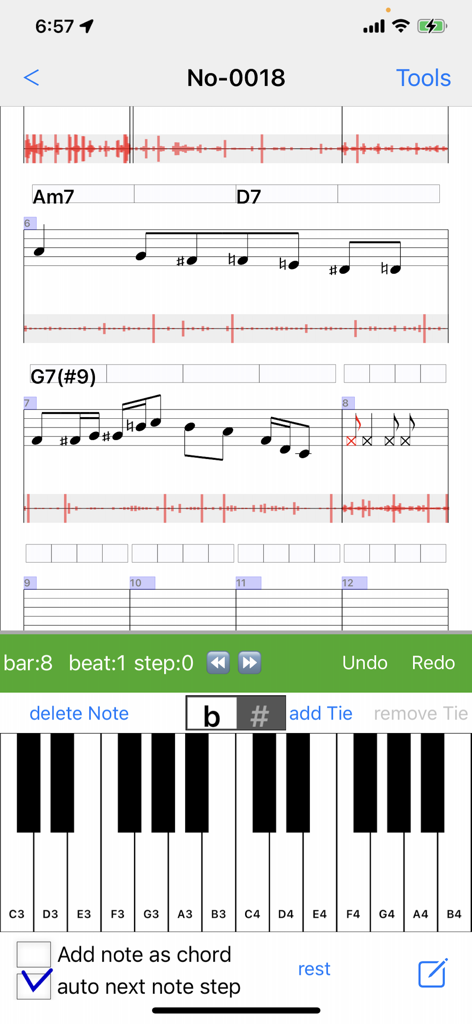
The app now supports second voice parts in sheet music. To enable this, go to "Edit Track(s)" and select an individual Note Track, then check "Second Voice Part." This allows you to enter a second voice part for that track.
To enter second voice notes, tap the lower area of the staff. You can also prioritize second voice selection by enabling the "2nd Voice" option in the note input view. 9 Adding Slurs and Text to Sheet Music
You can now input slurs and text onto the sheet music. Simply select a range of notes and use the popup menu to add them.

Download

Scarica su App Store

Questa pagina non è una pagina ufficiale dell'app o del suo sviluppatore, ma una pubblicazione editoriale indipendente creata a scopo informativo e di commento. Salvo espressa indicazione contraria, né l'app né il suo sviluppatore sono affiliati, approvati, sponsorizzati, autorizzati o altrimenti ufficialmente collegati a MWM, Apple, Google Play, all'editore dell'app o allo sviluppatore dell'app, e nulla in questa pagina implica che l'app sia stata sviluppata utilizzando i servizi di MWM. Tutti i marchi, loghi, screenshot e altri contenuti rimangono di proprietà dei rispettivi proprietari.







