PhotoMapper: GPS EXIF Editor

PhotoMapper: GPS EXIF Editor


Scarica su App Store
Logo di PhotoMapper: GPS EXIF Editor

PhotoMapper: GPS EXIF Editor – Completa la tua Mappa Fotografica e Proteggi la Tua Privacy

L'utility essenziale per l'archivista digitale e il fotografo professionista. Aggiungi senza sforzo geotag mancanti agli scatti DSLR, modifica metadati in blocco e cancella in modo sicuro i dati di posizione prima della condivisione per mantenere privata la tua vita personale.

Scarica su App Store

Editore

Mykola Fiantsev

Categoria

Photo & Video

Download

120K+

Valutazione

4.3/5

Valutazioni totali

400

Lingue

8

Il Tuo Mondo, Mappato

Scopri l'interfaccia usata da 120K+ utenti.
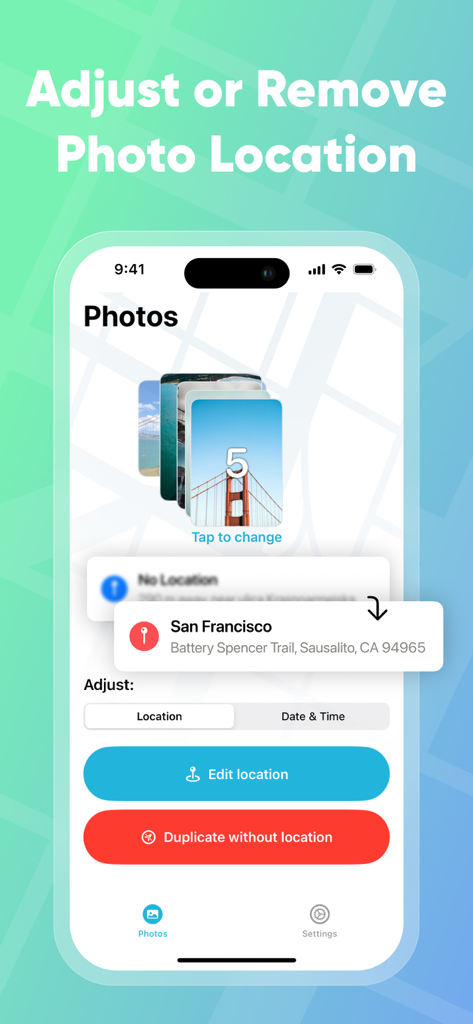
Interfaccia di PhotoMapper GPS EXIF Editor che mostra le opzioni di aggiustamento e rimozione della posizione per una pila di foto.

Interfaccia di PhotoMapper GPS EXIF Editor che mostra le opzioni di aggiustamento e rimozione della posizione per una pila di foto.

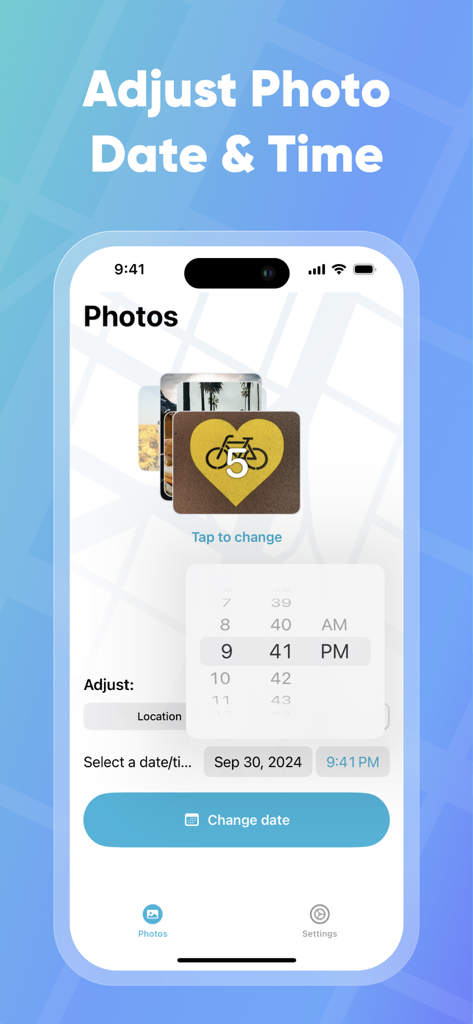
Interfaccia per aggiustare data e ora della foto nell'app PhotoMapper

Interfaccia per aggiustare data e ora della foto nell'app PhotoMapper

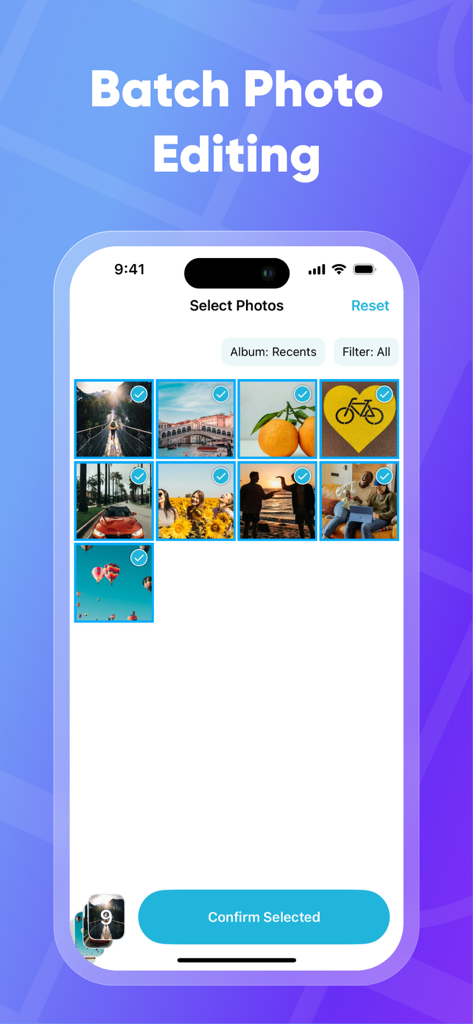
Schermata iPhone che mostra la funzione di selezione foto in blocco nell'app PhotoMapper per modificare i dati EXIF

Schermata iPhone che mostra la funzione di selezione foto in blocco nell'app PhotoMapper per modificare i dati EXIF

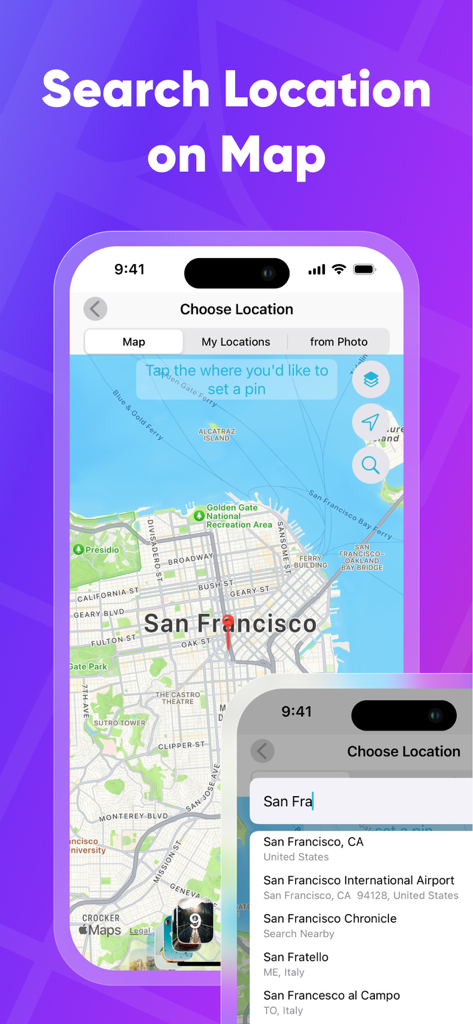
Cerca e seleziona una posizione geografica su una mappa per aggiungere metadati GPS alle foto

Cerca e seleziona una posizione geografica su una mappa per aggiungere metadati GPS alle foto

Perfeziona il Tuo Archivio Fotografico

Gli strumenti che rendono questa app unica, scelti da 120K+ utenti.

📍

Completa la Tua Mappa 'Luoghi'

Non lasciare mai che uno scatto DSLR rimanga non mappato. Aggiungi o correggi manualmente le coordinate GPS in modo che ogni foto appaia esattamente dove appartiene nella tua libreria iOS.

🛡️

Condividi con Totale Privacy

Proteggi i tuoi dati personali generando duplicati privi di metadati. Condividi i tuoi momenti preferiti sui social media senza rivelare la tua casa o le tue posizioni private.

Efficienza per Power User

Risparmia ore di lavoro manuale con la modifica in blocco. Copia i dati di posizione da una foto e applicali a centinaia di altre con pochi tocchi.

Info sull'app

Tutto quello che devi sapere su PhotoMapper: GPS EXIF Editor.

Descrizione

PhotoMapper: GPS EXIF Editor is an essential app for anyone who wants to keep their iOS Photo library organized by the places where photos were taken. All photographers who store photos in their iOS Photos library and use geo-tags for systematization could be upset with lost geo-tag information due to using DSLRs or getting these photos from friends. Just add this info with our app and keep your geo-tag system in a consistent state. PhotoMapper: GPS EXIF Editor is also useful for people who want to protect their personal privacy. When you share your photos on social networks or send them via email, the geo-location information – where the photo was taken – is shared as well. If you are concerned about your personal privacy and would like to share photos without any mark of location in EXIF metadata, PhotoMapper can remove it. **FEATURES:** • Location info of your photos will always be correct and never missed Easily add or modify location info of photos in your iOS Photo library by simply placing a pin on the map. Never miss this info even if you use a DSLR or for any other reason. • Prepare photos for social sharing with clear location info - Keep the original photo for yourself and create a copy without any mark of the GPS location info (Geotagging) in EXIF metadata for sharing, reinforcing your privacy. • Batch photo editing Edit multiple photos in a few clicks, the fast and easy way. Forget about single selection. • Find all photo with missed location info Easily find all photos without location in one click. • Copy location info from one photo to another Long press in the gallery to open a large preview of the selected photo and use the “Copy Location” action. Now you can copy the location to as many other photos as you wish. **HOW TO ADD OR MODIFY LOCATION INFO:** This action adds a new location, which will be available in the iOS Photo library. 1. Select one or multiple photos 2. Click “Edit location” 3. Set the desired location by placing a pin on the map 4. Confirm the action. **HOW TO REMOVE LOCATION INFO:** This action keeps the original photo and creates a duplicate copy without GPS location info, which you can share. The EXIF metadata will be clean in this case. There is no location info of this photo in any app. 1. Select one or multiple photos on the first screen. 2. Click “Duplicate photo without location.” 3. Confirm the action. Thanks for all feedback! Please leave a 5-star review if you are happy with PhotoMapper :) Terms of Use: https://gist.github.com/bigMOTOR/27f60cb35180a150d38dc11df5462276 Privacy Policy: https://gist.github.com/bigMOTOR/e373f36ef179c17679d5083e5fb39e80

Ultima versione

4.2.0

Dimensione

21.6 MB

Data di lancio

26 mar 2018

Perfeziona Oggi Stesso la Tua Libreria Fotografica

Unisciti a oltre 120.000 utenti che usano PhotoMapper per organizzare i loro ricordi DSLR e condividere foto in modo sicuro senza rivelare la loro posizione.

Scarica su App Store

App information, icons, screenshots, and descriptions displayed on this page are sourced from the Apple App Store and are the property of their respective developers. Download estimates and rankings are based on MWM's proprietary models and may not reflect actual figures. This page is provided for informational and analytical purposes only.

Believe this page infringes your intellectual property? File a dispute