PlayOn Cloud - Streaming DVR

PlayOn Cloud - Streaming DVR

Scarica su App Store
Logo di PlayOn Cloud - Streaming DVR

PlayOn Cloud: Il tuo DVR universale per lo streaming e Ad-Skipper

Registra film e programmi da Netflix, Disney+ e Hulu nel cloud. Salta gli spot pubblicitari, bypassa i limiti di download e conserva i tuoi preferiti per sempre per guardarli offline, in qualsiasi momento e ovunque.

Editore

MediaMall Technologies, Inc.

Categoria

Entertainment

Download

1M+

Valutazione

4.3/5

Valutazioni totali

4K+

Lingue

-

Il tuo DVR per lo streaming in azione

Scopri l'interfaccia usata da 1M+ utenti.

Logo e slogan di PlayOn Cloud per il primo DVR di streaming al mondo con persone che utilizzano dispositivi mobili
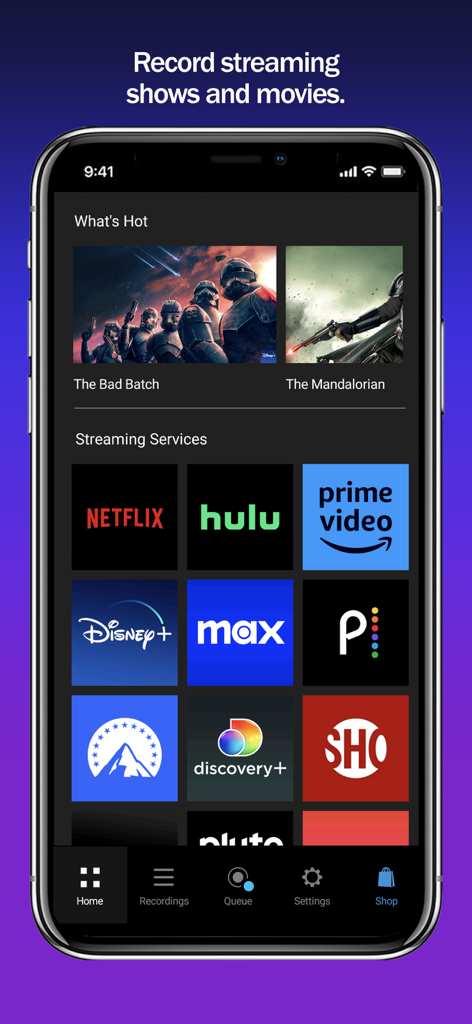
Logo e slogan di PlayOn Cloud per il primo DVR di streaming al mondo con persone che utilizzano dispositivi mobili

Schermata home dell'app PlayOn Cloud che mostra le icone per servizi di streaming come Netflix, Hulu e Prime Video
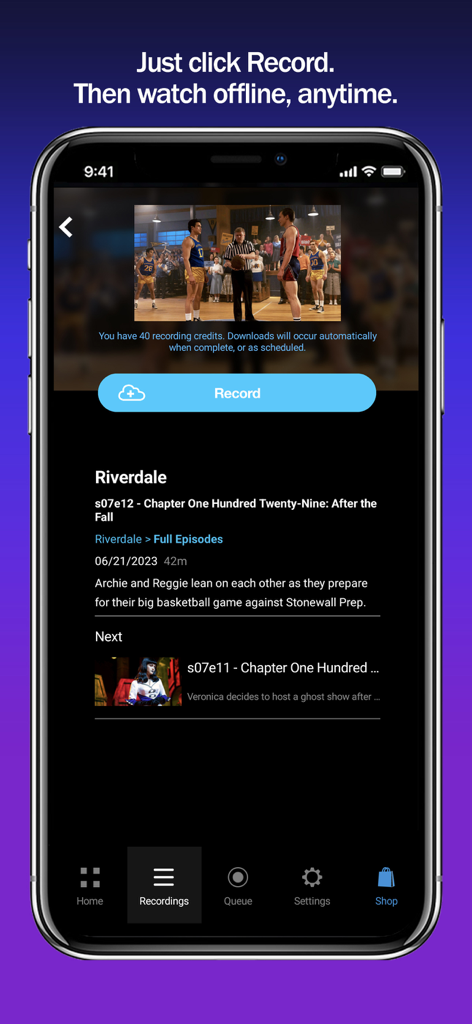
Schermata home dell'app PlayOn Cloud che mostra le icone per servizi di streaming come Netflix, Hulu e Prime Video

Interfaccia dell'app PlayOn Cloud che mostra il pulsante di registrazione per scaricare un episodio TV per la visualizzazione offline
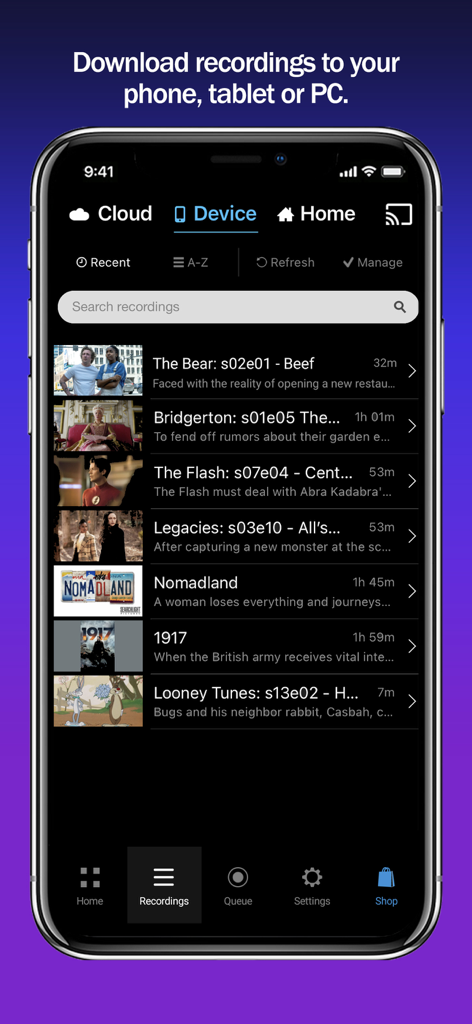
Interfaccia dell'app PlayOn Cloud che mostra il pulsante di registrazione per scaricare un episodio TV per la visualizzazione offline

Interfaccia dell'app PlayOn Cloud che mostra un elenco di programmi TV e film scaricati per la visualizzazione offline, inclusi titoli come The Bear e Bridgerton.

Interfaccia dell'app PlayOn Cloud che mostra un elenco di programmi TV e film scaricati per la visualizzazione offline, inclusi titoli come The Bear e Bridgerton.

Il tuo streaming, senza limitazioni

Gli strumenti che rendono questa app unica, scelti da 1M+ utenti.

⏭️

Salto automatico della pubblicità

Smetti di perdere tempo. Registra dai piani più economici con pubblicità di Netflix, Hulu o Disney+ e salta automaticamente gli spot durante la riproduzione.

✈️

Vera portabilità offline

Il compagno di viaggio perfetto. Scarica le tue registrazioni su telefono, tablet o PC per guardarle durante il tragitto casa-lavoro o durante i lunghi voli senza consumare dati.

📦

Archivio video permanente

Non perdere mai più un programma. A differenza dei normali download in-app, le registrazioni PlayOn non scadono mai e rimangono tue anche se il titolo viene rimosso dal servizio di streaming.

Info sull'app

Tutto quello che devi sapere su PlayOn Cloud - Streaming DVR.

Descrizione

Record and download any streaming video from Netflix, Disney+, Hulu, Amazon Prime, HBO Max, Peacock, Paramount+, The CW, Discovery+, Showtime, STARZ, Vudu, Pluto, Tubi, CBS, NBC, ABC, FOX, PBS, The Roku Channel, and BBC iPlayer, Acorn, Xfinity, and Spectrum. PlayOn Cloud downloads never expire. Download Big Bang Theory, The Bear, House of Dragon, Superman & Lois, Star Trek: Strange New Worlds, Yellowstone, Gotham Knights, Chicago Fire, Grey's Anatomy, or any of your favorite movies and shows; watch anytime, anywhere, even offline. Save hundreds of dollars a year by subscribing to the Ad-supported tiers of Netflix, Hulu, Disney+, HBO Max, Peacock, and Paramount+ and then skip over the ads when you watch with PlayOn (just like you do with your cable DVR). Record and download videos from Netflix before they go offline then watch them anywhere, anytime, even after they have been removed from Netflix. No need to select only the videos that Netflix lets you download, with PlayOn Cloud you can download ANY Netflix or Hulu video. Record and download Disney+ videos to watch offline. The simple PlayOn Cloud app gives you easy access to download all streaming videos from Netflix, Disney+, Hulu, Amazon Prime, HBO Max, Peacock, Paramount+, The CW, Discovery+, Showtime, STARZ, Vudu, Pluto, Tubi, CBS, NBC, ABC, FOX, PBS, The Roku Channel, and BBC iPlayer, Acorn, Xfinity, and Spectrum.– over 20 of the most popular streaming services. Love House of Dragon, Game of Thrones, Jack Ryan or want to watch Moon Knight when you’re offline? Simply select the show you want and hit record. Once recorded, a streaming show or movie will be available for you to download to your mobile device or PC. You can even set it to automatically download to your phone, tablet, or TV as soon as the recording is finished. You can skip right over the recordings automatically when you watch. You can even watch your recordings on your Roku, Chromecast, Fire TV, or Apple TV (and skip the recordings). The recording happens in the PlayOn Cloud so no data is used to make the recording. Once your PlayOn Cloud recording is downloaded, you can watch it anytime and anywhere. You can watch it on your big screen TV with your Roku, Chromecast, Fire TV, or Apple TV. No more worrying about a Netflix video leaving. You can even download it to your Mac, PC or other device. No more WiFi requirement to watch on your mobile device – you can download Netflix and watch when you're not on WiFi without using data. Want to watch your downloaded PlayOn Cloud recordings on your TV? You can cast to your TV with Roku, Chromecast or Fire TV or AirPlay it to your Apple TV. Have a long flight tomorrow? Queue up Game of Thrones, Jack Ryan or The Mandalorian tonight and they’ll be downloaded and waiting when you take off. Long subway ride to work? With PlayOn Cloud, you’ll be watching downloaded Netflix, The CW, or Disney+ videos the entire time. Need a selection of safe shows for your kids to watch? PlayOn Cloud makes it easy to fill up your kid's device with safe streaming shows - and watch them without using any cellular data, or watching any commercials. When you watch recordings that have commercials, you have an option to automatically skip the ads. How great is that? Want to make PlayOn Cloud even more powerful? Get an optional PlayOn Cloud Storage and Credit plan. You'll get a week to make 7 free recordings. After that you'll be billed $4.99 per month for 30 recordings and 100GB cloud storage. You’ll be charged as a recurring transaction through your iTunes account. Your subscription will automatically renew unless canceled at least 24 hours before the end of the current billing period. Your account will be charged for renewal within 24 hours prior to the end of the current period. You can manage your subscription and turn off auto-renewal by going to your iTunes Account Settings after purchase. Terms of Use: https://www.playon.tv/eula Privacy Policy: http://www.playon.tv/privacy

Ultima versione

1.2.127.37153

Dimensione

155.0 MB

Data di lancio

3 ott 2016

Prendi il controllo del tuo streaming oggi stesso

Salta la pubblicità, risparmia sui dati e conserva i tuoi programmi preferiti per sempre. Unisciti a oltre 1 milione di utenti e ottieni le tue prime 7 registrazioni gratuitamente.

Scarica su App Store

App information, icons, screenshots, and descriptions displayed on this page are sourced from the Apple App Store and are the property of their respective developers. Download estimates and rankings are based on MWM's proprietary models and may not reflect actual figures. This page is provided for informational and analytical purposes only.

Believe this page infringes your intellectual property? File a dispute