
Questa pagina non è una pagina ufficiale dell'app o del suo sviluppatore, ma una pubblicazione editoriale indipendente creata a scopo informativo e di commento. Salvo espressa indicazione contraria, né l'app né il suo sviluppatore sono affiliati, approvati, sponsorizzati, autorizzati o altrimenti ufficialmente collegati a MWM, Apple, Google Play, all'editore dell'app o allo sviluppatore dell'app, e nulla in questa pagina implica che l'app sia stata sviluppata utilizzando i servizi di MWM. Tutti i marchi, loghi, screenshot e altri contenuti rimangono di proprietà dei rispettivi proprietari.


Quiver - 3D Coloring App
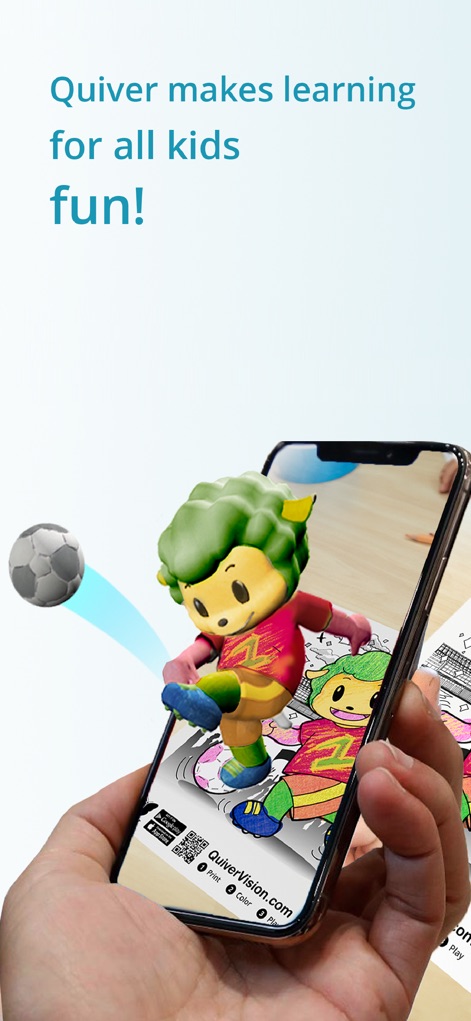
La carta morta si anima: L'app trasforma semplici pastelli in un universo digitale tridimensionale, conferendo al disegno un'esistenza oltre il foglio.
Download
2.5M+Valutazione
Valutazioni totali
426Editore
Categoria
EntertainmentLingue
1Ultima versione
6.32Dimensione
265.2 MBData di lancio
30 mag 2013Una disamina delle caratteristiche chiave che rendono l'app un ponte tra creatività tradizionale e tecnologia AR immersiva per il pubblico giovane e gli educatori.
Analisi Funzionale: 'Quiver - 3D Coloring App'
Realtà Aumentata Interattiva
L'app trasforma disegni fisici in mondi 3D interattivi tramite la realtà aumentata, offrendo un'esperienza visiva e giocosa unica per i bambini.
Interazione e Giochi con i Modelli 3D
Consente agli utenti di interagire attivamente e giocare con le loro creazioni animate in 3D, estendendo il divertimento e l'esplorazione oltre la semplice visualizzazione.
Contenuti Educativi Diversificati
Questo strumento integra una vasta gamma di pagine da colorare educative (es. alfabeto, spazio, matematica, scienze) che supportano l'apprendimento di varie materie in modo coinvolgente.
Personalizzazione delle Creazioni
L'app consente ai bambini di vedere le proprie pagine colorate prendere vita con le loro personalissime scelte cromatiche, generando un senso di orgoglio e autorialità per ogni creazione.
Piani Lezione e Attività per Educatori
L'applicazione offre piani lezione e attività gratuiti, creati da insegnanti ed educatori, facilitando l'integrazione della realtà aumentata nell'ambiente scolastico.
Supporto Multi-dispositivo per la Classe
Il dashboard educativo di Quiver consente di implementare l'app su più dispositivi in classe con un'unica sottoscrizione, rendendola uno strumento pratico per gli insegnanti.
Domande Frequenti
Tutto quello che devi sapere su Quiver - 3D Coloring App
What is the Quiver - 3D Coloring App?
The Quiver app combines physical coloring with augmented reality technology. It creates an engaging, educational, and magical experience by bringing colored pages to life as 3D animations on smart devices.
How does the Quiver app work?
Users download the Quiver app, print pages from the website, color them, then scan the QR code and the colored page with their device's camera. The Quiver app then makes the creation leap from the page with augmented reality.
Does the Quiver - 3D Coloring App offer free content?
Yes, the Quiver app offers free pages available for download from its website. These free pages allow users to test the augmented reality coloring experience before considering a subscription.
What kind of educational content does Quiver provide?
Quiver provides a wide range of educational content including subjects like ABCs, space, math, science, and geography. It also offers lesson and activity plans created by educators to help students visualize and understand various topics.
Do I need a subscription for the Quiver app?
A subscription for the Quiver app unlocks all paid premium augmented reality content and lesson plans. While free pages are available, in-app purchases and subscriptions give access to additional content.
Can multiple devices use one Quiver app subscription in a classroom?
Yes, the Quiver Education dashboard allows deployment of the Quiver app across multiple classroom devices using a single subscription. All these devices can then access and use the available Quiver app content during the subscription term.
Does the Quiver - 3D Coloring App collect personal data?
No, the Quiver app does not collect any personally identifiable data. It collects only anonymous, aggregated analytics data to improve the app experience, adhering to its privacy policy.
What are the technical requirements for using the Quiver app?
The Quiver app requires physically printed coloring pages to enjoy the full experience, an Internet connection to download new content, and it only works with QuiverVision pages, identifiable by the Quiver Butterfly logo.
Where can I find Quiver coloring pages to print?
Users can find and download Quiver coloring pages from the Quiver app's website, specifically at quivervision.com/coloring-packs. These pages are then printed to be colored and used with the app.
Gli screenshot e la descrizione seguenti provengono direttamente dall'elenco ufficiale dello store dell'app e sono di proprietà dello sviluppatore.
App Store
Screenshot



Descrizione
Download
App Simili
App con funzionalità ed esperienza simili
Project Aqua: Adobe for Kids
Adobe Labs, Inc.

The Magical Mix-Up AR
King Studio, LLC

Plugo by PlayShifu
MOBILIZAR TECHNOLOGIES PRIVATE LIMITED

Animopus: kids drawing 2+
Animopus Inc.

My Very Hungry Caterpillar AR
StoryToys Limited

Discover Dairy
Center for Dairy Excellence
Elf Studio
North Pole Command Centre Limited

Orboot Earth AR by PlayShifu
MOBILIZAR TECHNOLOGIES PRIVATE LIMITED
Kids Drawing, Doodle Painting
Hue Hoang Thi
Questa pagina non è una pagina ufficiale dell'app o del suo sviluppatore, ma una pubblicazione editoriale indipendente creata a scopo informativo e di commento. Salvo espressa indicazione contraria, né l'app né il suo sviluppatore sono affiliati, approvati, sponsorizzati, autorizzati o altrimenti ufficialmente collegati a MWM, Apple, Google Play, all'editore dell'app o allo sviluppatore dell'app, e nulla in questa pagina implica che l'app sia stata sviluppata utilizzando i servizi di MWM. Tutti i marchi, loghi, screenshot e altri contenuti rimangono di proprietà dei rispettivi proprietari.