
Questa pagina non è una pagina ufficiale dell'app o del suo sviluppatore, ma una pubblicazione editoriale indipendente creata a scopo informativo e di commento. Salvo espressa indicazione contraria, né l'app né il suo sviluppatore sono affiliati, approvati, sponsorizzati, autorizzati o altrimenti ufficialmente collegati a MWM, Apple, Google Play, all'editore dell'app o allo sviluppatore dell'app, e nulla in questa pagina implica che l'app sia stata sviluppata utilizzando i servizi di MWM. Tutti i marchi, loghi, screenshot e altri contenuti rimangono di proprietà dei rispettivi proprietari.


Remove BG - Background Remover
Trasforma qualsiasi foto in un'inserzione di prodotto professionale, miniatura per social media o foto d'identità in pochi secondi. Sperimenta la rimozione dello sfondo di qualità da studio con un solo tocco, senza bisogno di competenze di design.
Download
4K+Valutazione
Valutazioni totali
0Editore
Categoria
Photo & VideoLingue
48Ultima versione
1.2.1Dimensione
57.6 MBData di lancio
5 mag 2023Dai Potenza al Tuo Side-Hustle con l'AI
Smetti di lottare con complessi software di editing. Rimuovi BG offre strumenti di livello professionale progettati specificamente per creatori, rivenditori e imprenditori digitali.
Rimozione Sfondo AI con un Tocco
Ritaglia automaticamente persone, animali domestici e prodotti in pochi secondi. La nostra AI intelligente offre bordi perfetti senza alcun intervento manuale.
Inserzioni E-commerce di Livello Professionale
Aumenta le tue vendite su Poshmark, eBay ed Etsy. Trasforma scatti casalinghi disordinati in vetrine di prodotti pulite e di qualità da studio all'istante.
Domande Frequenti
Tutto quello che devi sapere su Remove BG - Background Remover
Cos'è Remove BG - Background Remover?
Remove BG - Background Remover è un'applicazione per rimuovere istantaneamente sfondi da immagini originali. Ritaglia automaticamente immagini, cancella parti indesiderate e lascia solo gli elementi desiderati.
Come rimuovo uno sfondo usando l'app Remove BG?
Per rimuovere uno sfondo con l'app Remove BG, carica un'immagine dalla tua galleria o fotocamera. Quindi, premi il pulsante "rimuovi sfondo" sullo schermo. Puoi scegliere un nuovo sfondo o salvare l'immagine.
Remove BG - Background Remover utilizza l'IA per la rimozione dello sfondo?
Sì, Remove BG - Background Remover offre una Modalità IA. Questa modalità riconosce automaticamente persone, animali, piante e anime per rimuovere gli sfondi. Produce immagini ritagliate di alta qualità con bordi nitidi.
Posso modificare manualmente i ritagli in Remove BG - Background Remover?
Sì, Remove BG - Background Remover fornisce una Modalità Manuale. Gli utenti possono delineare rapidamente l'oggetto che desiderano ritagliare ed estrarre, quindi cancellare e riparare manualmente l'immagine ritagliata per un editing preciso.
Remove BG - Background Remover è un'app gratuita?
Sì, l'app "Remove BG - Background Remover" dichiara "non ti costa un centesimo" per la sua funzionalità. Si posiziona come uno strumento intelligente che esegue la rimozione dello sfondo gratuitamente.
Quali opzioni di sfondo offre Remove BG - Background Remover?
Remove BG - Background Remover offre varie opzioni di sfondo integrate. Queste includono colori solidi, sfumature e sfondi specifici per prodotti. L'app dispone anche di categorie come "Velvet" per diversi stili.
Remove BG - Background Remover può creare immagini per l'e-commerce?
Sì, Remove BG - Background Remover può creare immagini adatte per vetrine di prodotti e-commerce. Supporta anche la generazione di immagini per copertine di podcast, profili di cartoni animati e foto profilo perfette.
Remove BG - Background Remover può essere utilizzato per foto tessera o passaporto ufficiali?
Sì, Remove BG - Background Remover può essere utilizzato per foto tessera, passaporto o foto per candidature ufficiali. Gli utenti possono aggiungere uno sfondo colorato all'immagine estratta per soddisfare requisiti specifici.
Gli screenshot e la descrizione seguenti provengono direttamente dall'elenco ufficiale dello store dell'app e sono di proprietà dello sviluppatore.
App Store
Screenshot
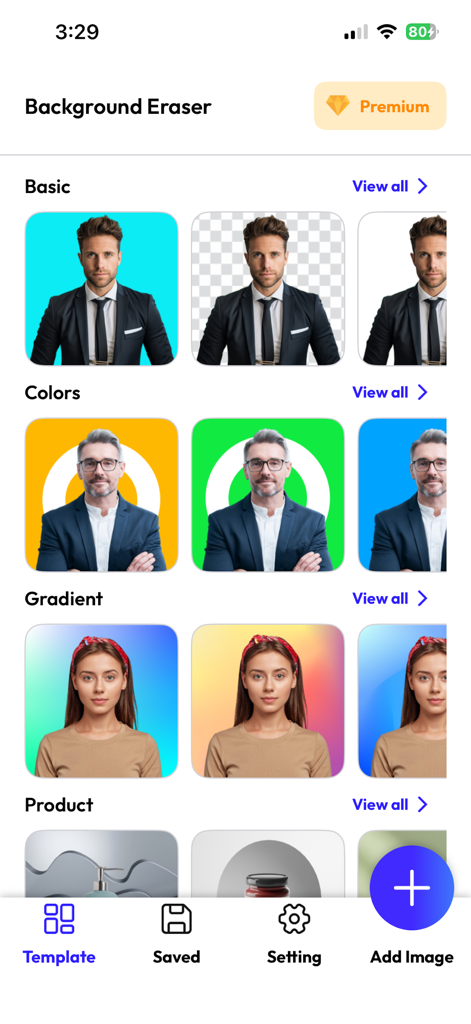
Interfaccia di un'app di rimozione dello sfondo mobile che mostra vari modelli colorati e sfumati per ritratti e prodotti.
Schermata di avvio dell'app Rimuovi BG con un'immagine del profilo circolare e un indicatore di caricamento su uno sfondo sfumato blu
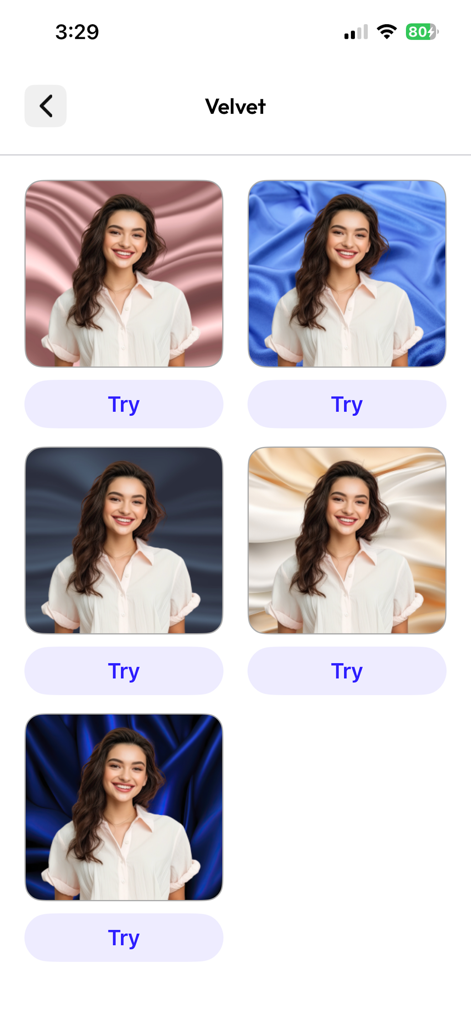
Schermata di un'app mobile che mostra diverse opzioni di sfondo in tessuto di velluto per una foto di un ritratto
Descrizione
Download
App Simili
App più classificate nella stessa categoria

CapCut: Photo & Video Editor
BYTEDANCE PTE. LTD.

Instagram, Inc.

YouTube
Google LLC

Canva: AI Photo & Video Editor
Canva Pty Ltd

快手
Beijing Kwai Technology Co., Ltd.

Snapchat
Snap, Inc.

Edits: Video Editor
Instagram, Inc.

Google Photos: Backup & Edit
Google LLC

Meta AI - Vibes & AI Glasses
Meta Platforms, Inc.
Questa pagina non è una pagina ufficiale dell'app o del suo sviluppatore, ma una pubblicazione editoriale indipendente creata a scopo informativo e di commento. Salvo espressa indicazione contraria, né l'app né il suo sviluppatore sono affiliati, approvati, sponsorizzati, autorizzati o altrimenti ufficialmente collegati a MWM, Apple, Google Play, all'editore dell'app o allo sviluppatore dell'app, e nulla in questa pagina implica che l'app sia stata sviluppata utilizzando i servizi di MWM. Tutti i marchi, loghi, screenshot e altri contenuti rimangono di proprietà dei rispettivi proprietari.