running time record

running time record

Scarica su App Store
Logo di running time record

running time record: Il Diario di Corsa Professionale e Privato

Prendi il controllo del tuo allenamento con inserimenti manuali precisi e grafici annuali illuminanti. Progettato per corridori che apprezzano la privacy dei dati e la gestione multi-utente, senza il rumore dei social media o del tracciamento GPS.

Scarica su App Store

Editore

YUTAKA IZUMIYAMA

Categoria

Sports

Download

200

Valutazione

1.0/5

Valutazioni totali

0

Lingue

2

Le Tue Statistiche a Colpo d'Occhio

Scopri l'interfaccia usata da 200 utenti.
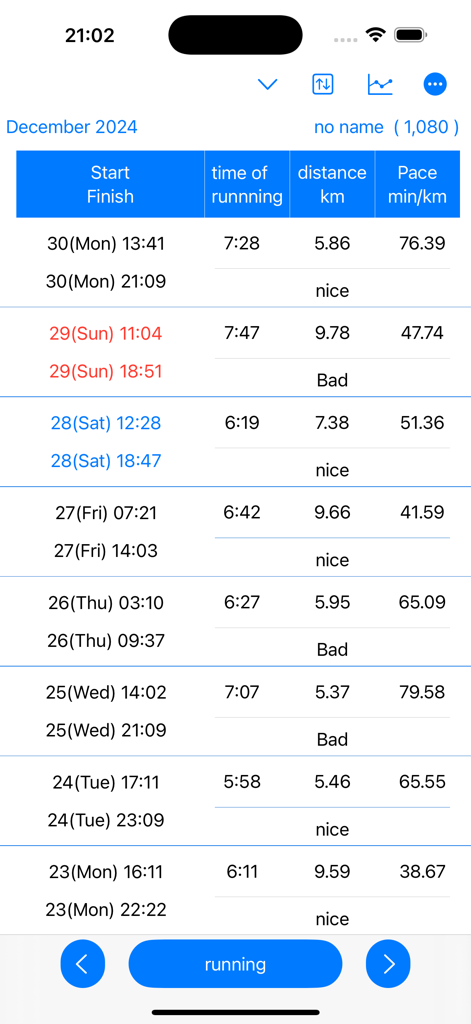
Una tabella dettagliata di registri di corsa che mostra orari di inizio orari di fine distanza e passo

Una tabella dettagliata di registri di corsa che mostra orari di inizio orari di fine distanza e passo

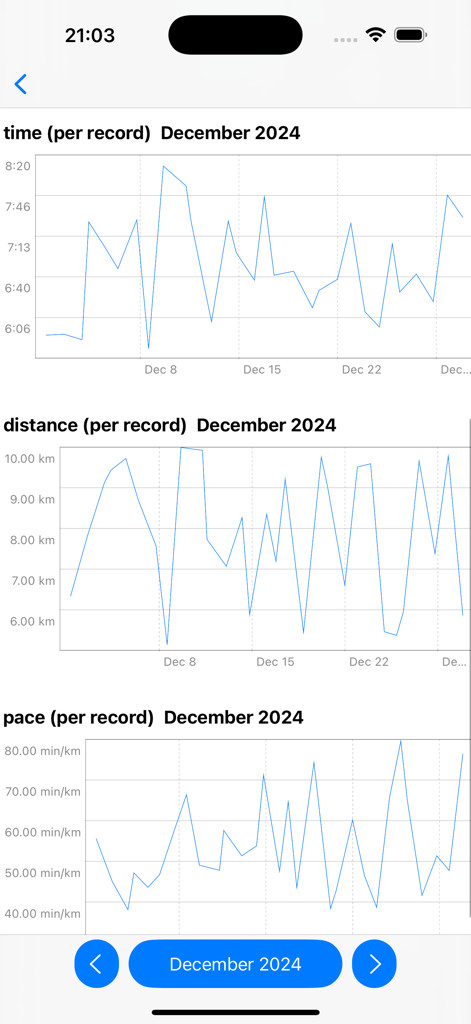
Grafici lineari che mostrano dati di corsa mensili per tempo distanza e passo a dicembre 2024

Grafici lineari che mostrano dati di corsa mensili per tempo distanza e passo a dicembre 2024

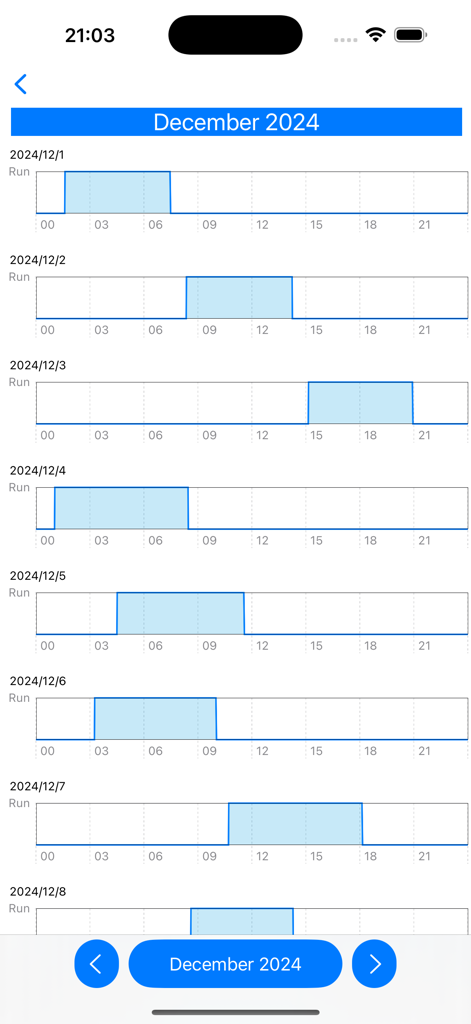
Un grafico del ritmo di corsa mensile che mostra i registri di allenamento giornalieri per dicembre

Un grafico del ritmo di corsa mensile che mostra i registri di allenamento giornalieri per dicembre

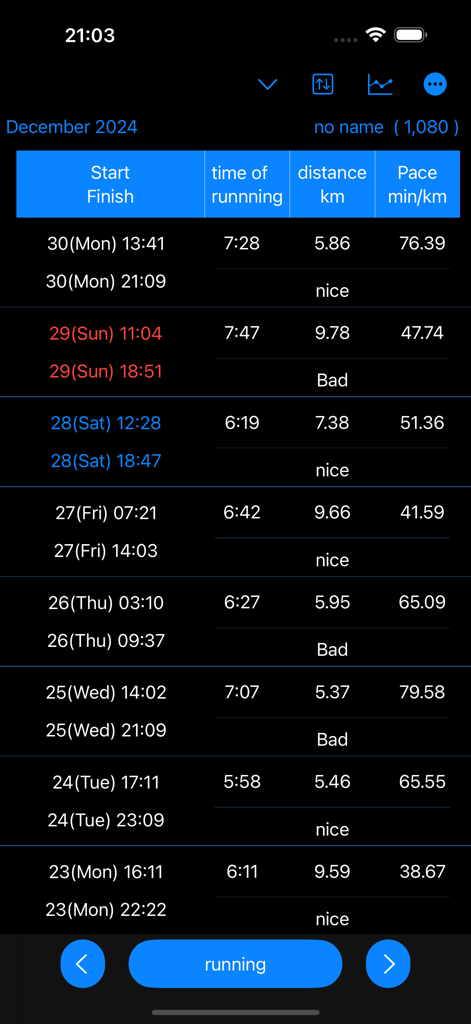
Un registro attività dettagliato in modalità scura che mostra orari di inizio e fine corsa durata distanza e passo per chilometro

Un registro attività dettagliato in modalità scura che mostra orari di inizio e fine corsa durata distanza e passo per chilometro

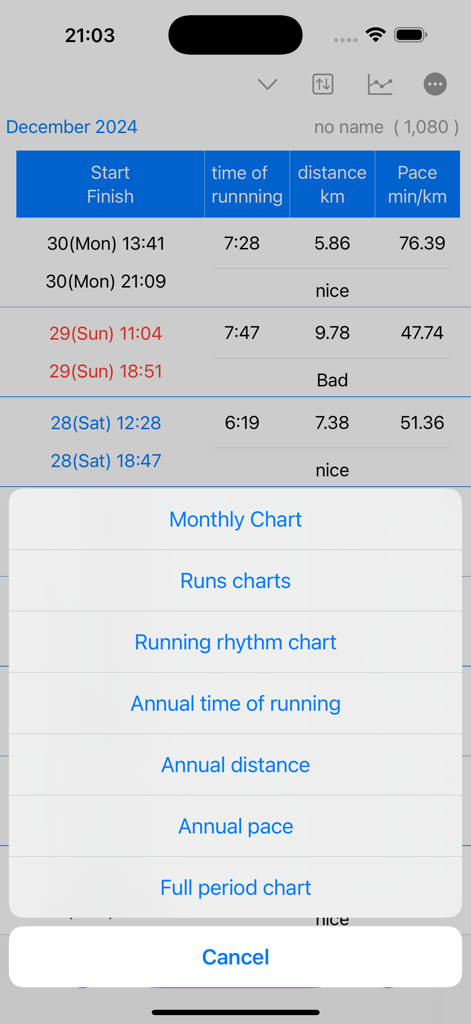
Uno screenshot dell'app running time record che mostra un elenco di opzioni di visualizzazione dati inclusi grafici mensili e annuali per passo e distanza.

Uno screenshot dell'app running time record che mostra un elenco di opzioni di visualizzazione dati inclusi grafici mensili e annuali per passo e distanza.

Monitoraggio Preciso delle Prestazioni

Gli strumenti che rendono questa app unica, scelti da 200 utenti.

🔒

Registrazione Manuale Prioritaria sulla Privacy

Abbandona il tracciamento GPS invasivo. Registra le tue corse sul tapis roulant o nel quartiere con controllo manuale al 100%, mantenendo privati i tuoi dati di localizzazione e accurati i tuoi record.

👥

Gestione Multi-Utente

Lo strumento definitivo per famiglie e allenatori giovanili. Tieni traccia dei progressi di più corridori o studenti da un'unica app, ognuno con i propri set di dati distinti.

📈

Visualizzazione Analitica Approfondita

Trasforma i tuoi registri in intuizioni azionabili. Visualizza il passo annuale, i ritmi mensili e le prestazioni dell'intero periodo attraverso grafici lineari dettagliati progettati per la crescita a lungo termine.

Info sull'app

Tutto quello che devi sapere su running time record.

Descrizione

Running time is calculated and displayed based on start and end date and time. Displays time in a line graph. ・Record start date and time 1. Tap the “running” button. If you press/tap for a long time, step 2/step 3 will be skipped. The current date and time will be set. 2. Select the year, month, and day and tap "Next". 3. Select your start time and tap OK. ・When recording the end date and time 1. Tap the “end date and time" button in the Finish column of the table. If you press/tap for a long time, step 2/step 3 will be skipped. The current date and time will be set. 2. Select the year, month, and day and tap "Next". 3. Select finish time and tap "OK". ▼running time The running time in the table is automatically displayed based on the start and end date and time. ▼Display chart 1. Press the line chart button at the top. 2. Click the displayed chart from the menu below. Monthly chart Runs chart Running rhythm chart Annual time of runnning Annual distance Annual pace Full period chart ▼Add user 1. Press the user button at the top 2. Press add user 3. Enter the username and press OK. ▼Edit username 1. Press the user button at the top 2. Press user edit and delete 3. Press the username from the list. 4. Edit the user name on the edit screen and press OK. ▼Delete username 1. Press the user button at the top 2. Press user edit and delete 3. Swipe the username you want to delete from the list from the left and press Delete. ▼Dartk mode ON/OFF You can choose between Light mode and Dark mode. Setting apperance mode Light mode Dark mode ▼If you want to delete all records From the menu on the top right, select Erase all data. You can delete all records. ▼Model change data migration For users with the same Apple ID Because records are stored in iCloud View the same recording on a new iPhone/iPad

Ultima versione

25.11.5

Dimensione

4.9 MB

Data di lancio

9 apr 2025

Prendi il Controllo del Tuo Percorso di Corsa Oggi

Che tu stia monitorando i tuoi obiettivi personali sul tapis roulant o gestendo i progressi della tua famiglia, ottieni il diario semplice, sicuro e basato sui dati che meriti.

Scarica su App Store

App information, icons, screenshots, and descriptions displayed on this page are sourced from the Apple App Store and are the property of their respective developers. Download estimates and rankings are based on MWM's proprietary models and may not reflect actual figures. This page is provided for informational and analytical purposes only.

Believe this page infringes your intellectual property? File a dispute