
Questa pagina non è una pagina ufficiale dell'app o del suo sviluppatore, ma una pubblicazione editoriale indipendente creata a scopo informativo e di commento. Salvo espressa indicazione contraria, né l'app né il suo sviluppatore sono affiliati, approvati, sponsorizzati, autorizzati o altrimenti ufficialmente collegati a MWM, Apple, Google Play, all'editore dell'app o allo sviluppatore dell'app, e nulla in questa pagina implica che l'app sia stata sviluppata utilizzando i servizi di MWM. Tutti i marchi, loghi, screenshot e altri contenuti rimangono di proprietà dei rispettivi proprietari.


SafeExamBrowser
La distrazione è morta. L'app SafeExamBrowser di MWM sigilla lo studente in una bolla digitale inattaccabile, un incubo per i furbetti del voto facile.
Download
1M+Valutazione
Valutazioni totali
6.6KEditore
Categoria
EducationLingue
2Ultima versione
3.6.2Dimensione
66.8 MBData di lancio
15 giu 2017Valutazione delle principali funzionalità per l'e-assessment sicuro in ambiente educativo e formativo.
Analisi Funzionale di SafeExamBrowser per iOS
Modalità Chiosco Sicura
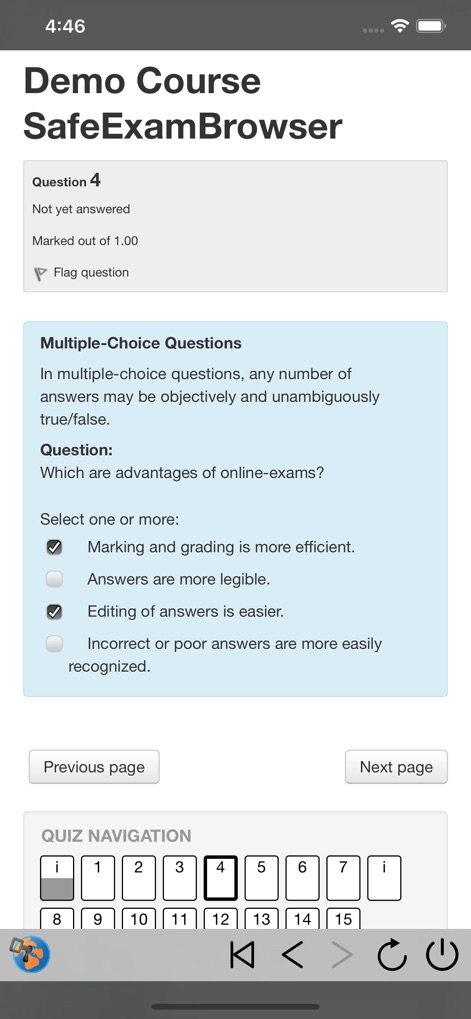
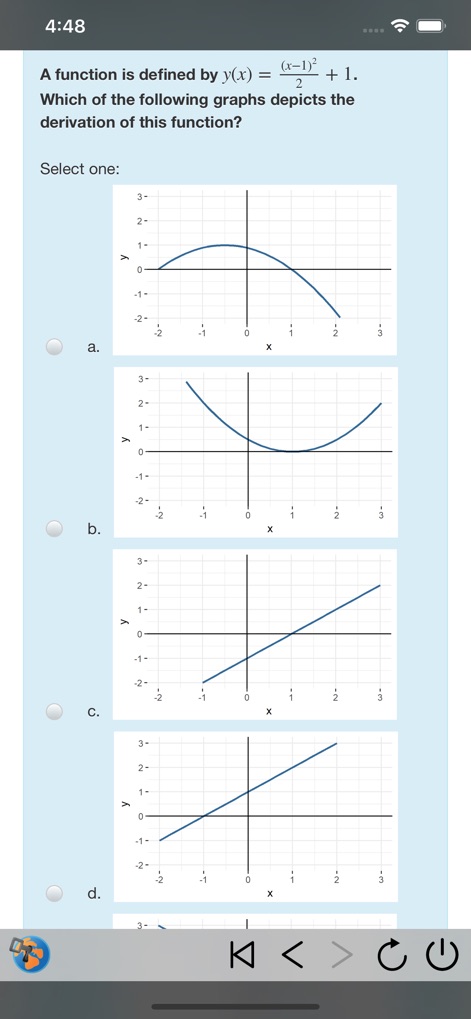
L'app blocca i dispositivi iOS in una modalità chiosco sicura, impedendo agli studenti di accedere ad altre applicazioni o siti web durante gli esami.
Integrazione MDM
L'app può essere implementata e configurata inizialmente tramite sistemi di Mobile Device Management (MDM), facilitando la gestione su larga scala per le istituzioni.
Configurazione Flessibile e Semplificata
L'app offre diverse opzioni di configurazione flessibili, inclusi API, file di configurazione, collegamenti ipertestuali e codici QR, per avviare esami specifici.
Ampia Compatibilità con Piattaforme
L'app fornisce un'ampia compatibilità con la maggior parte dei sistemi di quiz ed e-assessment basati sul web e si integra particolarmente bene con LMS come Moodle e OpenOlat.
File di Configurazione .seb Crittografati
L'app utilizza file di configurazione .seb crittografati, compatibili con le versioni di Safe Exam Browser per altre piattaforme, garantendo una configurazione sicura e coerente.
Integrazione con Apple Classroom
Si integra con Apple Classroom, permettendo agli insegnanti di avviare esami configurati individualmente su più dispositivi degli studenti contemporaneamente.
Supporto per Dispositivi Gestiti e Non Gestiti
Consente l'esecuzione di esami sicuri sia su dispositivi iOS personali non gestiti che su dispositivi di proprietà e gestiti dall'istituzione.
Terminazione Sessione e Sblocco Controllato
Consente la terminazione automatica della modalità di valutazione dopo l'invio dell'esame o tramite una password di uscita per lo sblocco del dispositivo.
Interfaccia Utente per la Navigazione
Questo strumento presenta un Dock opzionale o un menu a scorrimento che offre comandi per navigare tra le schede, tornare alla pagina iniziale dell'esame, ricaricare pagine e gestire la cronologia di navigazione.
Architettura Decentrata
Questo strumento funziona autonomamente, senza richiedere un server centralizzato o servizi cloud, semplificando la configurazione e riducendo la dipendenza da infrastrutture esterne.
Domande Frequenti
Tutto quello che devi sapere su SafeExamBrowser
What is SafeExamBrowser (SEB)?
SafeExamBrowser (SEB) is a secure kiosk web browser environment designed for e-assessments on iOS devices. It locks the device into an exam mode, preventing students from accessing other apps or websites during an exam.
Which devices does SafeExamBrowser support?
SafeExamBrowser supports iOS devices, specifically iPads, iPhones, and iPod Touches. It enables secure exams on both unmanaged student-owned devices and institution-managed devices.
How does SafeExamBrowser ensure exam security?
SafeExamBrowser locks an iOS device into assessment kiosk mode. This prevents students from switching to other apps, accessing unauthorized websites, or communicating during an exam.
Can SafeExamBrowser be used with existing learning management systems (LMS)?
Yes, SafeExamBrowser integrates well with learning management systems (LMS) such as Moodle, OpenOlat, and ILIAS. It also supports various commercial and non-commercial exam systems.
How can an exam be started in SafeExamBrowser?
Exams can be started in SafeExamBrowser by opening a configuration hyperlink from Safari, Mail, or a messenger app. Users can also scan a QR code or enter an institution's URL.
Does SafeExamBrowser use a cloud service for exams?
No, SafeExamBrowser does not use a centralized server or cloud service. It can be configured using an API, configuration files, special links, and QR codes.
Is SafeExamBrowser compatible with Apple Classroom?
Yes, SafeExamBrowser works with Apple Classroom. Teachers can start individually configured exams on all student devices directly through Apple Classroom.
How can an exam session be quit in SafeExamBrowser?
An exam session in SafeExamBrowser can be quit automatically after submission, or manually by an invigilator using a quit password. A left slider menu command also exists for quitting.
Can students reconfigure SafeExamBrowser during an exam?
Reconfiguring SafeExamBrowser during an exam session can be restricted. The "Allow Reconfiguring" option in the Exam Session settings controls this functionality.
Is SafeExamBrowser a free application?
Yes, SafeExamBrowser is released as freeware. Its code is subject to the Mozilla Public License Version 1.1, which permits its free use.
Gli screenshot e la descrizione seguenti provengono direttamente dall'elenco ufficiale dello store dell'app e sono di proprietà dello sviluppatore.
App Store
Screenshot




Descrizione
Download
App Simili
App con funzionalità ed esperienza simili




Questa pagina non è una pagina ufficiale dell'app o del suo sviluppatore, ma una pubblicazione editoriale indipendente creata a scopo informativo e di commento. Salvo espressa indicazione contraria, né l'app né il suo sviluppatore sono affiliati, approvati, sponsorizzati, autorizzati o altrimenti ufficialmente collegati a MWM, Apple, Google Play, all'editore dell'app o allo sviluppatore dell'app, e nulla in questa pagina implica che l'app sia stata sviluppata utilizzando i servizi di MWM. Tutti i marchi, loghi, screenshot e altri contenuti rimangono di proprietà dei rispettivi proprietari.