Say it Mail it Plus
Say it Mail it Plus
Scarica su App Store

Questa pagina non è una pagina ufficiale dell'app o del suo sviluppatore, ma una pubblicazione editoriale indipendente creata a scopo informativo e di commento. Salvo espressa indicazione contraria, né l'app né il suo sviluppatore sono affiliati, approvati, sponsorizzati, autorizzati o altrimenti ufficialmente collegati a MWM, Apple, Google Play, all'editore dell'app o allo sviluppatore dell'app, e nulla in questa pagina implica che l'app sia stata sviluppata utilizzando i servizi di MWM. Tutti i marchi, loghi, screenshot e altri contenuti rimangono di proprietà dei rispettivi proprietari.


Logo di Say it Mail it Plus
Scarica su App Store

Say it Mail it Plus

Smetti di digitare e inizia a parlare. Cattura idee, foto e posizioni GPS a mani libere, poi inviale automaticamente direttamente nella tua casella di posta. Perfetto per professionisti impegnati che devono rimanere produttivi in movimento.

Numeri Chiave

Download

26K+

Valutazione

1.0/5

Valutazioni totali

0

Editore

Carnation Software

Categoria

Business

Lingue

1

Ultima versione

1.0.4

Dimensione

2.8 MB

Data di lancio

16 ott 2021
Funzioni

Cattura idee alla velocità del pensiero

Say it & Mail it Plus è lo strumento di produttività definitivo per professionisti impegnati che devono trasformare le note vocali in azioni senza mai toccare una tastiera.

Cattura vocale senza intoppi

Registra a mani libere semplicemente tenendo il telefono all'orecchio o scuotendolo rapidamente: niente più armeggiamenti con la tastiera mentre guidi o sei sul posto.

Consegna automatica nella casella di posta

Salta completamente il pulsante 'Invia'. I tuoi memo vengono inviati automaticamente via email come file audio universali, garantendo che le tue attività ti aspettino nella tua casella di posta.

Gli screenshot e la descrizione seguenti provengono direttamente dall'elenco ufficiale dello store dell'app e sono di proprietà dello sviluppatore.

App Store

Screenshot
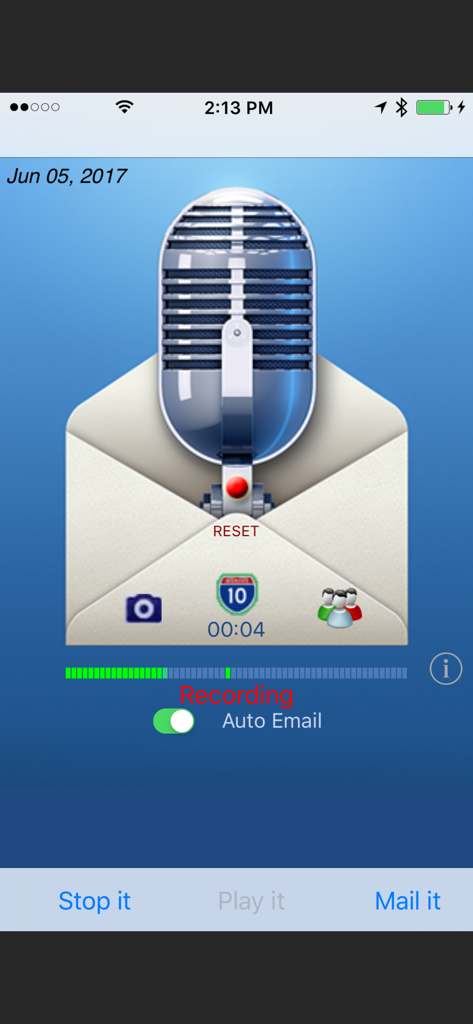
Say it Mail it Plus - Interfaccia dell'app Say it Mail it Plus che mostra la registrazione di un memo vocale con l'interruttore di invio automatico via email
Interfaccia dell'app Say it Mail it Plus che mostra la registrazione di un memo vocale con l'interruttore di invio automatico via email

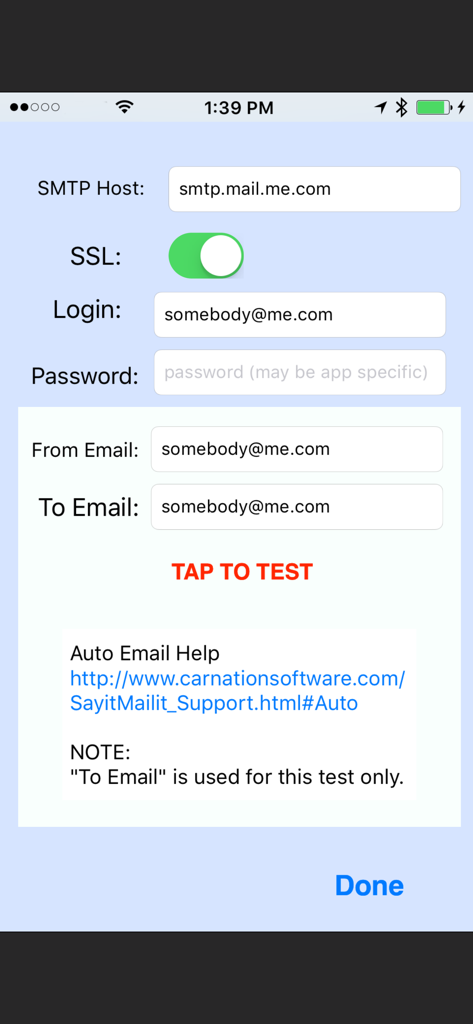
Say it Mail it Plus - Schermata di configurazione SMTP nell'app che mostra i campi per l'accesso e il test del server email

Schermata di configurazione SMTP nell'app che mostra i campi per l'accesso e il test del server email

Descrizione

Don't type it! Just Say it & Mail it. The fastest way to email a voice memo to yourself or to someone else and optionally include a photo, movie and map location. You can optionally turn on Auto Email. (Then you can Say it and Mail it with no need to tap the Send button) No In-App purchases. "Say it & Mail it" has been designed with simplicity and speed in mind. It remembers your name and an email address, which makes it very fast and easy to send yourself an email memo. Four methods of recording to fit your style: * Method 1: Tap 'Say it' then tap 'Mail it' * Method 2: Hold the iPhone to your ear and speak. When you move the iPhone away, recording stops and the email window opens * Method 3: Shake it to start recording and shake it to stop * Method 4: Tap on the microphone to start recording and tap it again to stop BUT WAIT, THERE'S MORE :-) EMAIL TO GROUPS Uses the groups you already have set up in your Contacts INCLUDE A PICTURE OR MOVIE IN YOUR EMAIL Take a photo or movie or select from the album. Pictures are full resolution compressed jpg format and the picture size can be adjusted. INCLUDE YOUR MAP LOCATION IN YOUR EMAIL When someone receives your email with an iPhone, they will be able to click on the link to launch the map application, see your location and get directions. When someone receives your email with a Mac or PC, they will be able to click on the link to launch their browser to see your location and get directions. So, what else can you do with 'Say it & Mail it'? Lots of things! •Recommend a good restaurant, including location map and photo •Email a reminder to yourself, a friend or preset groups •Document when, why and where you took a great photo •Update your blog via email •Track a real estate tour with info about each home (agent or buyer) •Send a customer the location and details of a house for sale •Record scientific notes with map location and photo of findings •Add content to your podcast •Communicate with elderly relatives who have difficulty typing •Send product information or newsflashes to clients •Email great vacation photos, footage, maps and commentary •Let people know where you are when you need help •Email your messages in any language (no QWERTY keyboard limits) •Document where you park your car so you can easily find it again •And a whole lot more! Emailed voice memos are compatible with Mac, PC and any other computer O/S (uses compressed wave format). No file maintenance on your iPhone/iPod Touch, since audio files are not stored there. NO ADVERTISING in your emails. Just a 'Say it Mail it' signature, which you can optionally remove in the 'Info' setup. Send yourself reminders when you are away from your computer. No typing required. Your email address and subject are autofilled. If you are using an iPhone, your message is sent off immediately, thanks to cell towers. iPod Touch devices store the email and send as soon as they are able to make a Wi-Fi connection. Great way to send anyone a detailed email without using the keyboard. Send an MMS Instant Message So many uses, we can't imagine them all. You will think of many more NOTES: iPod Touch requires headphones with microphone and a Wi-Fi connection. The iPhone has a microphone built-in. Camera may only be available on iPhone. Not all devices can take movies.

Download

Scarica su App Store

Questa pagina non è una pagina ufficiale dell'app o del suo sviluppatore, ma una pubblicazione editoriale indipendente creata a scopo informativo e di commento. Salvo espressa indicazione contraria, né l'app né il suo sviluppatore sono affiliati, approvati, sponsorizzati, autorizzati o altrimenti ufficialmente collegati a MWM, Apple, Google Play, all'editore dell'app o allo sviluppatore dell'app, e nulla in questa pagina implica che l'app sia stata sviluppata utilizzando i servizi di MWM. Tutti i marchi, loghi, screenshot e altri contenuti rimangono di proprietà dei rispettivi proprietari.








