Screen Mirroring ⋆ Miracast TV

Screen Mirroring ⋆ Miracast TV

Scarica su App Store
Logo di Screen Mirroring ⋆ Miracast TV

Screen Mirroring ⋆ Miracast TV: lo schermo del tuo iPhone sul grande schermo, senza hardware

Colma istantaneamente il divario tra i tuoi dispositivi iOS e qualsiasi Smart TV. Condividi ricordi di famiglia, segui routine di fitness o mostra presentazioni in uno splendido HD senza la necessità di hardware costosi o cavi disordinati.

Editore

Plane Cubes

Categoria

Utilities

Download

1M+

Valutazione

4.6/5

Valutazioni totali

14K+

Lingue

1

Vivi il grande schermo

Scopri l'interfaccia usata da 1M+ utenti.
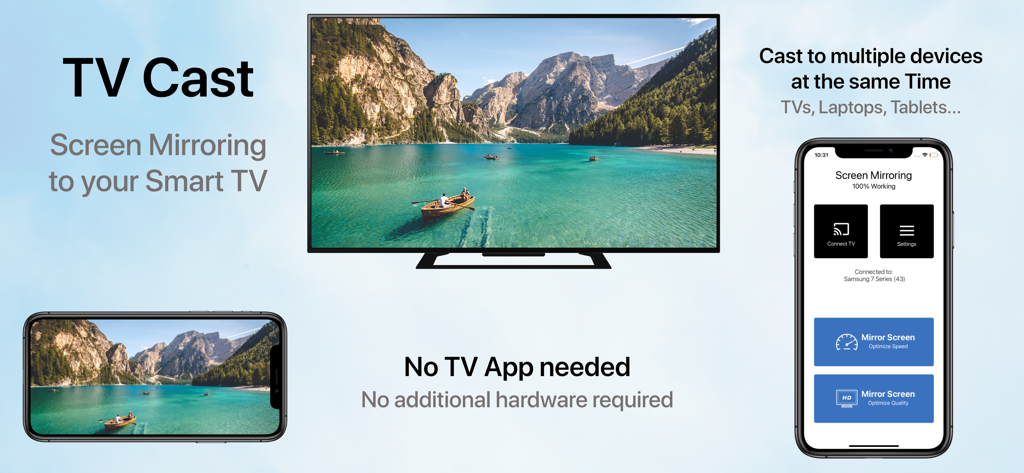
Schermo dell'iPhone in mirroring su una smart TV che mostra un video in orizzontale con l'interfaccia dell'app a lato

Schermo dell'iPhone in mirroring su una smart TV che mostra un video in orizzontale con l'interfaccia dell'app a lato

Condividi ogni momento sul grande schermo

Gli strumenti che rendono questa app unica, scelti da 1M+ utenti.

📺

Compatibilità universale con TV

Effettua il mirroring dello schermo su Samsung, LG, Sony e altri senza bisogno di Apple TV, cavi o hardware aggiuntivo.

🚀

Modalità a latenza ultra-bassa

Scegli la Modalità Velocità per una reattività in tempo reale durante la navigazione o la Modalità Qualità per una brillantezza visiva ad alta definizione.

🔄

Supporto verticale e orizzontale

Goditi la vista perfetta per tutto, sia che tu stia scorrendo TikTok o guardando filmati domestici in formato widescreen.

Analisi recensioni

Approfondimenti dalle recensioni degli utenti.

Punteggio sentimento

21%
Negativo

Riepilogo

User reviews for this mobile app are overwhelmingly negative, with a low overall sentiment score. The most significant complaint is that the app frequently 'does not work' as intended, especially concerning its core functionality of connecting to and finding smart TVs, with specific mentions of issues with LG TVs and iPhone 14 Pro to Mi TV box connections. Many users also expressed frustration with an abundance of intrusive advertisements, mandatory paywalls, hidden costs, and difficulty canceling subscriptions. A considerable number of reviews explicitly label the app as a 'scam' or 'fraudulent,' leading to a poor user experience, though a small minority found the app to be satisfactory.

Temi comuni

Functionality(17)
Cost & Subscriptions(14)
Connectivity(9)
Ads(8)
Scam Allegations(6)
Overall Experience(6)

Info sull'app

Tutto quello che devi sapere su Screen Mirroring ⋆ Miracast TV.

Descrizione

‣‣‣ Mirror your screen to your TV! ‣‣‣ Free and easy to use! " With Screen mirroring HD, it it now easy to mirror your iPhone or iPad!" "I love the fact that you can mirror simultaneously on different devices. "It is very useful to have both Portrait & Landscape modes available" FEATURES: - Mirror your screen to your TVs, Laptop's, Phones, Gaming consoles & Tablets - Two modes available: 'Speed Mode' for low latency and liquid speed & 'Quality Mode' for gorgeous full resolution HD broadcast - Mirror in Landscape or Portrait mode - Mirror to multiple devices simultaneously - No TV App or other software or hardware necessary HOW TO MIRROR: - Connect your iPhone/iPad and your TV to the same WiFi network - (Optional: connect your device to the app) - Choose your mirroring mode and tap on 'Start Mirroring' to start mirroring to your TV and other devices - Open your TV browser and tap the URL. (Tip: save the URL in your bookmarks for quicker access next time you want to mirror your screen.) - Watch your screen mirroring - To stop mirroring, tap 'Stop Mirroring' button or bar - NB: On other devices than TV, just type the URL in your device browser to watch the screen mirroring Download now and leave a review to let us know about your mirroring experience. SUPPORT: - Compatible TVs: Smart TVs with an integrated modern web browser: Samsung TV, LG TV, Sony TV, Panasonic TV,TV, Philips TV, Hitachi TV, TCL TV, Grundig TV... - Compatible Devices: any device (phone, laptop, tablet, Console) with a modern web browser: Safari, Brave, Chrome, Firefox, Edge... - Latency is supreme (0 seconds) when you have fast WiFi network conditions - Please do not use VPN, Proxy, VLANS and Subnets. - Sound is not yet support yet, we are working on it. In the meantime, please use Bluetooth speakers as a workaround. - Black screen issues: Some third party apps prevent screen mirroring. When you try to mirror them, you will just see a black screen on your TV, for example with Netflix... This is a restriction chosen by Netflix and others, so there is currently nothing we can do about it. - Our application has been tested carefully on many TV models, however we can unfortunately not guarantee the products works on ALL TV models. Reach out to us with your TV Brand and Model if you encounter issues. DISCLAIMER:This is not an official application. We are not affiliated with any brand mentioned in any way. SUBSCRIPTION: We offer 2 auto-renewing subscriptions: - Length: weekly and monthly - Payment will be charged to iTunes Account at confirmation of purchase - You will be able to access the Premium features of the app for the duration of the subscription - Subscription automatically renews for the same price and duration period as the original period unless auto-renew is turned off at least 24-hours before the end of the current period - The account will be charged for renewal within 24-hours prior to the end of the current period at the cost of the chosen package. - Subscriptions may be managed by the user and auto-renewal may be turned off by going to the user's iTunes Account Settings after purchase - No cancellation of the current subscription is allowed during the active subscription period - You may cancel a subscription during its free trial period via the subscription setting through your Apple account. This must be done 24 hours before the end of the subscription period to avoid being charged. Please visit https://support.apple.com/en-us/HT202039 for more information on how to proceed. - You may turn off the auto-renewal of your subscription via your Apple Account Settings. However, you are not able to cancel the current subscription during its active period - Any unused portion of a free-trial period will be forfeited when the user purchases a subscription. By using our app, you agree to our Terms of Use & Privacy Policy Terms: https://planecubes.com/terms/ Privacy: https://planecubes.com/privacy/

Ultima versione

1.1.0

Dimensione

16.6 MB

Data di lancio

1 ott 2020

Pronto a vederlo sul grande schermo?

Unisciti a oltre 1 milione di utenti e colma il divario tra il tuo iPhone e qualsiasi Smart TV. Nessun cavo, nessun hardware aggiuntivo: solo mirroring istantaneo.

Scarica su App Store
FAQ

Domande Frequenti

Tutto quello che devi sapere su Screen Mirroring ⋆ Miracast TV

Cos'è Screen Mirroring ⋆ Miracast TV?

Screen Mirroring ⋆ Miracast TV è un'applicazione che rispecchia lo schermo del tuo iPhone o iPad su vari dispositivi come TV, laptop, telefoni, console di gioco e tablet. È gratuita e facile da usare.

Screen Mirroring ⋆ Miracast TV richiede un'app TV o un hardware separato?

No, Screen Mirroring ⋆ Miracast TV non richiede un'app TV separata, software aggiuntivo o hardware. Esegue il mirroring direttamente su dispositivi compatibili con un browser web moderno.

Come si esegue il mirroring dello schermo con Screen Mirroring ⋆ Miracast TV?

Per eseguire il mirroring, connetti il tuo iPhone/iPad e la TV alla stessa rete Wi-Fi. Scegli una modalità di mirroring, tocca 'Avvia Mirroring', quindi apri il browser della TV e digita l'URL fornito.

Screen Mirroring ⋆ Miracast TV può eseguire il mirroring su più dispositivi contemporaneamente?

Sì, Screen Mirroring ⋆ Miracast TV può eseguire il mirroring dello schermo su più dispositivi contemporaneamente. Questa funzione consente di trasmettere contemporaneamente su TV, laptop, telefoni e tablet.

Quali modalità di mirroring offre Screen Mirroring ⋆ Miracast TV?

Screen Mirroring ⋆ Miracast TV offre due modalità: 'Modalità Velocità' per bassa latenza e 'Modalità Qualità' per una splendida esperienza di trasmissione HD a piena risoluzione.

Screen Mirroring ⋆ Miracast TV supporta il mirroring audio?

No, l'audio non è attualmente supportato da Screen Mirroring ⋆ Miracast TV. Gli utenti dovrebbero utilizzare altoparlanti Bluetooth come soluzione alternativa per l'uscita audio.

Perché alcune app mostrano uno schermo nero quando vengono rispecchiate con Screen Mirroring ⋆ Miracast TV?

Alcune app di terze parti, come Netflix, impediscono il mirroring dello schermo a causa delle proprie restrizioni. Ciò causa uno schermo nero sulla TV quando si tenta di eseguirne il mirroring.

Quali dispositivi sono compatibili con Screen Mirroring ⋆ Miracast TV?

Screen Mirroring ⋆ Miracast TV è compatibile con Smart TV (ad esempio, Samsung, LG) che dispongono di un browser web moderno e con qualsiasi dispositivo (telefono, laptop, tablet, console) dotato di un browser web moderno.

Screen Mirroring ⋆ Miracast TV offre un abbonamento?

Sì, Screen Mirroring ⋆ Miracast TV offre abbonamenti settimanali e mensili auto-rinnovabili. Il pagamento viene addebitato sul tuo account iTunes alla conferma dell'acquisto.

Come si annulla l'abbonamento a Screen Mirroring ⋆ Miracast TV?

Puoi gestire il tuo abbonamento a Screen Mirroring ⋆ Miracast TV e disattivare il rinnovo automatico tramite le Impostazioni del tuo account iTunes dopo l'acquisto. La cancellazione durante un periodo attivo non è consentita.

App information, icons, screenshots, and descriptions displayed on this page are sourced from the Apple App Store and are the property of their respective developers. Download estimates and rankings are based on MWM's proprietary models and may not reflect actual figures. This page is provided for informational and analytical purposes only.

Believe this page infringes your intellectual property? File a dispute








