
Questa pagina non è una pagina ufficiale dell'app o del suo sviluppatore, ma una pubblicazione editoriale indipendente creata a scopo informativo e di commento. Salvo espressa indicazione contraria, né l'app né il suo sviluppatore sono affiliati, approvati, sponsorizzati, autorizzati o altrimenti ufficialmente collegati a MWM, Apple, Google Play, all'editore dell'app o allo sviluppatore dell'app, e nulla in questa pagina implica che l'app sia stata sviluppata utilizzando i servizi di MWM. Tutti i marchi, loghi, screenshot e altri contenuti rimangono di proprietà dei rispettivi proprietari.


Slideshow Maker & Music Video
La vostra galleria fotografica è un cimitero digitale. Questa app vi dà il potere di profanarla con stile, trasformando pixel morti in narrazioni vivide. Preparatevi a far resuscitare i vostri ricordi.
Download
2.5M+Valutazione
Valutazioni totali
24.8KEditore
Categoria
Photo & VideoLingue
1Ultima versione
4.1.2Dimensione
104.2 MBData di lancio
29 nov 2013Un'esplorazione delle capacità principali dell'applicazione, valutate per il suo impatto sul pubblico che crea contenuti per i social media.
Analisi delle Funzionalità Chiave: Slideshow Maker & Music Video
Creazione Rapida e Automatica di Slideshow
L'app consente agli utenti di generare automaticamente slideshow coinvolgenti selezionando foto e video, accelerando notevolmente il processo di creazione per la condivisione sui social media.
Esportazione HD e Condivisione Multi-Formato
Consente di esportare i video in alta risoluzione (fino a 60 FPS) e in vari rapporti d'aspetto (es. 1:1, 16:9), rendendoli perfetti per qualsiasi piattaforma social e salvabili come progetti.
Personalizzazione Audio Avanzata
Questo strumento permette di arricchire gli slideshow con musica di sottofondo dalla libreria o registrazioni vocali, offrendo funzioni di taglio, regolazione del volume e posizionamento preciso per un'esperienza sonora su misura.
Gestione Semplificata della Timeline Video
L'app fornisce una timeline intuitiva per organizzare e riordinare facilmente foto e video, permettendo anche di personalizzare le transizioni tra le singole slide per un flusso visivo fluido.
Inserimento e Animazione Testi
Consente agli utenti di aggiungere testi personalizzabili ai video con diverse opzioni di font, colori, stili e animazioni, migliorando l'impatto narrativo e l'engagement del pubblico.
Editor Dettagliato per Singole Slide
L'app include un editor che consente di controllare la durata di ogni foto, tagliare i video e modificarne la velocità (es. 0.5x, 2x, 4x), oltre a definire animazioni di inizio e fine per un maggiore dinamismo.
Domande Frequenti
Tutto quello che devi sapere su Slideshow Maker & Music Video
What is PicMusic: Slideshow Maker?
PicMusic: Slideshow Maker combines photos, videos, and background music to create unique slideshow videos. The app offers easy-to-use editing tools for quick creation and customization.
How can I create a slideshow video using PicMusic?
Yes, you can create a slideshow by selecting photos and/or videos. PicMusic automatically generates a slideshow which you can then export or edit using various tools.
Can I add music to my slideshows in PicMusic?
Yes, PicMusic allows adding background music, loading songs from iTunes Library, or recording your voice. You can also trim the song, adjust its volume, and set its play position.
What video editing options are available for slides in PicMusic?
PicMusic offers slide editing with duration control for photos. Video slides can be trimmed and their playing speed adjusted to 0.5x, 1x, 2x, or 4x.
Can I add text to videos with the PicMusic app?
Yes, PicMusic allows adding text, customizing its font, color, and styles. You can animate text and manage its duration within the slideshow timeline, similar to audio items.
What are the export options for slideshows created with PicMusic?
PicMusic slideshows export in high resolution and up to 60 FPS. The app supports multiple aspect ratios for sharing, including 1:1, 16:9, 9:16, 4:3, and 3:4.
What are the subscription options for Pic Music Pro?
Pic Music Pro offers two subscription options: $5.99 Weekly and $29.99 Annually. Prices may vary depending on the user's location.
Does a Pic Music Pro subscription automatically renew?
Yes, Pic Music Pro subscriptions automatically renew. Auto-renewal must be turned off at least 24 hours before the current period ends to avoid being charged.
How do I cancel my Pic Music Pro subscription?
You can manage and cancel your Pic Music Pro subscription by accessing 'Manage App Subscriptions' within your iTunes Account settings.
Where can I find the privacy policy for PicMusic: Slideshow Maker?
The Privacy Policy for PicMusic: Slideshow Maker is available on the app's official terms page, specifically at http://typimage.com/terms.html#privacy.
Does PicMusic offer templates for creating slideshows?
Yes, PicMusic offers various templates for quick slideshow creation, including themes for birthdays, celebrations, and anniversaries. These templates are fully customizable.
Can I create video collages using PicMusic: Slideshow Maker?
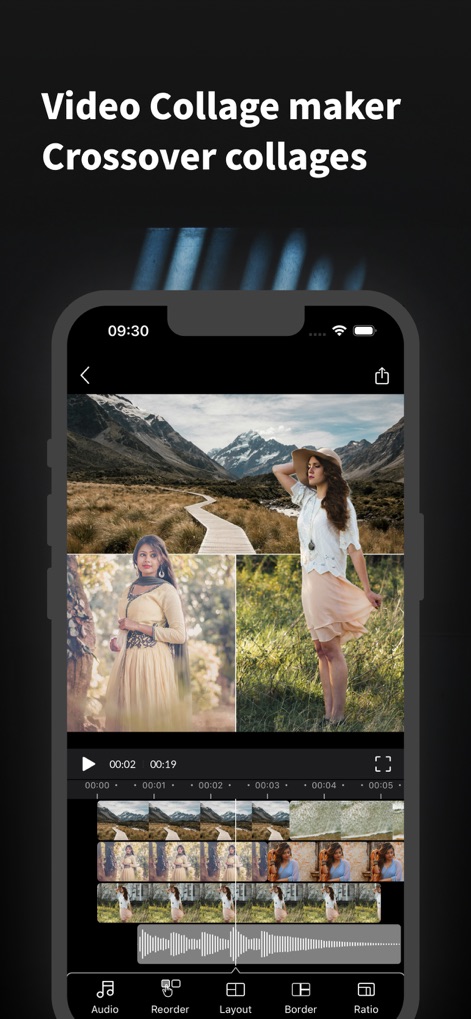
Yes, PicMusic functions as a video collage maker. It supports 'Crossover collages', allowing users to arrange multiple images within their video projects effectively.
Gli screenshot e la descrizione seguenti provengono direttamente dall'elenco ufficiale dello store dell'app e sono di proprietà dello sviluppatore.
App Store
Screenshot




Descrizione
Download
App Simili
App più classificate nella stessa categoria

CapCut: Photo & Video Editor
BYTEDANCE PTE. LTD.

Instagram, Inc.

YouTube
Google LLC

Canva: AI Photo & Video Editor
Canva Pty Ltd

Snapchat
Snap, Inc.

快手
Beijing Kwai Technology Co., Ltd.

Edits: Video Editor
Instagram, Inc.

Meitu- AI Photo & Video Editor
Xiamen Meitu Technology Co., Ltd.

Google Photos: Backup & Edit
Google LLC
Questa pagina non è una pagina ufficiale dell'app o del suo sviluppatore, ma una pubblicazione editoriale indipendente creata a scopo informativo e di commento. Salvo espressa indicazione contraria, né l'app né il suo sviluppatore sono affiliati, approvati, sponsorizzati, autorizzati o altrimenti ufficialmente collegati a MWM, Apple, Google Play, all'editore dell'app o allo sviluppatore dell'app, e nulla in questa pagina implica che l'app sia stata sviluppata utilizzando i servizi di MWM. Tutti i marchi, loghi, screenshot e altri contenuti rimangono di proprietà dei rispettivi proprietari.