Stagehand: PRO DJ LINK Manager
Scarica su App Store

Questa pagina non è una pagina ufficiale dell'app o del suo sviluppatore, ma una pubblicazione editoriale indipendente creata a scopo informativo e di commento. Salvo espressa indicazione contraria, né l'app né il suo sviluppatore sono affiliati, approvati, sponsorizzati, autorizzati o altrimenti ufficialmente collegati a MWM, Apple, Google Play, all'editore dell'app o allo sviluppatore dell'app, e nulla in questa pagina implica che l'app sia stata sviluppata utilizzando i servizi di MWM. Tutti i marchi, loghi, screenshot e altri contenuti rimangono di proprietà dei rispettivi proprietari.

Logo di Stagehand: PRO DJ LINK Manager
Scarica su App Store

Stagehand: PRO DJ LINK Manager

Ottimizza il tuo flusso di lavoro di produzione con il controllo hardware remoto, il monitoraggio dello stato in tempo reale e la sincronizzazione precisa dell'illuminazione per configurazioni CDJ-3000 e DJM-A9.

Numeri Chiave

Download

1K+

Valutazione

1.0/5

Valutazioni totali

0

Editore

AlphaTheta Corporation

Categoria

Entertainment

Lingue

12

Ultima versione

1.0.4

Dimensione

8.9 MB

Data di lancio

17 apr 2023
Funzioni

Controllo Totale della Cabina, Ovunque nel Locale

La prima soluzione iPad del settore per ingegneri FOH e team di produzione per gestire, monitorare e sincronizzare da remoto l'hardware Pioneer DJ tramite PRO DJ LINK.

Efficienza del Soundcheck Remoto

Avvia tracce, gestisci le impostazioni di utilità e testa l'acustica dalla pista da ballo. Elimina la regola dei due uomini e dimezza i tempi di configurazione.

Monitoraggio dello Stato in Tempo Reale

Mantieni una distanza professionale dalla cabina monitorando i livelli master e lo stato del dispositivo. Individua il red-lining e i problemi tecnici prima che rovinino il set.

Gli screenshot e la descrizione seguenti provengono direttamente dall'elenco ufficiale dello store dell'app e sono di proprietà dello sviluppatore.

App Store

Screenshot
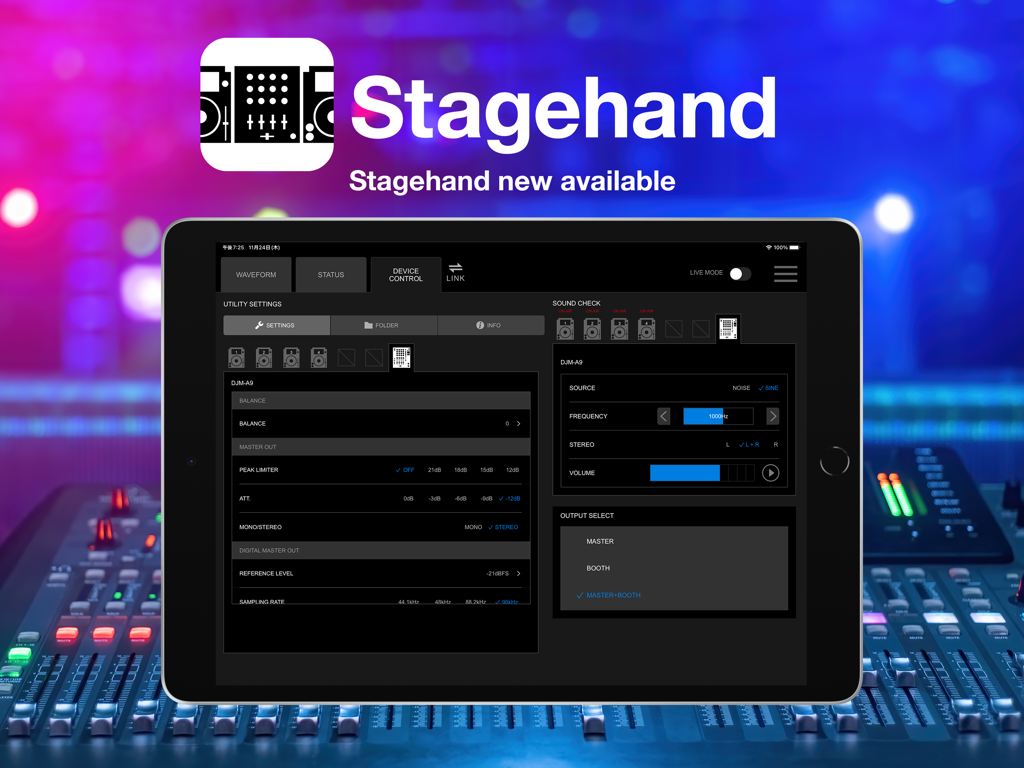
Stagehand: PRO DJ LINK Manager - iPad che visualizza l'interfaccia Stagehand PRO DJ LINK Manager per il controllo remoto delle apparecchiature DJ
iPad che visualizza l'interfaccia Stagehand PRO DJ LINK Manager per il controllo remoto delle apparecchiature DJ

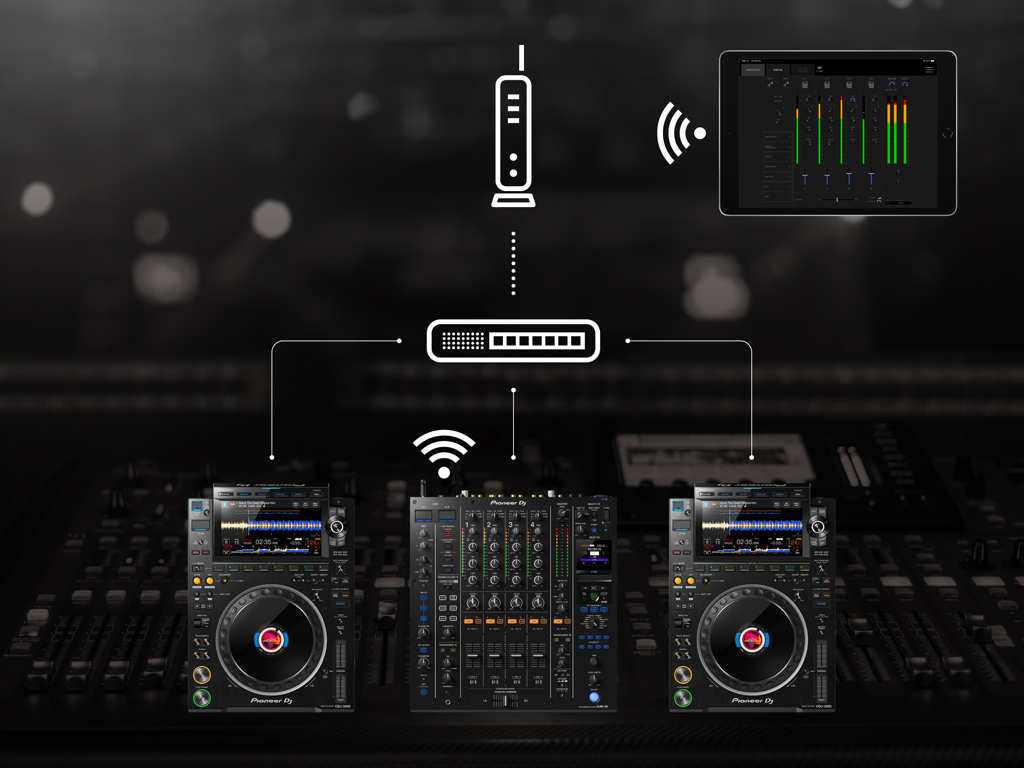
Stagehand: PRO DJ LINK Manager - Un iPad che utilizza l'app Stagehand per monitorare e controllare in modalità wireless un mixer Pioneer DJ e lettori multipli su una rete
Un iPad che utilizza l'app Stagehand per monitorare e controllare in modalità wireless un mixer Pioneer DJ e lettori multipli su una rete

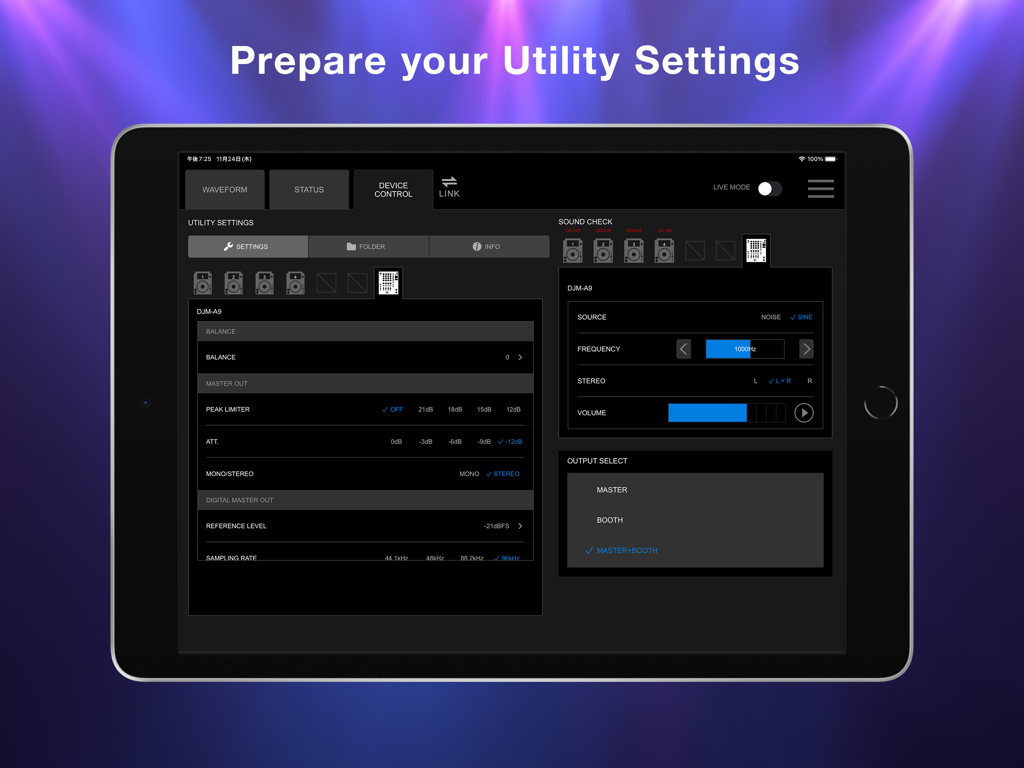
Stagehand: PRO DJ LINK Manager - Schermata iPad che mostra l'app Stagehand con le impostazioni di utilità del mixer DJM-A9 e i controlli del sound check
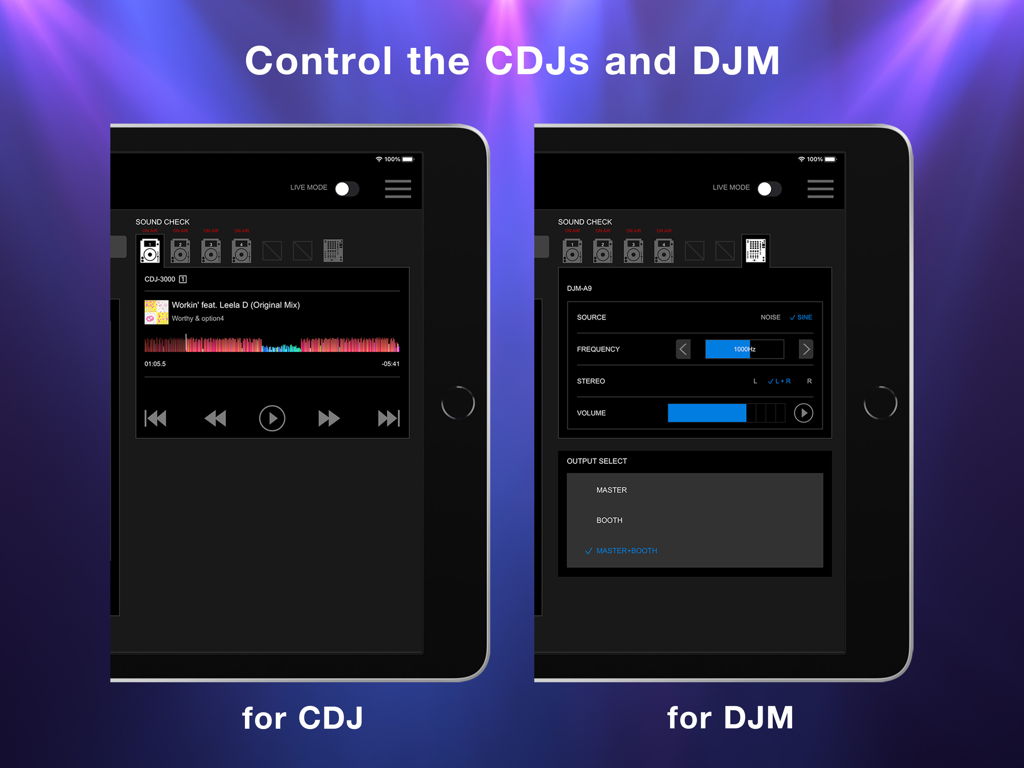
Schermata iPad che mostra l'app Stagehand con le impostazioni di utilità del mixer DJM-A9 e i controlli del sound check

Stagehand: PRO DJ LINK Manager - Schermata iPad che visualizza l'interfaccia dell'app Stagehand per il controllo remoto di lettori CDJ e mixer DJM
Schermata iPad che visualizza l'interfaccia dell'app Stagehand per il controllo remoto di lettori CDJ e mixer DJM

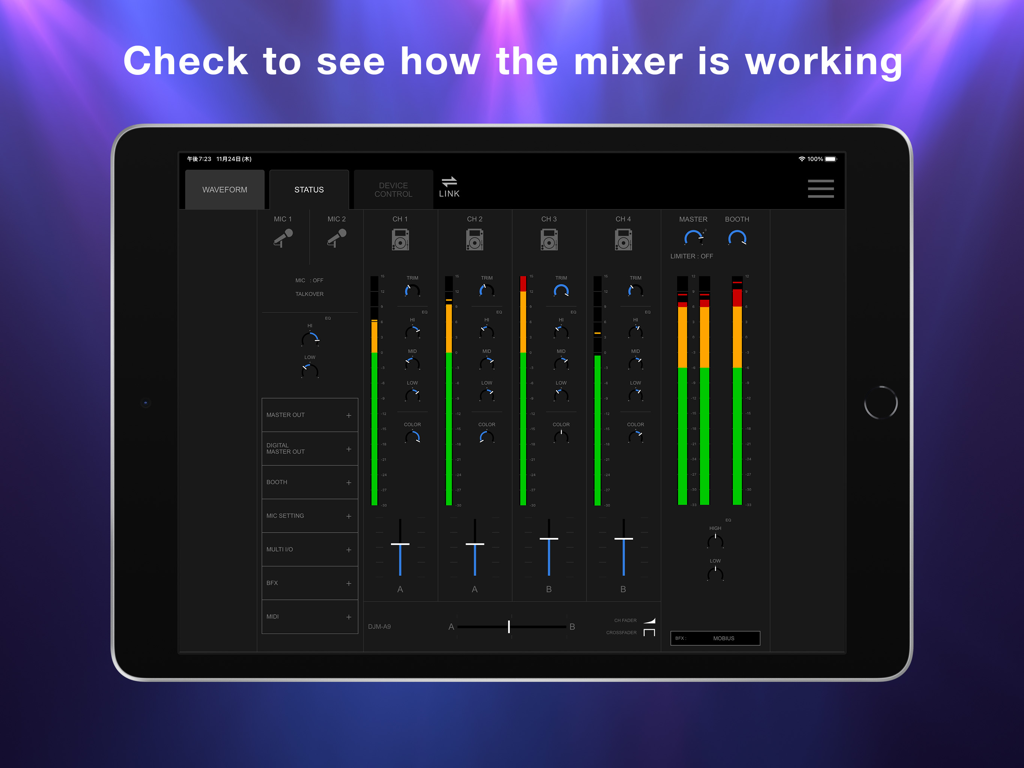
Stagehand: PRO DJ LINK Manager - iPad che mostra la schermata di stato dell'app Stagehand con livelli dei canali del mixer DJ in tempo reale e posizioni dei fader
iPad che mostra la schermata di stato dell'app Stagehand con livelli dei canali del mixer DJ in tempo reale e posizioni dei fader

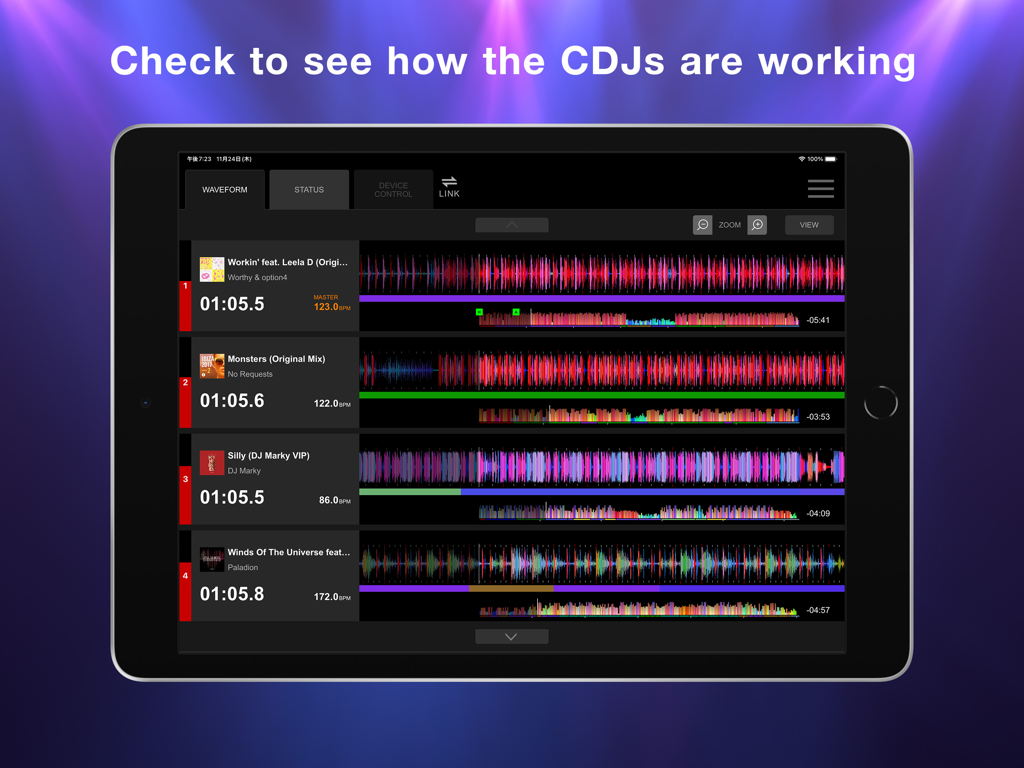
Stagehand: PRO DJ LINK Manager - Schermata iPad che mostra il display delle forme d'onda dell'app Stagehand per il monitoraggio di più unità CDJ.

Schermata iPad che mostra il display delle forme d'onda dell'app Stagehand per il monitoraggio di più unità CDJ.

Descrizione

This indispensable new app, the first of its kind, enables you to keep an eye on a host of information and remotely adjust settings on DJM-A9 and CDJ-3000, CDJ-3000X units in a PRO DJ LINK network, all from your iPad. By managing the mixer and multi players via Stagehand, you can run smoother shows and produce more exciting lighting in sync with sound. Before your event begins, you can use Stagehand to remotely check and change the Utility settings of the DJM-A9 and CDJ-3000, CDJ-3000X units for quicker setup. Stagehand is also useful once a gig is underway as you can monitor the DJ’s use of the mixer and players without needing to enter the booth. The app enables you to keep an eye on volume levels and settings, and use beatgrid, BPM, and time information to help create effective lighting displays. There’s a Live mode too, which disables many of the app’s features so you can’t accidentally stop the music during the show. You can try Stagehand free for 60 days. Download the app from App Store to use it with an iPad. To use Stagehand, update the mixer and player's firmware to the latest version via our support page [https://www.pioneerdj.com/support/software/]. A device with the A12 Bionic chip or later is recommended. [Key Features] - Device Control If you’re the designated Admin user of the system, you can easily check and change the Utility settings of the DJM-A9 and CDJ-3000, CDJ-3000X units in the PRO DJ LINK network via the Device Control screen. You can create multiple settings files in advance, giving you the option to apply multiple changes in one go if you need to, and you can share them in numerous ways, including via AirDrop or email to make event preparations run smoother. Speed up sound checks with remote control of the CDJ-3000, CDJ-3000X. There’s no need to go back and forth between the booth and the dancefloor; simply use Sound Check in Stagehand to play, stop, fast-forward, and rewind tracks. You can also control sine waves and noise from the DJM-A9 to make sure the sound system is set up correctly for the room’s acoustics. When the gig starts, turn on Live mode to disable Device Control functions so you can’t accidentally interrupt the music in the middle of a DJ’s set. - Status Keep an eye on a host of information without needing to look over the DJ’s shoulder – or even enter the booth. The Status screen gives you a remote view of almost everything happening on the DJM-A9, including the status of Utility settings, enabling you to quickly spot problems such as excessive volume from the trim and master levels so you can troubleshoot effectively. You can also check the playing information on the CDJ-3000, CDJ-3000X units from here. - Waveform Remotely view various elements of track information from your iPad to help you create exciting lighting sequences in sync with sound. From the Waveform screen, you can view not only the waveforms of tracks playing on CDJ-3000, CDJ-3000X units in real time but also the beatgrid, BPM, and time information. DJs have a choice of public and private settings in their own rekordbox account for sharing most of the music information, and settings made in advance will be reflected in Stagehand.

Download

Scarica su App Store

Questa pagina non è una pagina ufficiale dell'app o del suo sviluppatore, ma una pubblicazione editoriale indipendente creata a scopo informativo e di commento. Salvo espressa indicazione contraria, né l'app né il suo sviluppatore sono affiliati, approvati, sponsorizzati, autorizzati o altrimenti ufficialmente collegati a MWM, Apple, Google Play, all'editore dell'app o allo sviluppatore dell'app, e nulla in questa pagina implica che l'app sia stata sviluppata utilizzando i servizi di MWM. Tutti i marchi, loghi, screenshot e altri contenuti rimangono di proprietà dei rispettivi proprietari.








