Tennis - Score Keeper
Scarica su App Store

Questa pagina non è una pagina ufficiale dell'app o del suo sviluppatore, ma una pubblicazione editoriale indipendente creata a scopo informativo e di commento. Salvo espressa indicazione contraria, né l'app né il suo sviluppatore sono affiliati, approvati, sponsorizzati, autorizzati o altrimenti ufficialmente collegati a MWM, Apple, Google Play, all'editore dell'app o allo sviluppatore dell'app, e nulla in questa pagina implica che l'app sia stata sviluppata utilizzando i servizi di MWM. Tutti i marchi, loghi, screenshot e altri contenuti rimangono di proprietà dei rispettivi proprietari.

Logo di Tennis - Score Keeper
Scarica su App Store

Tennis - Score Keeper

Il compagno definitivo per Apple Watch per il giocatore competitivo. Tieni traccia facilmente dei punteggi, dei cambi di servizio e dei tiebreaker professionali, sincronizzando l'intensità della tua partita direttamente con Apple Salute.

Numeri Chiave

Download

9K+

Valutazione

1.0/5

Valutazioni totali

0

Editore

Peter Stahl

Categoria

Health & Fitness

Lingue

1

Ultima versione

2.13

Dimensione

17.6 MB

Data di lancio

22 ott 2020
Funzioni

Concentrati sul Tuo Gioco, Non sul Punteggio

Il compagno definitivo per Apple Watch per i giocatori di tennis. Tieni traccia facilmente di ogni punto sincronizzando i dati delle tue prestazioni direttamente con Apple Salute.

Controllo Intuitivo con Gesti

Scorri per segnare e tocca per cambiare servizio. Rimani completamente immerso nella partita senza interrompere il tuo ritmo o perdere il conto del set.

Quantifica le Tue Prestazioni

Visualizza battito cardiaco in tempo reale, calorie bruciate e distanza. Chiudi i tuoi anelli mentre domini il campo con un'integrazione fluida con Apple Salute.

Gli screenshot e la descrizione seguenti provengono direttamente dall'elenco ufficiale dello store dell'app e sono di proprietà dello sviluppatore.

App Store

Screenshot
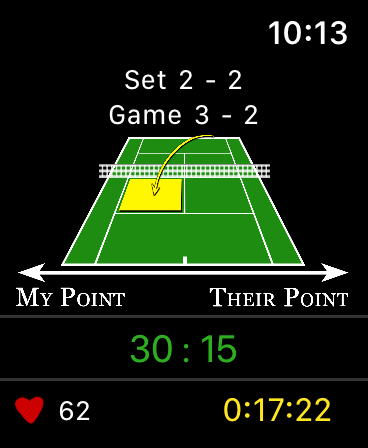
Tennis - Score Keeper - Interfaccia dell'app Tennis Score Keeper su Apple Watch che mostra i punteggi di game e set
Interfaccia dell'app Tennis Score Keeper su Apple Watch che mostra i punteggi di game e set

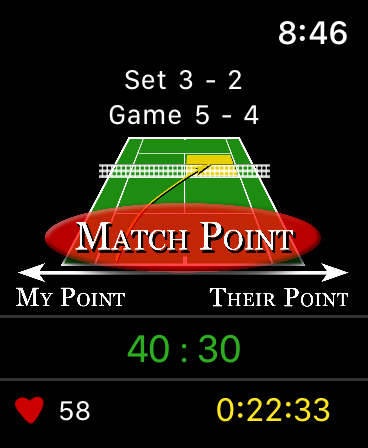
Tennis - Score Keeper - Schermata Apple Watch che mostra l'app Tennis Score Keeper sul punto decisivo con metriche di fitness
Schermata Apple Watch che mostra l'app Tennis Score Keeper sul punto decisivo con metriche di fitness

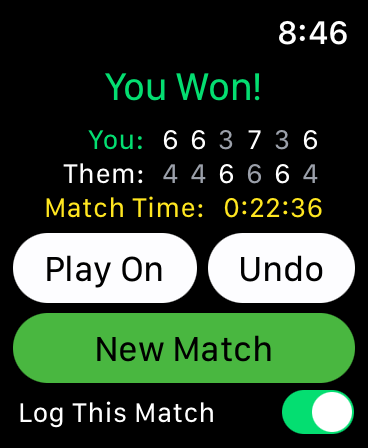
Tennis - Score Keeper - Schermata Apple Watch che mostra i punteggi della partita di tennis, la notifica del vincitore e la durata della partita.
Schermata Apple Watch che mostra i punteggi della partita di tennis, la notifica del vincitore e la durata della partita.

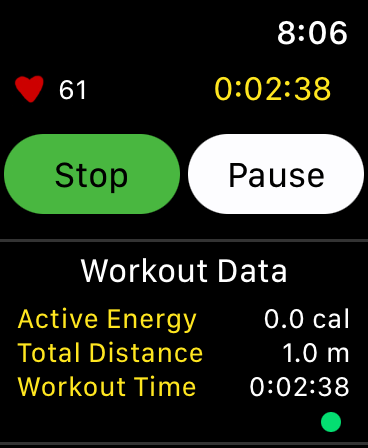
Tennis - Score Keeper - Schermata Apple Watch che mostra i dati dell'allenamento di tennis con metriche di battito cardiaco ed energia attiva
Schermata Apple Watch che mostra i dati dell'allenamento di tennis con metriche di battito cardiaco ed energia attiva

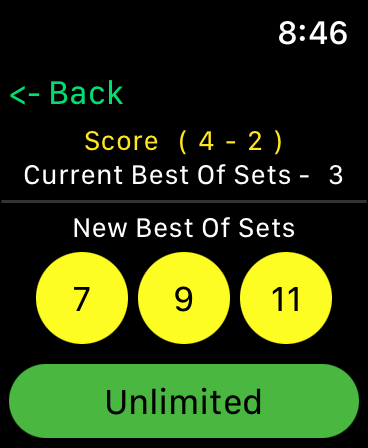
Tennis - Score Keeper - Interfaccia dell'app Tennis Score Keeper su Apple Watch che mostra le opzioni per selezionare il numero di set per una partita, inclusi 7, 9, 11 o illimitati
Interfaccia dell'app Tennis Score Keeper su Apple Watch che mostra le opzioni per selezionare il numero di set per una partita, inclusi 7, 9, 11 o illimitati

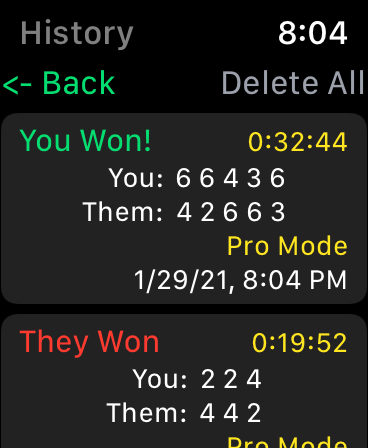
Tennis - Score Keeper - Schermata della cronologia delle partite di tennis su Apple Watch che mostra i risultati e i punteggi delle partite passate
Schermata della cronologia delle partite di tennis su Apple Watch che mostra i risultati e i punteggi delle partite passate

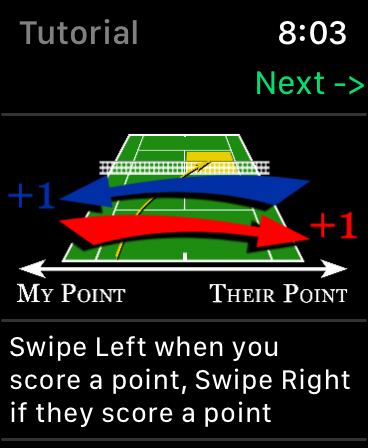
Tennis - Score Keeper - Tutorial per Apple Watch che mostra i gesti di scorrimento per tracciare i punteggi di tennis su una grafica di campo digitale
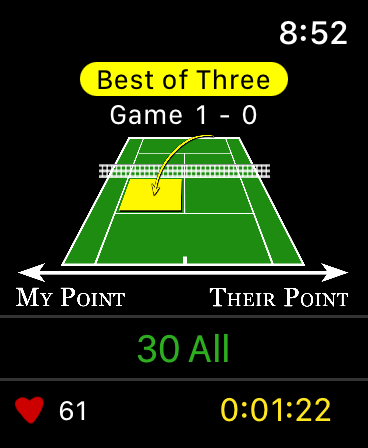
Tutorial per Apple Watch che mostra i gesti di scorrimento per tracciare i punteggi di tennis su una grafica di campo digitale

Tennis - Score Keeper - Schermata Apple Watch che mostra l'interfaccia dell'app Tennis Score Keeper con tracciamento del punteggio e monitoraggio del battito cardiaco
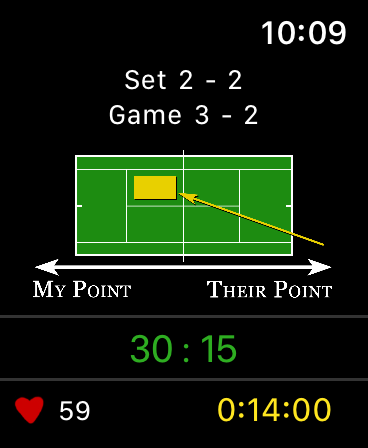
Schermata Apple Watch che mostra l'interfaccia dell'app Tennis Score Keeper con tracciamento del punteggio e monitoraggio del battito cardiaco

Tennis - Score Keeper - Interfaccia Apple Watch dell'app Tennis Score Keeper che mostra i punteggi della partita e il monitoraggio del battito cardiaco
Interfaccia Apple Watch dell'app Tennis Score Keeper che mostra i punteggi della partita e il monitoraggio del battito cardiaco

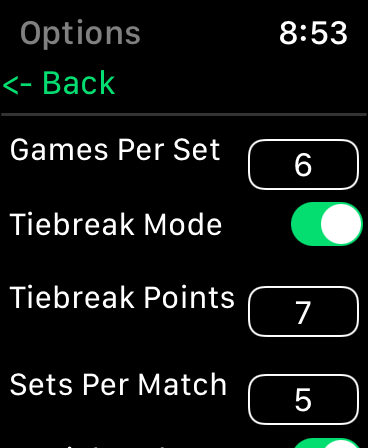
Tennis - Score Keeper - Impostazioni dell'app Tennis Score Keeper su Apple Watch che mostrano le configurazioni delle regole della partita

Impostazioni dell'app Tennis Score Keeper su Apple Watch che mostrano le configurazioni delle regole della partita

Descrizione

This tennis score keeper app exclusively for the Apple Watch offers an intuitive score tracker for friendly or competitive gameplay. Tennis – Score Keeper app is designed keep track of Your Match Score, Set Score, Game Score, Server and Serve Side during gameplay, as well as keeping the History of all matches played. Using simple gestures on the tennis court image, you can swipe left or right when a point is scored, tap to change serve side (Optional), and double tap to change server (Optional). Once initially synced the app automatically updates after each point, and game. A long press locks the screen to prevent inadvertent scrolling. The app has setup options to allow you to customize your gameplay from professional rules to casual “Best Of” matches. In casual mode choose best of games, from 1-7 and even infinity. (Stop the game at any time to tally up the score) Pro Score Mode allows you to choose Games per Set (2-10, or Infinity) A tiebreaker mode with official rules of who is serving and to which side and the option to choose how many tiebreak points (1-10). Sets per Match (1,3,5,7 and 9 or infinity), played as Best Of. And a + 1 tiebreaker set is optional depending on the rules you play. At any time, you can stop the game to tally the current points, particularly if you are playing with an Infinity set point. If you’re in a match and win or lose and want to keep it going “Play on” allows you to add more sets to the match in pro mode or switch to unlimited in pro or casual game play. There is also a “Game Score Mode” that allows you to swipe for games vs points for big picture score keeping. A History of each match is kept under the “History” button, individual matches can be deleted with a swipe, or the whole history cleared using the “Delete All” Button. Factory Reset does not clear the history or the workout information but resets all the settings. Additionally, Apple Health is integrated to keep track of your workout, and displays current Heart Rate, Active Energy, Distance and Workout Time (pending your authorization). These workout sessions can also be accessed from your connected IOS devices under the Apple Health App. A tutorial in the app shows how to interact, and what each setting does. A Local Notification is sent if you are in a workout but haven’t logged a point in a user defined amount of time, this helps remind you if you are heading home but forgot to end the match. There are NO external notifications (as in, you won’t get notifications unrelated to an active workout, nothing to annoy you). Apple Health Integration: You have the option to confirm the apps access to health parameters and allow the app to log “Tennis” as a workout activity. You can deny this access to any feature or parameter. You can also choose at any time to go into the Apple Health App and remove access. Alternatively, you can deselect “Save Workout” within the app, so that you can view the health data without saving the workout. For More information read “Privacy Policy” link provided. If you have any suggestions or issues, feel free to contact me through the “Support Link” provided. I would really appreciate any feedback! Most of the updates from 2.1 to 2.3 have come from suggestions by users, and 2.8 was specifically made to update the tap to change serve function that one user found frustrating if it was accidentally pressed during a match. If there is anything you would like to see… just ask!

Download

Scarica su App Store

Questa pagina non è una pagina ufficiale dell'app o del suo sviluppatore, ma una pubblicazione editoriale indipendente creata a scopo informativo e di commento. Salvo espressa indicazione contraria, né l'app né il suo sviluppatore sono affiliati, approvati, sponsorizzati, autorizzati o altrimenti ufficialmente collegati a MWM, Apple, Google Play, all'editore dell'app o allo sviluppatore dell'app, e nulla in questa pagina implica che l'app sia stata sviluppata utilizzando i servizi di MWM. Tutti i marchi, loghi, screenshot e altri contenuti rimangono di proprietà dei rispettivi proprietari.








