
Questa pagina non è una pagina ufficiale dell'app o del suo sviluppatore, ma una pubblicazione editoriale indipendente creata a scopo informativo e di commento. Salvo espressa indicazione contraria, né l'app né il suo sviluppatore sono affiliati, approvati, sponsorizzati, autorizzati o altrimenti ufficialmente collegati a MWM, Apple, Google Play, all'editore dell'app o allo sviluppatore dell'app, e nulla in questa pagina implica che l'app sia stata sviluppata utilizzando i servizi di MWM. Tutti i marchi, loghi, screenshot e altri contenuti rimangono di proprietà dei rispettivi proprietari.


TestFlight
Pochi vedono il domani, tu lo plasmi. TestFlight non è un'anteprima; è la tua licenza per incidere, per trasformare l'incertezza del codice in una direttiva chiara, dettando l'evoluzione delle app ben prima del lancio.
Download
100M+Valutazione
Valutazioni totali
15.2MEditore
Categoria
Developer ToolsLingue
33Ultima versione
4.1.0Dimensione
16.7 MBData di lancio
23 lug 2014Una disamina delle capacità chiave offerte dalla piattaforma di Apple per il collaudo anticipato di applicazioni iOS e App Clip.
Analisi Funzionale di TestFlight: Strumento Essenziale per Beta Testing
Accesso Esclusivo a Beta
L'app offre l'opportunità unica di testare in anteprima versioni non ancora rilasciate di applicazioni e App Clip, permettendo agli utenti di scoprire nuove funzionalità prima del lancio pubblico.
Canale Diretto di Feedback
Consente agli utenti di inviare feedback costruttivo e dettagliato direttamente agli sviluppatori, influenzando attivamente lo sviluppo e il miglioramento delle app.
Contributo alla Qualità del Software
Partecipando ai test, gli utenti contribuiscono attivamente a migliorare la qualità e l'affidabilità delle applicazioni prima che raggiungano un pubblico più ampio sull'App Store.
Monitoraggio Automatico di Stabilità
Questo strumento raccoglie e trasmette automaticamente agli sviluppatori i crash log e i dati sull'utilizzo, facilitando l'identificazione rapida e la correzione di bug e problemi di performance.
Domande Frequenti
Tutto quello che devi sapere su TestFlight
What is TestFlight and what does it do?
TestFlight enables users to test beta versions of apps and App Clips, providing valuable feedback directly to developers before their apps are released on the App Store.
How do developers invite testers to TestFlight?
Developers invite testers to TestFlight beta programs through email invitations or by providing a public link. Testers then accept these invitations to begin testing.
What data does TestFlight collect during beta testing?
When you test a beta app via TestFlight, Apple collects and sends crash logs, usage information, and any submitted feedback to the developer. Apple may also use crash logs and usage for its own product improvement.
How do developers use the data collected by TestFlight?
Developers use the information collected by TestFlight, including crash logs, usage data, and feedback, to improve their apps and related products before their official release.
Can users view all their beta apps in TestFlight?
Yes, TestFlight displays all beta apps a user is currently testing or has previously tested within its main interface. This includes apps that require updates.
Does TestFlight allow users to update beta apps?
Yes, TestFlight allows users to update beta apps directly from its interface. An 'Update' button appears next to apps with newer versions available for installation.
How do I accept a beta app invitation using TestFlight?
Yes, TestFlight presents a dedicated screen to accept beta app invitations, displaying app details, developer, category, and build expiration, with an 'Accept' button.
Can I send feedback to developers directly through TestFlight?
Yes, TestFlight provides a dedicated feedback interface where users can share thoughts, describe issues, and directly submit feedback to the app's developer.
Can I attach screenshots to my feedback in TestFlight?
Yes, TestFlight allows users to attach screenshots to their feedback submissions, providing developers with visual context for reported issues or suggestions.
Does TestFlight share my email address with developers when I submit feedback?
Yes, TestFlight indicates that beta feedback and device information are collected and shared with the developer, along with the user's email address.
Can I manage which devices I use for TestFlight beta testing?
Yes, TestFlight provides a settings menu where users can manage the devices they use for testing apps, listing current and other associated devices.
Does TestFlight support automatic updates for beta apps?
Yes, TestFlight features an option for 'Automatic updates for new apps'. This toggle enables automatic installation of new beta versions when they become available.
Can I provide feedback if I decide not to join a TestFlight beta app?
Yes, TestFlight allows users to provide feedback even if they choose not to join a beta app, using a 'Leave Feedback' option within the app list.
Gli screenshot e la descrizione seguenti provengono direttamente dall'elenco ufficiale dello store dell'app e sono di proprietà dello sviluppatore.
App Store
Screenshot
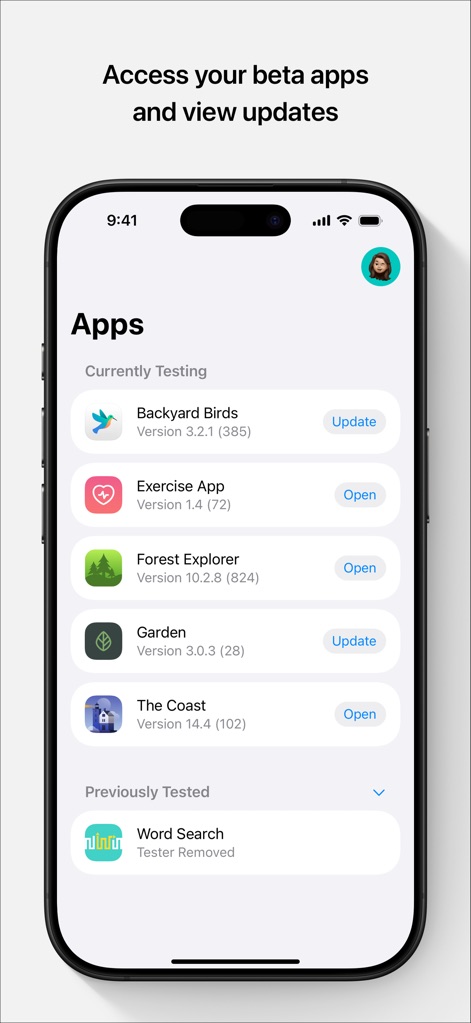
Questo strumento mostra un elenco chiaro delle applicazioni in fase di test, con indicazioni per aggiornare le versioni esistenti e aprirle con un semplice tocco.
Gestione App Beta
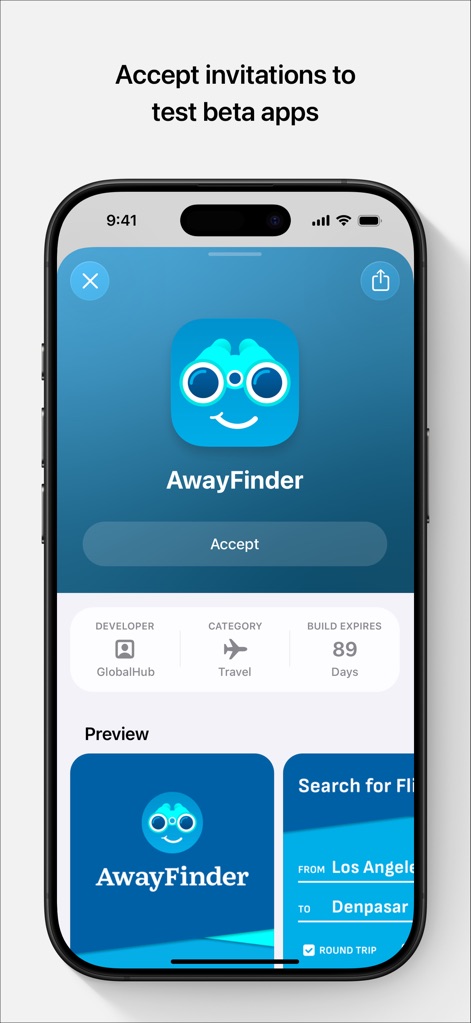
L'app semplifica l'accettazione di nuovi inviti, presentando un pulsante 'Accept' ben visibile e dettagli cruciali come lo sviluppatore e la data di scadenza della build.
Accetta Nuovi Test
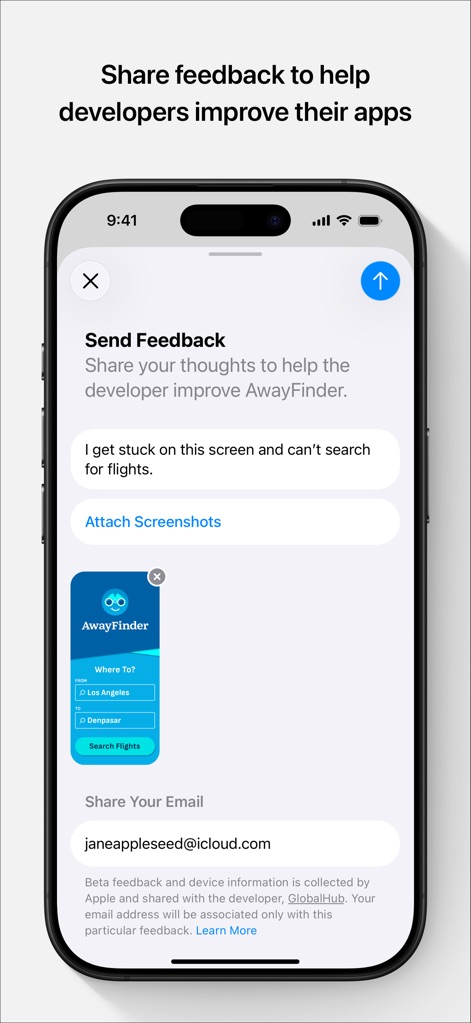
Gli utenti possono facilmente condividere i loro pensieri attraverso un campo di testo dedicato e allegare screenshot, fornendo agli sviluppatori un contesto visivo preciso per la risoluzione dei bug.
Invia Feedback Dettagliato
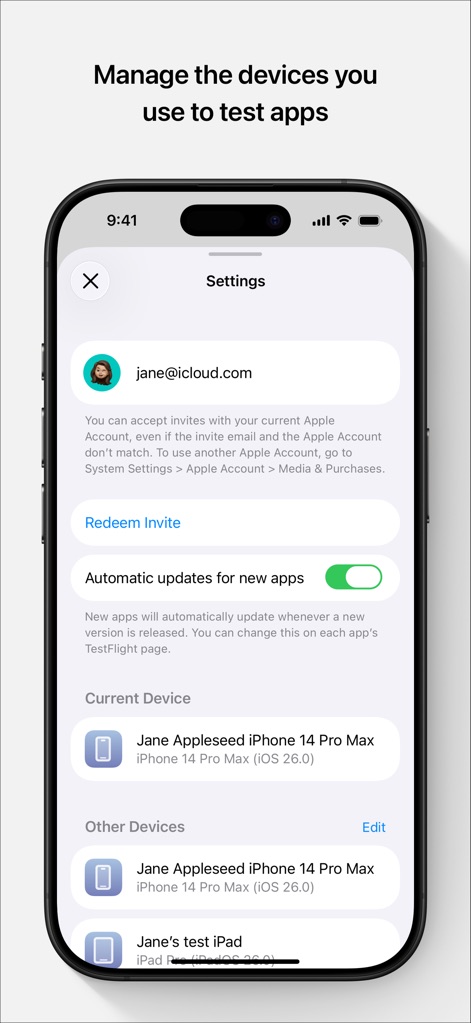
Questo strumento consente di gestire i dispositivi di testing associati all'account, visualizzando il 'Current Device' e offrendo un toggle per gli aggiornamenti automatici delle nuove app.
Configura Dispositivi
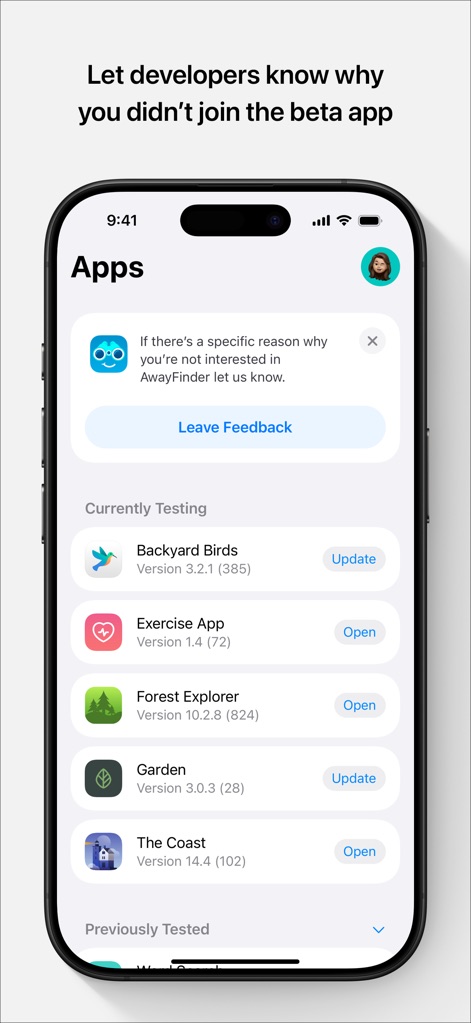
L'app offre la possibilità di comunicare il motivo del rifiuto di un test, mostrando un banner informativo e un pulsante 'Leave Feedback' per fornire dettagli agli sviluppatori.
Declina con Contesto
Descrizione
Download
App Simili
App con funzionalità ed esperienza simili

Questa pagina non è una pagina ufficiale dell'app o del suo sviluppatore, ma una pubblicazione editoriale indipendente creata a scopo informativo e di commento. Salvo espressa indicazione contraria, né l'app né il suo sviluppatore sono affiliati, approvati, sponsorizzati, autorizzati o altrimenti ufficialmente collegati a MWM, Apple, Google Play, all'editore dell'app o allo sviluppatore dell'app, e nulla in questa pagina implica che l'app sia stata sviluppata utilizzando i servizi di MWM. Tutti i marchi, loghi, screenshot e altri contenuti rimangono di proprietà dei rispettivi proprietari.