
Questa pagina non è una pagina ufficiale dell'app o del suo sviluppatore, ma una pubblicazione editoriale indipendente creata a scopo informativo e di commento. Salvo espressa indicazione contraria, né l'app né il suo sviluppatore sono affiliati, approvati, sponsorizzati, autorizzati o altrimenti ufficialmente collegati a MWM, Apple, Google Play, all'editore dell'app o allo sviluppatore dell'app, e nulla in questa pagina implica che l'app sia stata sviluppata utilizzando i servizi di MWM. Tutti i marchi, loghi, screenshot e altri contenuti rimangono di proprietà dei rispettivi proprietari.


TV Cast for Samsung TV App
La tua TV Samsung, finalmente liberata dalle catene del browser integrato, diventa il vero hub multimediale che meritava di essere.
Download
10M+Valutazione
Valutazioni totali
117.8KEditore
Categoria
Photo & VideoLingue
1Ultima versione
3.8Dimensione
34.7 MBData di lancio
26 mar 2015Un'esplorazione dettagliata delle capacità principali di questa soluzione di streaming per l'intrattenimento domestico.
Analisi Funzionale: TV Cast for Samsung TV App
Streaming Universale da Web
L'app consente di trasmettere direttamente video web, film online, live stream e programmi TV in diretta da qualsiasi sito web alla tua Smart TV o Blu-ray Player Samsung.
Facilità d'Uso e Configurazione Minima
Offre un processo di trasmissione semplificato: basta navigare sul web, attendere il rilevamento automatico del link video e toccare per avviare lo streaming, eliminando la necessità di complessi server multimediali esterni.
Supporto Ampio Formati Video
Questo strumento presenta una compatibilità estesa con vari formati video online, inclusi MP4, M3U8, livestream HLS e video su HTTPS, garantendo una riproduzione versatile dei contenuti.
Blocco Annunci Integrato
La funzione di blocco annunci (premium) migliora l'esperienza utente eliminando pubblicità e popup dalla maggior parte dei siti web e dall'app stessa.
Controllo Video Avanzato
Con la Remote Playbar (funzionalità premium), l'app fornisce controlli video avanzati come avanzamento, riavvolgimento, pausa e riproduzione, anche durante la navigazione.
Assenza di Limiti di Tempo
Consente agli utenti di guardare video di qualsiasi durata, senza restrizioni temporali, per un'esperienza di visione ininterrotta sul grande schermo.
Domande Frequenti
Tutto quello che devi sapere su TV Cast for Samsung TV App
What is the TV Cast for Samsung TV App?
The TV Cast for Samsung TV App streams web videos, online movies, livestreams, and live TV shows to Samsung Smart TVs and Blu-ray Players. It provides direct casting from your mobile device.
Does the TV Cast for Samsung TV App require a subscription?
No, there are no recurring subscription fees for the TV Cast for Samsung TV App. The app emphasizes "NO SUBSCRIPTIONS" on its primary promotional material, indicating one-time purchases for features.
Does TV Cast for Samsung TV App offer in-app purchases?
Yes, the TV Cast for Samsung TV App offers in-app purchases for upgrade features. The Premium Edition unlocks all available features, including future updates without additional payment.
What video formats does TV Cast for Samsung TV App support?
The TV Cast for Samsung TV App supports streaming of mp4, m3u8, hls livestreams, and video-over-https. Users can cast various web video formats directly to their Samsung Smart TV.
Does the TV Cast for Samsung TV App have a time limit for streaming?
No, the TV Cast for Samsung TV App does not impose any time limits on streaming. Users can watch videos of any duration, including those lasting hours, without interruption.
How do I set up the TV Cast for Samsung TV App on my TV?
To set up the TV Cast for Samsung TV App, open the Samsung App Store (Smart Hub) on your TV or Blu-ray Player. Search for and install the 'TV Cast' receiver app to enable video casting.
How do I connect my iPhone/iPad to the TV Cast for Samsung TV App?
Users connect their iPhone/iPad to the TV Cast for Samsung TV App by entering their device's IP address on the Samsung TV using the remote's number pad and navigation keys.
Does the TV Cast for Samsung TV App support DRM-protected content?
No, the TV Cast for Samsung TV App does not support DRM-protected videos. This includes iTunes movies, Flash video, and content from services like HBO Now.
Does the TV Cast for Samsung TV App mirror my device's screen?
No, the TV Cast for Samsung TV App does not mirror your device's screen or tab. It only streams the video portion of a website directly to your Samsung Smart TV.
What is the Remote Playbar feature in TV Cast for Samsung TV App?
The Remote Playbar feature in TV Cast for Samsung TV App provides advanced video control, such as scrubbing, forward, rewind, play, pause, and stop, while browsing.
Can I cast local videos with TV Cast for Samsung TV App?
Yes, the TV Cast for Samsung TV App allows users to cast local videos from their iPhone or iPad camera roll. It supports mp4, m4v, and mov formats.
Does the TV Cast for Samsung TV App include an ad-blocker?
Yes, the TV Cast for Samsung TV App offers an Ad-Blocker feature as an in-app purchase. It blocks ads and pop-ups on most websites and removes sponsoring ads from within the app.
Does TV Cast for Samsung TV App offer customer support?
Yes, TV Cast for Samsung TV App provides "FAST PREMIUM SUPPORT CHAT." This indicates that users can obtain quick assistance with the app's features or any encountered issues.
Gli screenshot e la descrizione seguenti provengono direttamente dall'elenco ufficiale dello store dell'app e sono di proprietà dello sviluppatore.
App Store
Screenshot
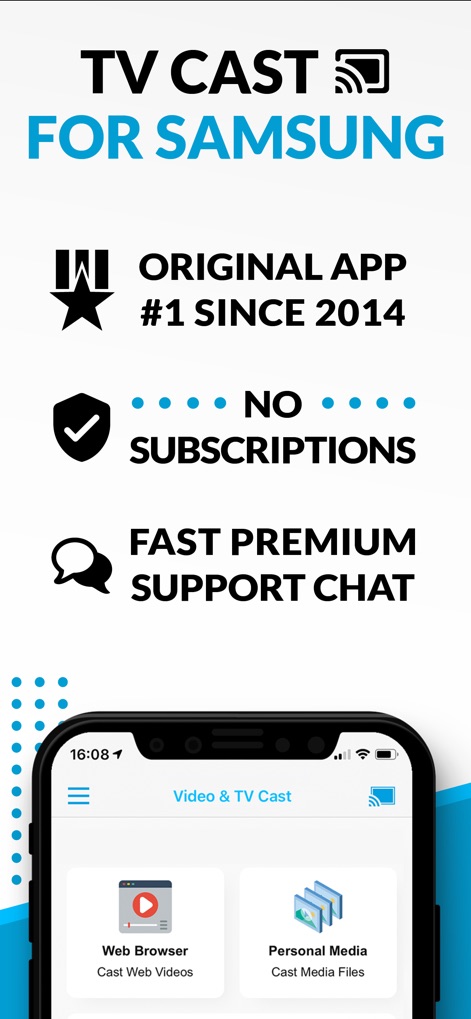
L'interfaccia iniziale mette in risalto l'assenza di abbonamenti (X) e la possibilità di trasmettere sia video web che file multimediali personali (Y), garantendo un'esperienza chiara e diretta.
Streaming Intuitivo

Questo screenshot illustra come l'app proietta contenuti dal telefono (X) direttamente sulla Samsung TV, mostrando la stessa immagine della donna (Y) su entrambi gli schermi per un'esperienza visiva coinvolgente.
Visione Amplificata

L'app facilita la condivisione di foto e musica (X), presentando un'immagine paesaggistica che viene riprodotta sia sul dispositivo mobile che sullo schermo del televisore (Y) attraverso una connessione semplice.
Media Personalizzati
Descrizione
Download
App Simili
App con funzionalità ed esperienza simili



Questa pagina non è una pagina ufficiale dell'app o del suo sviluppatore, ma una pubblicazione editoriale indipendente creata a scopo informativo e di commento. Salvo espressa indicazione contraria, né l'app né il suo sviluppatore sono affiliati, approvati, sponsorizzati, autorizzati o altrimenti ufficialmente collegati a MWM, Apple, Google Play, all'editore dell'app o allo sviluppatore dell'app, e nulla in questa pagina implica che l'app sia stata sviluppata utilizzando i servizi di MWM. Tutti i marchi, loghi, screenshot e altri contenuti rimangono di proprietà dei rispettivi proprietari.