WinZip: #1 zip & unzip tool

WinZip: #1 zip & unzip tool

Scarica su App Store
Logo di WinZip: #1 zip & unzip tool

WinZip: L'utility professionale numero 1 al mondo per iPhone e iPad

Supera i colli di bottiglia del mobile. Apri senza sforzo file RAR, 7z e Zip, proteggi i tuoi documenti con la crittografia AES e gestisci tutti i tuoi account di archiviazione cloud in un unico flusso di lavoro potente e ottimizzato.

Editore

WinZip Computing LLC

Categoria

Utilities

Download

3M+

Valutazione

4.0/5

Valutazioni totali

14K+

Lingue

8

Il tuo flusso di lavoro, visualizzato

Scopri l'interfaccia usata da 3M+ utenti.

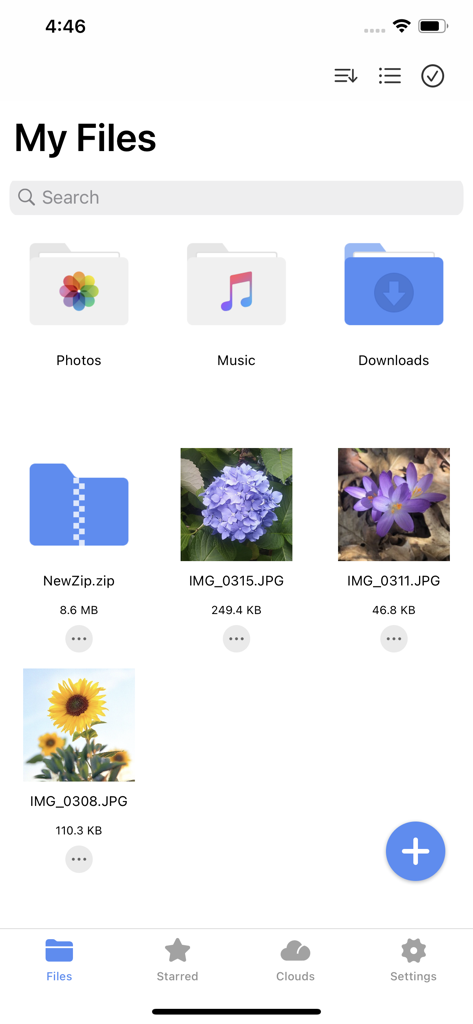
Screenshot dell'app WinZip che mostra l'interfaccia dei miei file con cartelle e immagini organizzate
Screenshot dell'app WinZip che mostra l'interfaccia dei miei file con cartelle e immagini organizzate

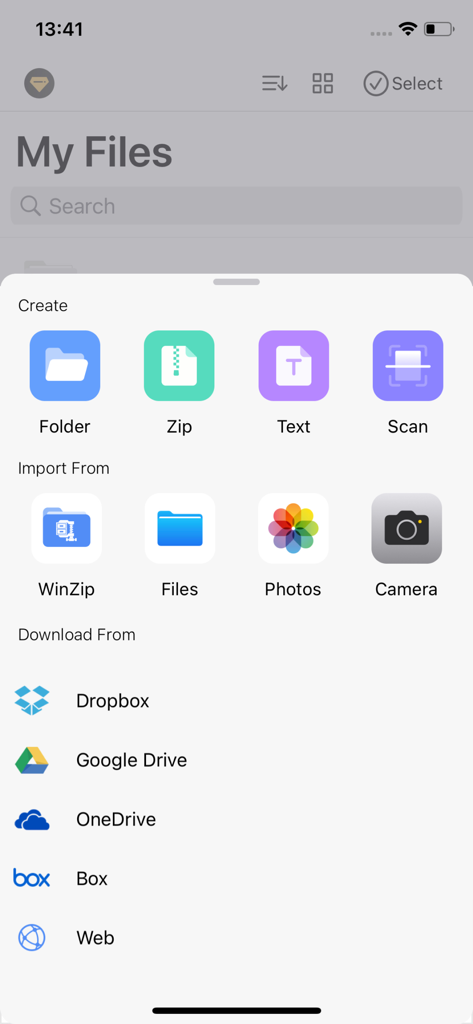
Interfaccia dell'app WinZip che mostra opzioni per creare file, importare dal telefono e scaricare da servizi di archiviazione cloud come Dropbox e Google Drive.
Interfaccia dell'app WinZip che mostra opzioni per creare file, importare dal telefono e scaricare da servizi di archiviazione cloud come Dropbox e Google Drive.

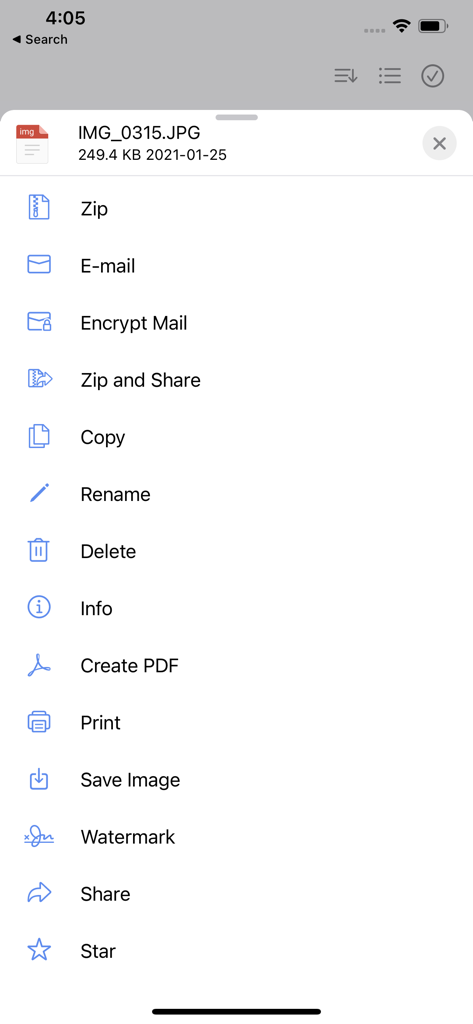
Screenshot dell'app mobile WinZip che mostra un elenco di opzioni di gestione file tra cui zip, crittografa email, filigrana e crea PDF.
Screenshot dell'app mobile WinZip che mostra un elenco di opzioni di gestione file tra cui zip, crittografa email, filigrana e crea PDF.

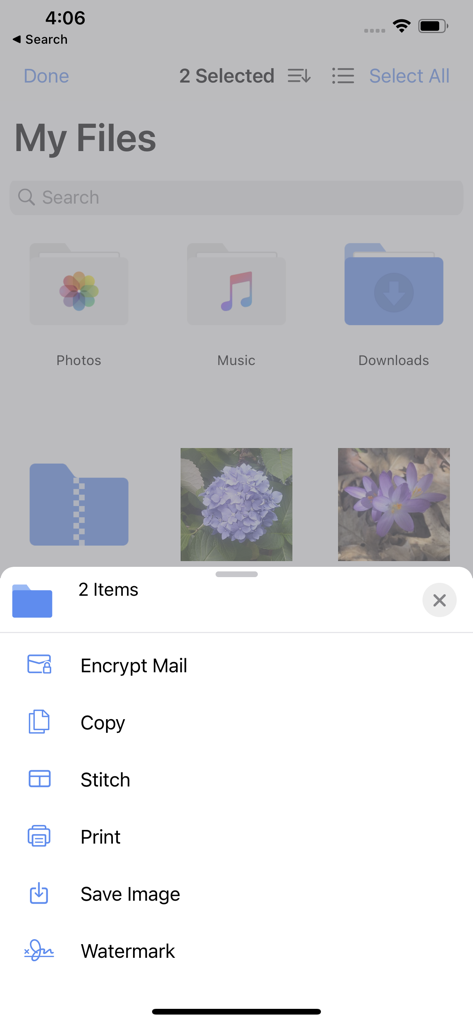
Interfaccia dell'app mobile WinZip che mostra opzioni di gestione file e menu azioni per gli elementi selezionati
Interfaccia dell'app mobile WinZip che mostra opzioni di gestione file e menu azioni per gli elementi selezionati

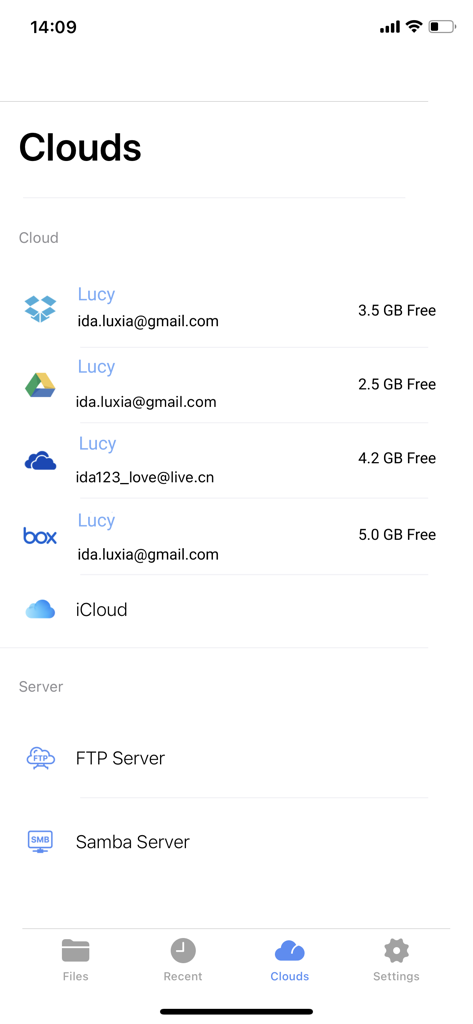
Interfaccia dell'app WinZip iOS che visualizza gli account di archiviazione cloud connessi e le opzioni del server.
Interfaccia dell'app WinZip iOS che visualizza gli account di archiviazione cloud connessi e le opzioni del server.

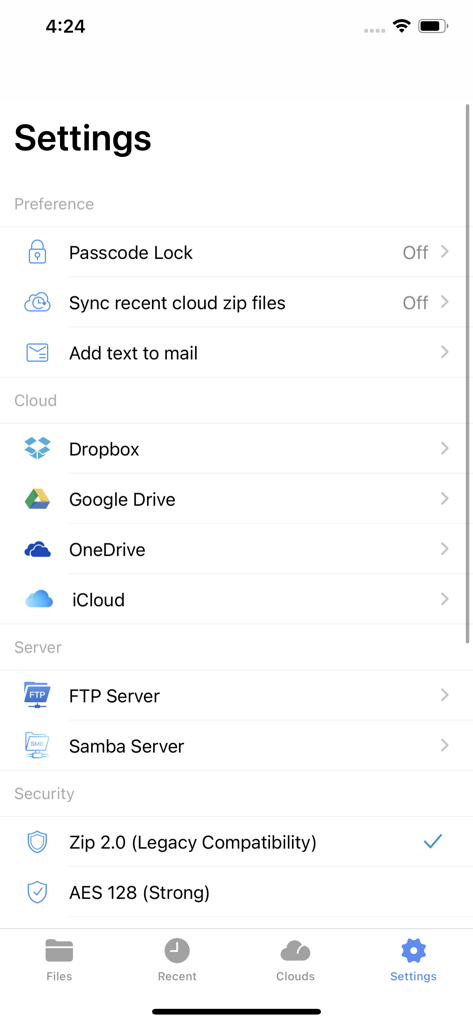
Menu delle impostazioni dell'app WinZip iOS che mostra opzioni di archiviazione cloud, connessioni server e preferenze di crittografia di sicurezza
Menu delle impostazioni dell'app WinZip iOS che mostra opzioni di archiviazione cloud, connessioni server e preferenze di crittografia di sicurezza

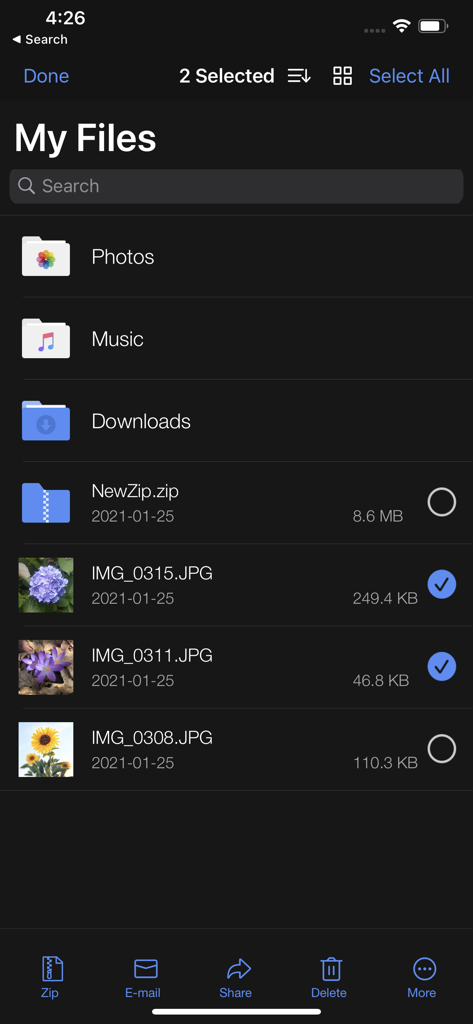
Schermata "I miei file" dell'app WinZip su iPhone con due foto selezionate per la compressione o la condivisione.
Schermata "I miei file" dell'app WinZip su iPhone con due foto selezionate per la compressione o la condivisione.

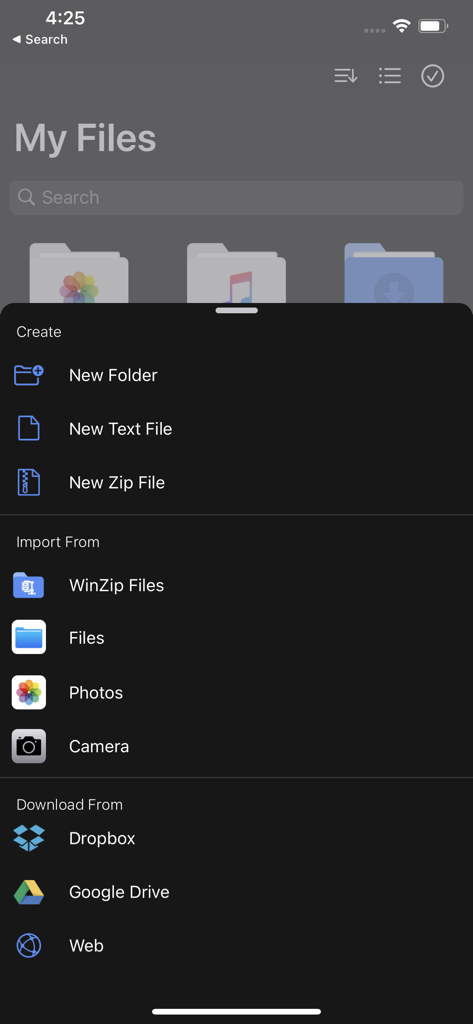
Interfaccia dell'app mobile WinZip che mostra il menu di creazione file e importazione da cloud storage.
Interfaccia dell'app mobile WinZip che mostra il menu di creazione file e importazione da cloud storage.

App WinZip che mostra una foto di fiori con un menu di opzioni tra cui Zip e Condividi, Filigrana e Crea PDF.
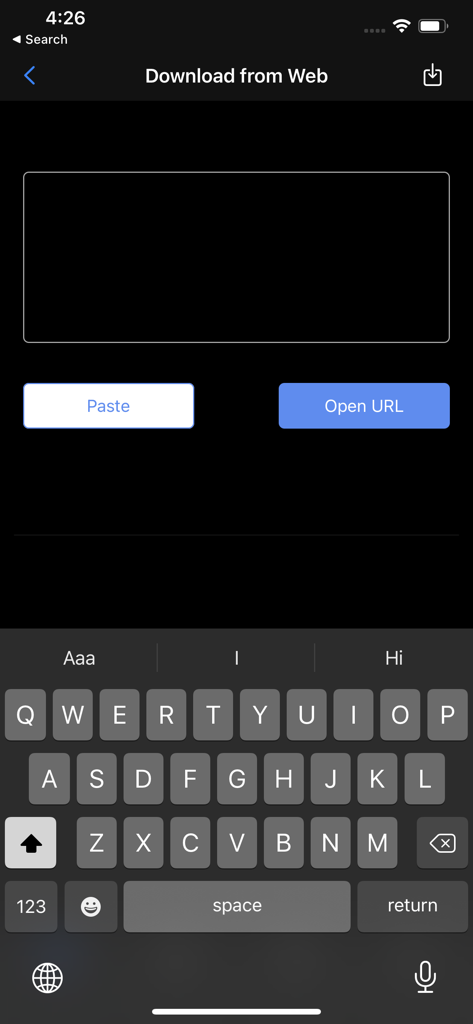
App WinZip che mostra una foto di fiori con un menu di opzioni tra cui Zip e Condividi, Filigrana e Crea PDF.

Schermata dell'app WinZip su iPhone che mostra la funzione Download dal Web con un campo di inserimento URL e tastiera

Schermata dell'app WinZip su iPhone che mostra la funzione Download dal Web con un campo di inserimento URL e tastiera

Padroneggiare il tuo flusso di lavoro mobile

Gli strumenti che rendono questa app unica, scelti da 3M+ utenti.

📂

Decomprimi tutto

Smetti di lottare con i limiti di file mobili. Apri istantaneamente ZIP, RAR, 7z e altro direttamente dagli allegati email o dal browser web.

☁️

Il tuo cloud, connesso

Comprimi, decomprimi e condividi tra Google Drive, Dropbox e OneDrive senza passare da un'app all'altra. Un hub per tutto il tuo spazio di archiviazione professionale.

🛡️

Crittografia di livello bancario

Proteggi documenti aziendali sensibili con la potente crittografia AES a 256 bit prima di condividerli o archiviarli nel cloud.

Analisi recensioni

Approfondimenti dalle recensioni degli utenti.

Punteggio sentimento

29%
Negativo

Riepilogo

The app receives largely negative feedback, reflected in its low sentiment score, primarily due to widespread issues. Many users report significant problems with crashes and instability, particularly after updating to iOS 18 or iPadOS 18, which often prevents them from opening files or folders. A major source of frustration stems from the app's monetization strategy, with numerous complaints about mandatory subscriptions, paywalls for basic features, high costs, and instances of being charged during supposed free trials. While some users find the app easy to use and generally useful, and one reviewer noted a crash issue being resolved, core functionalities like zipping and unzipping documents are frequently cited as problematic or non-existent without payment.

Temi comuni

Overall App Satisfaction(6)
User Interface & Experience(3)
Crashes & Stability(1)
Pricing & Subscriptions(1)
Core Functionality (Zip/Unzip)(1)

Info sull'app

Tutto quello che devi sapere su WinZip: #1 zip & unzip tool.

Descrizione

Get the world’s #1 zip file opener utility on iOS! Create Zip and Zipx files, extract files, encrypt, open Zip, Zipx, 7z, RAR or LHA files, send large files by email, share to Dropbox, Google Drive, OneDrive, iCloud, Twitter or Facebook. The reviews are unanimous! “Trying to open zip files a zip file on your mobile phone? Good luck -- unless you happen to have this handy tool installed. It launches directly from your inbox to give you a look inside those pesky file packages. “ - Mashable CNET (download.com) gives WinZip for iOS a 5 star rating, saying "We love apps that are simple and straightforward to use. WinZip definitely fits that description. We recommend it for all users." If you frequently use your iOS device to send and receive documents and large image files, you'll find a friend in the new WinZip app for iPhones and iPads, according to CIO.com blogger James A. Martin. From AppPicker: "Why not sink a few dollars into this fantastic full version of WinZip for your iPhone and iPad!" WinZip makes it easy to handle major compressed types of files on your iPhone, iPad or iPod Touch! Whether you receive a Zip, Zipx, 7z, RAR or LHA file as an email attachment, or want to extract download and view the contents of a Zip, Zipx, 7z, RAR or LHA file from the web, just “Open with WinZip”. Sharing files is safe and simple too, with direct integration with Dropbox, Google Drive, OneDrive and iCloud, and support for AirDrop. Now you can: • Connect directly to your Dropbox, Google Drive, OneDrive and iCloud accounts to zip, unzip and share files • Zip your cloud storage files, unzip files to your accounts, and create and save .zip and .zipx files to your accounts • Send or copy links to your files in your cloud storage accounts • Copy files from your cloud storage accounts and save them on your device • Unzip major compressed file types, including .ZIP, .Zipx, .RAR, .7z and LHA with just a tap • Choose Zip or Zipx format to compress and email large files, photos and videos with ease • Zip and share photos and videos from your Camera Roll • Use WinZip to access music files on your device and save them to your cloud accounts • Send files to other iOS users with integrated support for AirDrop • Protect your files before you save and share with powerful 128- or 256-bit AES encryption • Open and save email attachments to your connected cloud storage accounts or My Documents folder on your iPhone or iPad • Easily view all images in a Zip file with the enhanced image viewer • Browse your Photo Album and easily multi-select, zip and share photo collections • Share photos in your zip files to Facebook and Twitter • Download or upload files from/to WinZip through iTunes/iTools • Unzip and view most common file types, including: .doc, .docx, .xls, .xlsx, .ppt, .pptx, .pages (including new iWork 13), .numbers (including new iWork 13), .key, .rtf, .pdf, .jpg, .png, .bmp, .gif, .tif, and more View any of the following types of files within your Zip or RAR file: • Word documents (.doc, .docx) • Excel spreadsheets (.xls, .xlsx) • PowerPoint presentations (.ppt, .pptx) • PDF files (.pdf) • Photos and images (.jpg, .jpeg, .png, .bmp, .gif, .tif, .tiff, .heic) • Text files (.txt, .ini, .inf, .bat, .js, .log, .xml, .css, .java, .cs, .h, .m, .cpp, .c, .sql) • Web documents (.htm, .html, .jsp, .asp) • Rich Text Format documents (.rtf) • Keynote presentations (.key) • Numbers spreadsheets (.numbers) • Pages documents (.pages) • Media files (.m4a, .mp3, .wav, .mp4, .mov) Would you like to translate WinZip from English into your native language? Please contact help(at)winzip.com using the subject line "Translate WinZip into XXX", replacing XXX with your native language. In recognition of your efforts, your name will be included in the application description.

Ultima versione

7.14

Dimensione

56.3 MB

Data di lancio

13 feb 2012

Pronto a potenziare il tuo flusso di lavoro mobile?

Unisciti a oltre 3 milioni di professionisti che si affidano all'utility numero 1 al mondo per gestire, proteggere e condividere file di grandi dimensioni senza problemi su iPhone e iPad.

Scarica su App Store

App information, icons, screenshots, and descriptions displayed on this page are sourced from the Apple App Store and are the property of their respective developers. Download estimates and rankings are based on MWM's proprietary models and may not reflect actual figures. This page is provided for informational and analytical purposes only.

Believe this page infringes your intellectual property? File a dispute