
Questa pagina non è una pagina ufficiale dell'app o del suo sviluppatore, ma una pubblicazione editoriale indipendente creata a scopo informativo e di commento. Salvo espressa indicazione contraria, né l'app né il suo sviluppatore sono affiliati, approvati, sponsorizzati, autorizzati o altrimenti ufficialmente collegati a MWM, Apple, Google Play, all'editore dell'app o allo sviluppatore dell'app, e nulla in questa pagina implica che l'app sia stata sviluppata utilizzando i servizi di MWM. Tutti i marchi, loghi, screenshot e altri contenuti rimangono di proprietà dei rispettivi proprietari.


Wireless Display - TV+
La tua schermata mobile, prigioniera di uno schermo minuscolo, finalmente libera di dominare il salotto. Wireless Display - TV+ offre l'arroganza di proiettare i tuoi contenuti dove meritano: in grande.
Download
750k+Valutazione
Valutazioni totali
432Editore
Categoria
UtilitiesLingue
7Ultima versione
2.8Dimensione
52.9 MBData di lancio
13 set 2023Valutazione delle capacità principali e del loro impatto sull'esperienza dell'utente finale.
Analisi delle Funzionalità Chiave di Wireless Display - TV+
Screen Mirroring ad Alta Qualità e in Tempo Reale
L'app consente agli utenti di replicare lo schermo del proprio telefono o tablet su una Smart TV con immagini nitide e senza ritardi, garantendo un'esperienza visiva fluida e immersiva.
Ampia Compatibilità per Dispositivi
Questo strumento presenta un supporto esteso per diverse tecnologie e sistemi operativi, inclusi iPhone, iPad, dispositivi Android, Chromecast e Miracast, assicurando che la maggior parte degli utenti possa connettersi senza problemi.
Casting di Contenuti Multimediali Personali
Consente agli utenti di proiettare facilmente foto e video memorizzati sui propri dispositivi mobili direttamente sulla TV, rendendo la condivisione di ricordi e intrattenimento con amici e familiari semplice e immediata.
Visualizzazione di Notizie e Sport in Tempo Reale
Consente agli utenti di trasmettere in streaming eventi live come notiziari e incontri sportivi, garantendo di non perdere momenti importanti e di godere di un'esperienza dinamica sul grande schermo.
Streaming di Video da Browser Web
L'app fornisce la capacità di trasmettere video direttamente da siti web al televisore, ampliando le fonti di contenuto disponibili al di là delle app tradizionali.
Facilità di Condivisione e Intrattenimento Sociale
Questo strumento facilita la condivisione di film, serie e altri contenuti sul grande schermo, migliorando l'esperienza di intrattenimento per gruppi e momenti sociali.
Domande Frequenti
Tutto quello che devi sapere su Wireless Display - TV+
What is Wireless Display - TV+?
Wireless Display - TV+ is an application that helps cast a small phone screen to a big TV screen. It delivers content in high quality and real-time speed.
Does Wireless Display - TV+ support screen mirroring technologies like Airplay and Miracast?
Yes, Wireless Display - TV+ supports screen mirroring. It utilizes Airplay and Miracast for wireless connections, enabling users to cast devices like laptops, tablets, or smartphones to display receivers.
Can I cast content from my iPhone or iPad to a TV using Wireless Display - TV+?
Yes, Wireless Display - TV+ enables casting of iPhone and iPad screens to a TV. Users can mirror photos and videos, and stream live news or sports.
Does Wireless Display - TV+ offer a free trial period?
Yes, Wireless Display - TV+ may offer a free trial period. If offered, any unused portion of the free trial is forfeited when the user purchases a subscription.
How does the subscription model work for Wireless Display - TV+?
Subscriptions for Wireless Display - TV+ automatically renew unless turned off 24 hours prior to the current period's end. Payment is charged to the iTunes Account upon purchase confirmation.
Can Wireless Display - TV+ cast videos directly from a web browser to a TV?
Yes, Wireless Display - TV+ includes a Web Video Caster feature. This allows users to watch videos from websites directly on their television screen.
Does Wireless Display - TV+ provide high-quality picture and video streaming?
Yes, Wireless Display - TV+ provides high-quality streaming. It supports HD video quality for Miracast and displays pictures in Full HD on the TV screen.
How does a user connect to a TV with Wireless Display - TV+?
Users connect to a TV with Wireless Display - TV+ via a one-tap process. They select their desired device, such as Airplay TV or Android TV, from a provided list.
Can Wireless Display - TV+ stream live content?
Yes, Wireless Display - TV+ streams live content. Users can stream various forms of media, including live news and sports, to their connected TV.
Does Wireless Display - TV+ allow multitasking between a PC and TV?
Yes, Wireless Display - TV+ supports multitasking. With wireless media streaming, users can perform different functions simultaneously on their PC and TV.
Gli screenshot e la descrizione seguenti provengono direttamente dall'elenco ufficiale dello store dell'app e sono di proprietà dello sviluppatore.
App Store
Screenshot

L'app consente di avviare il casting in modo intuitivo toccando il pulsante "Screen Casting" sul telefono, mentre il logo "Wireless Display" conferma la connessione sullo schermo del televisore.
Avvia il Casting
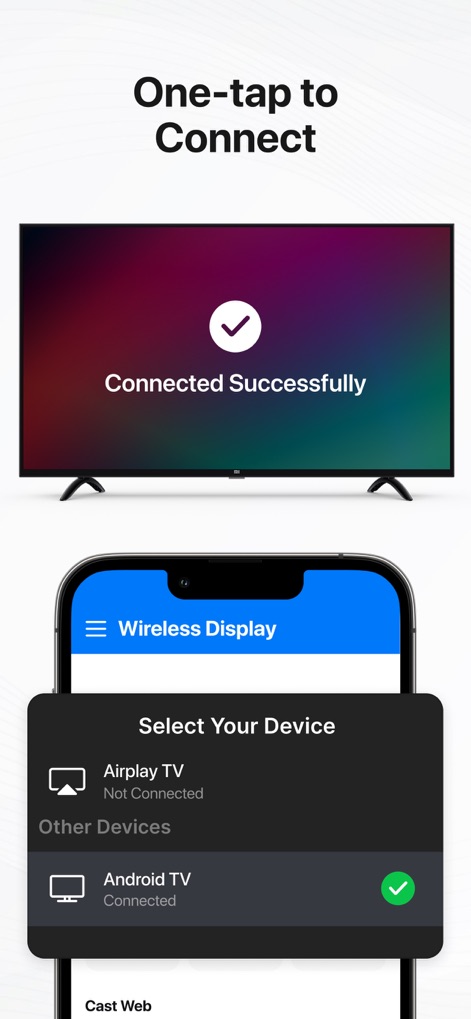
Questo strumento garantisce una "Connessione Rapida", mostrando la conferma "Connected Successfully" sulla TV e permettendo di scegliere facilmente il proprio dispositivo, come "Android TV", dall'elenco.
Connessione Rapida

Gli utenti possono godere di "Film sul Grande Schermo", con una scena vivida visualizzata sulla TV e l'interfaccia di controllo della riproduzione video comodamente accessibile sul telefono.
Film sul Grande Schermo

Le "Foto in Alta Qualità" vengono proiettate sullo schermo del televisore, mentre gli utenti possono navigare e selezionare le immagini dalla galleria visualizzata sul dispositivo mobile.
Foto in Alta Qualità

Questa funzionalità permette di visualizzare "Contenuti Web Condivisi" direttamente sulla TV, mostrando il video dal browser sul grande schermo e l'URL del sito web sul telefono.
Contenuti Web Condivisi
Descrizione
Download
App Simili
App con funzionalità ed esperienza simili

Web Video Cast | Browser to TV
InstantBits Inc

PigeonCast:Send by Google Cast
Sichuan FalconAI Technology Co., Ltd.

Screen Mirroring • Smart TV
Mihkel Pikk

Screen Mirroring | Cast to TV
Ozuna Limited

Screen Mirroring・Smart View TV
TOGGLE APPS SP Z O O

UbeCast: Music Streamer & PiP
AER SOFTWARE COMPANY LIMITED

AirDroid Cast-screen mirroring
SAND STUDIO CORPORATION LIMITED

Miracast: Screen Mirroring TV
Hainan Delta Software Co., Ltd

Screen Mirroring・Air Cast TV
Dalma Innovation Solutions d.o.o.
Questa pagina non è una pagina ufficiale dell'app o del suo sviluppatore, ma una pubblicazione editoriale indipendente creata a scopo informativo e di commento. Salvo espressa indicazione contraria, né l'app né il suo sviluppatore sono affiliati, approvati, sponsorizzati, autorizzati o altrimenti ufficialmente collegati a MWM, Apple, Google Play, all'editore dell'app o allo sviluppatore dell'app, e nulla in questa pagina implica che l'app sia stata sviluppata utilizzando i servizi di MWM. Tutti i marchi, loghi, screenshot e altri contenuti rimangono di proprietà dei rispettivi proprietari.