The app garners highly polarized feedback. Many users laud its exceptional ability to successfully locate lost Bluetooth devices, such as earbuds, Fitbits, and phones, often praising its signal tracking for leading them directly to their missing items where other apps had failed. Conversely, a significant portion of reviews criticize the app for its aggressive paywall and mandatory subscription model, which many find too expensive and renders the free version largely useless. Common complaints also highlight misleading "radar" advertising and a general lack of precision or difficulty in identifying specific devices in tech-dense environments, suggesting that the premium version often doesn't deliver sufficient added value.
主なテーマ
Lost Item Recovery(13)
Signal Strength Guidance(6)
Overall App Effectiveness(5)
Free Version Utility(3)
Competitive Performance(2)
Premium Version Consideration(1)
アプリについて
について知っておくべきこと Bluetooth BLE Device Finder.
説明
*** Now you can find your lost Bluetooth device quickly, before its battery runs out!
*** This app can help you Find Your Lost AirPods, iPhone, iPad, AirTag, Apple Watch, and many other Bluetooth devices in seconds. Use it when you or your family misplace the device – and save the money you'd otherwise need to spend on a new one!
HOW TO USE IT:
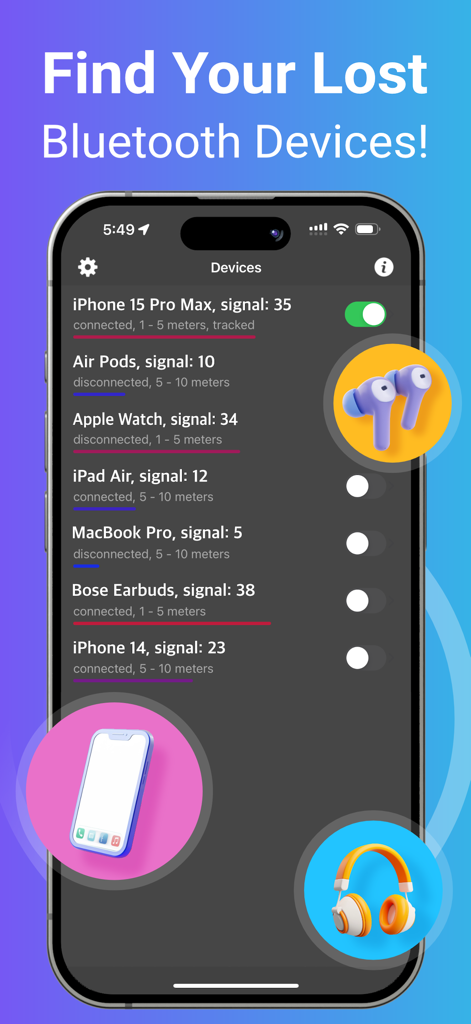
1. Run the app. Find and select your lost device in the list.
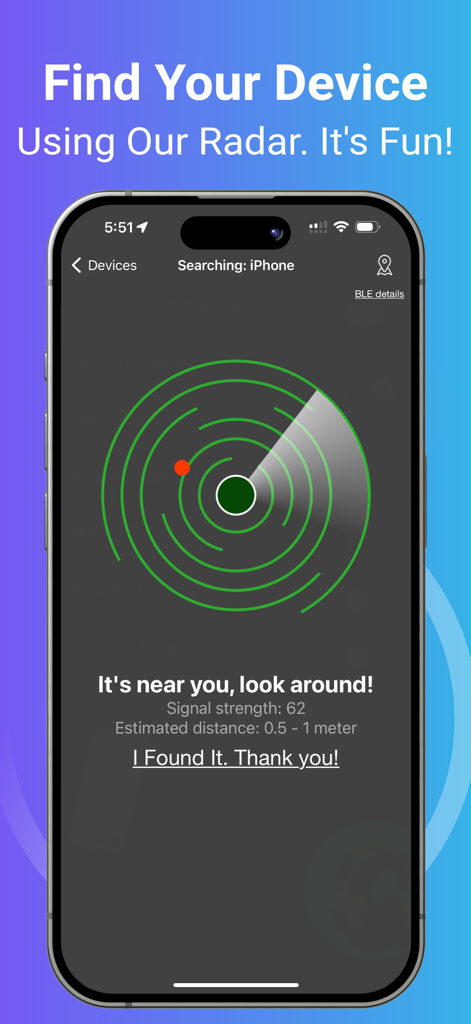
2. Move around slowly and keep watching the data (i.e., the signal strength and estimated distance) on the radar screen. When you get close to your lost device, the spot will turn red on the radar screen.
3. When the signal strength is over 90 and the estimated distance is 0 - 0.5m, look around. Your device won't be far away!
Note: When you try to find your device, please walk slowly and watch the radar carefully. Find your device ASAP, or its battery will run out.
Note: Your Bluetooth device must be powered on and within a detectable range.
TRACKING FUNCTION:
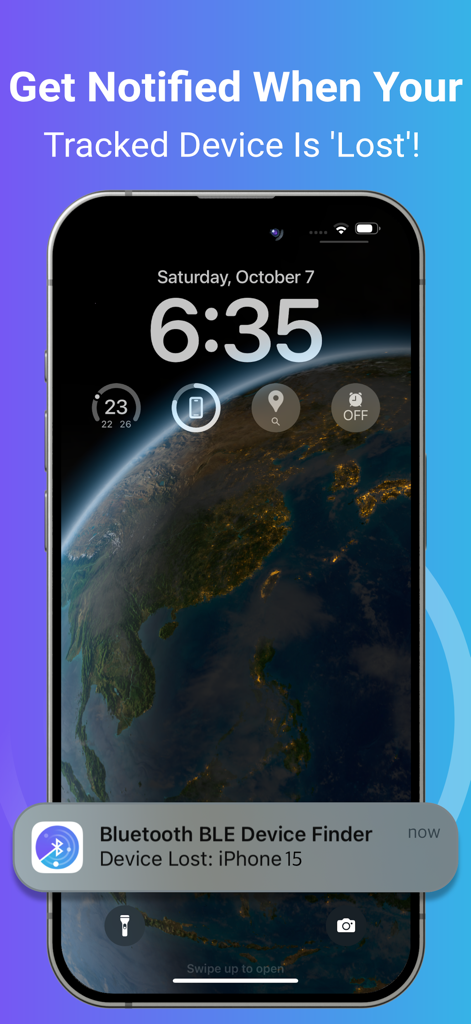
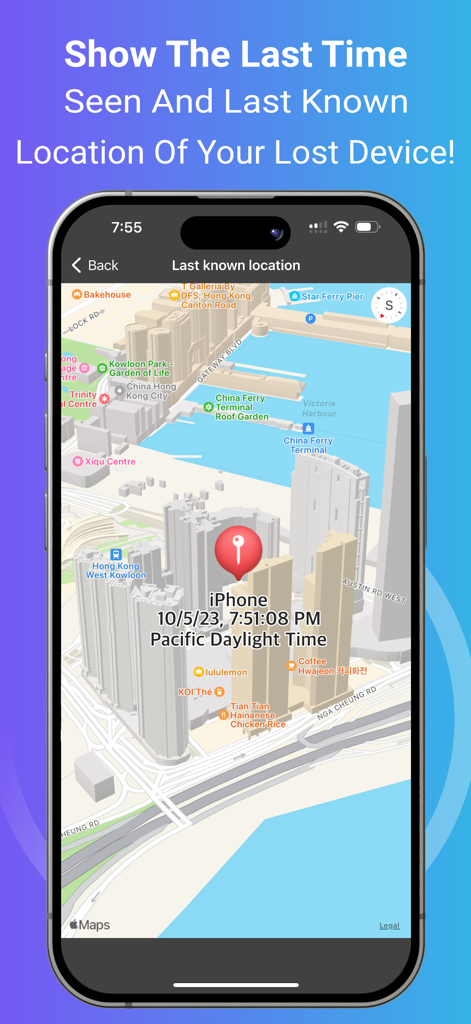
You may enable tracking for devices in the background by turning on the switch next to the device on the list. You will receive a notification when your tracked device is disconnected/lost. The application will ping the tracked devices from time to time and remember the last location and time the device was seen.
KEY FEATURES:
• Find your lost Bluetooth device (with BLE signal advertising). The app is easy to use!
• Track your device constantly in the background with this app. A notification will tell you when your tracked device is 'Lost' (i.e., Disconnected). Also, the last detected time and location will be recorded for you. It's very useful when you’re travelling and want to keep your devices safe. ^
• Find your device using our radar. It's fun! No need to read a manual. ^
• Show hints, signal strength and the estimated distance between you and your lost device to help you find it quickly. ^
• Show the last seen (detected) time and last known location of your lost device on a map. ^
• Show your device's BLE (Bluetooth Low Energy) details such as UUID, RSSI, Services, etc. ^
• The following devices can be found/tracked by this app:
- AirPods 1/2/3/4, AirPods Pro 1/2, AirPods Max
- AirTag
- iPhone 5/6/7/8/X/11/12/13/14/15/16, iPad 3/4/5/6/7/8/9/10/A16, iPad mini 2/3/4/5/6/A17Pro, iPad Air 1/2/3/4/5/M2/M3, iPad Pro 1/2/3/4/5/6/M4, iPod Touch 6/7
- Apple Watch Series 1/2/3/4/5/6/7/8/9/10/SE1/SE2/Ultra1/Ultra2
- Apple Pencil 1/2/Pro
- MacBook, MacBook Air, MacBook Pro, iMac, iMac Pro, Mac Pro, Mac Mini, Mac Studio
- Microsoft Gear, Band 1 & 2
- Samsung Earbuds, Galaxy Watch
- JBL Tune, Vibe, Tour Pro, Charge, Flip 3
- Bellabeat Leaf
- Garmin Watches
- Many other Bluetooth headphones, earphones, and speakers (e.g. Bose, Sony, Google, Jabra, Logitech, Anker, Sennheiser, Technics, etc.)
NOTE: The app can locate any BLE (Bluetooth Low Energy) device that is broadcasting a Bluetooth signal.
^ Requires In-App Purchase.
Please contact support if you need help.
Thank you!
Privacy Policy:
http://www.99mobileapp.com/pp.html
Terms:
http://www.99mobileapp.com/terms/index.html
Bluetooth BLE Device Finderは、紛失したデバイスの特定にどのように役立ちますか?
Bluetooth BLE Device Finderは、レーダー画面に信号強度と推定距離を表示することで、紛失したデバイスの特定に役立ちます。近接度を示し、非常に近い場合は赤色になり、範囲内にある場合は0〜0.5mと表示されます。
Bluetooth BLE Device Finderは、どのAppleデバイスを特定できますか?
Bluetooth BLE Device Finderは、AirPods、AirTag、Apple Watch、iPhone、iPad、iPod Touch、Apple Pencil、Macデバイスを特定します。最新のiPhone 16やApple Watch Series 10を含む、各デバイスのさまざまなモデルをサポートしています。
Bluetooth BLE Device Finderは、バックグラウンドでデバイスを追跡できますか?
はい、Bluetooth BLE Device Finderはデバイスのバックグラウンド追跡を提供します。ユーザーはデバイスリストのスイッチを介してこの機能を有効にすると、追跡中のデバイスが切断されたり紛失したりした場合に通知を受け取ることができます。
Bluetooth BLE Device Finderは、紛失したデバイスの最後の既知の場所を表示しますか?
はい、Bluetooth BLE Device Finderは、地図上に紛失したデバイスの最後の検出時間と最後の既知の場所を表示します。この機能により、ユーザーはデバイスの最後の検出位置を追跡できます。
このアプリに関連して、Bluetooth Low Energy(BLE)とは何ですか?
Bluetooth BLE Device Finderは、Bluetooth Low Energy(BLE)信号を利用してデバイスを特定します。このアプリは、信号をブロードキャストしている任意のBLEデバイスを特定でき、UUIDやRSSIなどのBLE詳細を表示します。
Bluetooth BLE Device Finderのすべての機能は無料で利用できますか?
いいえ、Bluetooth BLE Device Finderの一部の主要機能(バックグラウンド追跡、レーダー、ヒント、信号強度、推定距離、最後の検出場所の表示など)には、アプリ内課金が必要です。
Bluetooth BLE Device Finderは、電源がオフになっているデバイスを特定できますか?
いいえ、Bluetooth BLE Device Finderは、デバイスがオンになっており、検出可能なBluetooth範囲内にある必要があります。このアプリはアクティブなBLE信号のブロードキャストに依存しています。
Bluetooth BLE Device Finderは、どのような種類の非Apple Bluetoothデバイスを見つけることができますか?
Bluetooth BLE Device Finderは、Microsoft Gear/Band、Samsung Earbuds/Galaxy Watch、JBLスピーカー/ヘッドフォン、Bellabeat Leaf、Garmin Watches、Bose、Sony、Google、Jabra、Logitech、Anker、Sennheiserデバイスなどの非Appleデバイスを見つけることができます。
Bluetooth BLE Device Finderのレーダーは、デバイスの特定にどのように役立ちますか?
Bluetooth BLE Device Finderのレーダーは、紛失したデバイスへの信号強度と推定距離を視覚的に表します。ユーザーを誘導するのに役立ち、デバイスが非常に近い場合(0〜0.5m)は赤色になり、近くにあることを示します。
App information, icons, screenshots, and descriptions displayed on this page are sourced from the Apple App Store and are the property of their respective developers. Download estimates and rankings are based on MWM's proprietary models and may not reflect actual figures. This page is provided for informational and analytical purposes only.
Believe this page infringes your intellectual property? File a dispute