GNSS View

GNSS View

ダウンロード: App Store
ロゴ: GNSS View

GNSS View: 衛星の視認性と測位精度をマスターする

QZSS、GPS、およびグローバルのコンステレーションをリアルタイムで視覚化します。プロフェッショナルグレードのARディスプレイとスカイプロットを活用してHDOP/VDOPを監視し、ドローン飛行、測量、探査に最適な信号精度を確保します。

開発元

NEC Corporation

カテゴリ

Navigation

ダウンロード

259K+

ユーザー評価

4.2/5

評価数

100

対応言語

1

視覚化された精度

このインターフェースを利用する 259K+ 人のユーザー.

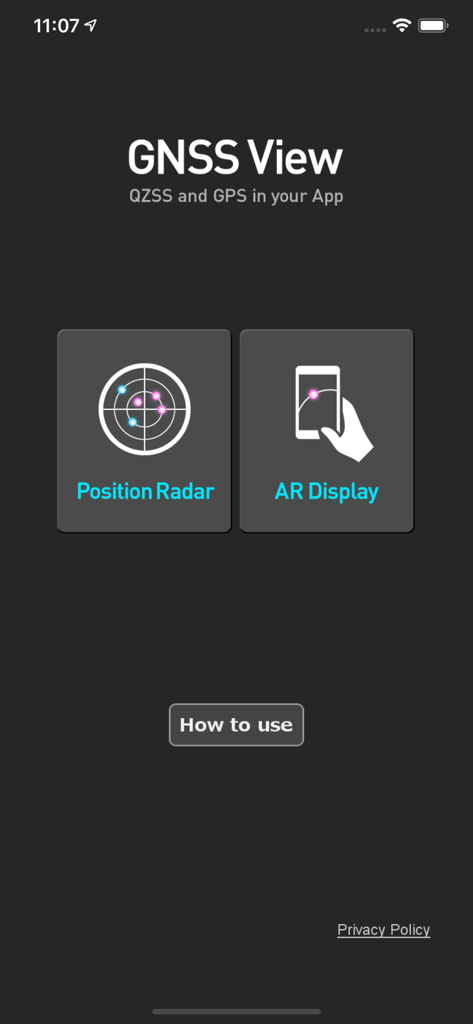
GNSS Viewモバイルアプリのホーム画面。Position RadarとAR Displayのボタンが表示されています。

GNSS Viewモバイルアプリのホーム画面。Position RadarとAR Displayのボタンが表示されています。

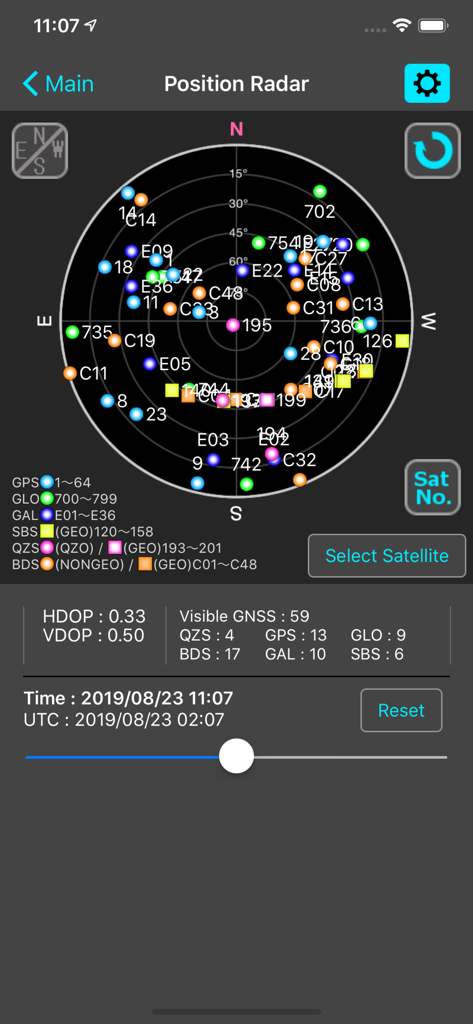
GNSS ViewアプリのPosition Radar画面。HDOPおよびVDOPメトリックが表示された衛星スカイプロットが表示されています。

GNSS ViewアプリのPosition Radar画面。HDOPおよびVDOPメトリックが表示された衛星スカイプロットが表示されています。

リアルタイム衛星視認性と精度分析

このアプリを際立たせるツール、 259K+ 人のユーザーが選択.

🛰️

グローバルマルチコンステレーション追跡

QZSS、GPS、GLONASS、Galileo、BeiDouを同時に監視し、高精度タスクの信号信頼性を最大限に高めます。

👁️

ARスカイ視覚化

ARカメラビューを使用して衛星位置を現実世界の環境に重ね合わせることで、視線障害を即座に特定します。

📊

プロフェッショナル精度メトリック

HDOP、VDOP、および仰角マスクの重要なデータにアクセスして、信号ジオメトリを確認し、運用開始前に測位エラーを軽減します。

アプリについて

について知っておくべきこと GNSS View.

説明

This application enables you to see where the Quasi-Zenith Satellite System in the sky! ●What is QZSS? Quasi-Zenith Satellite System (QZSS) is a Japanese satellite positioning system composed mainly of satellites in quasi-zenith orbits (QZO). Satellite positioning systems use satellite signals to calculate position information. One famous example is the American Global Positioning System (GPS) and the QZSS is sometimes called the Japanese GPS. For details, please refer to the following Website "Quasi-Zenith Satellite System". URL : https://qzss.go.jp/en ●What is GNSS View? GNSS View provides that iOS version application that is based on the website application "GNSS View". This application enables you to know position of positioning satellites such as QZSS and GPS in the specified time and location. The positioning satellites displayed in the GNSS View are not based on the satellite information directly received by the smartphone but are displayed based on the satellite arrangement calculated based on the publicly released orbit information. ●GNSS View 3 functions 【Main】 ・You can move to the Position Radar screen or AR Display screen from the application startup screen. ・You can see the operating manual and privacy policy of this application via the website. 【Position Radar】 ・It is provided radar view of positioning satellites such as QZSS and GPS as a sky plot at the specified time and location. ・Positioning satellites can be specified from QZSS, GPS, GLONASS, BeiDou, Galileo, SBAS. ・You can also select specified signal satellites to see on the radar. ・You can see selected satellites by setting elevation mask angle. ・You can switch east and west of satellite arrangement, turn on / off rotation, and switch on / off display of satellite number. ・It displays HDOP, VDOP, the total number of satellites and the number of each positioning satellites in the satellite arrangement displayed on the radar. 【AR Display】 ・Position of positioning satellites such as QZSS and GPS on the sky from your current location is able to see through your camera at the specified time. ・In order to display satellites, it is necessary to turn on the position information of the smartphone and complete the positioning. Therefore, it may take time to display. ・Positioning satellites can be specified from QZSS, GPS, GLONASS, BeiDou, Galileo, SBAS. ・You can also select specified signal satellites to see on the radar. ・You can see selected satellites by setting elevation mask angle. ●Supported versions ・iOS 18 ・iOS 17 ・iOS 16 ・iOS 15 ・iOS 14 ・iOS 13

最新バージョン

6.0.1

サイズ

4.3 MB

リリース日

2014年10月31日

精度を視覚化。位置データをマスターする。

NECの信頼できるリアルタイム衛星追跡、AR視覚化、ミッションクリティカルな信号解析ツールを使用している259,000人以上の専門家やテクノロジー愛好家に加わりましょう。

ダウンロード: App Store

App information, icons, screenshots, and descriptions displayed on this page are sourced from the Apple App Store and are the property of their respective developers. Download estimates and rankings are based on MWM's proprietary models and may not reflect actual figures. This page is provided for informational and analytical purposes only.

Believe this page infringes your intellectual property? File a dispute