[Service Details]
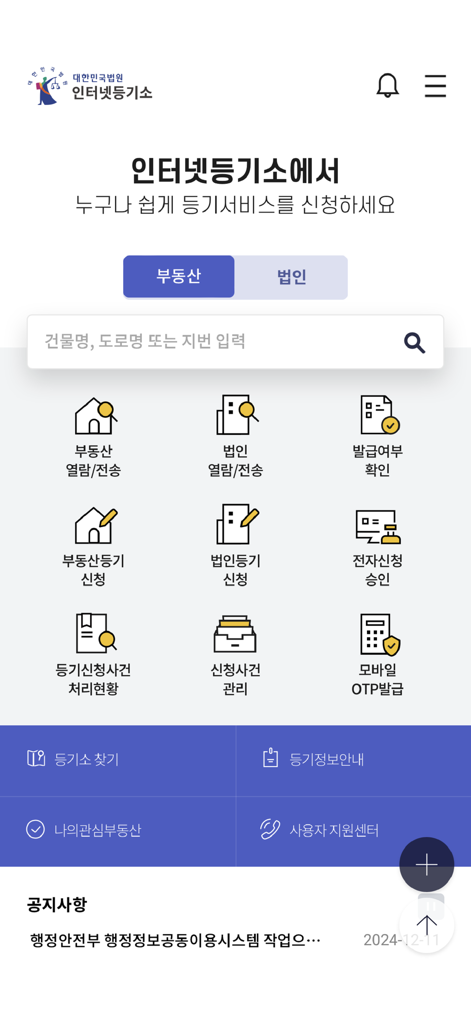
The Mobile Internet Registry Office allows you to conveniently use the main services provided on the Supreme Court's Internet Registry Office website on your smartphone.
In the 'Real Estate Inquiry/Transmission' and 'Corporate Inquiry/Transmission' menus, you can quickly inquire about and issue registry records through target searches and electronic payments.
In the 'Inquiry of Issuance Status' menu, you can check whether a registry certificate has been issued.
In the 'Real Estate Registry Application' and 'Corporate Registry Application' menus, you can quickly and conveniently apply for registration online from anywhere without visiting the registry office.
In the 'Electronic Application Approval' menu, you can electronically sign 'Application Details Confirmation and Attached Documents' for real estate/corporate registration applications.
In the 'Registry Application Case Processing Status' and 'Application Case Management' menus, you can check the current processing status of your application cases.
In the 'Mobile OTP Issuance' menu, you can issue/reissue a mobile OTP as a secondary authentication medium for electronic certificates.
The 'Authentication Center' allows you to copy joint certificates from PC to mobile and from mobile to PC.
Through other menus, you can check the location of registry offices/self-service kiosks, registry information guides, announcements, etc.
[Detailed Explanation of Main Menus]
1. Real Estate Inquiry/Transmission
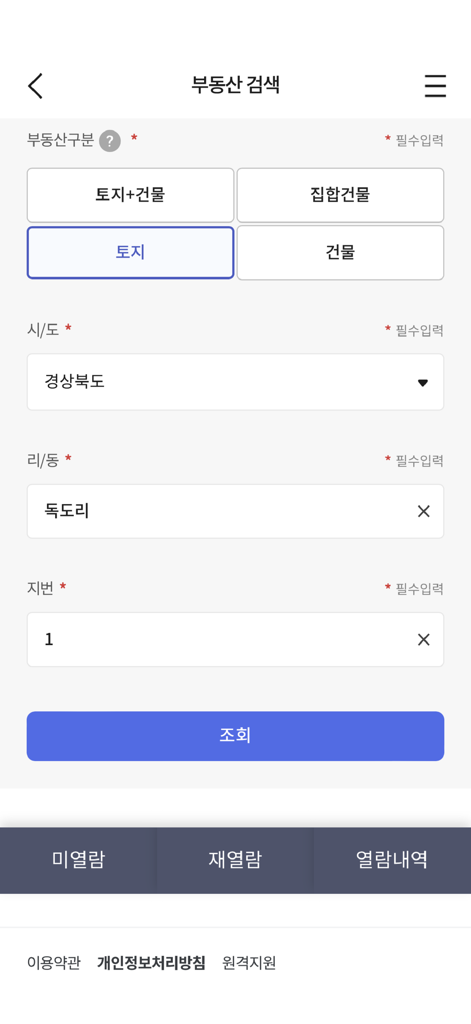
- Inquiry/Issuance Target Search: You can search for inquiry/issuance targets by entering simple search terms, location lot number, road name address, or unique number.
- Electronic Payment: You can pay by credit card, mobile phone, prepaid electronic payment method, or simple payment.
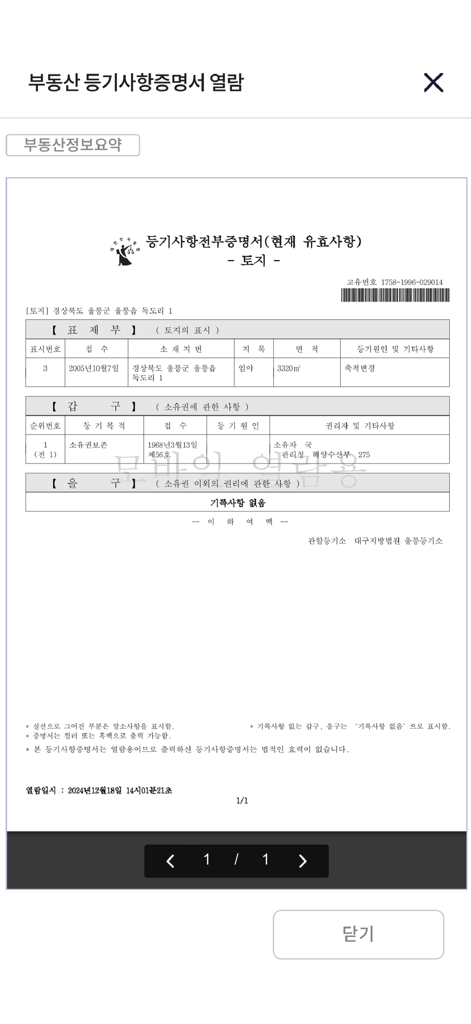
- Registry Certificate Inquiry: You can inquire about the registry certificate of the paid real estate.
- Self-Service Kiosk Issuance Reservation: You can reserve the issuance of the registry certificate for the paid real estate at a self-service kiosk.
- Electronic Issuance (Government24 Electronic Document Wallet): You can electronically issue the registry certificate for the paid real estate.
- Unread/Unissued: You can check the list of items paid for but not yet viewed/issued and view/issue them within 3 months.
- Re-inquiry: You can check and inquire about the list available for re-inquiry within 1 hour of the first inquiry.
- Real Estate Information Summary Table: You can view summarized real estate information for the inquiry target.
- Fixed Date: You can search for and view the status of fixed date assignments for housing.
2. Corporate Inquiry/Transmission
- Inquiry/Issuance Target Search: You can search for inquiry/issuance targets by entering the company name, registry number, registration number, or Roman characters.
- Electronic Payment: You can pay by credit card, mobile phone, prepaid electronic payment method, or simple payment.
- Registry Certificate Inquiry: You can inquire about the registry certificate of the paid corporation.
- Self-Service Kiosk Issuance Reservation: You can reserve the issuance of the registry certificate for the paid corporation at a self-service kiosk.
- Electronic Issuance (Government24 Electronic Document Wallet): You can electronically issue the registry certificate for the paid corporation.
- Unread/Unissued: You can check the list of items paid for but not yet viewed/issued and view/issue them within 3 months.
- Re-inquiry: You can check and inquire about the list available for re-inquiry within 1 hour of the first inquiry.
3. Inquiry of Issuance Status
- You can check whether a registry certificate has been issued by entering the issuance confirmation number for real estate, corporate, movable property collateral, or other registry certificates.
- You can check whether a corporate seal certificate has been issued by entering the issuance confirmation number.
4. Real Estate Registry Application
- Application Creation/Submission: You can submit an application after entering information such as real estate description, obligor information, beneficiary information, and applicant information.
- Application/Withdrawal Approval: You can collectively approve attached documents such as electronic power of attorney, and approve after selecting a withdrawal request.
- Application Processing History: You can view the processing history after applying for registration.
- Receipt of Registration Information: You can receive registration information by searching for your name and registration number (resident, corporate).
5. Corporate Registry Application
- Application Creation/Submission: You can submit an application after entering the registration type and applicant corporation, registration details, registration tax/fees, attached documents, and applicant information.
- Application/Withdrawal Approval: You can collectively approve attached documents such as electronic power of attorney, and approve after selecting a withdrawal request.
- Application Processing History: You can view the processing history after applying for registration.
6. Electronic Application Approval
- For real estate/corporate registration electronic applications, you can confirm application details such as attached documents and electronically sign with a joint certificate, financial certificate, or electronic certificate.
7. Registry Application Case Processing Status
- Real Estate Registration: You can inquire about the current processing status of the application case by entering simple search terms, location lot number, road name, and application number.
- Corporate Registration: You can inquire about the current processing status of the application case by entering the company name, registry number, Roman characters, and application number.
8. Application Case Management
- You can view the current processing status of real estate and corporate electronic standard form registration applications submitted by you in a consolidated manner.
9. Mobile OTP Issuance
- Issuance: After entering the access number, name, and resident registration number, you can receive a mobile OTP by proceeding with mobile phone authentication.
- Reissuance: You can reissue the issued mobile OTP.
10. Authentication Center
- You can copy joint certificates between your smartphone and PC.
* Access Permissions
- Optional Access Permissions
Camera: Used in the function for scanning and uploading attached documents for real estate/corporate electronic applications.
Album: Used in the function for scanning and uploading attached documents for real estate/corporate electronic applications.
Phone: Used in the function for automatically entering the device's mobile phone number information during mobile payment and for calling the user support center.
* Even if you do not agree to the optional access permissions, you can use the main services of the Internet Registry Office app (such as registry record inquiry and application case processing status inquiry), but there may be limitations in using some functions that require permissions.
* You can set permissions in Settings > Internet Registry Office > Permissions.
* This program is optimized for iOS 13.0 or later.
App information, icons, screenshots, and descriptions displayed on this page are sourced from the Apple App Store and are the property of their respective developers. Download estimates and rankings are based on MWM's proprietary models and may not reflect actual figures. This page is provided for informational and analytical purposes only.
Believe this page infringes your intellectual property? File a dispute