Money Manager Classic

Money Manager Classic


ダウンロード: App Storeダウンロード: Google Play
ロゴ: Money Manager Classic

Money Manager Classic: プロフェッショナルグレードの資産管理

複式簿記、PCでのデータ編集、そして計画的な最適化のために設計されたデスクトップツールの精度で、完全に管理しましょう。

開発元

RealByte

カテゴリ

Finance

ダウンロード

188K+

ユーザー評価

3.8/5

評価数

4K+

対応言語

10

細部までこだわる精度

このインターフェースを利用する 188K+ 人のユーザー.

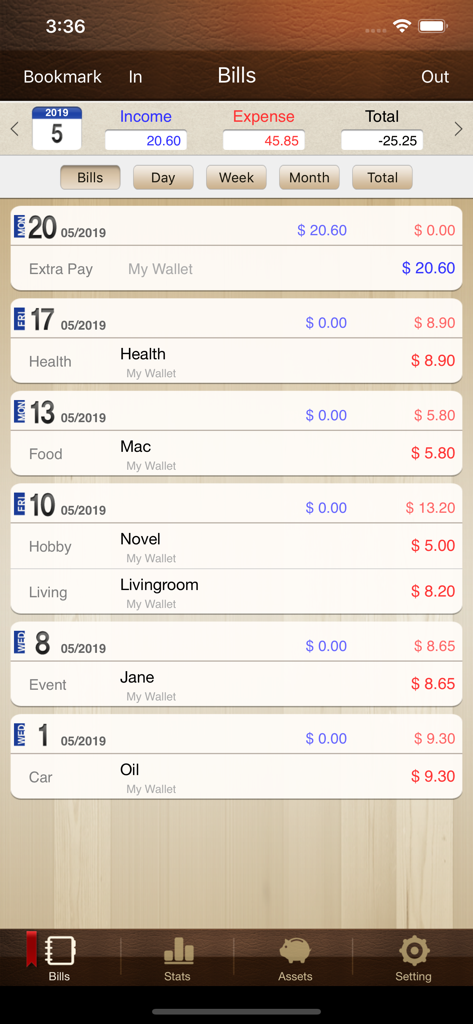
Money Manager Classicアプリでの月次取引リストと支出追跡

Money Manager Classicアプリでの月次取引リストと支出追跡

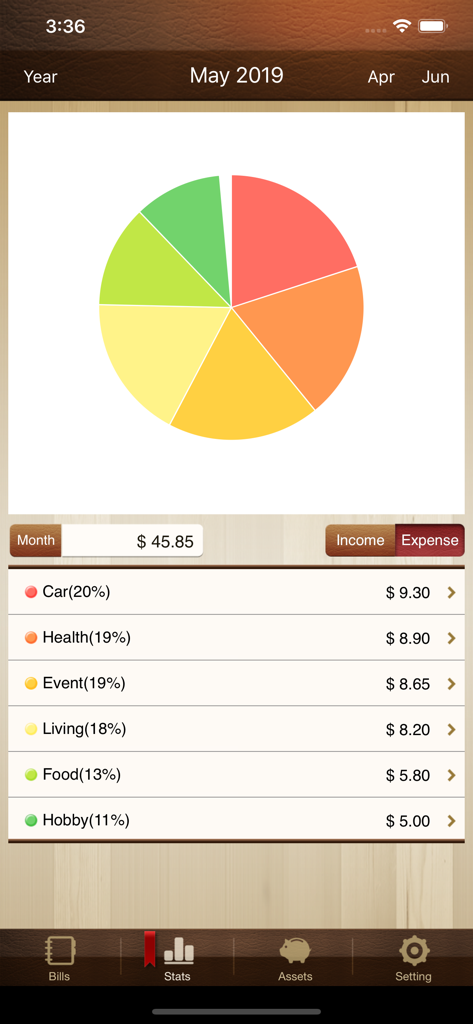
Money Manager Classicアプリのインターフェースにおける月次支出の円グラフとカテゴリ別リスト。

Money Manager Classicアプリのインターフェースにおける月次支出の円グラフとカテゴリ別リスト。

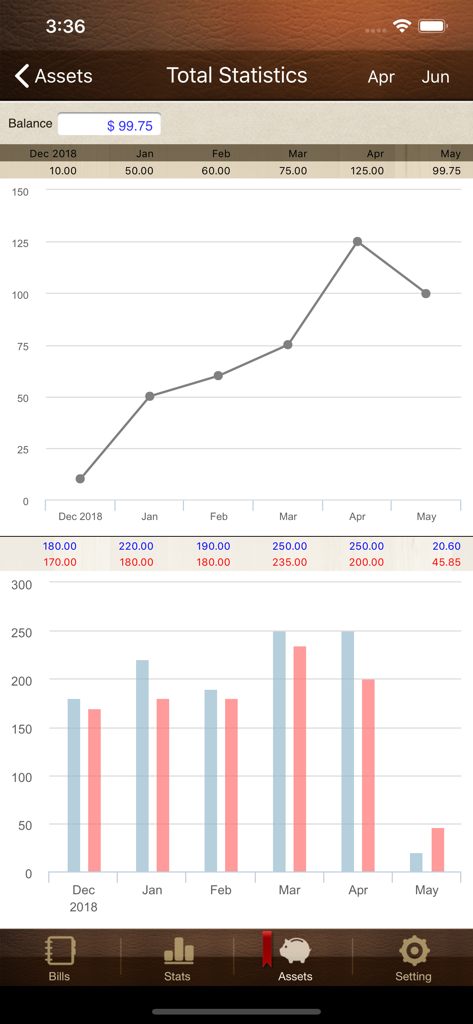
Money Manager Classicアプリの財務統計画面。月次残高の線グラフと収入・支出比較の棒グラフを表示。

Money Manager Classicアプリの財務統計画面。月次残高の線グラフと収入・支出比較の棒グラフを表示。

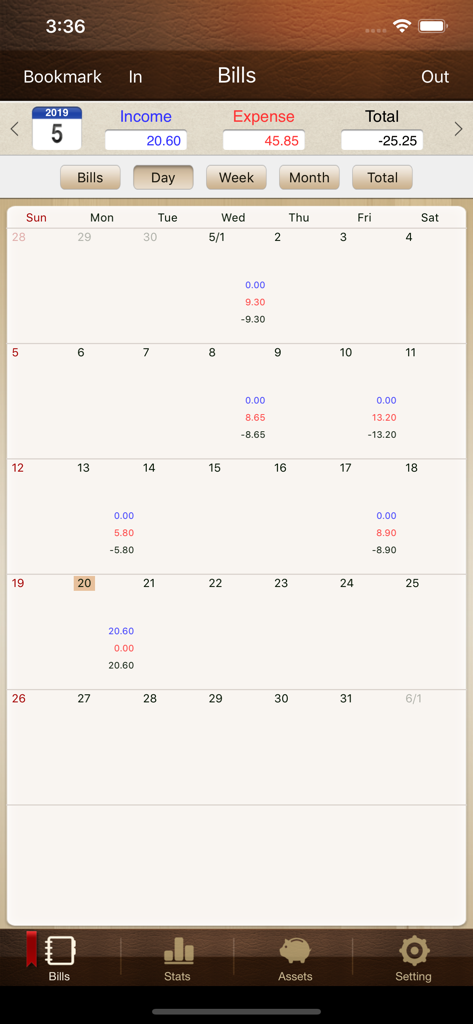
Money Manager Classicの月次カレンダー。収入と支出の合計を表示。

Money Manager Classicの月次カレンダー。収入と支出の合計を表示。

計画的な思考のためのプロフェッショナルな富管理

このアプリを際立たせるツール、 188K+ 人のユーザーが選択.

⚖️

複式簿記

個人の生活にプロフェッショナルの会計ロジックを適用します。すべての取引は資産と支出の間でバランスが取れ、純資産が正確に計算されます。

💻

PC編集とExcelエクスポート

大画面でアカウントを照合します。Wi-Fi経由で接続し、デスクトップでデータを管理し、詳細なレポートをExcelにエクスポートして、独自のプライベートアーカイブを作成します。

💳

複雑な資産管理

クレジットカード、決済日、保険、ローン、給与の自動定額振込を専用追跡機能でキャッシュフローをマスターしましょう。

アプリについて

について知っておくべきこと Money Manager Classic.

説明

We provide two version for iOS (Money Manager Next, Money Manager Classic). Next version (Blue Icon) is the later version which offers, even more, functionalities than Classic version (Brown Icon). That is why we recommend using Next version. Classic version is also good. “Money Manager” is an optimized application for personal asset management. ※ PC editing function You can view ‘“Money Manager” application by Wi-Fi or 3G. You can see the data sorted by date, category and asset group on the screen of your PC. In addition, you can see fluctuations of your asset indicated by graphs on your PC. ※ Applying double entry bookkeeping It facilitates efficient asset management. It does not just record your money coming in and out of your account but deposits your money into your account as soon as your income is input and draws money from your account as soon as your expenditure is input. ※ Budget management function You can manage your budget. It shows your budget and expenditure by a graph so you can see the amount of your expenditure against your budget quickly. ※ Card / Debit Card management function Entering a settlement date, you can see payment amount and outstanding payment at asset tab. You can arrange the automatic debit by simply connecting your debit card with your account. ※ Passcode You can check passcode in multitasking state so you can safely manage your account book. ※ Transfer, direct debit and recurrence function Transfer between assets is possible, which makes your asset management more efficient. In addition, you can manage you salary, insurance, term deposit and loan more easily by setting automatic transfer and recurrence. ※ Instant statistics Based on the data entered, you can instantly see your expenditure by category and changes between each month. And you can see change of your assets and income/expenditure indicated by a graph as well. ※ Bookmark function You can easily input your frequent expenditures all at once by bookmarking them. ※ Backup / Restore You can make and view backup files in Excel file and backup / restore is possible. ※ Choice of currency – you can freely choose your currency. ※ Other functions - Change of starting date - Calculator function (Amount > upper right button) - Sub Category ON-OFF function

最新バージョン

3.2.36

サイズ

44.8 MB

リリース日

2010年10月6日

プロフェッショナルの精度で、あなたの富を管理しましょう

複式簿記と詳細な資産管理の、クラシックで信頼性の高い標準を使用する数千人もの計画的な最適化者の仲間入りをしましょう。

ダウンロード: App Storeダウンロード: Google Play

App information, icons, screenshots, and descriptions displayed on this page are sourced from the Apple App Store and are the property of their respective developers. Download estimates and rankings are based on MWM's proprietary models and may not reflect actual figures. This page is provided for informational and analytical purposes only.

Believe this page infringes your intellectual property? File a dispute