MP3 Converter-Remove Vocals

MP3 Converter-Remove Vocals

ダウンロード: App Store
ロゴ: MP3 Converter-Remove Vocals

MP3コンバーター-ボーカル除去:クリエイターのための究極のAIオーディオスタジオ

ワンタップでボーカルを分離し、インストゥルメンタルを抽出し、ビデオをオーディオに変換します。強力なiOSネイティブAIを使用して、TikTokリミックス、カラオケセッション、音楽制作をレベルアップさせましょう。

開発元

益民 李

カテゴリ

Music

ダウンロード

151K+

ユーザー評価

4.5/5

評価数

2K+

対応言語

15

音の分離の芸術

このインターフェースを利用する 151K+ 人のユーザー.

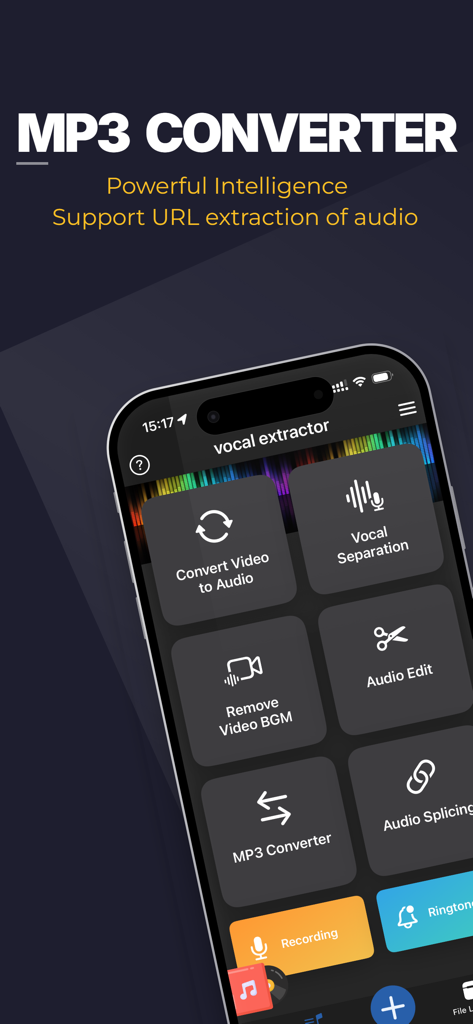
MP3コンバーターアプリのスマートフォンディスプレイ。ボーカル分離やオーディオ抽出などの機能が表示されています。

MP3コンバーターアプリのスマートフォンディスプレイ。ボーカル分離やオーディオ抽出などの機能が表示されています。

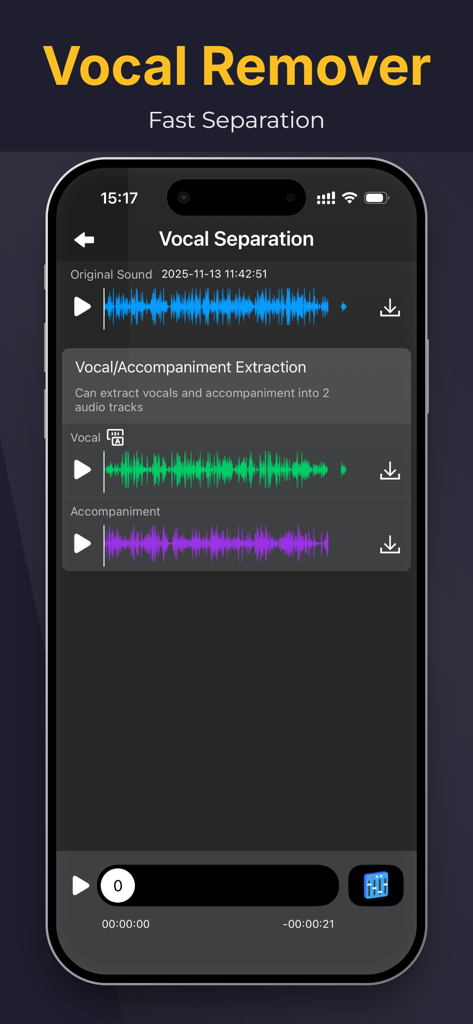
MP3コンバーターアプリのインターフェース。元のサウンドファイルから分離されたボーカルと伴奏のオーディオトラックが表示されています。

MP3コンバーターアプリのインターフェース。元のサウンドファイルから分離されたボーカルと伴奏のオーディオトラックが表示されています。

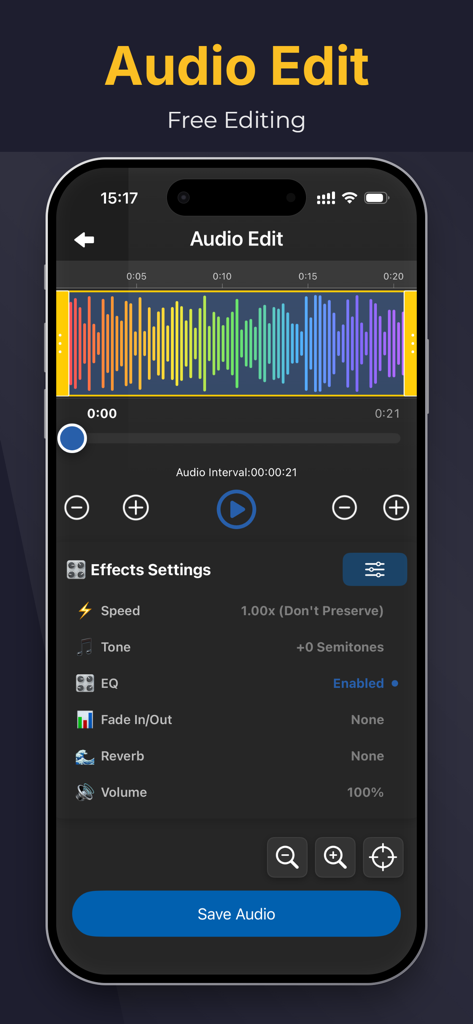
オーディオ編集用のモバイルアプリ画面。カラフルな波形ビジュアライザーと、速度やトーンなどのさまざまなサウンドエフェクト設定が特徴です。

オーディオ編集用のモバイルアプリ画面。カラフルな波形ビジュアライザーと、速度やトーンなどのさまざまなサウンドエフェクト設定が特徴です。

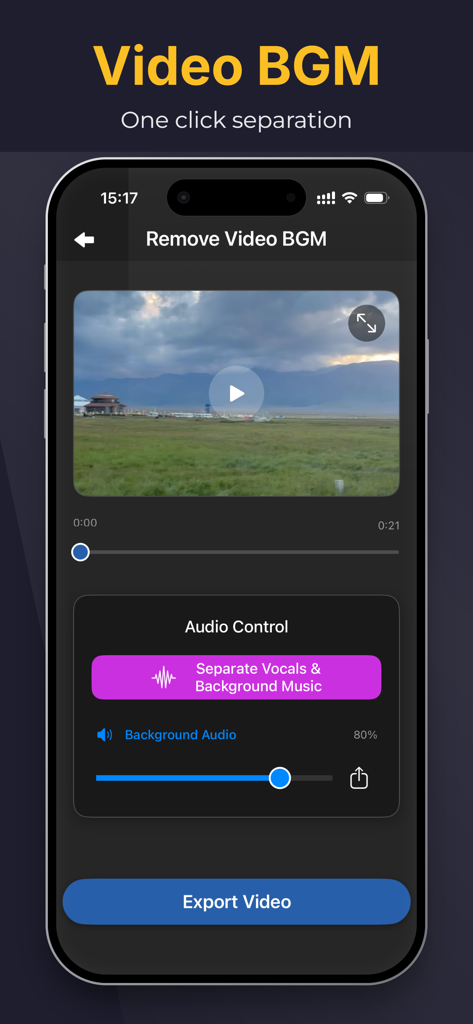
iPhoneインターフェース。Remove Video BGM機能が表示され、ボーカルとBGMをワンクリックで分離します。

iPhoneインターフェース。Remove Video BGM機能が表示され、ボーカルとBGMをワンクリックで分離します。

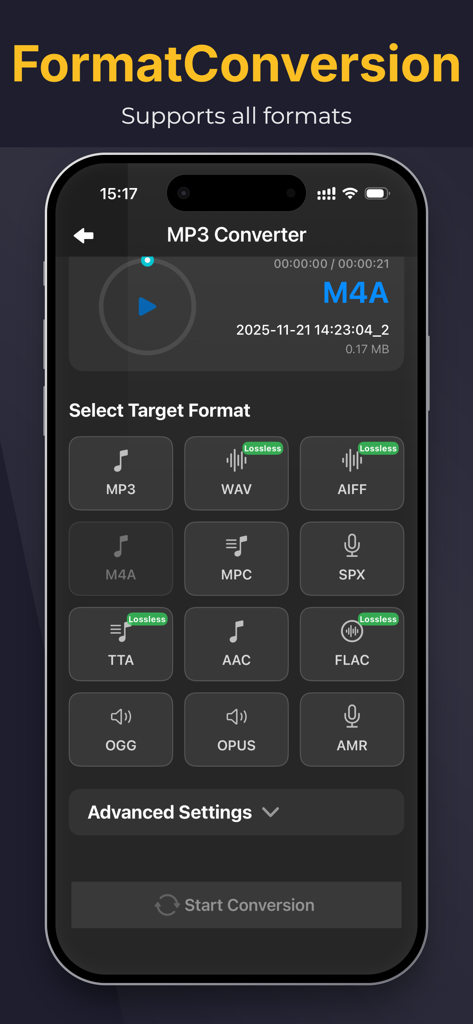
iPhone上のMP3コンバーターアプリのインターフェース。変換用のターゲットオーディオフォーマット選択が表示されています。

iPhone上のMP3コンバーターアプリのインターフェース。変換用のターゲットオーディオフォーマット選択が表示されています。

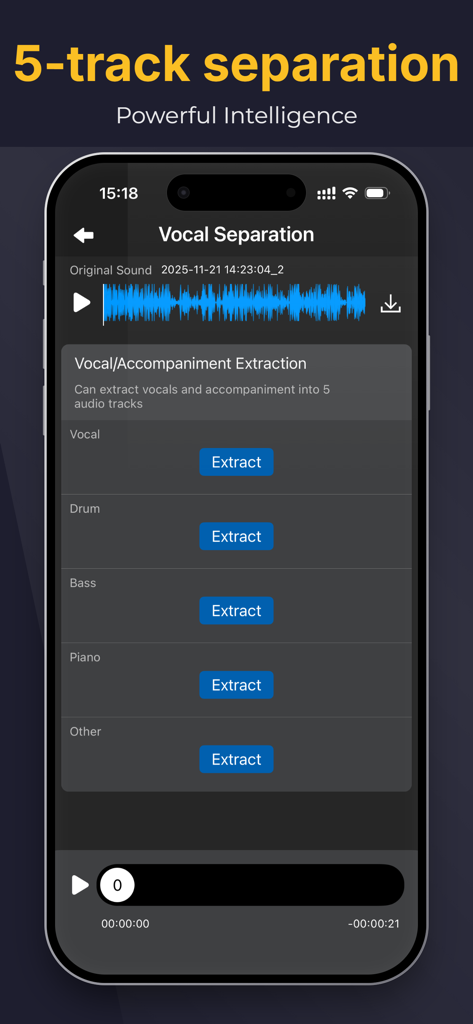
アプリインターフェース。ボーカル、ドラム、ベース、ピアノ、その他の楽器のAI 5トラック分離が表示されています。

アプリインターフェース。ボーカル、ドラム、ベース、ピアノ、その他の楽器のAI 5トラック分離が表示されています。

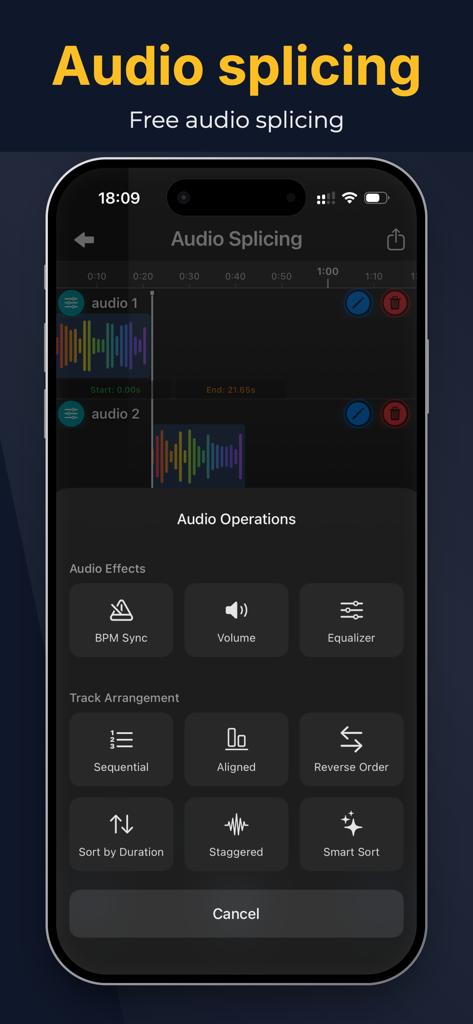
トラック配置とオーディオエフェクトオプションを備えたオーディオスプライシングインターフェース。

トラック配置とオーディオエフェクトオプションを備えたオーディオスプライシングインターフェース。

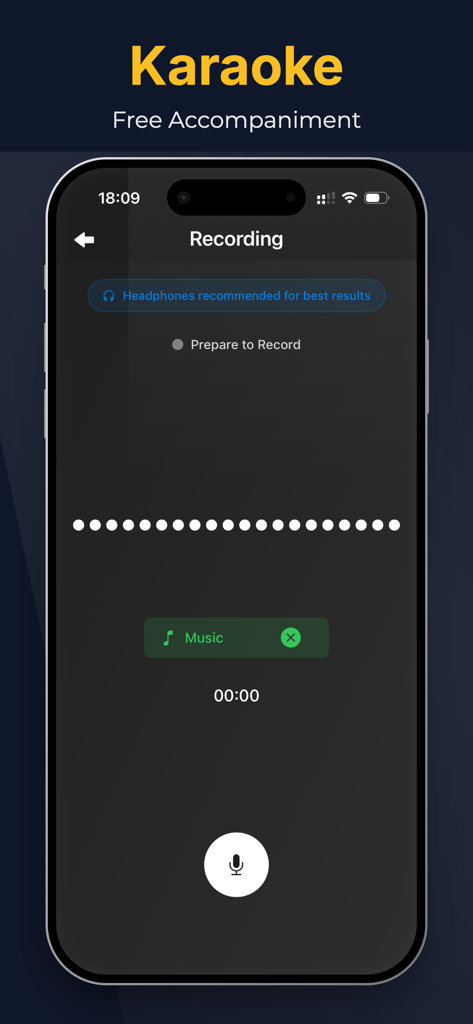
無料の伴奏オプションを備えたカラオケ録音機能が表示されているモバイルアプリインターフェース。

無料の伴奏オプションを備えたカラオケ録音機能が表示されているモバイルアプリインターフェース。

ポケットにプロフェッショナルなオーディオパワーを

このアプリを際立たせるツール、 151K+ 人のユーザーが選択.

🎤

インスタントカラオケ&バッキングトラック

どんな曲からでも数秒でボーカルを剥がし、練習、パフォーマンス、ソーシャルメディアカバービデオ用の高品質なインストゥルメンタルを作成します。

📱

あらゆるビデオをクリアなオーディオに

あのバイラルサウンドを手に入れよう。お気に入りのクリップから高忠実度のMP3を抽出し、iPhoneに直接保存して簡単にサンプリングできます。

🎚️

プロのリミックスのためにボーカルを分離

高度なAIを使用して、クリーンなアカペラとインストゥルメンタルを分離し、次のプロダクションやマッシュアップに必要な生のステムを提供します。

アプリについて

について知っておくべきこと MP3 Converter-Remove Vocals.

説明

"MP3 Converter" empowers your musical creativity and practice to reach new heights. This iOS-based app offers powerful features and intelligent experiences, allowing you to extract accompaniments, separate vocals from instrumentals, remove background music from videos, and enjoy a rich library of background music (BGM). "MP3 Converter" is a convenient audio extraction and format conversion tool that allows you to extract audio from various formats of videos. The converted audio files can be saved and played on your phone. With the accompaniment extraction master, you can easily extract the exciting music from short videos, save it as a sound file, and play it using any audio player. -Support various types of videos (3GP, FLV, MP4, MOV, MXF, MKV, AVI, MPG, MPEG, etc.); -Support extracting various types of audio from videos, such as MP3, AAC, M4A, M4R, WAV, OPUS, or other formats; Key Features: 1. Song Accompaniment Extraction: Easily extract the accompaniment from any song in your iOS music library. Remove vocals, focus on the instrumental parts, and create unique instrumental works or use them for personal practice. 2. Vocal Separation: Experience the powerful vocal separation function that separates vocals from the accompaniment. Remove vocals from songs, obtain pure instrumental tracks, suitable for karaoke, remixing, or personalized singing. 3. Video Background Music Removal: Remove unnecessary background music from videos, making vocals clearer, or add your own music. Make your video content more focused and captivating. "MP3 Converter" gives you control over your music. With an intuitive interface and advanced processing algorithms, you can easily extract, separate, and customize audio and video content. Whether you are a professional musician, aspiring artist, or music enthusiast, "MP3 Converter" will become your most valuable companion. Elevate your music production, create unique performance pieces, and enjoy the limitless possibilities of the music world. Download "MP3 Converter" now and experience unprecedented audio processing and music creation on the iOS platform. Unleash your creativity and embark on a brand new musical journey! Subscription instructions and terms 1. Monthly Membership - $3.99 2. Annual Membership - $14.99 3. Lifetime Membership - $29.99 【Payment】The payment will be charged to the user's iTunes account upon purchase confirmation. 【Renewal】“Continuous Monthly/Quarterly/Annual” products are auto-renewable subscriptions. Upon purchase confirmation, fees will be deducted from your iTunes account. Subscriptions will auto-renew unless auto-renewal is turned off at least 24 hours before the end of the current subscription period. Within 24 hours before your subscription expires, Apple will automatically charge your iTunes account and your membership will be automatically extended for one subscription period upon successful payment. 【Cancel Renewal】To cancel auto-renewal, manually go to iOS Settings > Apple ID > Subscriptions, and cancel the “MP3 Converter” subscription. -- Terms of Service https://htmlpreview.github.io/?https://github.com/zhangxin1982/panger/blob/main/agreement.html -- Privacy Policy https://htmlpreview.github.io/?https://github.com/zhangxin1982/panger/blob/main/audioPrivacyen.html

最新バージョン

2.9.2

サイズ

210.9 MB

リリース日

2023年6月26日

あなたの音楽的才能を解き放つ準備はできましたか?

AIを使用してボーカルを分離し、完璧なバッキングトラックを作成する15万人以上のクリエイターに加わりましょう。iOSでMP3コンバーターをダウンロードして、今日から制作を始めましょう。

ダウンロード: App Store
FAQ

よくある質問

について知っておくべきこと MP3 Converter-Remove Vocals

MP3 Converter-Remove Vocalsとは何ですか?

MP3 Converter-Remove Vocalsは、iOSアプリで、ビデオから伴奏を抽出したり、ボーカルとインストゥルメンタルを分離したり、バックグラウンドミュージックを削除したりします。また、さまざまなビデオ形式からオーディオを変換し、高度なオーディオ編集ツールも提供します。

MP3 Converter-Remove Vocalsは、音楽トラックからボーカルを分離できますか?

はい、MP3 Converter-Remove Vocalsは強力なボーカル分離機能を備えています。ボーカルと伴奏を個別のオーディオトラックに抽出し、ユーザーがさまざまな目的で純粋なインストゥルメンタルトラックを取得できるようにします。

MP3 Converter-Remove Vocalsは、ビデオからバックグラウンドミュージックを削除しますか?

はい、MP3 Converter-Remove Vocalsは、ビデオから不要なバックグラウンドミュージックを削除します。この機能により、ボーカルがクリアになったり、ユーザーが独自の音楽を追加したりできるようになり、ビデオコンテンツがより焦点を絞った魅力的なものになります。

MP3 Converter-Remove Vocalsは、オーディオ抽出のためにどのビデオ形式をサポートしていますか?

MP3 Converter-Remove Vocalsは、3GP、FLV、MP4、MOV、MXF、MKV、AVI、MPG、MPEGなどのさまざまなビデオ形式のオーディオ抽出をサポートしています。抽出されたオーディオをMP3、AAC、M4A、WAVなどの形式に変換することもできます。

MP3 Converter-Remove Vocalsのサブスクリプションの料金はいくらですか?

MP3 Converter-Remove Vocalsは、月額$3.99の月額プラン、年額$14.99の年額プラン、および$29.99の生涯メンバーシップの3つのサブスクリプションプランを提供しています。これらは自動更新サブスクリプションです。

MP3 Converter-Remove Vocalsのサブスクリプションをキャンセルするにはどうすればよいですか?

MP3 Converter-Remove Vocalsのサブスクリプションをキャンセルするには、iOS設定> Apple ID>サブスクリプションに移動します。現在の期間が終了する少なくとも24時間前に、「MP3 Converter」サブスクリプションの自動更新を手動でオフにします。

MP3 Converter-Remove Vocalsはマルチトラックオーディオ分離をサポートしていますか?

はい、MP3 Converter-Remove Vocalsは5トラック分離を提供します。オーディオからボーカル、ドラム、ベース、ピアノ、その他のトラックを抽出し、詳細なオーディオ操作のための強力なインテリジェンスを提供します。

ユーザーはMP3 Converter-Remove Vocalsアプリ内でオーディオを編集できますか?

はい、MP3 Converter-Remove Vocalsにはオーディオ編集機能が含まれています。ユーザーはアプリ内で速度、トーン、EQ、フェードイン/アウト、リバーブ、ボリュームなどのパラメータを調整できます。

MP3 Converter-Remove Vocalsにはオーディオスプライシング機能がありますか?

はい、MP3 Converter-Remove Vocalsは無料のオーディオスプライシング機能を提供しています。ユーザーは複数のオーディオトラックを結合し、さまざまなオーディオ操作やトラック配置を適用できます。

MP3 Converter-Remove Vocalsは録音やカラオケをサポートしていますか?

はい、MP3 Converter-Remove Vocalsは録音をサポートしており、カラオケ向けに設計されています。最良の結果を得るためにヘッドフォンを使用することを推奨しており、ユーザーは伴奏音楽で録音を準備できます。

MP3 Converter-Remove VocalsはURLからオーディオを抽出できますか?

はい、MP3 Converter-Remove VocalsはURLからのオーディオ抽出をサポートしています。この機能により、ユーザーはオンラインで見つかったオーディオコンテンツを直接処理できます。

App information, icons, screenshots, and descriptions displayed on this page are sourced from the Apple App Store and are the property of their respective developers. Download estimates and rankings are based on MWM's proprietary models and may not reflect actual figures. This page is provided for informational and analytical purposes only.

Believe this page infringes your intellectual property? File a dispute