Piano Partner 2

Piano Partner 2

ダウンロード: App Store
ロゴ: Piano Partner 2

Piano Partner 2:ローランド・ピアノのための究極のインタラクティブ・コンパニオン

モバイルデバイスから、スマートな伴奏機能、デジタル楽譜、そしてパーソナライズされた上達記録により、あなたの音楽の旅を一変させます。

開発元

Roland Corporation

カテゴリ

Music

ダウンロード

339K+

ユーザー評価

2.2/5

評価数

1K+

対応言語

1

ビジュアル・ツアー

このインターフェースを利用する 339K+ 人のユーザー.

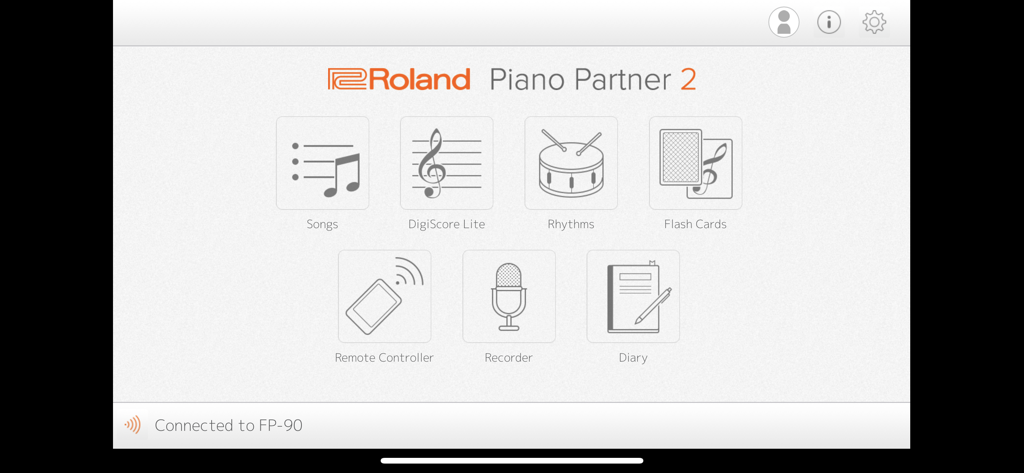
ローランド Piano Partner 2 アプリのメインメニュー。曲、デジスコア・ライト、リズム、フラッシュ・カード、リモート・コントローラー、レコーダー、ダイアリーのアイコンが表示されています。

ローランド Piano Partner 2 アプリのメインメニュー。曲、デジスコア・ライト、リズム、フラッシュ・カード、リモート・コントローラー、レコーダー、ダイアリーのアイコンが表示されています。

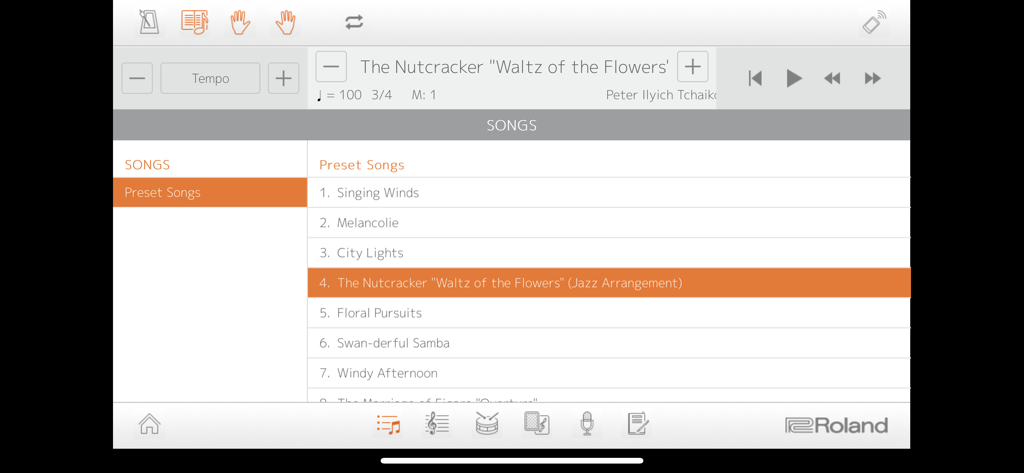
ローランド・デジタルピアノ用の内蔵曲ライブラリを表示している Piano Partner 2 アプリのインターフェース。

ローランド・デジタルピアノ用の内蔵曲ライブラリを表示している Piano Partner 2 アプリのインターフェース。

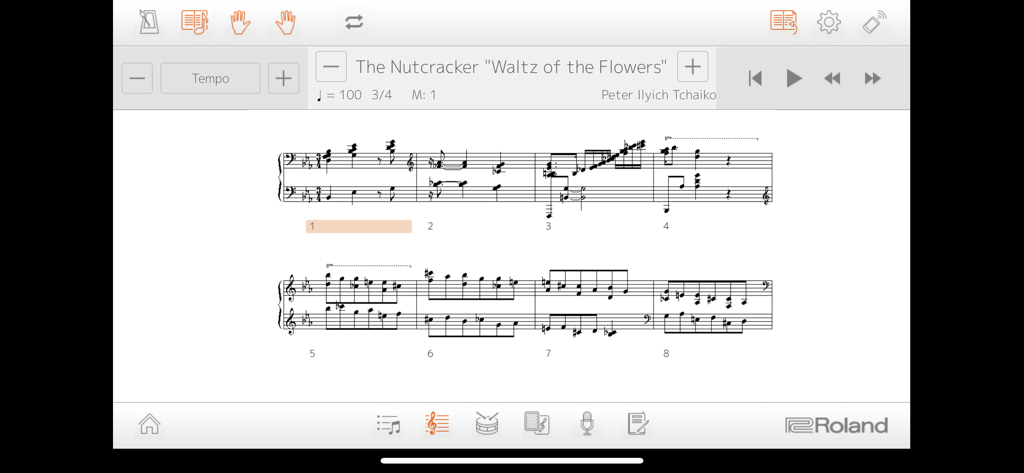
Piano Partner 2 アプリのインターフェースに表示された『くるみ割り人形』「花のワルツ」のデジタル楽譜。

Piano Partner 2 アプリのインターフェースに表示された『くるみ割り人形』「花のワルツ」のデジタル楽譜。

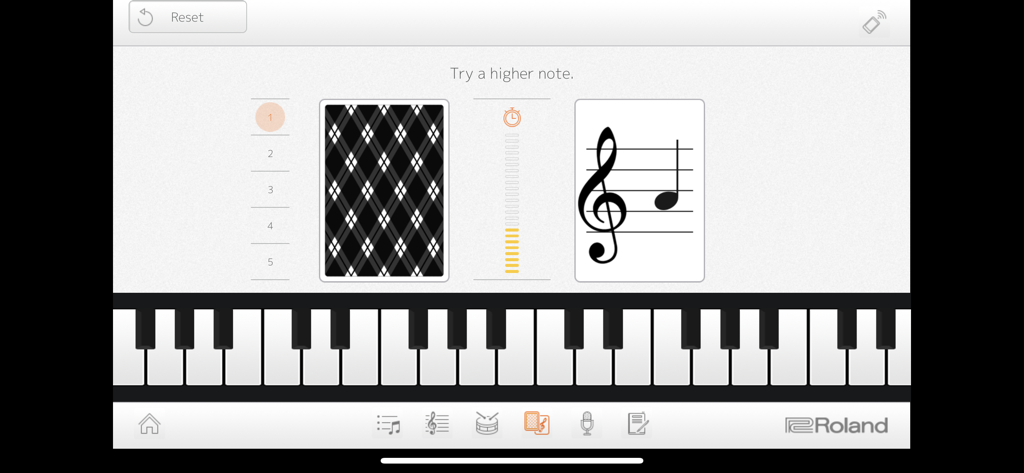
譜読み練習のための Piano Partner 2 アプリ内のフラッシュ・カード・ゲーム。

譜読み練習のための Piano Partner 2 アプリ内のフラッシュ・カード・ゲーム。

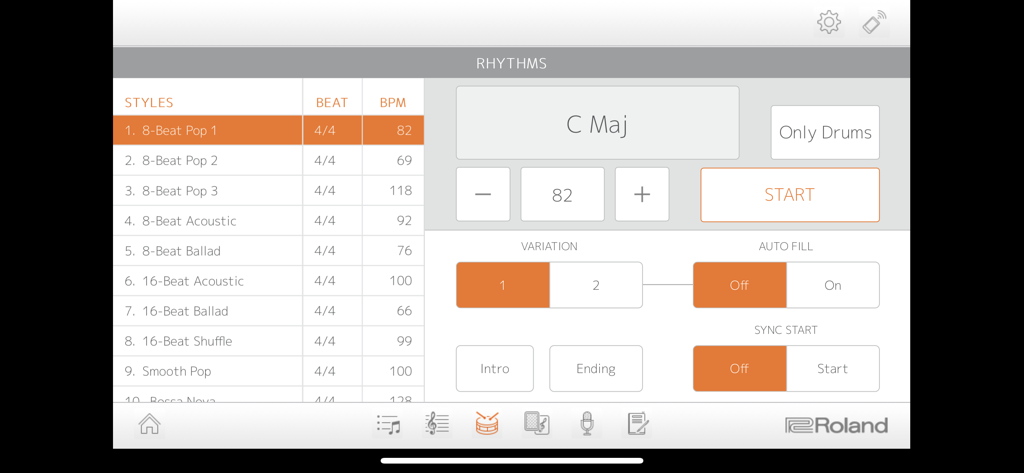
8ビート・ポップなどの様々な音楽スタイルや、コード伴奏、BPMの設定が表示されている Piano Partner 2 アプリのリズム画面。

8ビート・ポップなどの様々な音楽スタイルや、コード伴奏、BPMの設定が表示されている Piano Partner 2 アプリのリズム画面。

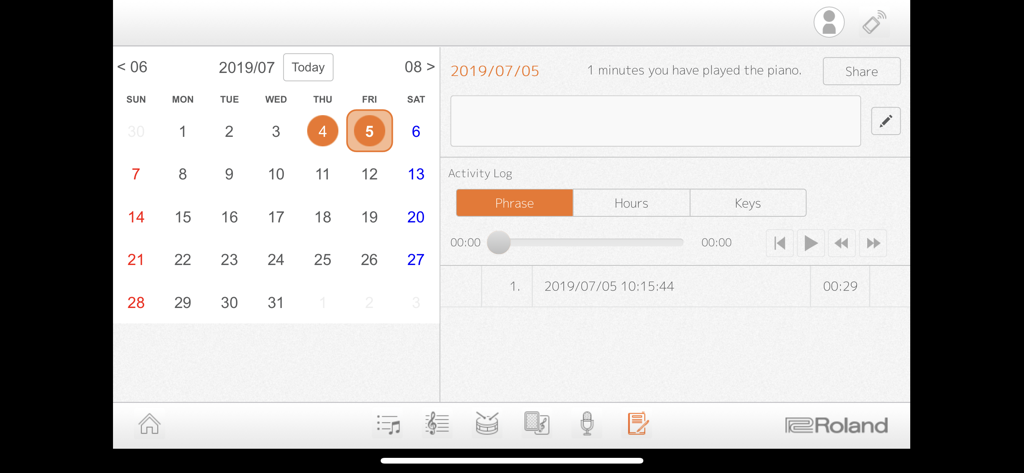
毎日の練習時間や録音を表示している Piano Partner 2 アプリのカレンダーとアクティビティ・ログ。

毎日の練習時間や録音を表示している Piano Partner 2 アプリのカレンダーとアクティビティ・ログ。

インタラクティブなイノベーションでピアノをマスター

このアプリを際立たせるツール、 339K+ 人のユーザーが選択.

🎹

インタラクティブな学習ゲーム

「フラッシュ・カード」や「デジスコア・ライト」で練習を遊びに変えましょう。ゲーム感覚のチャレンジを通じて、生徒や愛好家が譜読みや耳のトレーニングをマスターするのを助けます。

📱

シームレスなリモートコントロール

複雑な本体ボタンの操作は不要です。iPadやiPhone上の美しく直感的なインターフェースを通じて、ピアノの音色、リズム、設定をコントロールできます。

📈

パーソナライズされた練習ダイアリー

演奏時間や録音を自動的に記録して上達を確認。成果を先生や家族と簡単に共有できます。

アプリについて

について知っておくべきこと Piano Partner 2.

説明

Compatible Pianos: GP609、GP607、LX-17、LX-7、HP605、HP603A/HP603、HP601、RP501R、RP102、KIYOLA KF-10、DP603、F-140R、FP-90、FP-60、FP-30、FP-10、GO:PIANO(GO-61P)*、GP:PIANO88(GO-88P)、GO:PIANO with Alexa Built-in(GO-61P-A)*、 *Incompatible with iPad Pro 9.7 inch. Make sure your Roland digital piano is updated with the most current system program. The latest system program and setup instructions can be found at the support pages at www.roland.com. Introduction: The Piano Partner 2 app provides a friendly, interactive way to help you learn and enjoy music with your Roland digital piano. Songs and DigiScore Lite show the piano’s internal music collection on your device’s display, while Rhythm and Flash Card allow you to build skills with intelligent accompaniment and engaging music exercises. Piano Partner 2 also enables your iPad/iPhone to work as a remote controller for your Roland piano, offering an intuitive graphic interface for even easier operation. Recorder and Diary functions help you progress more quickly, allowing you to evaluate performances and keep track of your daily practice activities. The Diary logs stats about playing time, which keys you played, and more, and it’s even possible to share them with your family, friends, and teachers directly from the app. To use Piano Partner 2, connect your device and a compatible Roland piano wirelessly via Bluetooth®, or wired with a USB cable. -Songs—browse and select music from your Roland digital piano’s onboard song library -DigiScore Lite—display music notation for the onboard songs -Rhythm—develop your sense of rhythm with accompaniment that follows the chords you play -Flash Card game—fun challenges to develop ear-training and note-reading skills -Remote Controller—control Roland digital piano functions from your mobile device -Recorder—capture daily performances and listen back instantly -Diary—track your daily activities and share progress statistics on social media such as Twitter -Profiles—multiple users can track individual Diary data on one device Notes: - A connection with the compatible model is required to use this application except for the part of Flash Card. - The compatible model and an iPad or iPhone need Bluetooth connection or a wired connection by a USB cable. - When connecting an iPad or iPhone to the piano via a USB cable, a USB cable and Apple’s iPad Camera connection Kit or Lightning-USB Camera Adapter are required. - When using Piano Partner 2 with a compatible piano for the first time, an Internet connection for the tablet is required. - Songs and DigiScore Lite corresponds to only a built-in song of the piano. Log Retention Policies The Piano Partner 2 app collects information when it is used, including the device type and how the app is used (the functions used, date and time of use, etc.). We will never use this data for the purpose of collecting any personal information or identifying a specific person. We use the collected data for the following purposes only: • To improve the functionality of Piano Partner 2 and future related apps. • To create statistical analysis about how the app is used. When you download and use the Piano Partner 2 app, it is accepted that you agree with the above policies. If you do not accept these policies, we recommend that you do not use the app.

最新バージョン

2.0.16

サイズ

25.2 MB

リリース日

2016年5月27日

ローランド・ピアノをマスターする準備はできていますか?

日々の練習を革新させた339,000人以上のミュージシャンや保護者の仲間に加わりましょう。今すぐPiano Partner 2をダウンロードして、進捗を記録し、学習をゲーム感覚で楽しみ、楽器のポテンシャルを最大限に引き出しましょう。

ダウンロード: App Store
FAQ

よくある質問

について知っておくべきこと Piano Partner 2

Piano Partner 2アプリとは何ですか?

Piano Partner 2は、ローランドのデジタルピアノで音楽を学び、楽しむためのモバイルアプリケーションです。楽曲のブラウズ、楽譜の表示、リズム練習、演奏の記録などの機能を提供します。

Piano Partner 2に対応しているローランドのデジタルピアノはどれですか?

Piano Partner 2は、GP609、GP607、LX-17、HP605、RP501R、F-140R、FP-90など、アプリの説明に記載されている多くのローランド製デジタルピアノと互換性があります。ピアノのファームウェアは最新の状態である必要があります。

ローランドピアノをPiano Partner 2アプリに接続するにはどうすればよいですか?

Bluetoothによるワイヤレス接続、またはUSBケーブルを使用した有線接続のいずれかで、ローランドのデジタルピアノをPiano Partner 2アプリに接続できます。USB接続にはApple Camera Connection Kitが必要です。

Piano Partner 2で曲の楽譜を表示できますか?

はい、Piano Partner 2アプリにはDigiScore Lite機能があり、ローランド製デジタルピアノの内蔵曲ライブラリの楽譜をモバイルデバイスに直接表示できます。

Piano Partner 2はリズムトレーニングに役立ちますか?

はい、Piano Partner 2アプリにはリズム機能が搭載されています。この機能は、演奏したコードに合わせてインテリジェントな伴奏を提供し、リズム感を養うのに役立ちます。

Piano Partner 2のフラッシュカードゲームとは何ですか?

Piano Partner 2のフラッシュカードゲームは、ユーザーの耳のトレーニングと音符を読むスキルを向上させるための楽しいチャレンジを提供します。ピアノに接続せずに使用することもできます。

Piano Partner 2でピアノの演奏を録音できますか?

はい、Piano Partner 2にはレコーダー機能が搭載されています。日々の演奏を記録し、すぐに聴き返すことができるため、上達の評価に役立ちます。

Piano Partner 2のダイアリー機能はどのように機能しますか?

Piano Partner 2のダイアリー機能は、日々の練習活動を追跡します。演奏時間や弾いた鍵盤などの統計情報を記録し、アプリ内からこの進捗データを共有できます。

Piano Partner 2は個人のユーザーデータを収集しますか?

いいえ、Piano Partner 2は個人情報や特定の個人を特定する情報を収集しません。機能改善と統計分析のために、デバイスの種類やアプリの使用状況などの匿名化されたデータのみを収集します。

Piano Partner 2を使用するためにインターネット接続は必要ですか?

インターネット接続は、互換性のあるピアノでPiano Partner 2を初めて使用する場合にのみ必要です。それ以降の使用にはインターネット接続は必要ありません。

App information, icons, screenshots, and descriptions displayed on this page are sourced from the Apple App Store and are the property of their respective developers. Download estimates and rankings are based on MWM's proprietary models and may not reflect actual figures. This page is provided for informational and analytical purposes only.

Believe this page infringes your intellectual property? File a dispute