running time record

running time record

ダウンロード: App Store
ロゴ: running time record

running time record: プロフェッショナルでプライベートなランニングログブック

正確な手動入力と洞察力のある年間チャートでトレーニングを管理しましょう。ソーシャルメディアやGPSトラッキングのノイズなしに、データのプライバシーと複数ユーザー管理を重視するランナーのために設計されています。

ダウンロード: App Store

開発元

YUTAKA IZUMIYAMA

カテゴリ

Sports

ダウンロード

200

ユーザー評価

1.0/5

評価数

0

対応言語

2

あなたの統計を一目で

このインターフェースを利用する 200 人のユーザー.

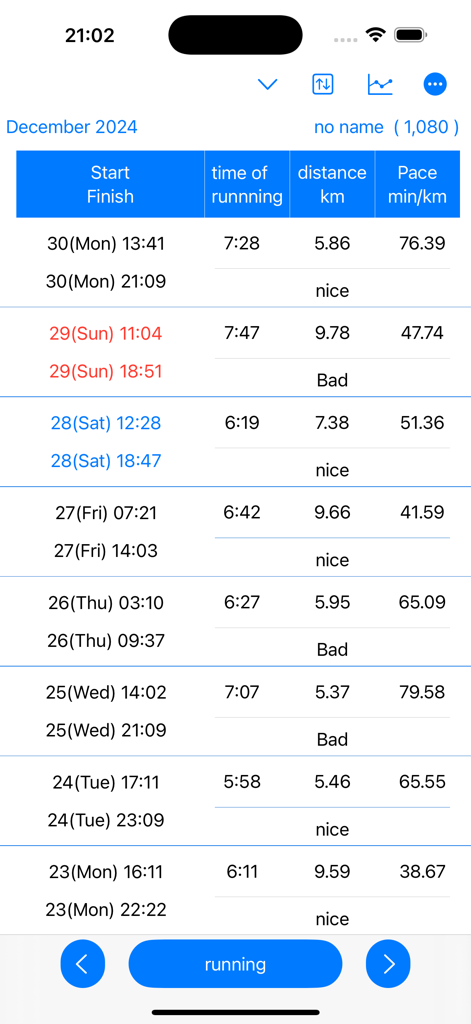
開始時間、終了時間、距離、ペースを示すランニングログの詳細なテーブル

開始時間、終了時間、距離、ペースを示すランニングログの詳細なテーブル

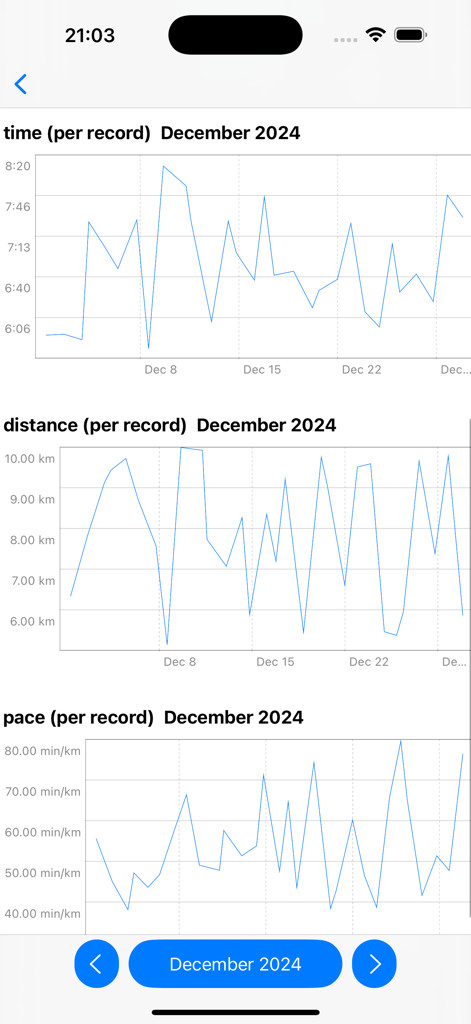
2024年12月の月間ランニングデータ(時間、距離、ペース)を示す折れ線グラフ

2024年12月の月間ランニングデータ(時間、距離、ペース)を示す折れ線グラフ

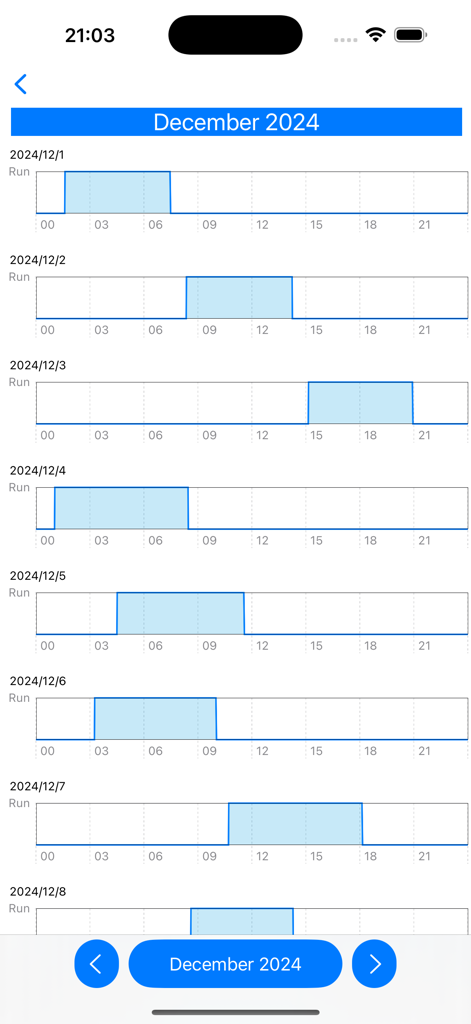
12月の毎日のワークアウトログを示す月間ランニングリズムチャート

12月の毎日のワークアウトログを示す月間ランニングリズムチャート

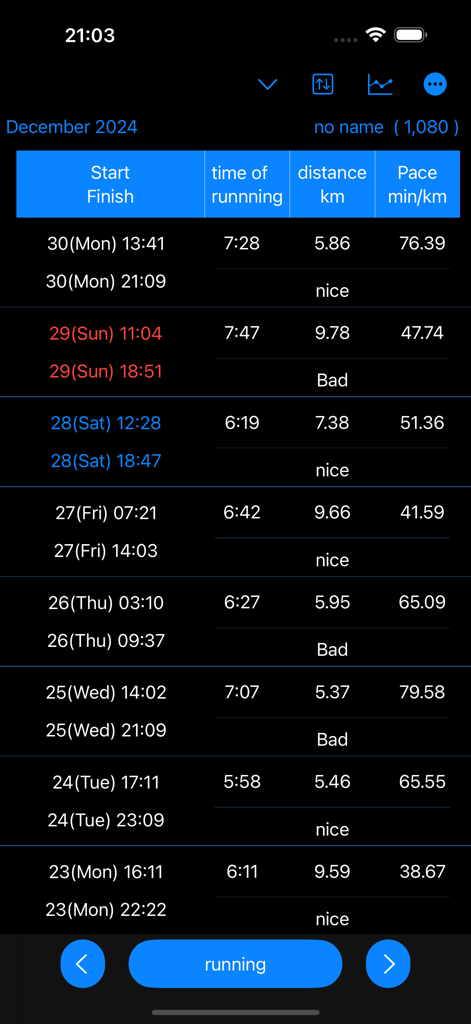
ランニングの開始/終了時間、期間、距離、キロメートルあたりのペースを示すダークモードの詳細なアクティビティログ

ランニングの開始/終了時間、期間、距離、キロメートルあたりのペースを示すダークモードの詳細なアクティビティログ

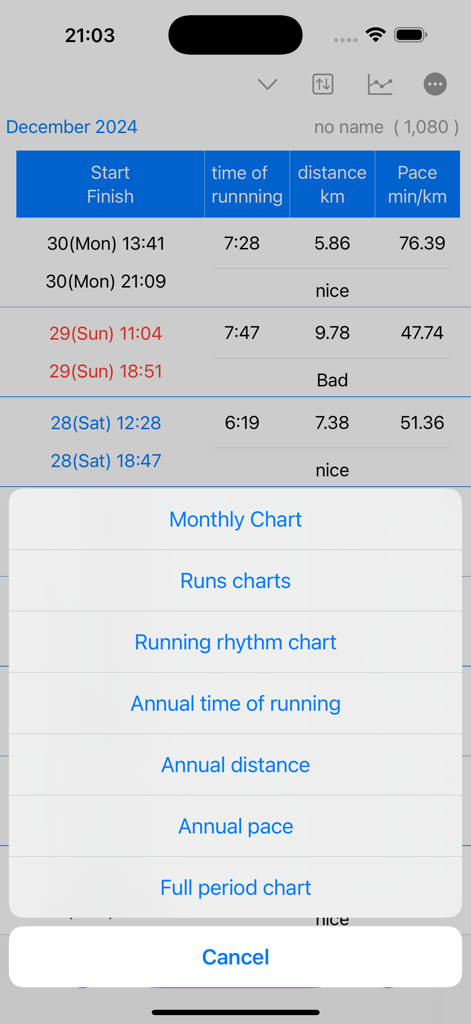
ペースと距離の月次および年次チャートを含むデータ視覚化オプションのリストを表示するrunning time recordアプリのスクリーンショット。

ペースと距離の月次および年次チャートを含むデータ視覚化オプションのリストを表示するrunning time recordアプリのスクリーンショット。

正確なパフォーマンス追跡

このアプリを際立たせるツール、 200 人のユーザーが選択.

🔒

プライバシー重視の手動ロギング

邪魔なGPSトラッキングはもうやめましょう。100%手動制御でトレッドミルや近所のランニングを記録し、位置データをプライベートに保ち、記録を正確に保ちます。

👥

複数ユーザー管理

家族やユースコーチに最適なツール。単一のアプリから複数のランナーまたは生徒の進捗状況を追跡し、それぞれに独自のデータセットがあります。

📈

深い分析的視覚化

ログを実用的な洞察に変えましょう。年間ペース、月間リズム、および期間全体のパフォーマンスを、長期的な成長のために設計された詳細な折れ線グラフで表示します。

アプリについて

について知っておくべきこと running time record.

説明

Running time is calculated and displayed based on start and end date and time. Displays time in a line graph. ・Record start date and time 1. Tap the “running” button. If you press/tap for a long time, step 2/step 3 will be skipped. The current date and time will be set. 2. Select the year, month, and day and tap "Next". 3. Select your start time and tap OK. ・When recording the end date and time 1. Tap the “end date and time" button in the Finish column of the table. If you press/tap for a long time, step 2/step 3 will be skipped. The current date and time will be set. 2. Select the year, month, and day and tap "Next". 3. Select finish time and tap "OK". ▼running time The running time in the table is automatically displayed based on the start and end date and time. ▼Display chart 1. Press the line chart button at the top. 2. Click the displayed chart from the menu below. Monthly chart Runs chart Running rhythm chart Annual time of runnning Annual distance Annual pace Full period chart ▼Add user 1. Press the user button at the top 2. Press add user 3. Enter the username and press OK. ▼Edit username 1. Press the user button at the top 2. Press user edit and delete 3. Press the username from the list. 4. Edit the user name on the edit screen and press OK. ▼Delete username 1. Press the user button at the top 2. Press user edit and delete 3. Swipe the username you want to delete from the list from the left and press Delete. ▼Dartk mode ON/OFF You can choose between Light mode and Dark mode. Setting apperance mode Light mode Dark mode ▼If you want to delete all records From the menu on the top right, select Erase all data. You can delete all records. ▼Model change data migration For users with the same Apple ID Because records are stored in iCloud View the same recording on a new iPhone/iPad

最新バージョン

25.11.5

サイズ

4.9 MB

リリース日

2025年4月9日

今日からランニングジャーニーをコントロールしましょう

個人のトレッドミルの目標を追跡する場合でも、家族の進捗状況を管理する場合でも、あなたが受けるに値するシンプルで安全、かつデータに基づいたログブックを入手してください。

ダウンロード: App Store

App information, icons, screenshots, and descriptions displayed on this page are sourced from the Apple App Store and are the property of their respective developers. Download estimates and rankings are based on MWM's proprietary models and may not reflect actual figures. This page is provided for informational and analytical purposes only.

Believe this page infringes your intellectual property? File a dispute