SAP SuccessFactors Mobile

SAP SuccessFactors Mobile


ダウンロード: App Storeダウンロード: Google Play
ロゴ: SAP SuccessFactors Mobile

SAP SuccessFactors Mobile: 従業員体験を向上させる

目標管理、休暇申請、承認の迅速化をモバイルで実現する、シームレスでコンシューマーグレードのHRプラットフォームで従業員に力を与えましょう。

開発元

SAP SE

カテゴリ

Business

ダウンロード

8M+

ユーザー評価

4.7/5

評価数

45K+

対応言語

41

あなたの職場を視覚化

このインターフェースを利用する 8M+ 人のユーザー.

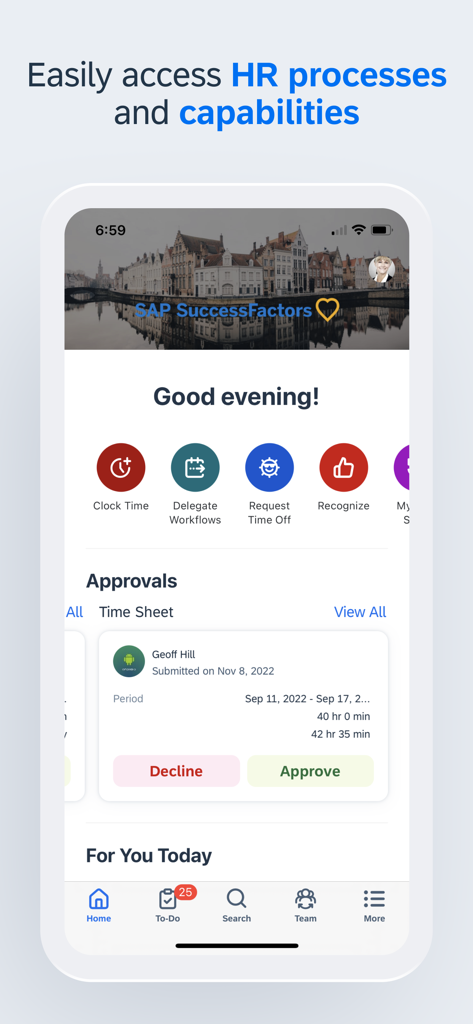
SAP SuccessFactorsアプリのダッシュボードを表示するモバイル画面。迅速なHRアクションと保留中のタイムシート承認が含まれています。

SAP SuccessFactorsアプリのダッシュボードを表示するモバイル画面。迅速なHRアクションと保留中のタイムシート承認が含まれています。

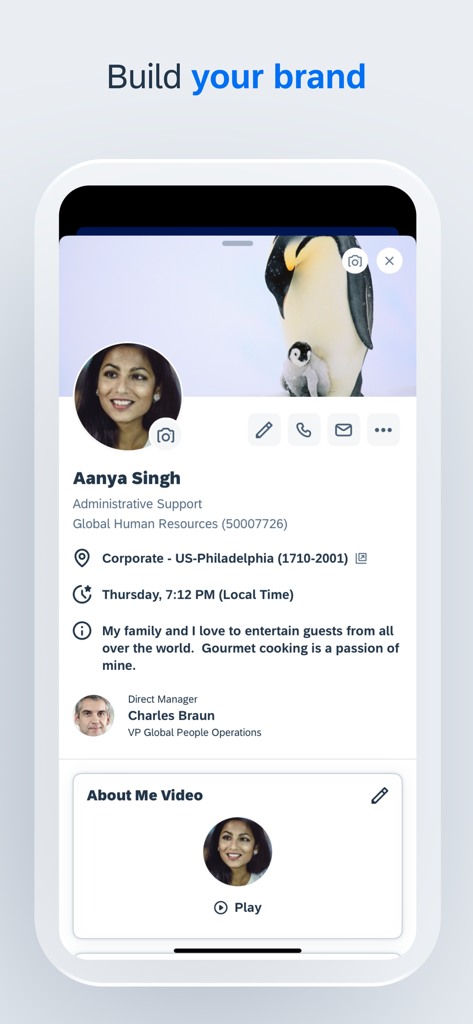
SAP SuccessFactors Mobileアプリの従業員プロファイル画面。ユーザーの自己紹介と「ブランドを構築する」というタイトルの下にあるパーソナライズされたコンテンツが表示されています。

SAP SuccessFactors Mobileアプリの従業員プロファイル画面。ユーザーの自己紹介と「ブランドを構築する」というタイトルの下にあるパーソナライズされたコンテンツが表示されています。

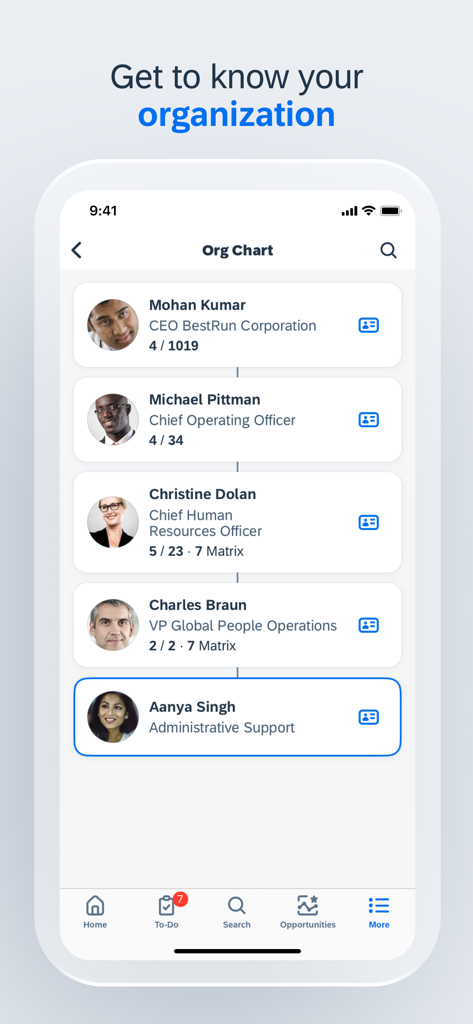
SAP SuccessFactorsアプリ内の組織図を表示するモバイル画面。

SAP SuccessFactorsアプリ内の組織図を表示するモバイル画面。

SAP SuccessFactors Mobileアプリで「キャリア管理」や「チームのリーダーシップと協力」などのコースオプションを含む学習モジュールが表示されています。

SAP SuccessFactors Mobileアプリで「キャリア管理」や「チームのリーダーシップと協力」などのコースオプションを含む学習モジュールが表示されています。

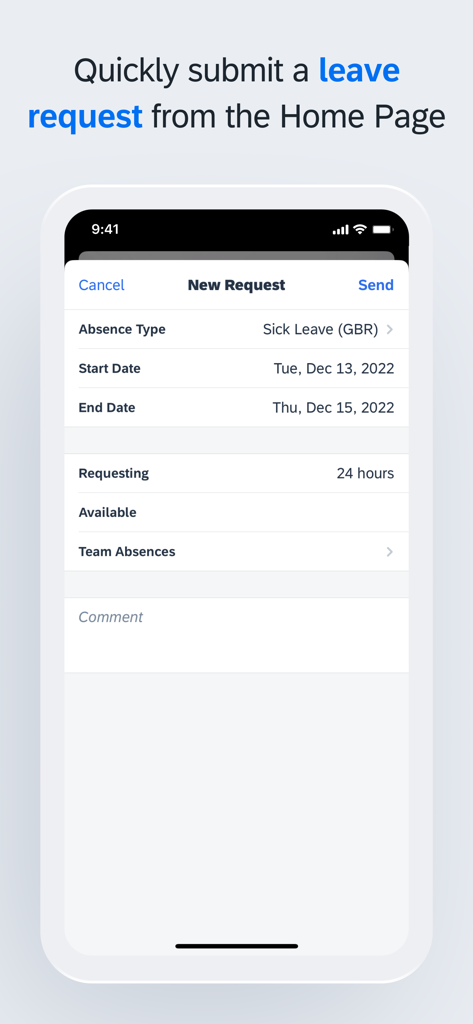
SAP SuccessFactors Mobileアプリで休暇申請を送信する。

SAP SuccessFactors Mobileアプリで休暇申請を送信する。

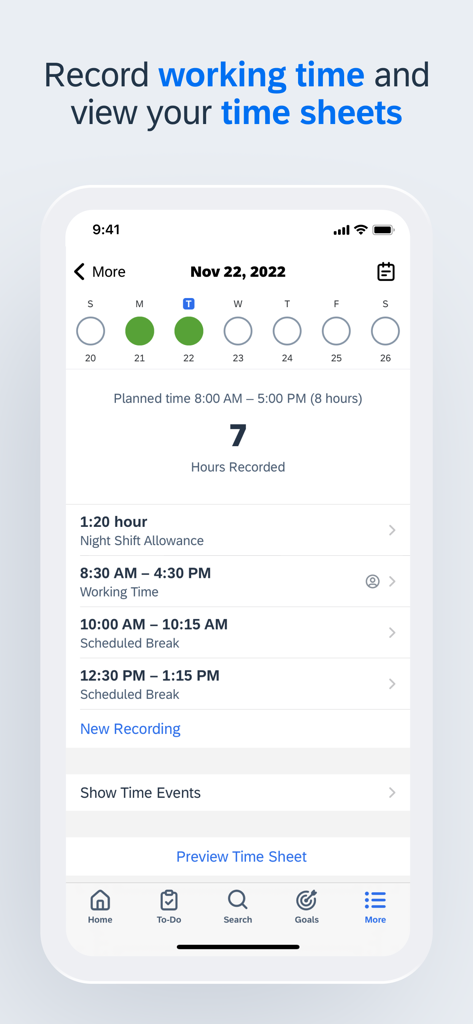
記録された労働時間と日次タイムシートを表示するSAP SuccessFactors Mobileアプリインターフェイスのスクリーンショット。

記録された労働時間と日次タイムシートを表示するSAP SuccessFactors Mobileアプリインターフェイスのスクリーンショット。

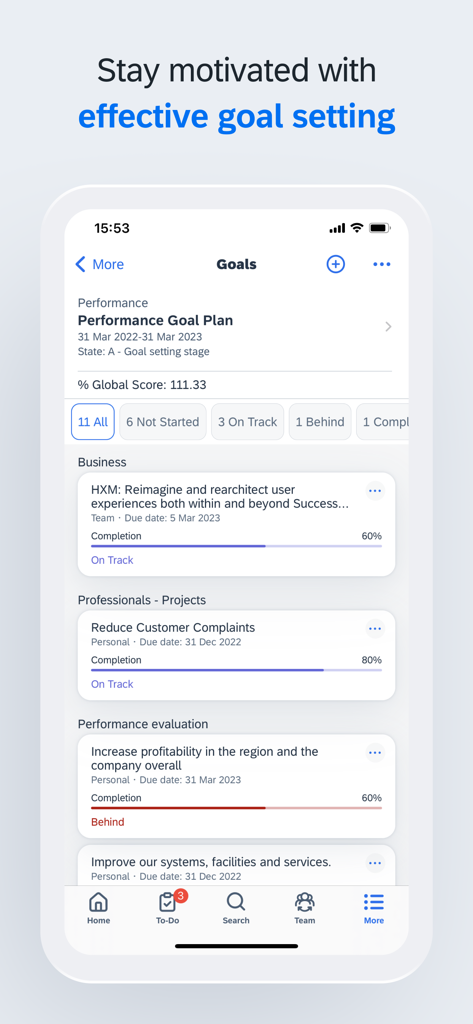
SAP SuccessFactorsモバイルアプリのパフォーマンス目標ダッシュボード。プロジェクト完了状況が表示されています。

SAP SuccessFactorsモバイルアプリのパフォーマンス目標ダッシュボード。プロジェクト完了状況が表示されています。

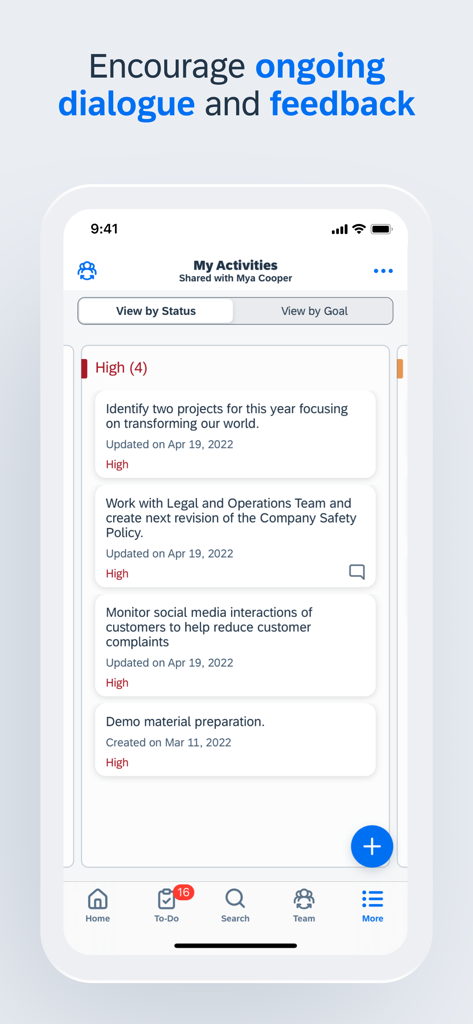
共有された作業アクティビティとフィードバックのリストを表示するSAP SuccessFactors Mobileアプリインターフェイス。

共有された作業アクティビティとフィードバックのリストを表示するSAP SuccessFactors Mobileアプリインターフェイス。

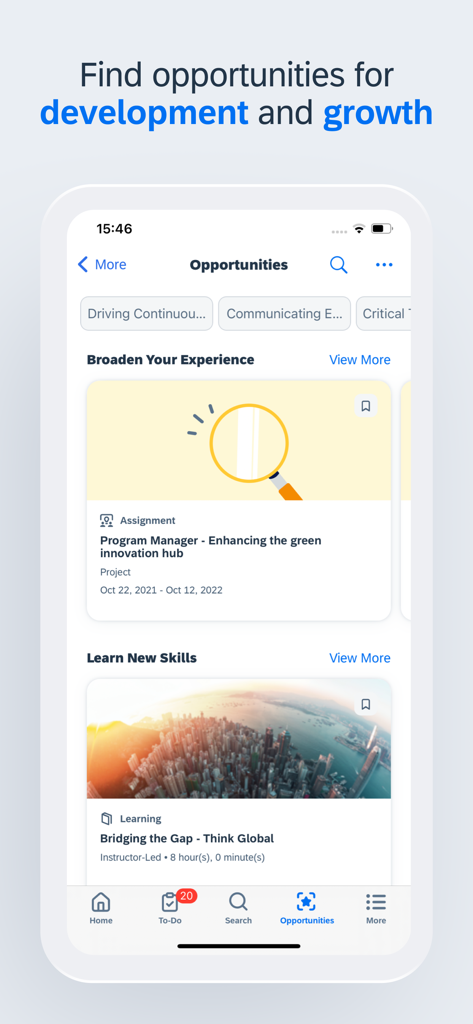
キャリア開発とスキル構築の機会のためのSAP SuccessFactorsアプリインターフェイス。

キャリア開発とスキル構築の機会のためのSAP SuccessFactorsアプリインターフェイス。

移動中でもキャリアを強化

このアプリを際立たせるツール、 8M+ 人のユーザーが選択.

✈️

シームレスな休暇管理

残高を確認し、数秒で休暇申請を提出できます。ラップトップを開くことなく、すぐにワークライフバランスを管理しましょう。

ワンタップで幹部承認

企業のボトルネックを解消しましょう。移動中に申請、ドキュメント、チームのリクエストを確認して承認してください。

📈

学習と目標追跡

常に先を行きましょう。通勤時間中や短い空き時間に、トレーニングモジュールにアクセスし、パフォーマンス目標を更新しましょう。

レビュー分析

ユーザーレビューの分析.

感情スコア

16%
ネガティブ

概要

The mobile app receives overwhelmingly negative feedback, primarily due to persistent and widespread login issues. Many users report being unable to access the app after updates, experiencing crashes, constant logouts, and "service unavailable" messages, especially on iOS devices and after recent updates. Users also widely criticize the app's limited functionality, noting that many essential features like payroll access, module management, and benefits are unavailable, forcing them to revert to desktop versions. While a few users find the app efficient and functional, the majority highlight significant usability problems and bugs, with updates frequently exacerbating existing issues rather than resolving them.

主なテーマ

Login Issues(24)
App Instability(7)
Overall Poor Quality(7)
Problematic Updates(6)
Limited Mobile Functionality(5)
Positive Feedback(4)

アプリについて

について知っておくべきこと SAP SuccessFactors Mobile.

説明

SAP SuccessFactors Mobile helps businesses bring HR closer to their employees, so they are more engaged, more productive, and much smarter about the way they work. SAP SuccessFactors Mobile provides a native, consumer-like experience, ability to meet strict security standards, manageability of features and functionalities in mobile devices and optimized procedures for mobile performance. Use SAP SuccessFactors Mobile to: · View employee profiles and call, text, or email them directly · Approve all your requisitions within seconds · View your company’s organization chart to see how everyone is connected, including direct reports, matrix reports and new hires · Post your own text, photo and video updates · View and add comments to entire documents, presentations, videos and links · Sign up for courses, connect with experts and complete entire classes · Manage your active goal plans and update your goal status and progress towards completion · View your time off balance, submit time off requests to your manager and let colleagues know when you will be away from work To make the most of the mobile app, we recommend that you grant the following permissions: · (Optional) Camera – For scanning QR codes and taking photos. · (Optional) Contact – For adding people to your device’s contact list. · (Optional) Calendar – For registering courses or class events in your calendar. · (Optional) Fingerprint/Face ID – As secondary user validation means. · (Optional) Location – For obtaining your location when you clock in or clock out. · (Optional) Notification – For receiving notifications. · (Optional) Photos – For uploading photos as attachments. (Note: This is a read-only permission and your photos are never modified. It is granted by default and can’t be denied by users.) You can use the app without granting optional permissions, except the specific features they enable. To deny the permissions, go to App > Settings > Permissions on your device. Important: If you are an SAP SuccessFactors customer and are having trouble logging in, contact your SAP SuccessFactors administrator. About SAP SuccessFactors SAP SuccessFactors provides the leading cloud-based SAP SuccessFactors HCM Suite, which helps HR drive business execution with solutions that are complete, beautiful, and flexible enough to start anywhere – optimizing your workforce today and preparing them for tomorrow. SAP SuccessFactors solutions are supported by a global partner ecosystem and the experience and commitment of SAP.

最新バージョン

16.0.3

サイズ

482.8 MB

リリース日

2011年4月13日

どこでも、あなたのワークデーを強化

企業体験を効率化している800万人以上のプロフェッショナルに参加しましょう。SAP SuccessFactors Mobileをダウンロードして、承認、休暇、キャリア目標を数秒で処理しましょう。

ダウンロード: App Storeダウンロード: Google Play
FAQ

よくある質問

について知っておくべきこと SAP SuccessFactors Mobile

SAP SuccessFactors Mobileとは何ですか?

SAP SuccessFactors Mobileは、HRを従業員に近づけ、エンゲージメントと生産性を向上させます。最適化された手順と機能を備えた、ネイティブで安全なモバイルエクスペリエンスを提供します。

SAP SuccessFactors Mobileで従業員プロフィールを表示できますか?

はい、SAP SuccessFactors Mobileでは従業員プロフィールを表示できます。これには、直接電話、テキストメッセージ、または電子メールを送信するための連絡先情報が含まれます。また、直属の上司や個人情報も表示されます。

SAP SuccessFactors Mobileは求人承認をサポートしていますか?

はい、SAP SuccessFactors Mobileでは、すべての求人承認を行うことができます。このアプリにより、モバイルデバイスから直接、承認ワークフローを迅速かつ効率的に管理できます。

SAP SuccessFactors Mobileでは、会社の組織図はどのように表示されますか?

SAP SuccessFactors Mobileでは、会社の組織図が表示されます。ユーザーは、直属の部下、マトリックスレポート、新規採用者を含む同僚のつながりを確認でき、明確な階層ビューを提供します。

SAP SuccessFactors Mobileでは目標管理ができますか?

はい、SAP SuccessFactors Mobileでは、アクティブな目標計画を管理できます。ユーザーは目標のステータスを更新し、完了に向けた進捗状況を追跡して、効果的なパフォーマンス管理をサポートします。

SAP SuccessFactors Mobileで休暇申請を提出できますか?

はい、ユーザーはSAP SuccessFactors Mobileを通じて、休暇残高を確認し、上司に休暇申請を提出できます。また、同僚に欠席を通知することもできます。

SAP SuccessFactors Mobileでは、どのようなオプションの権限が必要ですか?

SAP SuccessFactors Mobileでは、カメラ、連絡先、カレンダー、指紋/顔認証、位置情報、通知などのオプションの権限が要求されます。これらはアプリ内の特定の機能を有効にします。

SAP SuccessFactors Mobileの「写真」権限は読み取り専用ですか?

はい、SAP SuccessFactors Mobileの「写真」権限は読み取り専用です。写真のアップロードを添付ファイルとして可能にしますが、アプリはユーザーの写真を変更しません。この権限はデフォルトで付与されています。

SAP SuccessFactors Mobileのログイン問題については、誰に連絡すればよいですか?

モバイルアプリのログインに問題があるSAP SuccessFactorsの顧客は、SAP SuccessFactorsの管理者に連絡する必要があります。管理者はアクセス問題に対して直接サポートを提供します。

SAP SuccessFactors Mobileで勤務時間を記録および表示できますか?

はい、SAP SuccessFactors Mobileでは、ユーザーは勤務時間を記録できます。ユーザーはアプリ内で直接タイムシートを表示して、労働時間を効率的に管理および確認できます。

SAP SuccessFactors Mobileでは、学習コースは提供されていますか?

はい、SAP SuccessFactors Mobileでは、ユーザーはコースに登録してクラス全体を完了できます。また、専門家とのつながりも可能にし、継続的な学習と開発をサポートします。

SAP SuccessFactors Mobileはキャリア開発に役立ちますか?

はい、SAP SuccessFactors Mobileは、開発と成長の機会を示します。ユーザーは、担当業務や学習モジュールを探索して、経験を広げ、新しいスキルを習得できます。

App information, icons, screenshots, and descriptions displayed on this page are sourced from the Apple App Store and are the property of their respective developers. Download estimates and rankings are based on MWM's proprietary models and may not reflect actual figures. This page is provided for informational and analytical purposes only.

Believe this page infringes your intellectual property? File a dispute