Sessions: Plug-In Host

Sessions: Plug-In Host

ダウンロード: App Store
ロゴ: Sessions: Plug-In Host

Sessions: パフォーマンスを最優先する究極のプラグイン・ホスト

DAWを捨て、クリエイティブなフローを維持しましょう。iPadとMacでAUv3インストゥルメントとエフェクトを簡単にホストし、合理化されたMIDIルーティング、シームレスなシーン切り替え、そしてすべての素晴らしい偶然を捉える常時録音機能を体験してください。

ダウンロード: App Store

開発元

Open Planet Software Limited

カテゴリ

Music

ダウンロード

1K+

ユーザー評価

4.8/5

評価数

0

対応言語

1

パフォーマンスを一目で

このインターフェースを利用する 1K+ 人のユーザー.

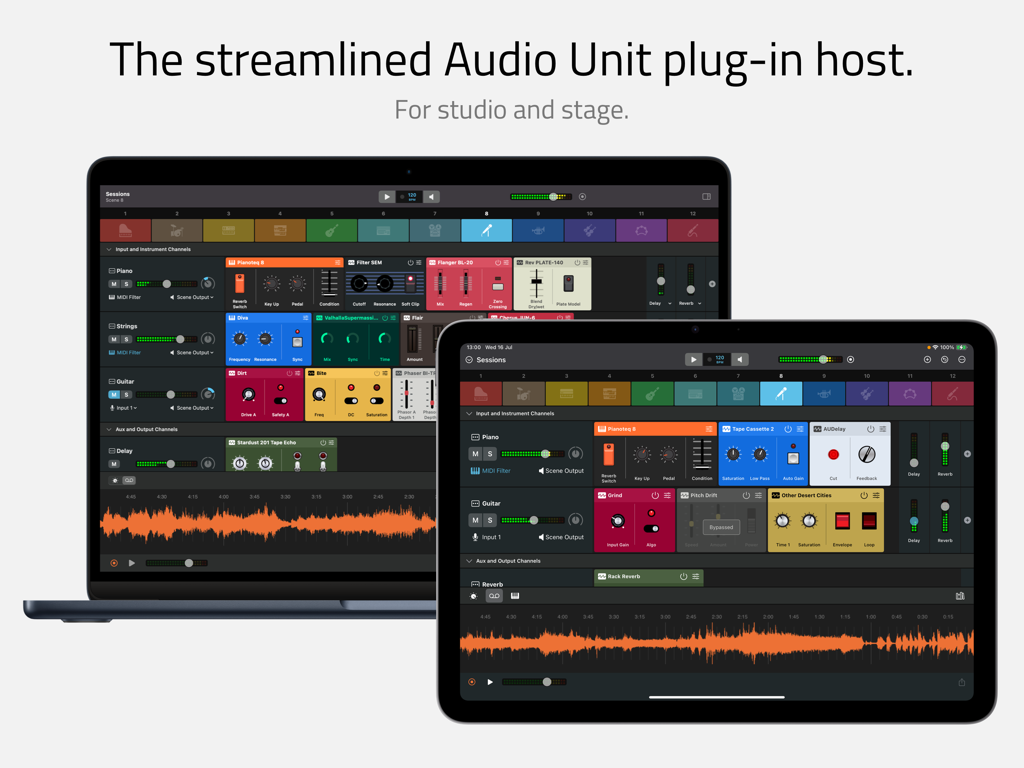
MacBookとiPadに表示されたSessionsアプリのインターフェース。オーディオユニットプラグインホストとミキサーを示しています。

MacBookとiPadに表示されたSessionsアプリのインターフェース。オーディオユニットプラグインホストとミキサーを示しています。

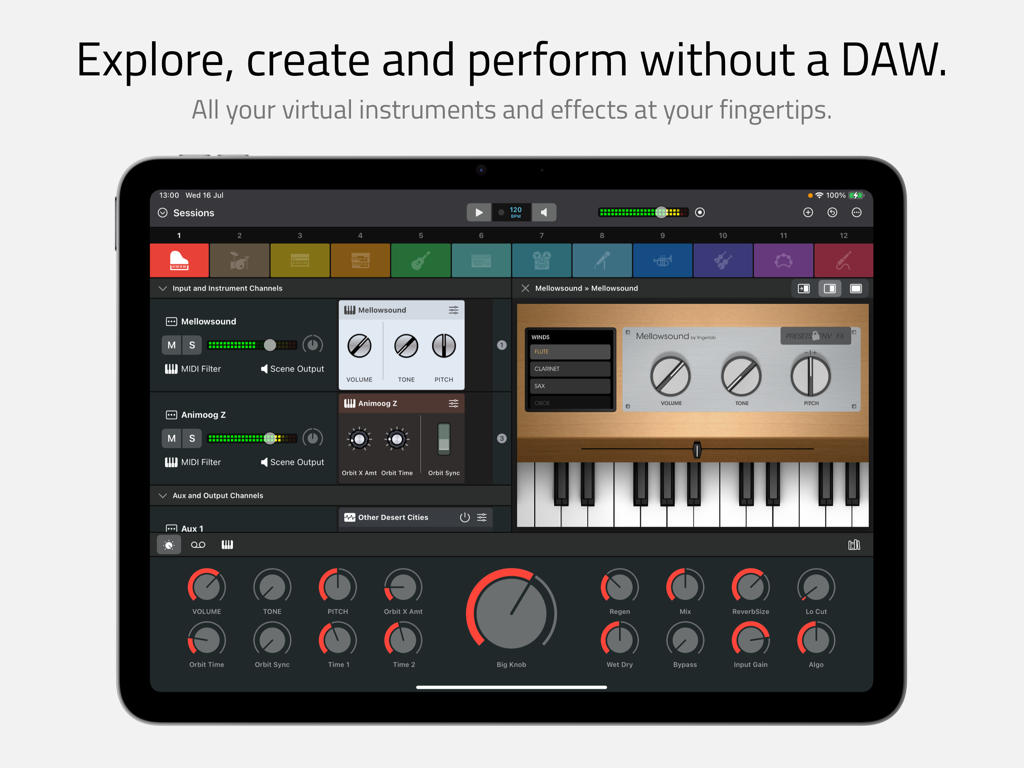
iPad上のSessionsアプリのインターフェース。仮想インストゥルメントとマクロコントロールを備えたマルチチャンネルミキサーを示しています。

iPad上のSessionsアプリのインターフェース。仮想インストゥルメントとマクロコントロールを備えたマルチチャンネルミキサーを示しています。

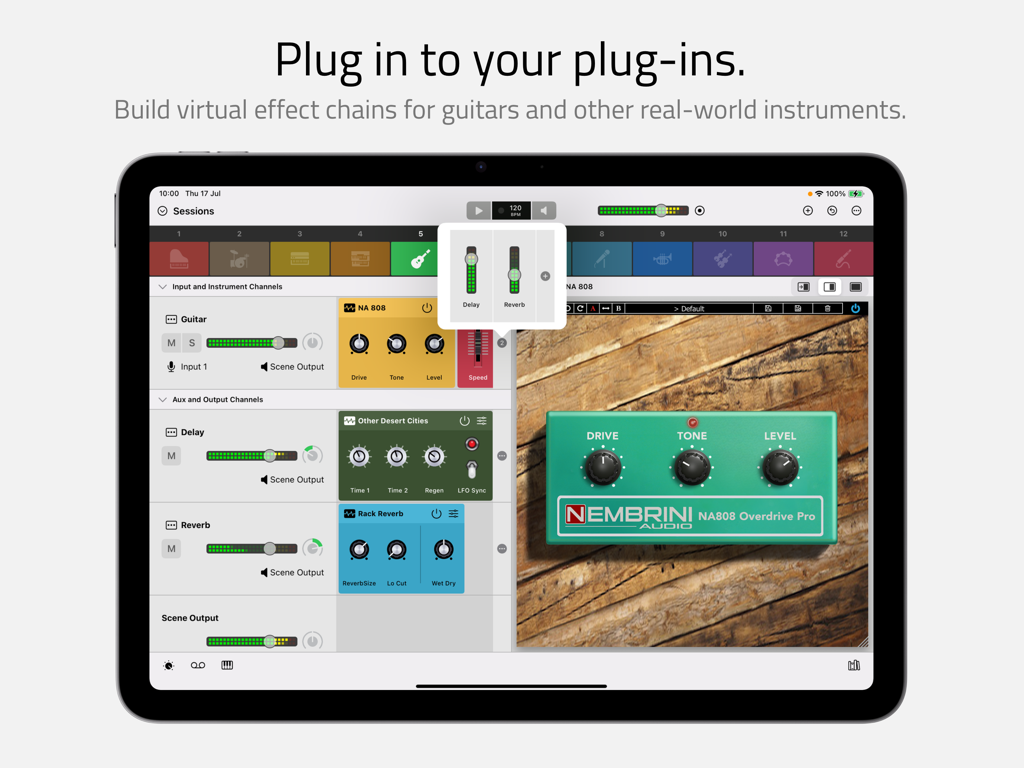
iPad上のSessionsプラグインホストのインターフェース。ギターエフェクトチェーンと仮想オーバードライブペダルを示しています。

iPad上のSessionsプラグインホストのインターフェース。ギターエフェクトチェーンと仮想オーバードライブペダルを示しています。

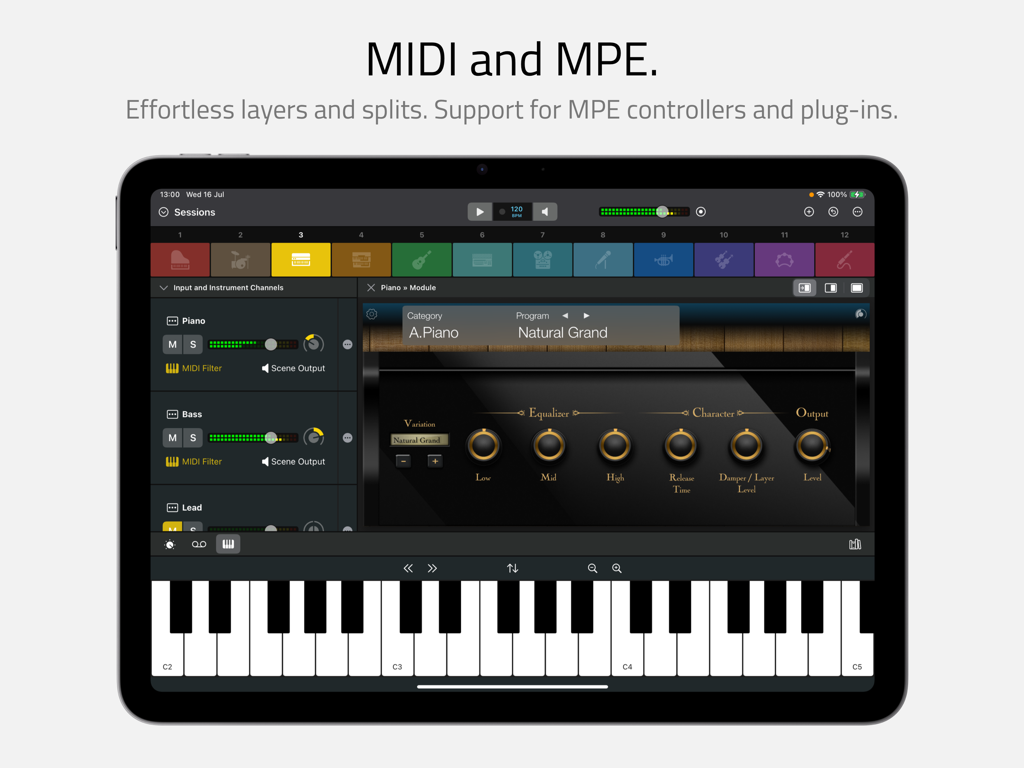
iPad上のSessionsアプリのインターフェース。仮想キーボードとピアノプラグインを備えたMIDIおよびMPE機能を示しています。

iPad上のSessionsアプリのインターフェース。仮想キーボードとピアノプラグインを備えたMIDIおよびMPE機能を示しています。

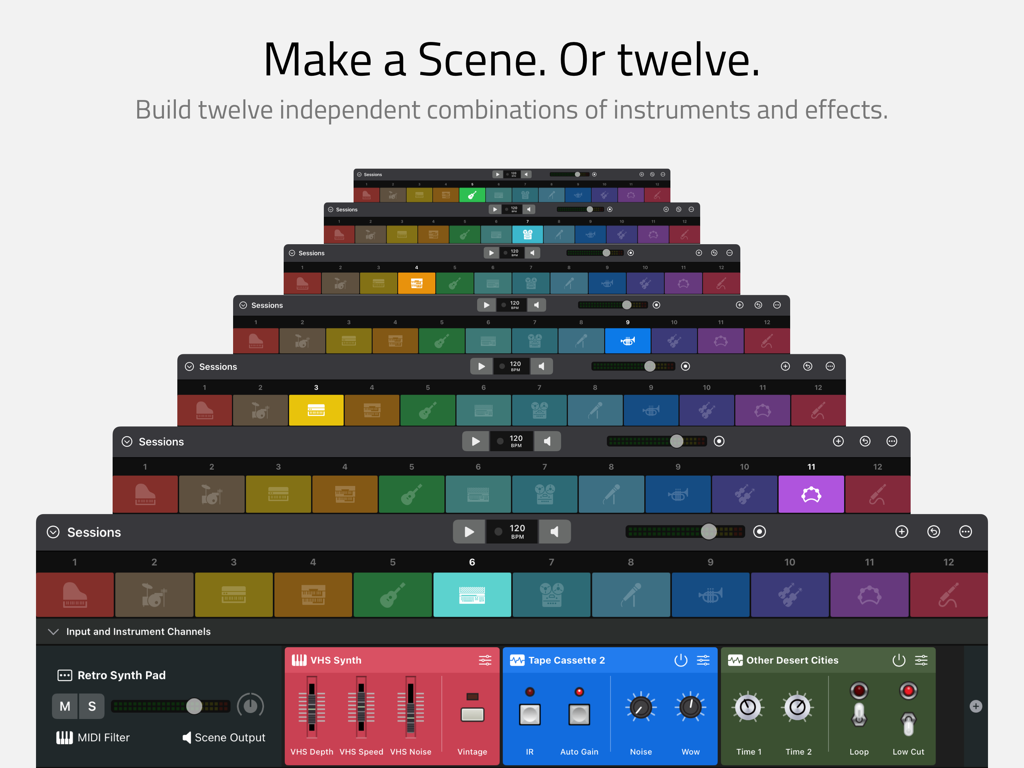
Sessionsインターフェースにある12の独立したインストゥルメントおよびエフェクトシーンを示すアプリ画面のスタック。

Sessionsインターフェースにある12の独立したインストゥルメントおよびエフェクトシーンを示すアプリ画面のスタック。

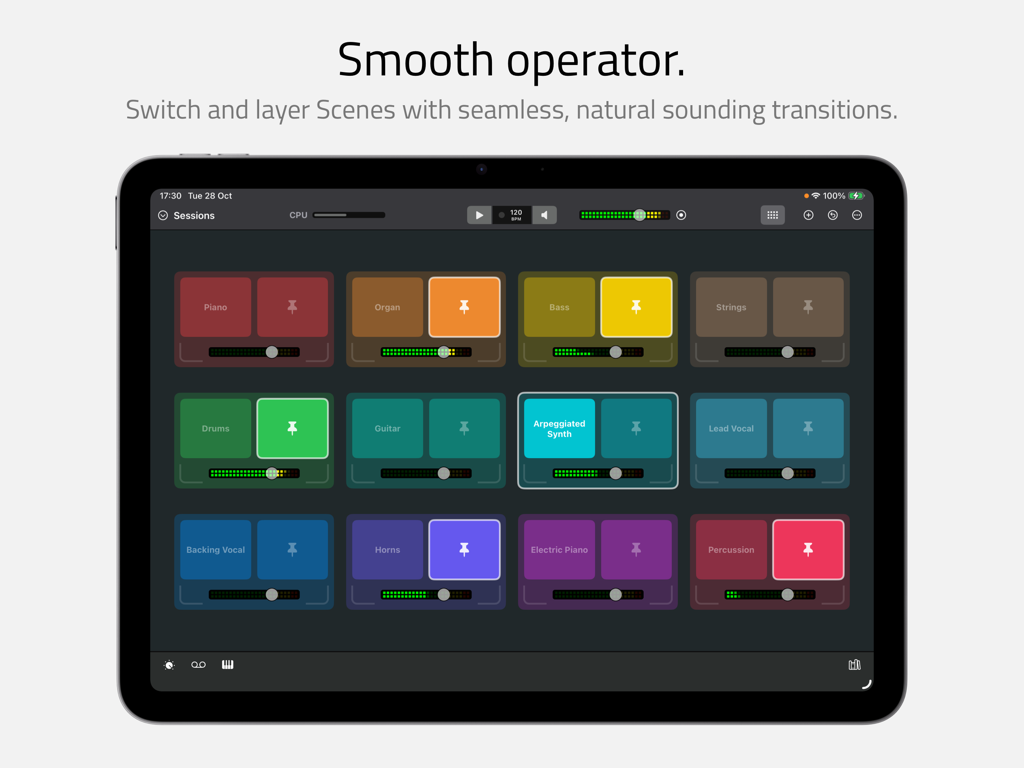
iPad上のSessionsアプリのインターフェース。シームレスな切り替えとレイヤリングのためのカラフルなインストゥルメントシーンのグリッドを示しています。

iPad上のSessionsアプリのインターフェース。シームレスな切り替えとレイヤリングのためのカラフルなインストゥルメントシーンのグリッドを示しています。

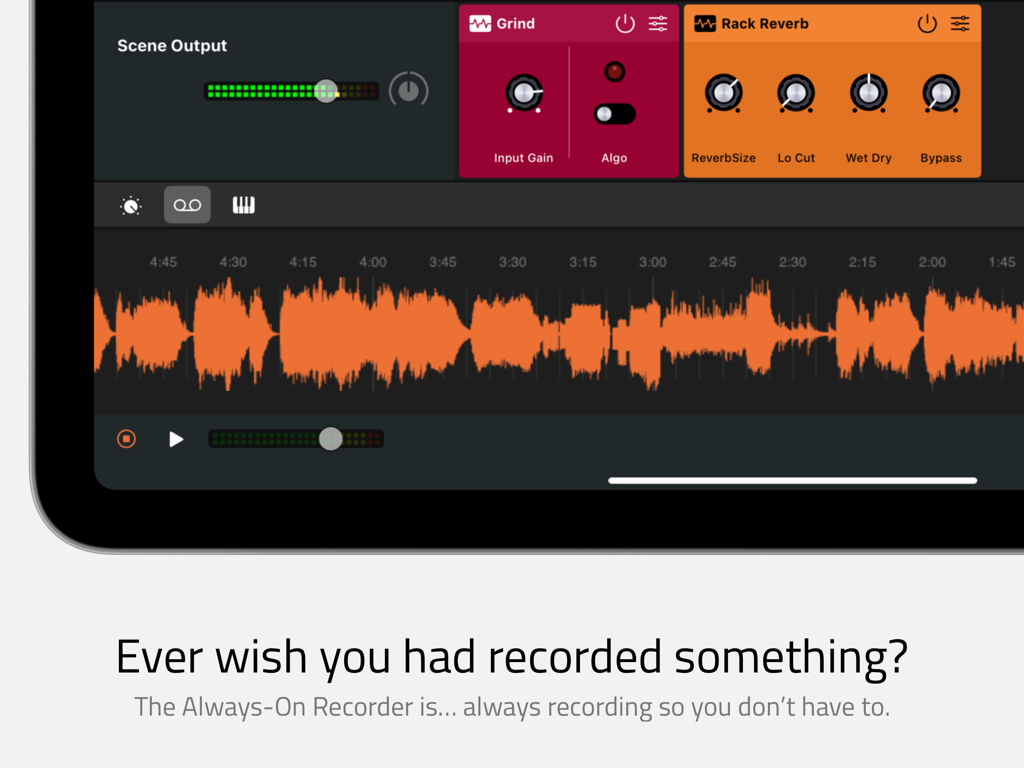
常時録音機能とオレンジ色のオーディオ波形を示すSessionsアプリのインターフェース。

常時録音機能とオレンジ色のオーディオ波形を示すSessionsアプリのインターフェース。

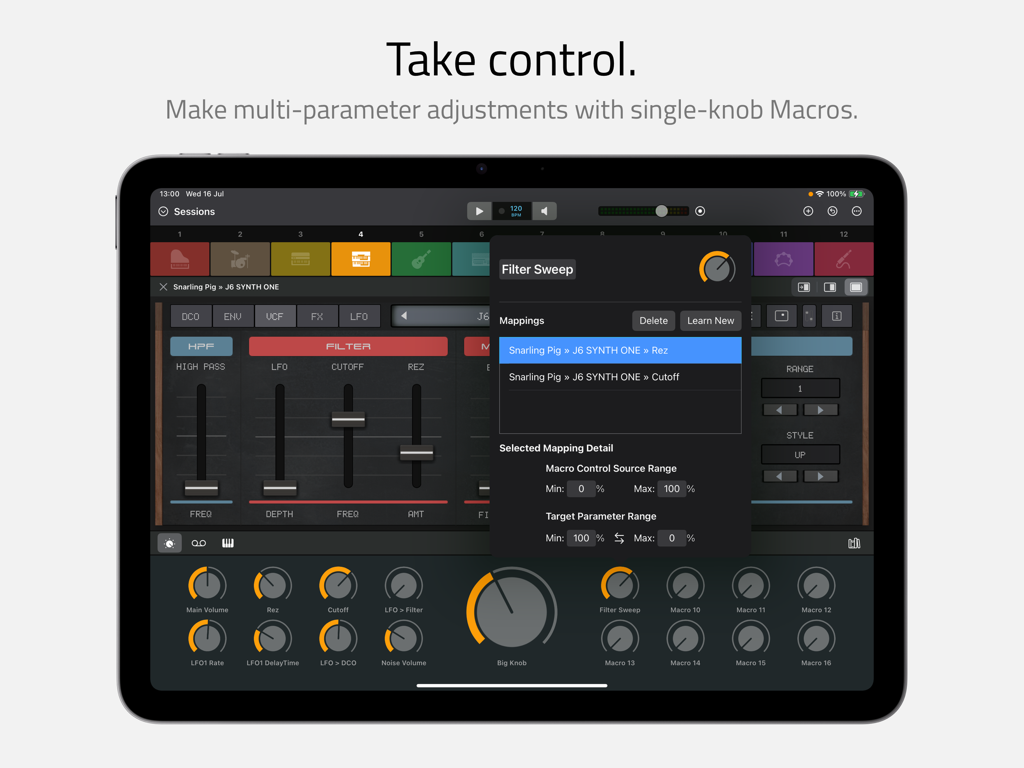
iPad上のSessionsアプリのインターフェース。マルチパラメータ調整を単一ノブのマクロコントロールにマッピングしています。

iPad上のSessionsアプリのインターフェース。マルチパラメータ調整を単一ノブのマクロコントロールにマッピングしています。

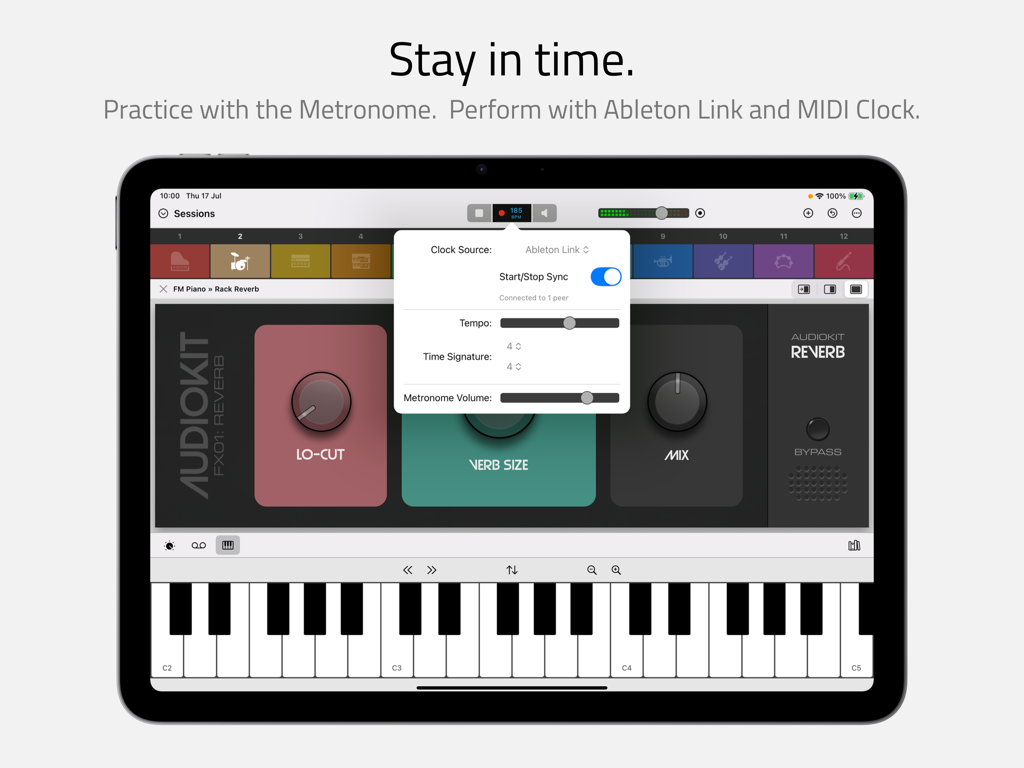
仮想キーボードを備えたビートクロックとAbleton Link設定を示すiPad上のSessionsアプリのインターフェース。

仮想キーボードを備えたビートクロックとAbleton Link設定を示すiPad上のSessionsアプリのインターフェース。

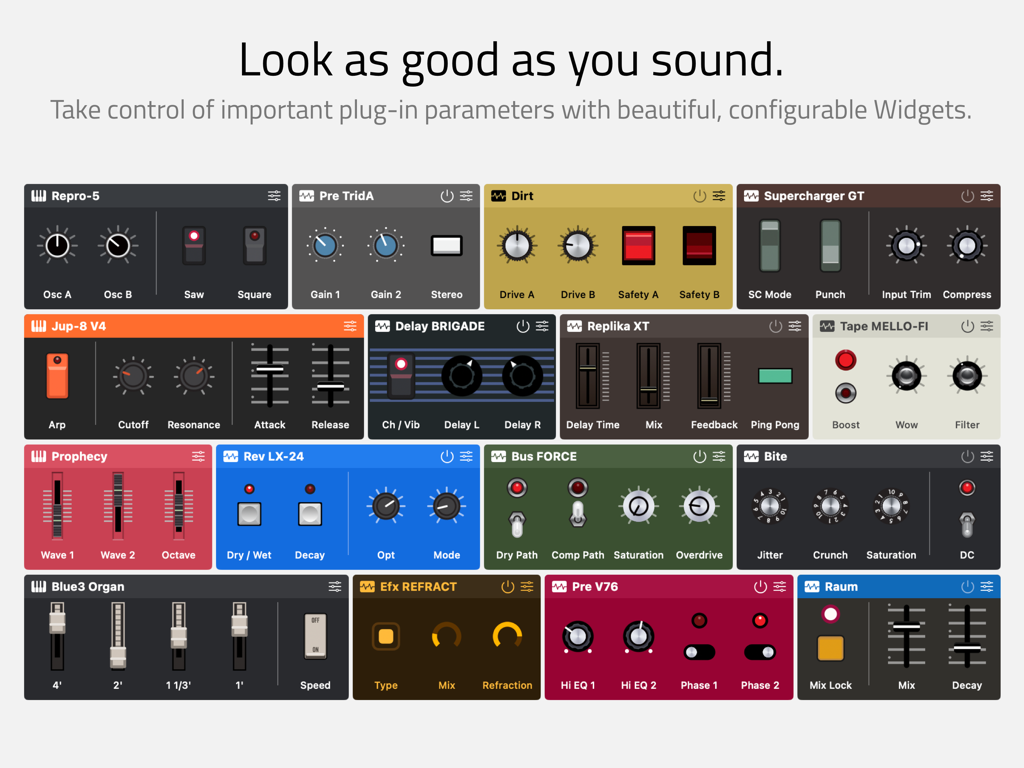
ノブとスライダーを備えた、様々​​なカラフルでカスタマイズ可能なオーディオプラグインウィジェットを示すグリッド。

ノブとスライダーを備えた、様々​​なカラフルでカスタマイズ可能なオーディオプラグインウィジェットを示すグリッド。

DAWの煩雑さなしにライブサウンドをマスターする

このアプリを際立たせるツール、 1K+ 人のユーザーが選択.

ひらめきを失わない

常時録音機能でフロー状態を維持しましょう。バックグラウンドでパフォーマンスを継続的にキャプチャし、あの「素晴らしい偶然」が決して失われないようにします。

🎹

複雑なリグが簡単に

プロレベルのMIDIレイヤーとスプリットを数秒で構築できます。12の独立したシーンをシームレスに切り替えて、完璧なライブトランジションと即興セッションを実現します。

🎛️

触覚的なハードウェアの美学

30種類以上の美しいウィジェットテーマでワークスペースをパーソナライズしましょう。複雑なパラメータをシンプルなマクロと大きなノブにマッピングして、ステージで究極のコントロールを実現します。

アプリについて

について知っておくべきこと Sessions: Plug-In Host.

説明

Sessions is the performance-oriented plug-in host that puts all your virtual instruments and effects at your fingertips. With powerful features and a streamlined workflow, musicians can enjoy ultimate freedom to explore, create, play and perform without a DAW. Refreshingly straightforward, Sessions is designed to keep you ‘in the moment’ however you make music. Thanks to the fluid drag-and-drop interface and innovations like the Always-On Recorder, producers, songwriters and sound designers can quickly experiment with new ideas and jump-start the creative process. For live players, Sessions has everything you need for an impromptu jam or a professional stage performance including MIDI layers and splits, flexible audio mixing, seamless sound switching, MIDI control, Ableton Link support and so much more… COMPATIBILITY * AUv2* and AUv3 instrument and effect plug-ins * Mac / iPad compatible multi-channel audio interfaces * MIDI keyboards and controllers * MPE controllers and plug-ins MIXER * Unlimited Audio Input Channels for live audio sources * Unlimited Instrument Channels for hosting instrument plug-ins * Unlimited Auxiliary Channels * 1 Master Output Channel per Scene * Unlimited effect plug-ins on each Channel * 8 sends per Channel, switchable pre / post fader * Auxiliary Channels can be routed to independent external outputs MIDI * Layers and splits using MIDI device, channel, note and velocity * Note transposition on each Instrument Channel * MIDI CC control for switching Scenes and controlling Macros, Start/Stop and more PLUG-INS AND WIDGETS * Plug-ins are represented in the Mixer by Widgets * Widgets can be customized with knobs, sliders and switches to control up to 12 plug-in parameters * Over 30 beautiful Widget themes, many inspired by the classic hardware of yesteryear * Flexible Mixer / Plug-in split screen options: auto-sized, fixed 50/50 or full width * A plug-in’s own UI can be displayed in the main app window or in separate floating windows* SCENES * 12 Scenes, each with its own independent Mixer * Seamless switching between Scenes * Seamless layering using Pinned Scenes * Session Mix view for ‘big-button’ Scene switching and pinning * Customizable with color, icon and name MACROS * 16 Macro Controls and 1 Big Knob per Scene * Macros auto-map to the first 16 Widget parameters by default * Macros can be configured to control multiple parameters, each with its own scale and range PATCHES AND PROJECTS * Save individual Channels and Scenes to the Patch Library * Save the content of all 12 Scenes, Macros and the Beat Clock as a Project file * Move Patches and Projects between Mac and iPad (third party plug-in availably may vary between platforms) RECORDING * The Always-On Recorder continuously records the last 5, 10 or 15 minutes * Loop playback of recorded or selectable region * Export recorded or selectable region as M4A or WAV * Manual direct-to-file recorder for recordings of unlimited duration BEAT CLOCK * Start / Stop, Tempo and Time Signature controls * Internal, Ableton Link and external MIDI clock sources * Metronome with selectable tick sound PLUG-IN LIBRARY * Separate tabs for Instruments and Effects * Independent Search and Favorites filter in each tab * Organise Plug-ins alphabetically or grouped by manufacturer * Hide unwanted plug-ins using the Plug-In Manager AND MORE… * Highly efficient multi-threaded audio engine * CPU meter * iPad background audio * Bluetooth Audio / MIDI * Keyboard shortcuts* * Light and Dark modes * Safe Start to help troubleshoot problematic plug-ins * Feature only available on macOS Promotional materials depict Sessions hosting Audio Units from third party manufacturers. These Audio Units are not included with Sessions and no endorsement from or affiliation with these manufacturers is implied. All trademarks from these manufacturers are property of their respective holders.

最新バージョン

5.3

サイズ

18.5 MB

リリース日

2024年8月28日

ルーティングをやめ、パフォーマンスを始めよう。

iPadまたはMacをパワフルでDAW不要のインストゥルメント・ホストに変えましょう。合理化されたワークフローの自由を体験し、常時録音機能でインスピレーションの火花を決して失わないようにしましょう。

ダウンロード: App Store
FAQ

よくある質問

について知っておくべきこと Sessions: Plug-In Host

What is Sessions: Plug-In Host?

はい、Sessionsは、仮想楽器やエフェクトのためのパフォーマンス指向のプラグインホストです。従来のデジタルオーディオワークステーション(DAW)を必要とせずに、ミュージシャンが探索、作成、演奏、パフォーマンスを行うことができます。

Does Sessions: Plug-In Host support AUv3 plug-ins?

はい、SessionsはAUv2およびAUv3のインストゥルメントおよびエフェクトプラグインをサポートしています。また、Mac/iPad互換のマルチチャンネルオーディオインターフェイス、MIDIキーボード、コントローラー、MPEデバイスもサポートしています。

How does the Always-On Recorder function in Sessions?

Sessionsには、オーディオの最後の5、10、または15分を連続して録音する常時録音機能があります。ユーザーは再生をループし、録音されたリージョンをM4AまたはWAVファイルとしてエクスポートできます。

Can I create multiple independent scenes in Sessions?

はい、Sessionsでは最大12個の独立したシーンを作成できます。各シーンには独自のミキサーがあり、シームレスな切り替えとレイヤー化のために、インストゥルメントとエフェクトのユニークな組み合わせを含めることができます。

What are Macros in Sessions: Plug-In Host?

Sessionsには、シーンごとに16個のマクロコントロールと1個のビッグノブがあります。これらのマクロは、ウィジェットのパラメータに自動的にマッピングでき、カスタムスケールと範囲で複数のパラメータを制御するように構成できます。

Does Sessions offer MIDI layering and splitting capabilities?

Sessionsは、デバイス、チャンネル、ノート、ベロシティに基づいたMIDIレイヤーとスプリットをサポートしています。また、各インストゥルメントチャンネルのノート移調や、さまざまな機能のMIDI CCコントロールも含まれています。

What are the channel limitations in the Sessions Mixer?

Sessionsは、無制限のオーディオ入力、インストゥルメント、および補助チャンネルを提供します。各シーンには1つのマスター出力チャンネルがあり、ユーザーはチャンネルごとに無制限のエフェクトプラグインを追加でき、8つのセンドがあります。

Does Sessions: Plug-In Host support Ableton Link synchronization?

はい、Sessionsには、スタート/ストップ、テンポ、拍子記号コントロールを備えたビートクロックが統合されています。内部、Ableton Link、および外部MIDIクロックソースをサポートし、選択可能なメトロノームも備えています。

What are Widgets in Sessions and how do they function?

Sessionsのウィジェットは、ミキサー内のプラグインの視覚的な表現です。ノブ、スライダー、スイッチでカスタマイズ可能で、最大12個のプラグインパラメータを制御でき、30以上のテーマが提供されています。

Can I save custom patches and projects in Sessions: Plug-In Host?

はい、Sessionsでは、個々のチャンネルとシーンをパッチライブラリに保存できます。すべての12シーン、マクロ、ビートクロックを含むプロジェクト全体をプロジェクトファイルとして保存できます。

App information, icons, screenshots, and descriptions displayed on this page are sourced from the Apple App Store and are the property of their respective developers. Download estimates and rankings are based on MWM's proprietary models and may not reflect actual figures. This page is provided for informational and analytical purposes only.

Believe this page infringes your intellectual property? File a dispute