Voice Translator: Translate AI

Voice Translator: Translate AI

ダウンロード: App Store
ロゴ: Voice Translator: Translate AI

ボイス翻訳:AI翻訳:シームレスなグローバルコミュニケーションのためのあなたのパーソナルAI通訳

高度なAIで言語の壁を瞬時に解消。自然な対面会話からリアルタイムのカメラ翻訳まで、どこへ行くにも150以上の言語でつながりましょう。

開発元

AVIRISE LIMITED

カテゴリ

Productivity

ダウンロード

2M+

ユーザー評価

4.6/5

評価数

15K+

対応言語

51

あらゆるインタラクションにおけるイノベーション

このインターフェースを利用する 2M+ 人のユーザー.

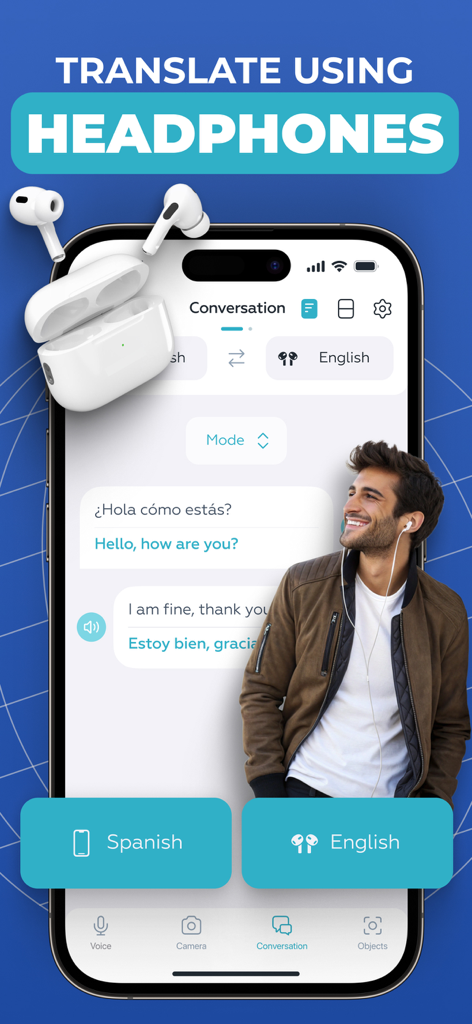
Voice Translator アプリのインターフェース。会話モードでヘッドフォンを使用して翻訳を表示しています。

Voice Translator アプリのインターフェース。会話モードでヘッドフォンを使用して翻訳を表示しています。

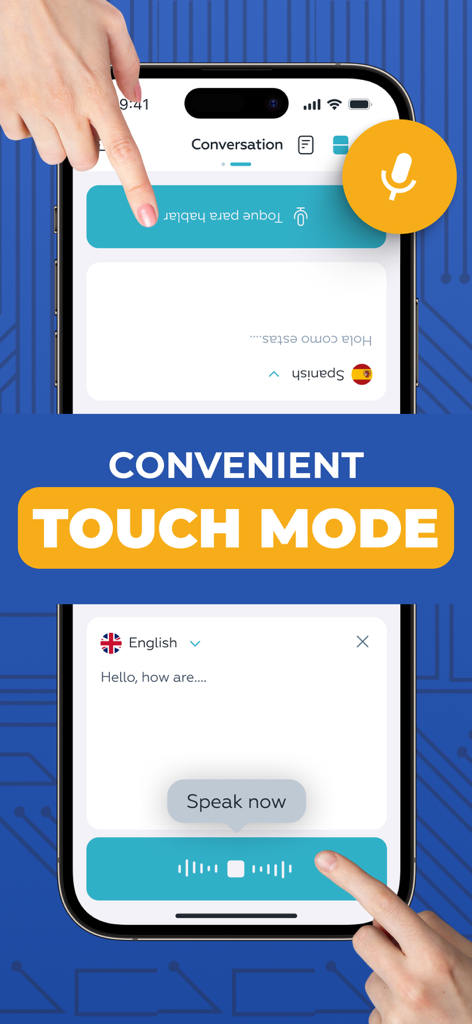
リアルタイムの分割画面音声翻訳のためのタッチモードを示すモバイルアプリのスクリーンショット。

リアルタイムの分割画面音声翻訳のためのタッチモードを示すモバイルアプリのスクリーンショット。

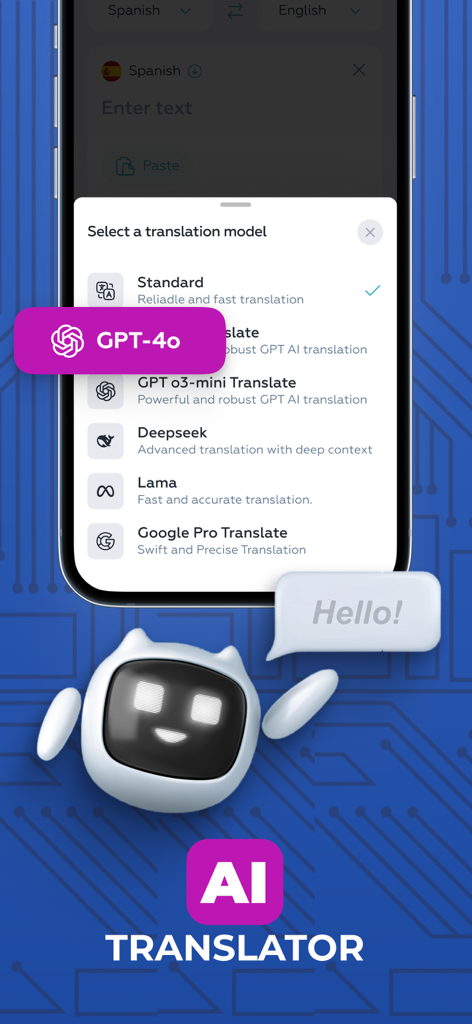
Voice Translator アプリ内の GPT-4o や Deepseek を含む AI 翻訳モデルのリストを表示するスマートフォンの画面。

Voice Translator アプリ内の GPT-4o や Deepseek を含む AI 翻訳モデルのリストを表示するスマートフォンの画面。

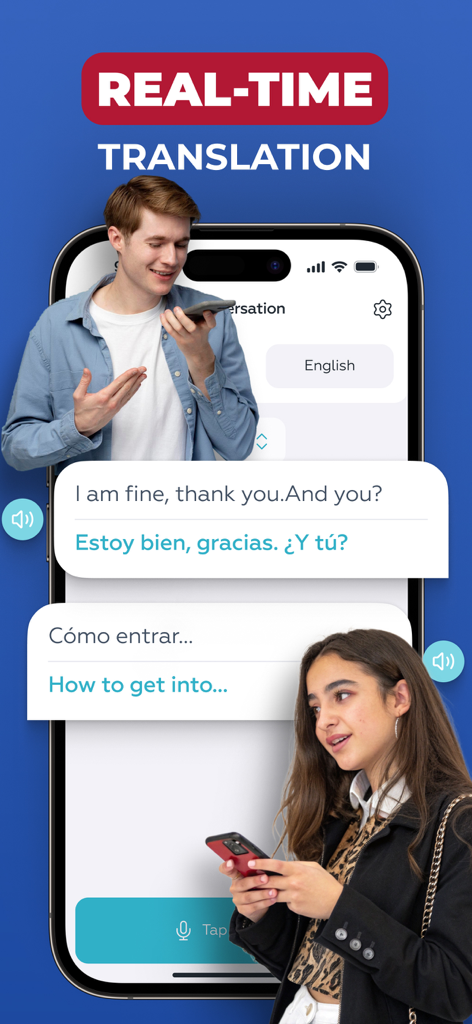
英語とスペイン語の間で、2人間のリアルタイム音声翻訳を示すスマートフォンの画面。

英語とスペイン語の間で、2人間のリアルタイム音声翻訳を示すスマートフォンの画面。

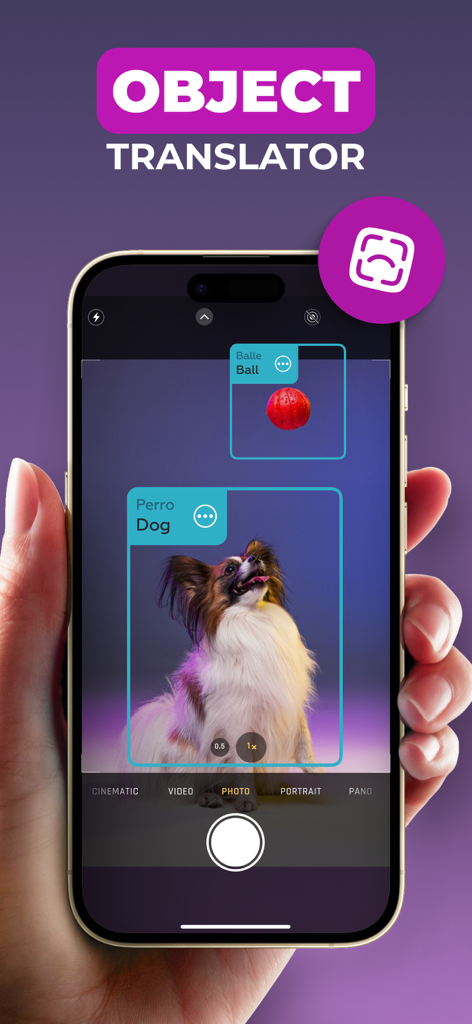
AI オブジェクト翻訳機能が、AR を使用してリアルタイムで犬とボールを識別し、翻訳しているスマートフォン。

AI オブジェクト翻訳機能が、AR を使用してリアルタイムで犬とボールを識別し、翻訳しているスマートフォン。

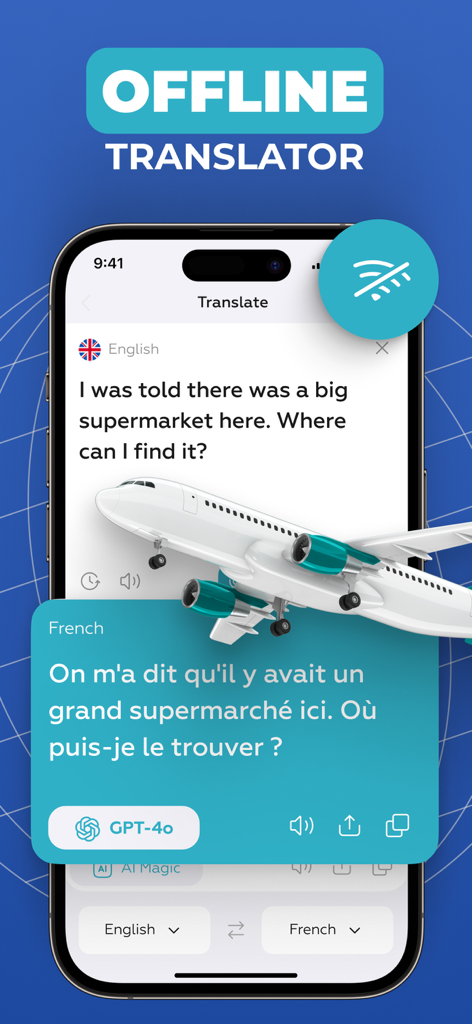
GPT-4o を使用して英語からフランス語へのオフライン翻訳を行う Voice Translator アプリのスマートフォンの画面。飛行機のイラスト付き。

GPT-4o を使用して英語からフランス語へのオフライン翻訳を行う Voice Translator アプリのスマートフォンの画面。飛行機のイラスト付き。

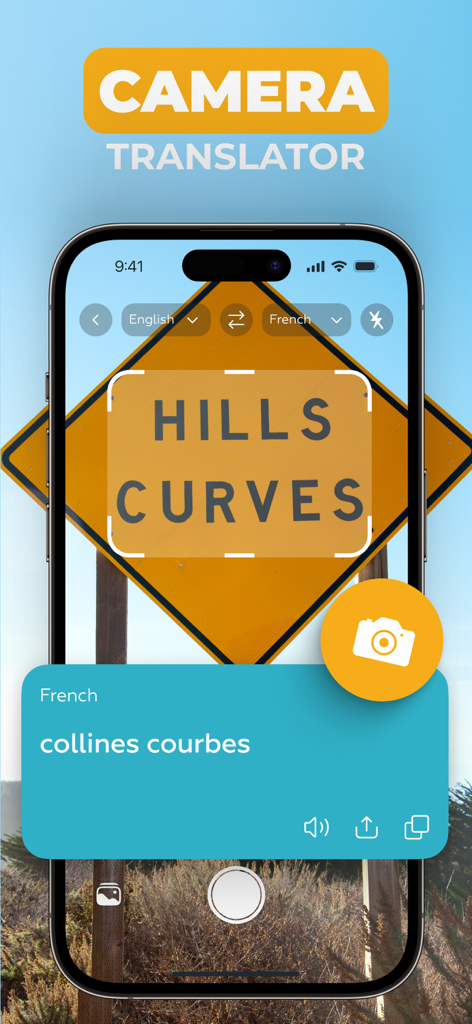
カメラを使用して道路標識を英語からフランス語に翻訳している Voice Translator アプリのスクリーンショット。

カメラを使用して道路標識を英語からフランス語に翻訳している Voice Translator アプリのスクリーンショット。

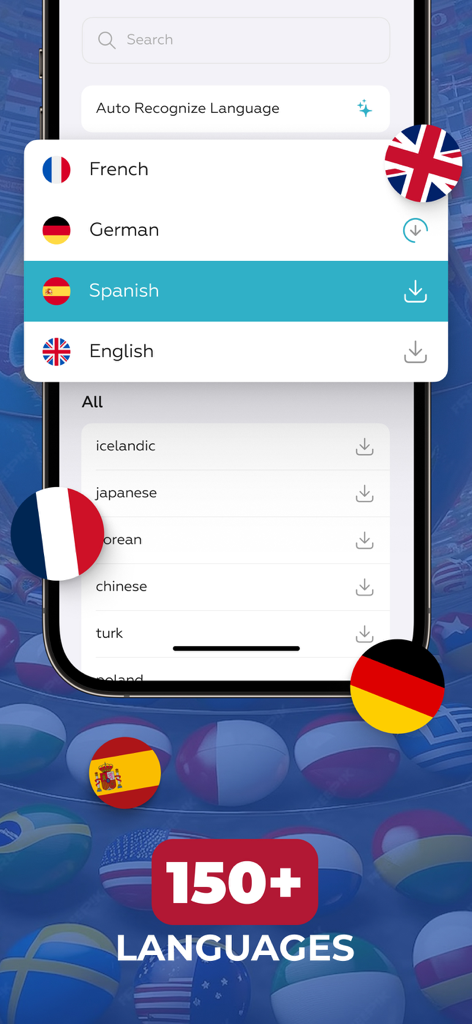
Voice Translator アプリの画面。国旗と共に150以上のサポート言語の選択肢が表示されています。

Voice Translator アプリの画面。国旗と共に150以上のサポート言語の選択肢が表示されています。

制限なくコミュニケーション

このアプリを際立たせるツール、 2M+ 人のユーザーが選択.

🤝

シームレスな対面チャット

タッチモードでギャップを埋めましょう。分割画面インターフェースにより、1対1の会話が自然で、速く、完全にスムーズになります。

🎧

プライベートAI通訳

ヘッドフォンを接続して、目立たずリアルタイムの音声翻訳を行います。外出先でのビジネス会議やプライベートな会話に最適です。

👁️

瞬時の視覚的インテリジェンス

カメラを向けて、看板、メニュー、オブジェクトを瞬時に翻訳します。ARテクノロジーを使用して、どんな環境でも自信を持ってナビゲートしましょう。

アプリについて

について知っておくべきこと Voice Translator: Translate AI.

説明

Voice Translator AI is the perfect tool for seamless communication with people from around the world. Whether you're traveling, working, or making new connections, this app offers fast, accurate, and natural translations in real time. With advanced AI technology, it transforms your device into a personal interpreter. Key features: - AI translation with model selection - Headphones Mode - Real Talk Mode - Touch Mode - Camera Translator - Object Translator - Supports more than 150 languages AI Voice Translator. Choose from multiple advanced AI translation models to get the most accurate and natural-sounding results. The app allows you to select the voice engine that best fits your needs - whether you're aiming for speed, nuance, or clarity. This flexibility ensures that your spoken words are translated with maximum precision, preserving tone and meaning across languages. Headphones Mode. This feature helps you stay focused during conversations by providing live audio translation directly through your own headphones. Simply connect your headphones, speak in your language, and hear the translation without disturbing others. It’s perfect for traveling, public spaces, or private discussions. Touch Mode. This mode is designed for face-to-face conversations where two people sit across from each other. The voice input buttons appear on opposite sides of the screen - one for each speaker - so each person can simply tap their side to talk. It’s a natural and convenient way to communicate using just one device. For added flexibility, you can also switch to a layout with both buttons at the bottom of the screen - whichever feels more comfortable. Real Talk Mode. Perfect for longer conversations, this mode allows you to start the dialogue with just a single tap. Once activated, you can speak freely without pressing the button again after each phrase. The app continuously captures the conversation and translates phrases as you go - ensuring a smooth experience. Camera Translator. Instantly translate printed text, menus, signs, documents using your phone's camera. The app uses smart OCR to detect and recognize text in various languages, delivering quick and accurate translations on screen. Object Translator. Identify and translate objects around you in real time using AR technology. Just point your camera at an item, and the app will recognize and display its name or description in your selected language - perfect for navigating unfamiliar environments or learning new vocabulary visually. Wide Language Support. The app includes a large selection of languages from globally spoken ones to more specific regional dialects - ensuring you’re covered in almost any situation, anywhere in the world. Auto-Renewable Subscription Terms: - Your subscription will automatically renew on a weekly, monthly, or annual basis according to the plan you choose, and the charge will be processed via your Apple ID. - Free trials automatically switch to paid subscriptions unless canceled at least 24 hours before the trial period ends. - If you purchase a premium plan during a free trial, any remaining trial time will be forfeited. - You can manage or cancel your subscription anytime in your iTunes account settings. Changes will apply after the current billing period ends. Terms Of Use - https://docs.google.com/document/d/1o074NELkqmPFKd1jRvL5cG_Pp-xw5eIiLwNkCNS0UY8

最新バージョン

4.5.0

サイズ

243.9 MB

リリース日

2020年8月17日

世界中どこでも、制限なくコミュニケーション

最も高度なAI通訳を使用する200万人以上のグローバル市民やプロフェッショナルに加わりましょう。今すぐVoice Translator AIをダウンロードして、すべての会話をつながりに変えましょう。

ダウンロード: App Store
FAQ

よくある質問

について知っておくべきこと Voice Translator: Translate AI

Voice Translator: Translate AIとは何ですか?

Voice Translator: Translate AIは、高度なAI技術を使用して、高速で正確、かつ自然なリアルタイム翻訳を提供するアプリです。グローバルなコミュニケーションのためのパーソナル通訳として機能します。

Voice Translator: Translate AIは画像からテキストを翻訳できますか?

はい、Voice Translator: Translate AIにはカメラ翻訳機能があります。スマートOCR技術とスマートフォンのカメラを使用して、印刷されたテキスト、メニュー、標識、ドキュメントを瞬時に翻訳します。

Voice Translator: Translate AIにはオブジェクト翻訳機能が含まれていますか?

はい、Voice Translator: Translate AIにはオブジェクト翻訳機能が含まれています。AR技術を使用してオブジェクトをリアルタイムで識別および翻訳し、選択した言語でその名前または説明を表示します。

Voice Translator: Translate AIはいくつの言語をサポートしていますか?

Voice Translator: Translate AIは、世界中で話されている言語や特定の地域の方言を含む150以上の言語をサポートしています。これにより、さまざまなコミュニケーションニーズに対応できます。

Voice Translator: Translate AIではAI翻訳モデルの選択ができますか?

はい、Voice Translator: Translate AIでは、GPT-4o、Deepseek、Lama、Google Pro Translateなど、複数の高度なAI翻訳モデルから選択して、正確な結果を得ることができます。

Voice Translator: Translate AIのヘッドフォンモードはどのように機能しますか?

Voice Translator: Translate AIのヘッドフォンモードは、接続されたヘッドフォンを介して直接ライブ音声翻訳を提供します。ユーザーは自分の言語で話し、他の人に迷惑をかけずに翻訳を聞くことができます。

Voice Translator: Translate AIのタッチモードは何に使用されますか?

Voice Translator: Translate AIのタッチモードは、対面での会話を容易にします。画面の反対側に2つの入力ボタンが表示され、各人が話すためにタップできます。

Voice Translator: Translate AIのリアルトークモードの利点は何ですか?

Voice Translator: Translate AIのリアルトークモードは、連続的でスムーズな会話を可能にします。ユーザーは1回のタップで自由に話すことができ、アプリはボタンをさらに押すことなくフレーズを継続的にキャプチャして翻訳します。

Voice Translator: Translate AIはオフライン翻訳を提供していますか?

はい、Voice Translator: Translate AIはオフライン翻訳機能を提供しています。これにより、ユーザーはアプリのビジュアルで示されているように、インターネット接続がない場合でも会話を翻訳できます。

Voice Translator: Translate AIのサブスクリプションはどのように機能しますか?

Voice Translator: Translate AIのサブスクリプションは、週次、月次、または年次で自動的に更新されます。サブスクリプションの条件に従って、Apple IDを介して請求が処理されます。

Voice Translator: Translate AIの無料トライアルはありますか?

はい、Voice Translator: Translate AIは無料トライアルを提供しています。これらのトライアルは、トライアル期間が終了する少なくとも24時間前にキャンセルされない限り、自動的に有料サブスクリプションに切り替わります。

Voice Translator: Translate AIのサブスクリプションをキャンセルするにはどうすればよいですか?

ユーザーは、iTunesアカウント設定でいつでもVoice Translator: Translate AIのサブスクリプションを管理またはキャンセルできます。変更は現在の請求期間が終了した後に適用されます。

Voice Translator: Translate AIの利用規約はどこで見られますか?

Voice Translator: Translate AIの利用規約は、提供されたリンクから入手できます: https://docs.google.com/document/d/1o074NELkqmPFKd1jRvL5cG_Pp-xw5eIiLwNkCNS0UY8。

App information, icons, screenshots, and descriptions displayed on this page are sourced from the Apple App Store and are the property of their respective developers. Download estimates and rankings are based on MWM's proprietary models and may not reflect actual figures. This page is provided for informational and analytical purposes only.

Believe this page infringes your intellectual property? File a dispute