XpenseTracker Pro

XpenseTracker Pro

ダウンロード: App Store
ロゴ: XpenseTracker Pro

XpenseTracker Pro:プロフェッショナル向けの究極の経費・マイレージトラッカー

ログを自動化し、税控除を最大化し、監査準備完了レポートを作成します。不動産業者、請負業者、事業主が2008年から時間とお金を節約するために信頼しています。

ダウンロード: App Store

開発元

Silverware Software, LLC

カテゴリ

Finance

ダウンロード

800

ユーザー評価

4.7/5

評価数

800

対応言語

5

あらゆるビューでの効率

このインターフェースを利用する 800 人のユーザー.

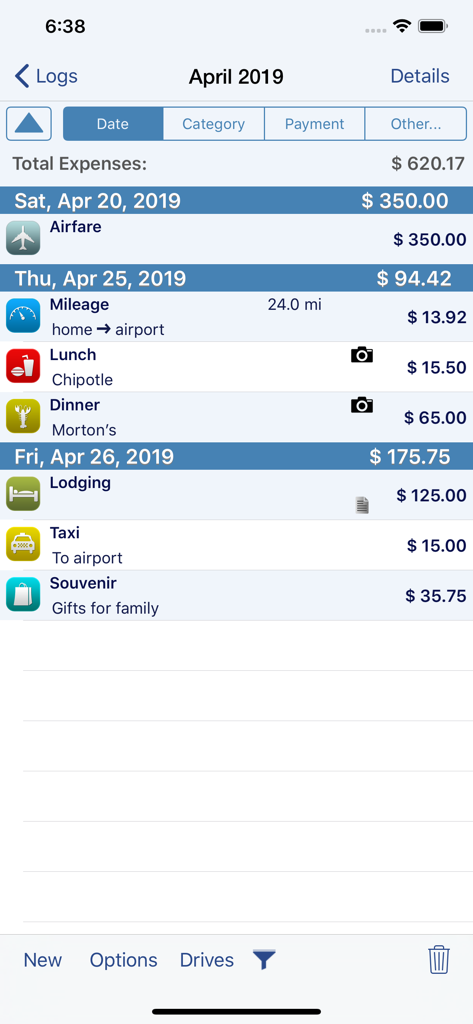
XpenseTracker Proアプリのスクリーンショット。航空運賃、マイレージ、食事など、詳細なビジネス旅行経費のリストが表示されます。

XpenseTracker Proアプリのスクリーンショット。航空運賃、マイレージ、食事など、詳細なビジネス旅行経費のリストが表示されます。

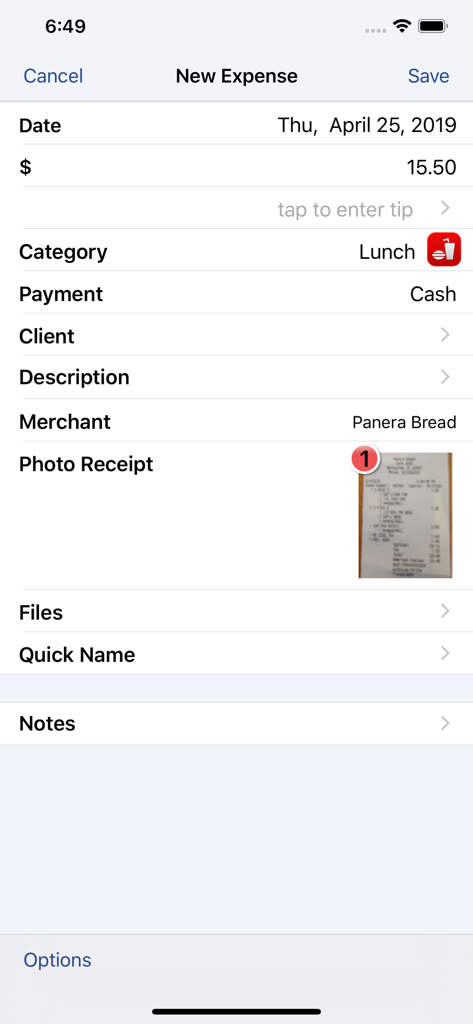
XpenseTracker Proアプリのインターフェース。写真付きレシートが添付されたビジネスランチの新しい経費エントリが表示されます。

XpenseTracker Proアプリのインターフェース。写真付きレシートが添付されたビジネスランチの新しい経費エントリが表示されます。

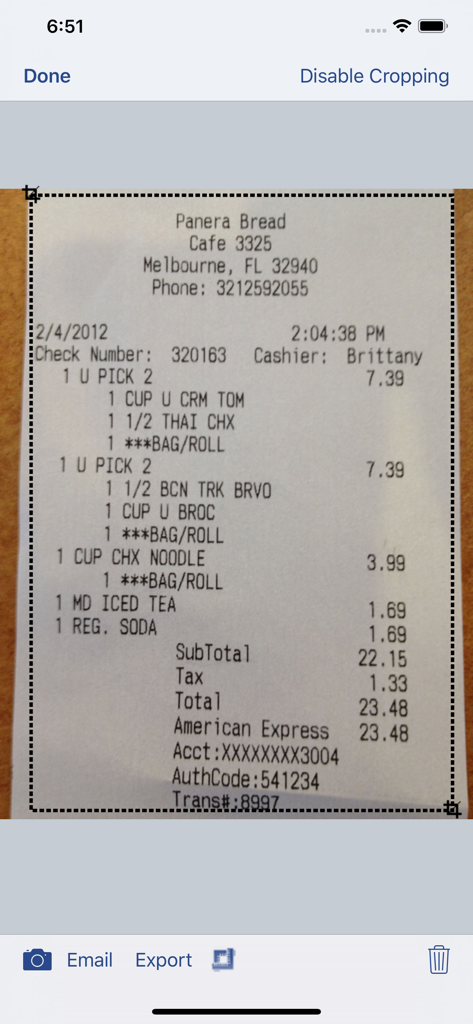
XpenseTracker Proアプリでレストランのレシートをスキャンしてトリミングしています。

XpenseTracker Proアプリでレストランのレシートをスキャンしてトリミングしています。

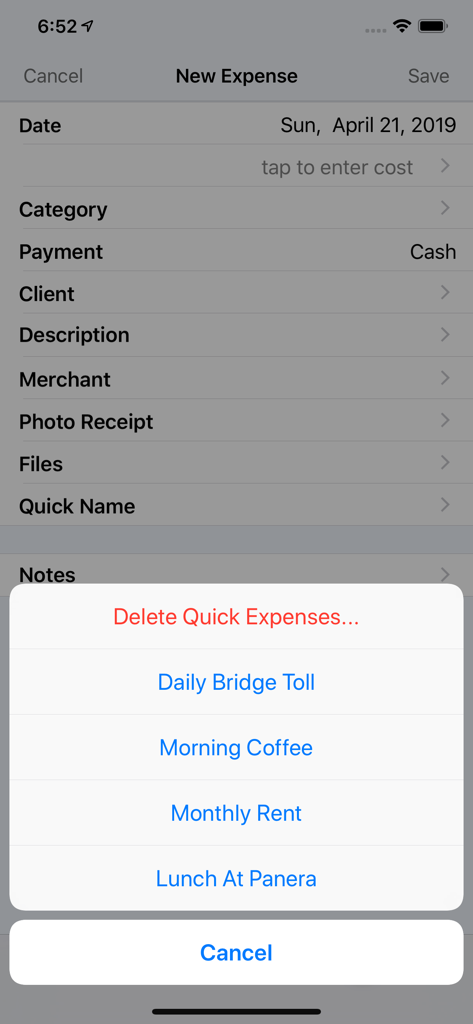
XpenseTracker Proの新しい経費エントリ画面。有料道路やコーヒーなど、頻繁に使用する経費のクイック選択メニューが表示されます。

XpenseTracker Proの新しい経費エントリ画面。有料道路やコーヒーなど、頻繁に使用する経費のクイック選択メニューが表示されます。

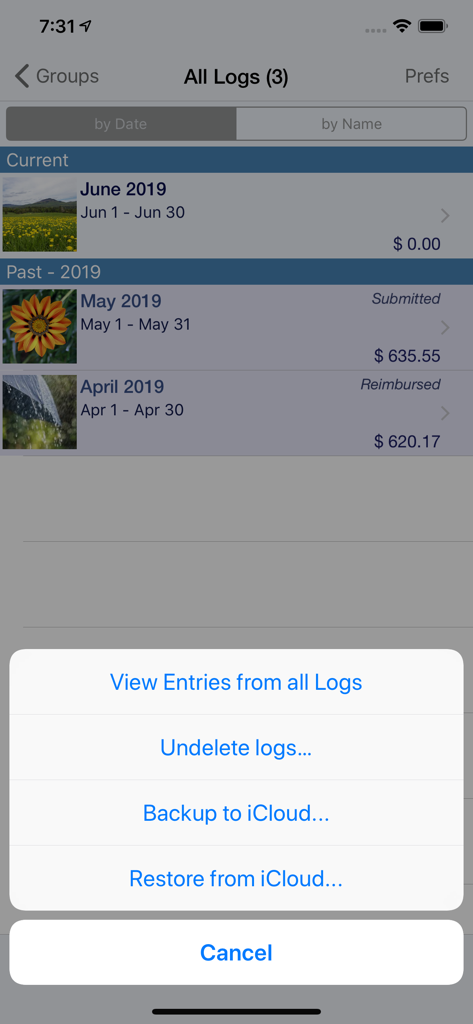
XpenseTracker Proアプリのインターフェース。月次経費ログと、iCloudバックアップおよび復元オプションのアクションメニューが表示されます。

XpenseTracker Proアプリのインターフェース。月次経費ログと、iCloudバックアップおよび復元オプションのアクションメニューが表示されます。

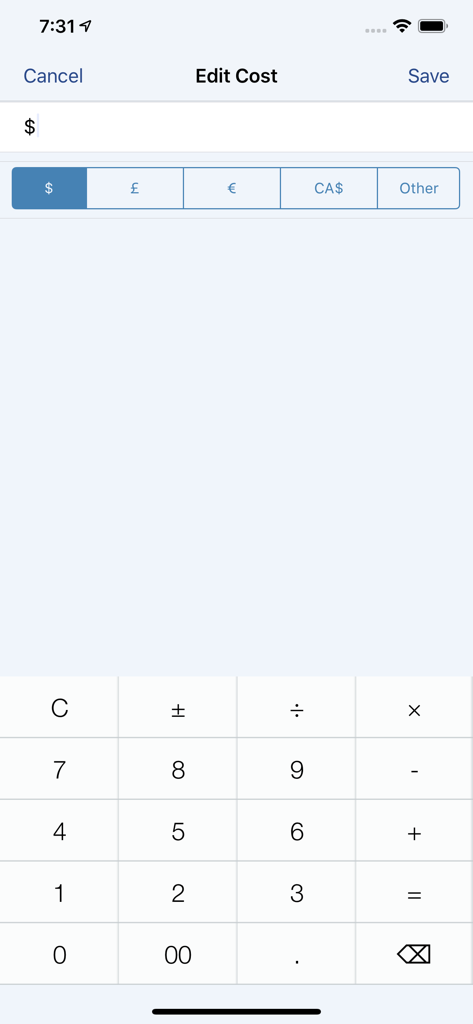
通貨セレクターと数値計算機を備えたXpenseTracker Pro編集コスト画面。

通貨セレクターと数値計算機を備えたXpenseTracker Pro編集コスト画面。

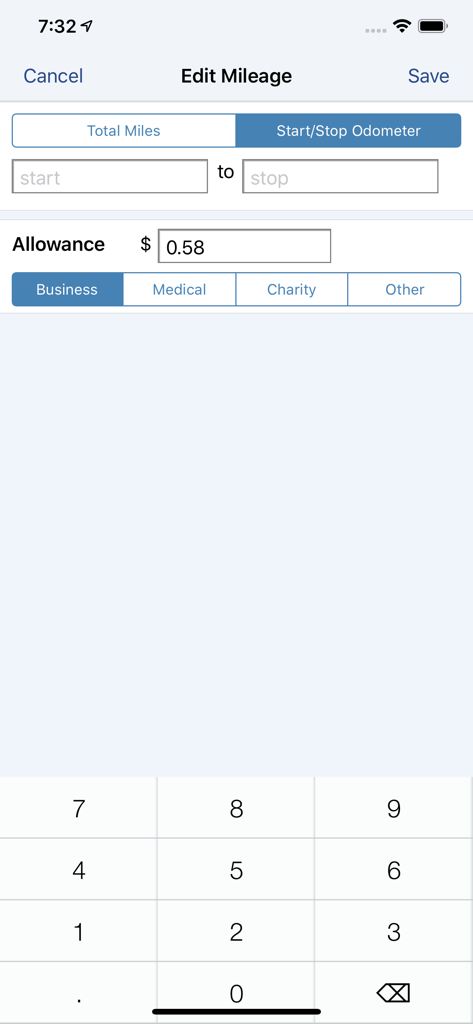
開始および停止オドメーターの読み取り値とビジネス経費分類を備えたXpenseTracker Proのマイレージ編集用インターフェース。

開始および停止オドメーターの読み取り値とビジネス経費分類を備えたXpenseTracker Proのマイレージ編集用インターフェース。

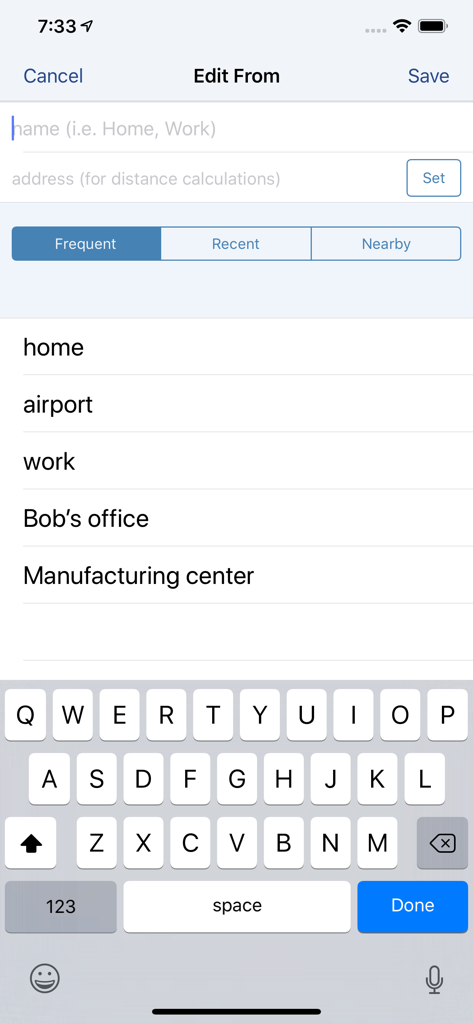
自宅や職場などの頻繁な場所を示す、XpenseTracker Proでの移動開始住所を編集するためのインターフェース。

自宅や職場などの頻繁な場所を示す、XpenseTracker Proでの移動開始住所を編集するためのインターフェース。

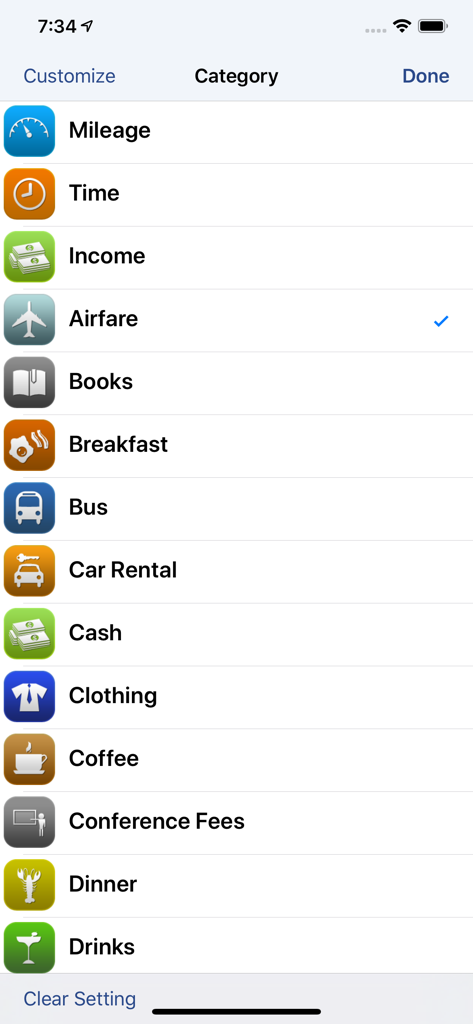
XpenseTracker Proアプリのカスタマイズ可能なビジネス経費カテゴリのリスト。

XpenseTracker Proアプリのカスタマイズ可能なビジネス経費カテゴリのリスト。

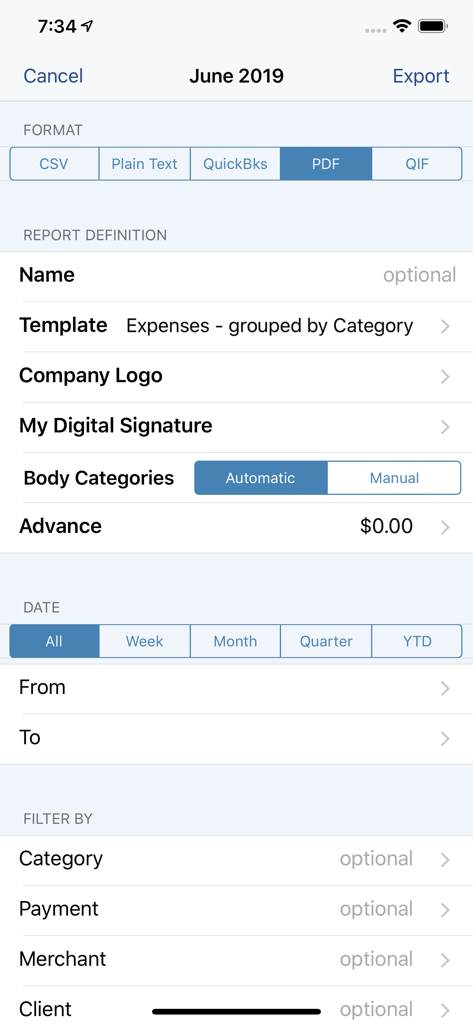
XpenseTracker Proレポートのエクスポート設定画面。PDF、CSV、QuickBooks形式のオプションが表示されます。

XpenseTracker Proレポートのエクスポート設定画面。PDF、CSV、QuickBooks形式のオプションが表示されます。

生産性を最大化するプロフェッショナルグレードのツール

このアプリを際立たせるツール、 800 人のユーザーが選択.

🚗

スマートマイレージ自動化

GPS、オドメーター、または住所間移動で各旅行を追跡します。複数目的地ルートおよび不動産業者向けに最適化されています。

🧾

監査準備完了レシートキャプチャ

外出先でレシートをスナップします。厳格な税務監査に耐える検証済みの正確さのために、当社の「ヒューマンスキャン」サービスをご利用ください。

📊

デスクトップクラスのデータエクスポート

QuickBooks、Excel、Numbersとシームレスに同期します。数秒で会計士向けのプロフェッショナルなPDFレポートを生成します。

アプリについて

について知っておくべきこと XpenseTracker Pro.

説明

Save time & money! Track your MILEAGE and EXPENSES with the most powerful expense app available! A comprehensive, full featured app that's easy to use and extends to your desktop. XpenseTracker has been a customer favorite on the App Store since 2008. *March 2017- "BEST FINANCE APP" http://www.creditdonkey.com/finance-apps.html *XpenseTracker named "must have tax app" by H & R Block** http://tinyurl.com/HRBlockLovesXT *EventJuice UK declares "must download app" http://tinyurl.com/MustHaveForEvents *TabletPCReview.com rated XpenseTracker "Best Personal Finance App for iPad" - http://tinyurl.com/bestfinanceapp ----- XpenseTracker is a comprehensive expense tracking and reporting application for anyone wishing to track their expenses and/or mileage. Its ease of use, full features and great interface make it an essential tool for every iPhone/iPad user. Its power even extends to the desktop by allowing emailing or exporting of the expense reports and accompanying photo receipts directly to the desktop. It will save you time and money. ----- Features include: * Records all of your expenses and provides a running total for each log * Completely customize categories, sub-categories and payment types * Completely customizable fields you choose to use or not. Unused fields are hidden when adding new expenses * Sort expenses by "Date" , "Category", "Payment Type" or "Client" * For each category, the last payment type is remembered further simplifying data entry * Keeps a frequently used list for many fields * Mark a log as "reimbursed" or "submitted" * Easy mileage tracking with MANY different options: + Enter total distance or start/stop odometer reading (remembers last stop reading) + Enter start/stop addresses (app will calculate distance) + Enter more than one destination in a single entry if desired (loved by real estate agents) + Use GPS to track distances - just tell the app when you leave and arrive (available if AutoTrack is not used) * Supports ALL major currencies * Many user defined preferences * Extensive support for VAT * Email your expense reports in comma delimited (CSV) format for easy import to Excel or Numbers. Photo receipts are also emailed as JPEG attachments * Support for Quickbooks (IIF) format * Export your reports directly to your Mac or PC via Wi-Fi connection and have your file immediately appear on your desktop. The customizable CSV file can be easily imported into Excel or Numbers * Well over a dozen PDF templates for creating beautiful, finished PDF format reports * Support for sorting and exporting by client * Using the iPhone’s built-in camera, take snapshots of your receipts * Capture multiple images per expense * Automatically backup your data to iCloud * Set Password or use TouchID ----- Required Subscription A subscription to Unlimited Usage or AutoTrack (which includes unlimited usage) is required after adding 25 free entries Subscription Details: * Choose between Unlimited Usage or AutoTrack (includes unlimited usage) * AutoTrack is a feature that will automatically track your drives. All you need to do is carry your device with you * Payment charged to iTunes account at confirmation of purchase * Automatically renews unless cancelled at least 24-hours before the end of the current period * Account will be charged for renewal within 24-hours prior to the end of the current period * Each subscription is available monthly or yearly Optional Subscription - Human Scan: * Human Scan will allow you to take a picture of a receipt and have an actual human extract the key information and update your expense entry. You do NOT need this add-on if you simply want to take photos of your receipt as the app already has that built-in. Questions/Comments: Tap the Email the Author field within the app's Prefs screen ----- silverwaresoftware.com/PrivacyPolicy.html silverwaresoftware.com/TermsOfUse.html

最新バージョン

1.8.5

サイズ

62.2 MB

リリース日

2021年4月22日

お金を無駄にするのをやめる準備はできましたか?

マイレージと経費を自動化する何千人もの移動の多いプロフェッショナルに加わりましょう。最初の25件のエントリを無料で開始し、H&R Blockが「税務シーズンには必須」と呼ぶ理由をご覧ください。

ダウンロード: App Store

App information, icons, screenshots, and descriptions displayed on this page are sourced from the Apple App Store and are the property of their respective developers. Download estimates and rankings are based on MWM's proprietary models and may not reflect actual figures. This page is provided for informational and analytical purposes only.

Believe this page infringes your intellectual property? File a dispute