정확성을 위해 설계된 전문가 수준의 개인 재정 도구입니다. 여러 계정을 추적하고, 사용자 지정 예산을 설정하며, 미래 현금 흐름을 예측하세요. 모든 것을 Apple 기기에서 안전하게 동기화할 수 있습니다.
개발사
Graham Haley
카테고리
Finance
다운로드
96K+
사용자 평점
4.5/5
총 평가 수
2K+
지원 언어
1
손끝에서 펼쳐지는 정확성
이 인터페이스를 사용하는 96K+ 명의 사용자.
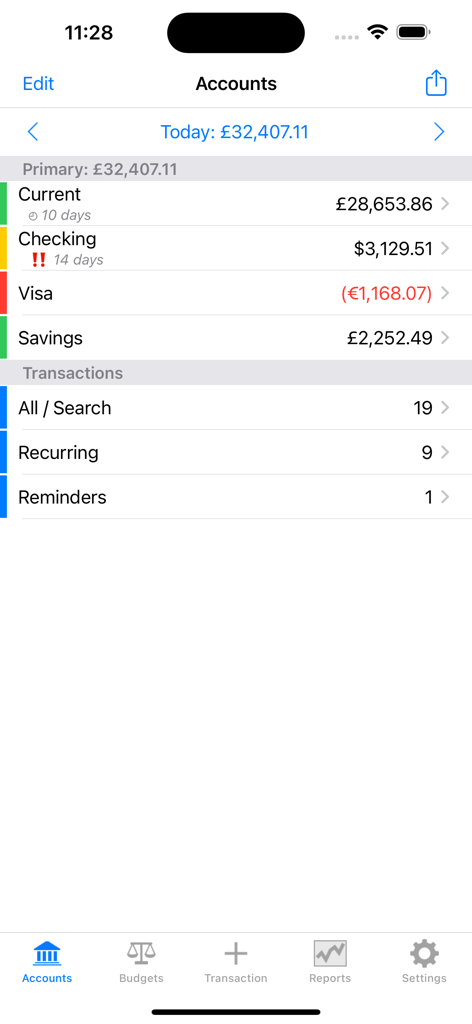
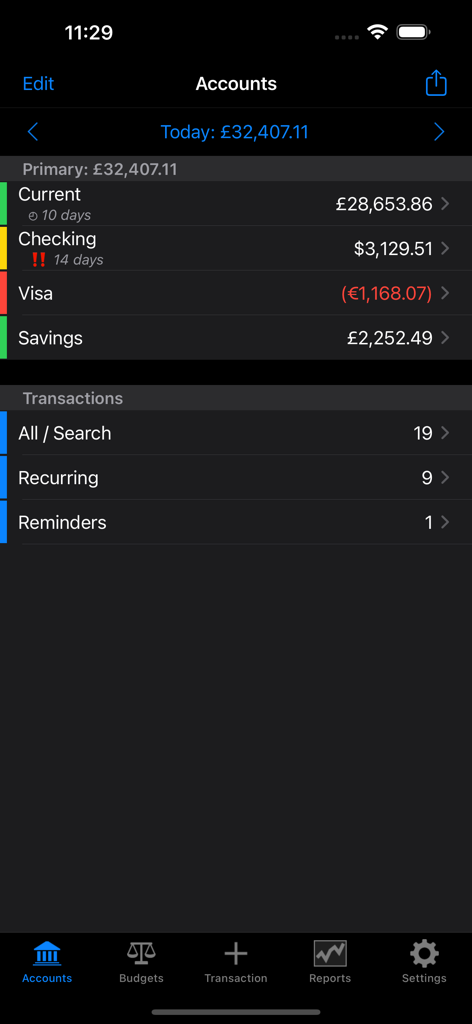
Account Tracker 인터페이스에 여러 은행 계좌와 다양한 통화 잔액 표시
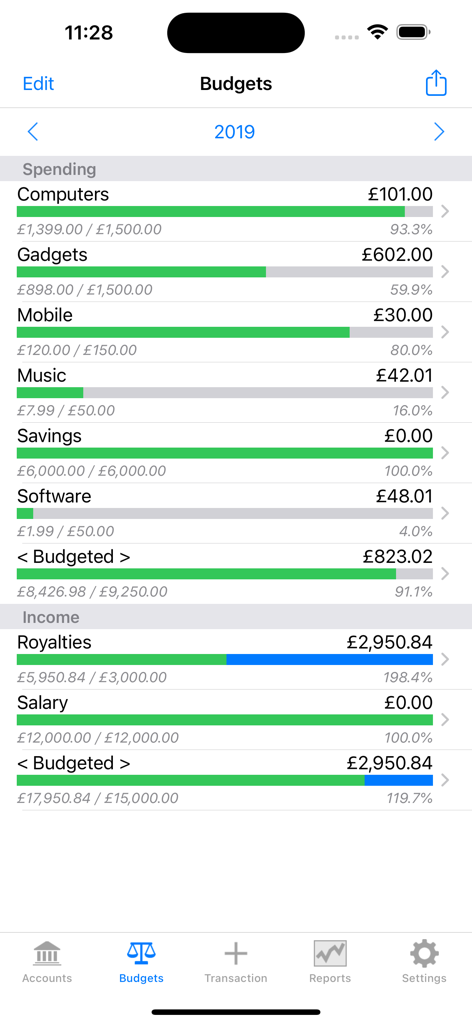
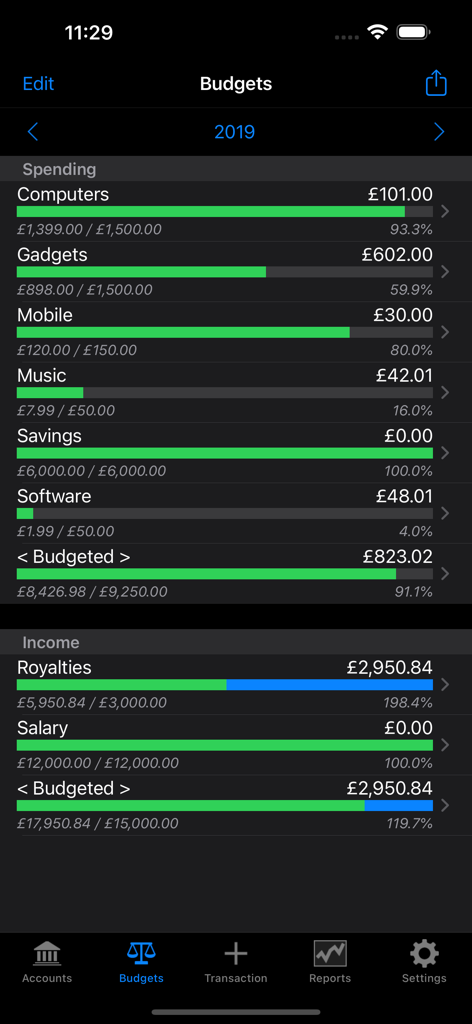
Account Tracker 앱의 상세한 예산 추적 보기. 지출 및 수입 범주에 대한 진행률 표시줄과 연간 총계 표시
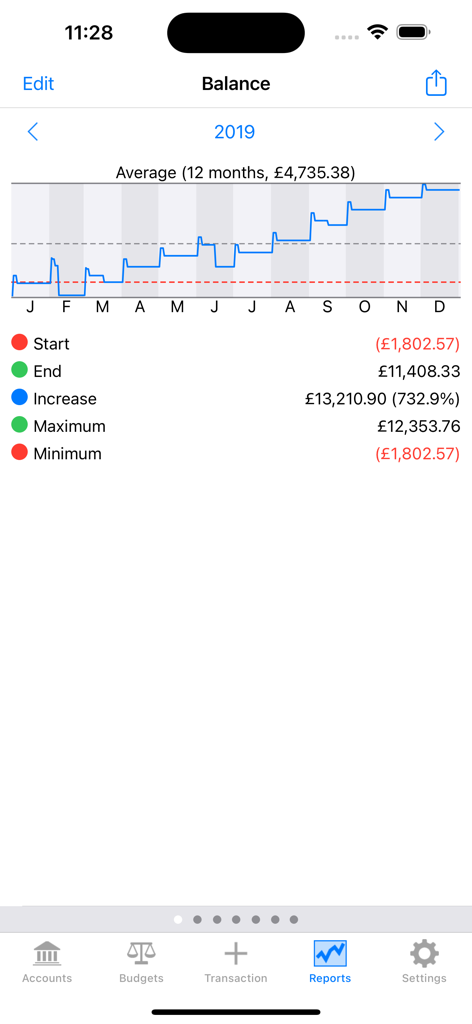
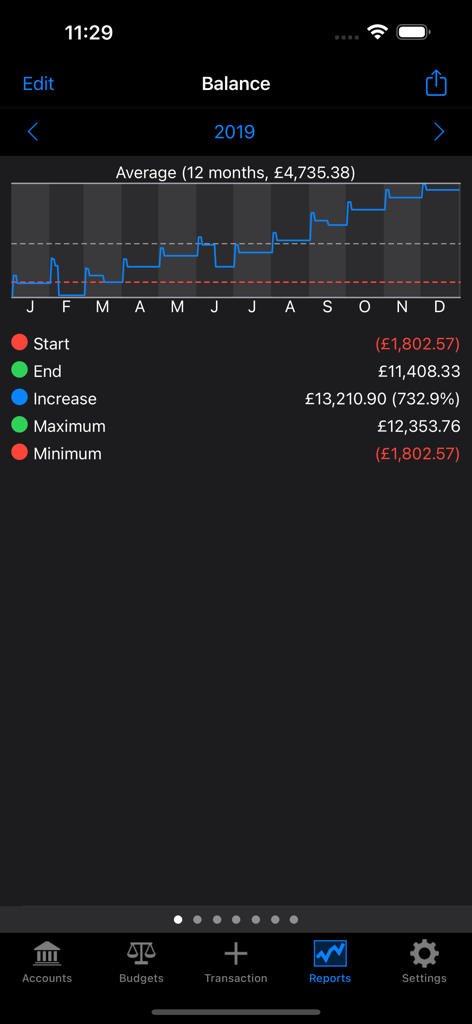
연간 계좌 잔액 보고서. 월별 라인 그래프와 재무 통계를 표시하여 계좌 성장 표시
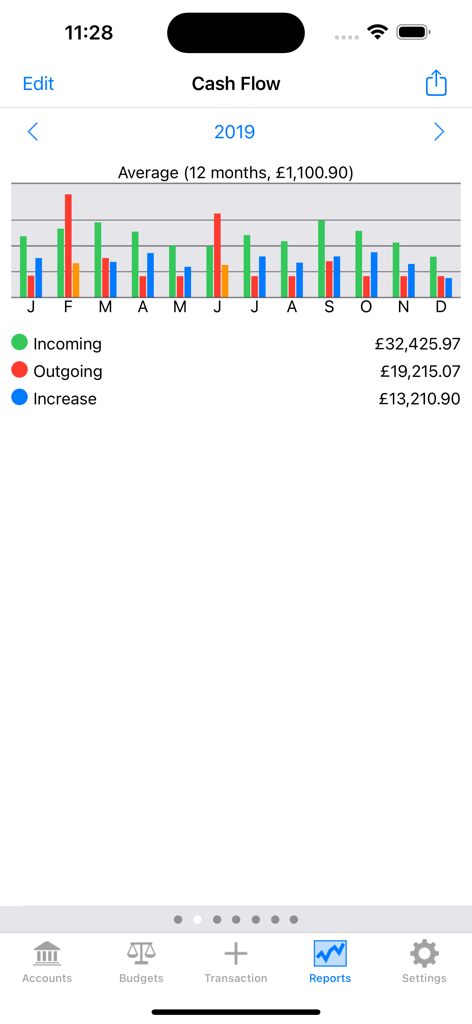
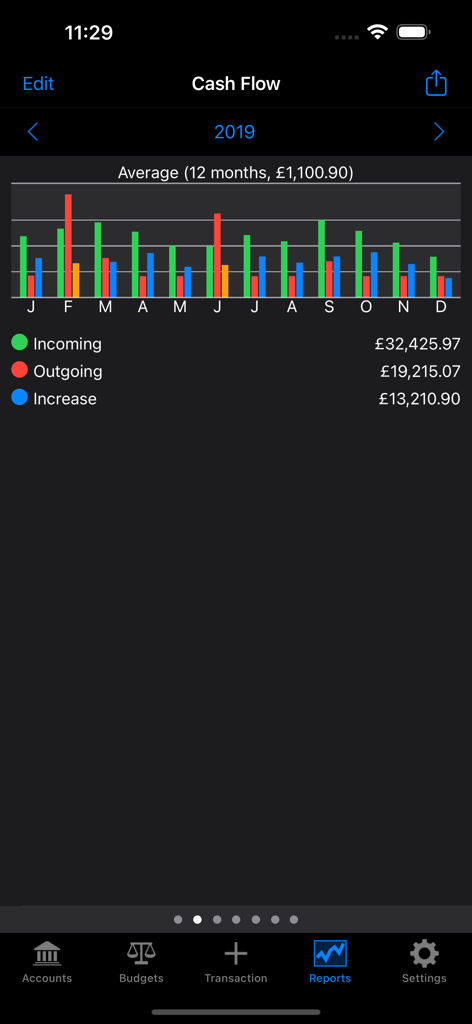
Account Tracker 현금 흐름 보고서 화면. 수입 및 지출의 월별 막대 차트 표시
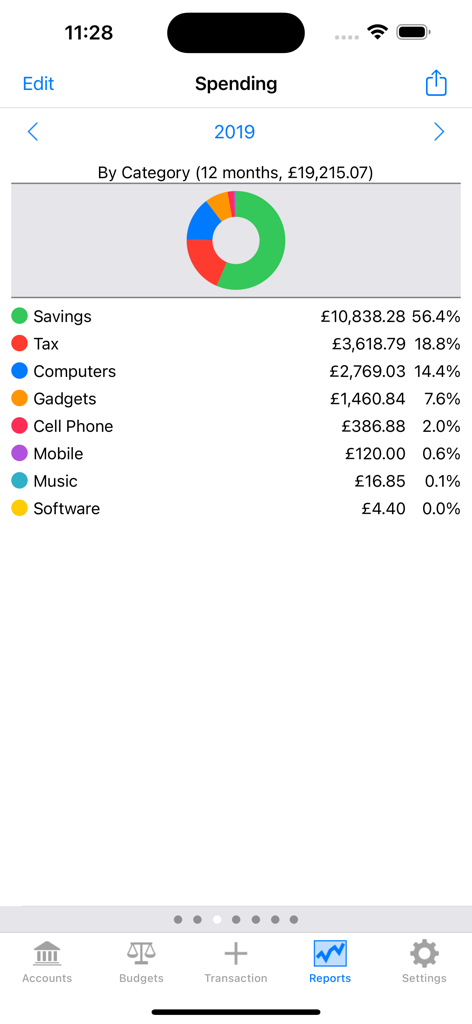
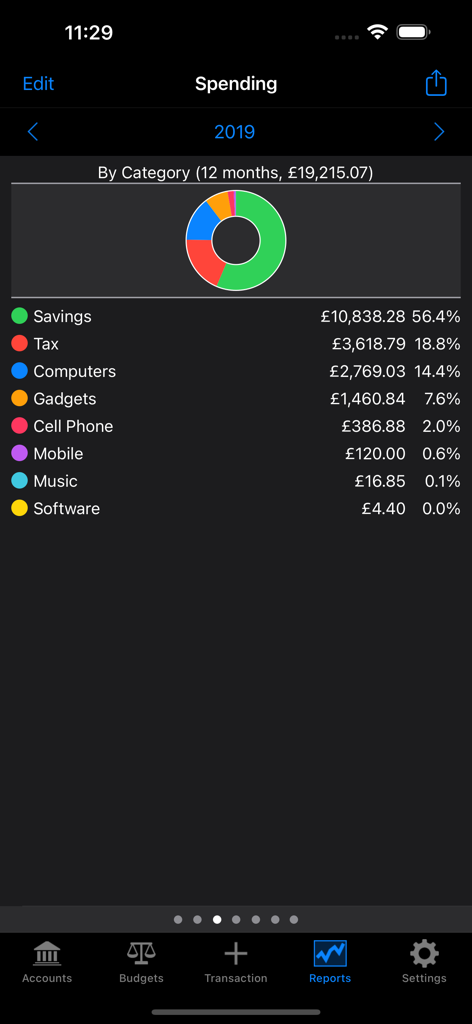
Account Tracker 지출 보고서. 범주와 도넛 차트 표시
Account Tracker 대시보드에 다중 통화 지원 및 거래 요약이 포함된 금융 계좌 목록 표시
Account Tracker 앱 대시보드에 개인 지출 및 수입 예산 진행률 표시줄 표시
연간 계좌 잔액 보고서에 성장 차트와 재무 요약 표시
Account Tracker 현금 흐름 보고서. 거래 수입 및 지출에 대한 월별 막대 차트 표시
Account Tracker 지출 보고서. 연간 지출 범주별 도넛 차트 표시
전문가 수준의 재정 관리
이 앱을 돋보이게 하는 도구, 96K+ 명의 사용자가 선택.
🔮
예측 현금 흐름
과거를 돌아보지 마세요. 예정된 청구서와 약속을 기반으로 미래 계좌 잔액을 예측하는 미래 예측 기능을 사용하세요.
⚖️
수동 계좌 대사
은행 명세서와 직접 거래를 대사하여 100% 정확성을 유지하세요. 기록이 항상 완벽하게 동기화되도록 보장합니다.
💼
비즈니스 및 개인 분리
다중 통화 거래 및 하위 범주에 대한 완벽한 지원을 통해 전문적인 생활과 개인적인 생활을 위한 별도의 계좌 그룹을 쉽게 관리하세요.
앱 소개
에 대해 알아야 할 모든 것 Account Tracker.
설명
Apple "New apps and games we love" (on the Mac), March 2017
Apple "Staff Favourite" in the UK (on iOS), Jul/Aug 2010
Account Tracker is a powerful personal finance app that helps you track spending and monitor balances across multiple accounts. Its clean, intuitive user interface, and features such as alerts, bill reminders, budgets, reports and full multi-currency support, make it easy to take control of your finances.
This FREE version requires a subscription, either quarterly or yearly. When you sign up, the first month is free, to give you a chance to try the app before being charged. You can manage or cancel your subscription at any time by going to your account settings on the AppStore. If you prefer a subscription-free alternative, Account Tracker Pro gives you the same content, plus basic support for Apple Watch.
Also check out Account Tracker for Mac, now available on the Mac App Store. It requires Account Tracker version 6 or above (to sync over iCloud or Dropbox), and macOS Sierra (10.12) or above.
ACCOUNTS
- Track multiple accounts: checking, current, savings, credit cards, loans/mortgages ... etc
- Separate your accounts into groups, e.g. personal vs business accounts
- Enter your recurring transactions using calendar-based repeat intervals, e.g. every 2 weeks, the last Friday of every month ... etc
- Quickly and simply enter one-off transactions as they happen
- Reconcile your account data with your statements
- While it is useful to see where your money goes, you can also look FORWARDS, showing all of your future commitments
- Alerts if an account is likely to go overdrawn or hit its overdraft limit
BILLS
- Enable reminders for non-automatic transactions, e.g. bills that you have to pay manually
- View all transactions with reminders set
- Alerts to tell you when these transactions are due
BUDGETS
- Add budgets per category for spending, income and transfers across individual or multiple accounts
- View these as daily, weekly, fortnightly/biweekly, monthly, yearly or custom dates (e.g. tax years)
- Monitor your transactions against the goals you set
REPORTS
- Detailed reports to really understand your financial position
- Account balance over time, cash flow, spending by category or payee detail, income by category or payer and transfers by category
- View these as daily, weekly, fortnightly/biweekly, monthly, yearly or custom dates (e.g. tax years)
- Export or print reports as PDF files
DATA, BACKUPS AND SYNCING
- Import historical transactions or bank statements from a CSV file
- Export account statements, budgets and reports in CSV format for offline processing, e.g. in a spreadsheet
- Local backup and restore on your device, plus transfer of backups by AirDrop, email, Dropbox or iCloud
- Support for database syncing across multiple devices (using either Dropbox or iCloud)
- PIN code protection, plus Face/Touch ID and 1Password integration
PLUS
- Full multi-currency support, per account and per transaction
- The default currency is the one local to your device, but this can be overridden
- Supports sub-categories and splitting a transaction across multiple categories/subcategories
- Universal, retina enabled app that works on the iPhone, iPad and iPod Touch - buy once, use it on ALL of your devices
- In-app user guide
SUPPORT
Please use the link to my support page from the AppStore page or from the app itself (or simply go to http://grahamhaley.co.uk/accounts/).
Alternatively, contact me directly via my support pages and you will get a quick response.
MORE INFORMATION
Privacy policy: http://grahamhaley.co.uk/privacy/
Terms of use (EULA): http://www.apple.com/legal/itunes/appstore/dev/stdeula
최신 버전
7.3.2
크기
15.6 MB
출시일
2009년 9월 13일
재정적 미래 완전 장악
정확한 예산 관리, 다중 통화 지원, 안전한 기기 간 동기화에 Account Tracker를 사용하는 96,000명 이상의 전문가와 함께하세요. 지금 30일 무료 체험을 시작하세요.
App information, icons, screenshots, and descriptions displayed on this page are sourced from the Apple App Store and are the property of their respective developers. Download estimates and rankings are based on MWM's proprietary models and may not reflect actual figures. This page is provided for informational and analytical purposes only.
Believe this page infringes your intellectual property? File a dispute