AVSub

AVSub

다운로드: App Store
로고: AVSub

AVSub: Subsonic을 위한 궁극의 Hi-Fi 스트리밍 파워하우스

개인 미디어 라이브러리를 완벽하게 제어하세요. 디지털 주권을 중시하는 오디오 애호가를 위해 설계된 비트 완벽 FLAC 재생, 고급 오프라인 캐싱, CarPlay 및 Apple Watch와의 원활한 통합을 경험하세요.

개발사

Richard Levy

카테고리

Music

다운로드

78K+

사용자 평점

3.8/5

총 평가 수

200

지원 언어

5

귀하의 라이브러리, 세련되게

이 인터페이스를 사용하는 78K+ 명의 사용자.

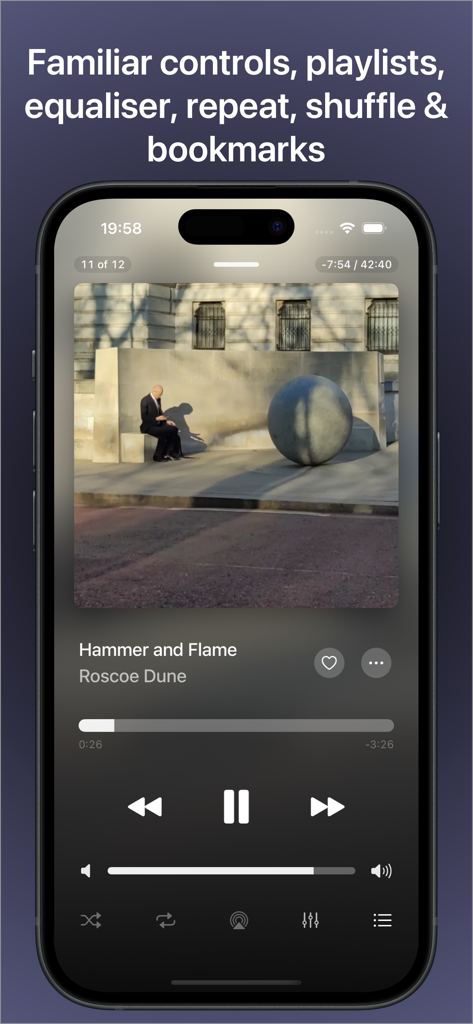
AVSub 음악 플레이어 인터페이스, iPhone에서 재생 컨트롤 및 앨범 아트 표시

AVSub 음악 플레이어 인터페이스, iPhone에서 재생 컨트롤 및 앨범 아트 표시

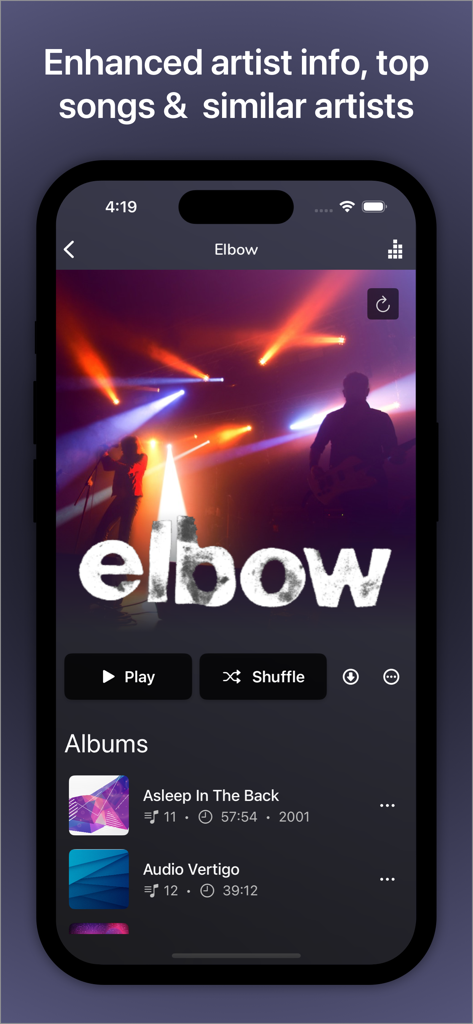
AVSub 앱 인터페이스, Elbow 밴드의 아티스트 세부 정보 및 앨범 표시

AVSub 앱 인터페이스, Elbow 밴드의 아티스트 세부 정보 및 앨범 표시

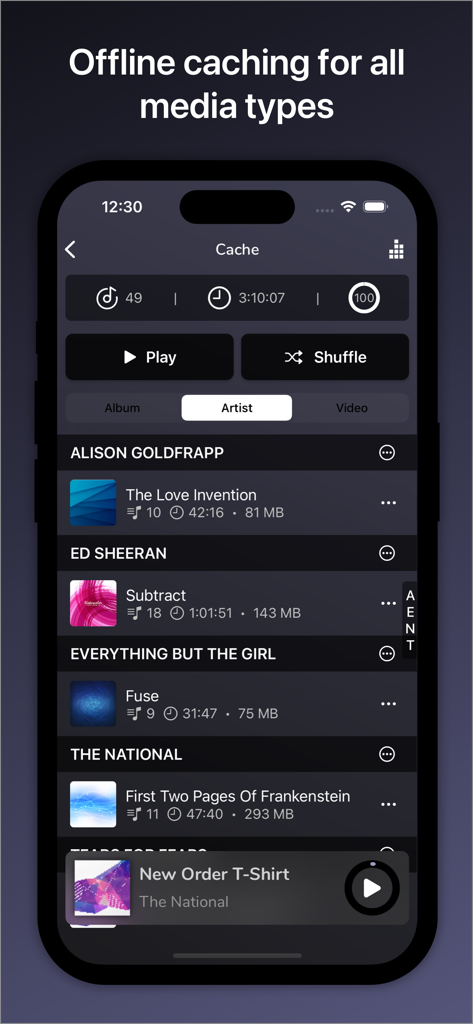
AVSub 앱 인터페이스, 재생을 위한 오프라인 캐시 음악 및 아티스트 표시

AVSub 앱 인터페이스, 재생을 위한 오프라인 캐시 음악 및 아티스트 표시

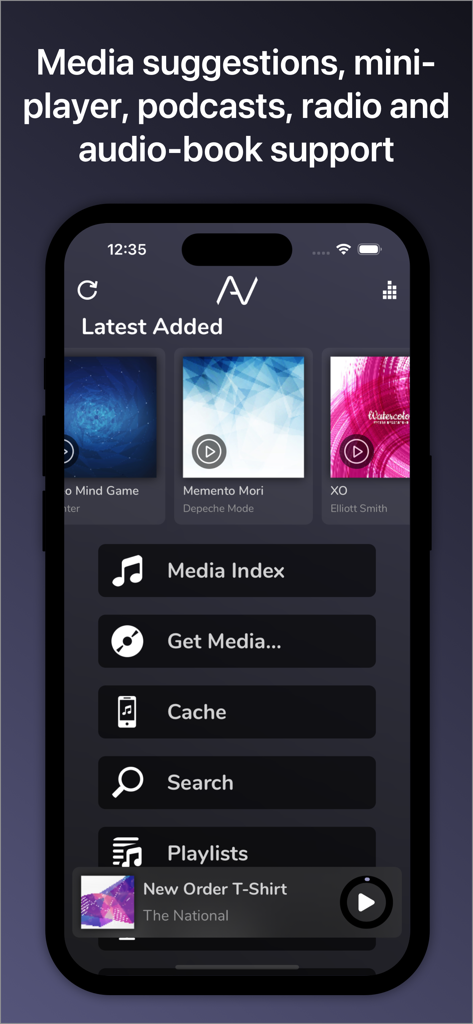
AVSub 앱 홈 화면, 최신 앨범 및 미디어 탐색 메뉴 표시

AVSub 앱 홈 화면, 최신 앨범 및 미디어 탐색 메뉴 표시

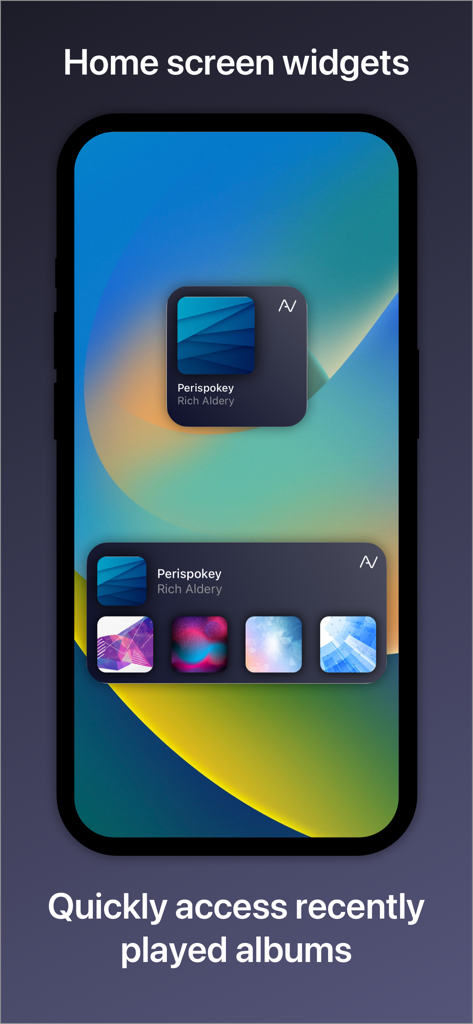
AVSub iOS 홈 화면 위젯, 최근 재생된 음악 앨범 표시

AVSub iOS 홈 화면 위젯, 최근 재생된 음악 앨범 표시

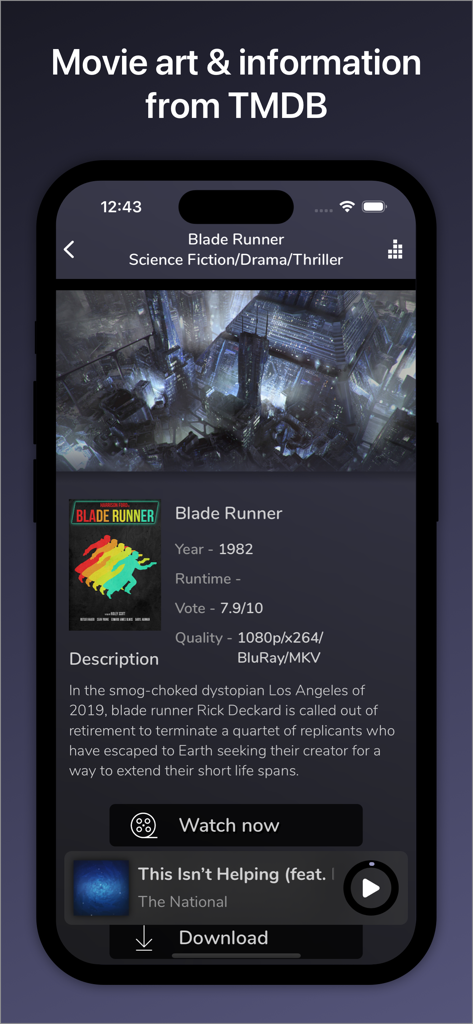
AVSub 앱 인터페이스, TMDB 통합으로 Blade Runner 영화 정보 및 포스터 표시

AVSub 앱 인터페이스, TMDB 통합으로 Blade Runner 영화 정보 및 포스터 표시

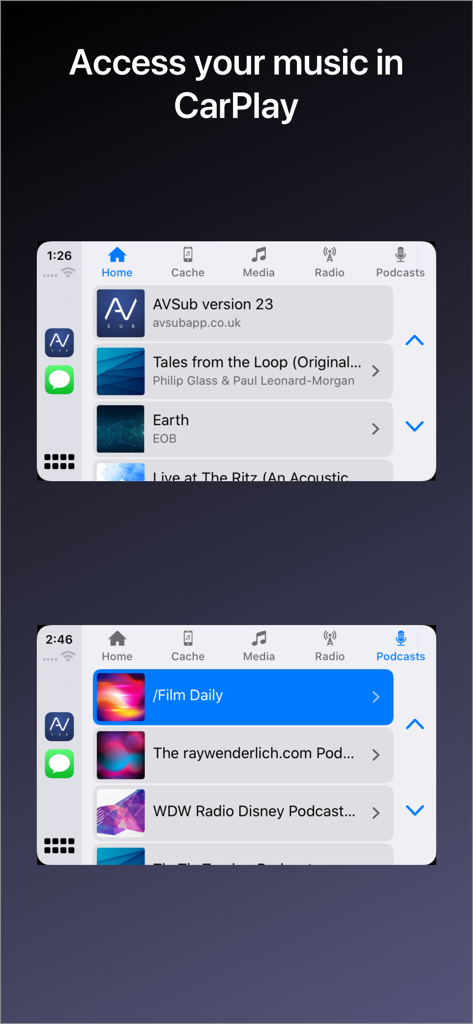
Apple CarPlay에서 AVSub 음악 및 팟캐스트 스트리밍 인터페이스

Apple CarPlay에서 AVSub 음악 및 팟캐스트 스트리밍 인터페이스

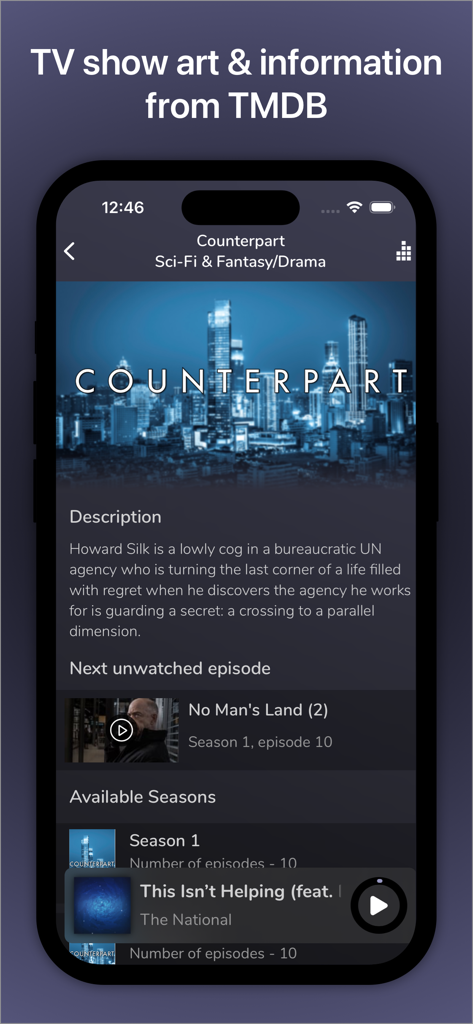
AVSub 모바일 앱 화면, TMDB에서 통합된 TV 쇼 메타데이터 및 에피소드 목록 표시

AVSub 모바일 앱 화면, TMDB에서 통합된 TV 쇼 메타데이터 및 에피소드 목록 표시

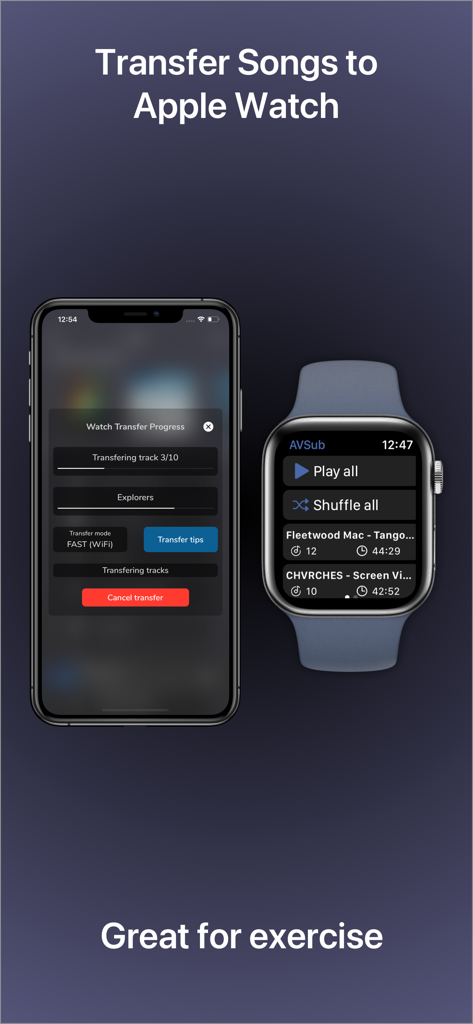
iPhone 및 Apple Watch, AVSub 앱에서 오프라인 청취를 위한 음악 전송 진행률 표시

iPhone 및 Apple Watch, AVSub 앱에서 오프라인 청취를 위한 음악 전송 진행률 표시

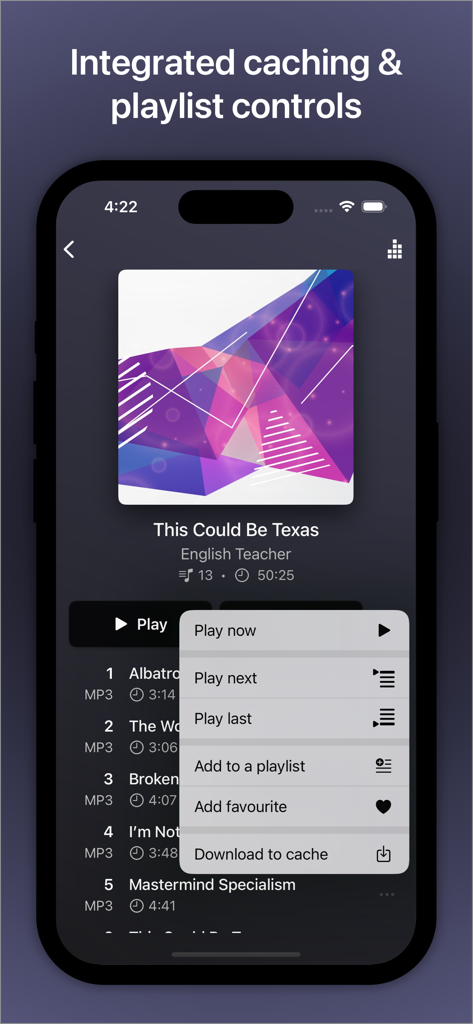
AVSub 음악 플레이어 인터페이스, 통합된 캐싱 및 재생 목록 제어 메뉴 포함

AVSub 음악 플레이어 인터페이스, 통합된 캐싱 및 재생 목록 제어 메뉴 포함

개인 미디어 우주를 마스터하세요

이 앱을 돋보이게 하는 도구, 78K+ 명의 사용자가 선택.

🔊

오디오 애호가 등급 성능

최첨단 DAC 및 헤드폰을 위해 설계된 FLAC, DSD 및 24비트/192kHz 출력을 비트 완벽하게 지원하여 타협하지 않는 사운드를 경험하세요.

📶

완전한 오프라인 독립성

지능형 백그라운드 캐싱으로 라이브러리를 어디든 가져가세요. 데이터 제한이나 셀룰러 끊김 없이 음악과 동영상을 스트리밍하세요.

🚗

원활한 Apple 통합

귀하의 개인 서버, 현대화됨. CarPlay, Apple Watch 확장 프로그램 및 고품질 AirPlay 스트리밍을 통해 컬렉션에 손쉽게 액세스하세요.

앱 소개

에 대해 알아야 할 모든 것 AVSub.

설명

AVSub is a fully featured, multi-language music and video streaming (after in-app purchase) app for SubSonic. With multi-format (including FLAC) support, quick & easy browsing, caching for offline listening or viewing, playlist support and a great user interface, accessing your media is fast and simple. With full Bluetooth Audio, Apple Watch, CarPlay, AVCast/Chromecast/FireTV & Airplay support too, you can have your media with you anywhere, anytime. Connect AVSub to your licensed SubSonic server and you'll have access to your entire media collection. AVSub supports any audio format that SubSonic supports and SSL. AVSub's user interface is easy to use. Buttons are large and clear and playback can be controlled by gestures. Optimized views for both portrait & landscape orientations make the most of your device. AVSub has full Bluetooth Audio support - stream to any Bluetooth device (car stereo, amplifier, speaker, headphones) with superb quality. Bluetooth remote-control is fully supported. AVSub also fully suports CarPlay. The AVSub Apple Watch extension is the easiest way to get your Subsonic playlists onto your watch. The extension supports full background playback. You can take your music with you even without your phone! AVSub supports caching so you can listen to your music or watch video even when you're not connected to the Internet. AVSub will intelligently cache what you listen to in the background, or you can choose to download tracks, albums or videos direct to the cache for quick pre-loading. Cache size is configurable, along with options such as cache reading & writing and the ability to control direct-downloading over a mobile/cellular network. Cache management in AVSub is easy too! When browsing the cache, simple swipe right-to-left on item to reveal a delete button. See the AVSub website for details. AVSub supports Subsonic playlists and will intelligently cache tracks on your device. AVSub can be used on both WiFi or a mobile/cellular connection (3G/4G). Audio caching ensure smoother playback. AVSub shows enhanced information for your media, recognising movies, TV, artists and giving bio information, top tracks and similar artists. AVSub supports the casting app AVCast. With AVSub you can access your full media library by browsing, selecting from the most recently added, most recently played, most frequently played or highest rated tracks, or search over your entire library. AVSub also supports multiple SubSonic top-level music folders, allowing you to select an individual top-level folder, or your entire collection. You can browse by folder structure or ID3 tags. AVSub Features: - Universal app for iPhone/iPad/iPod Touch - MP3/AAC/FLAC/MP4/ALAC/Vorbis/Opus/WAV/DSD - High-resolution digital audio output via CCK up to 24bit/192kHz - CarPlay - TMDb integration for full movie & TV posters and details - VLC integration - Equaliser - Mini player - AVCast support - Google Cast & Amazon Fire TV audio and video (after in-app purchase) - Portrait and landscape - Video streaming with caching (in-app purchase) - Subsonic Jukebox (in-app purchase) - Home screen & Notification center widget with recent items - 3D Touch quick action shortcuts - Internet radio - Crossfade - SSL support, including self-signed certificates - Caching for all media - Folder & ID3 mode - Multi-disc album support - Artist Radio/Similar Songs - Intelligent Bookmarks - Podcasts - Gapless playback - Track seeking - Subsonic playlist support - Streams over 3G/4G/5G/WiFi - Maximum streaming bitrate control - Bluetooth Audio/Airplay support - Remembers your playlist from the last session - Streams from any licensed SubSonic server (v4.0 and up) - Browse/search music collection - Browse most recently added, recently played, frequently played, highest rated - Random albums/songs - Shuffle and repeat - Album cover art - Lock-screen integration - Documentation & guides available at the AVSub website - Supports iOS10+

최신 버전

27.1.1

크기

89.1 MB

출시일

2014년 10월 25일

미디어를 완벽하게 제어하세요. 어디서든.

음악을 빌리지 말고 직접 고음질 컬렉션을 스트리밍하세요. 비트 완벽 FLAC 재생, CarPlay 통합, 완벽한 미디어 주권을 위해 AVSub를 신뢰하는 78,000명 이상의 오디오 애호가와 함께하세요.

다운로드: App Store
FAQ

자주 묻는 질문

에 대해 알아야 할 모든 것 AVSub

AVSub은 어떤 오디오 형식을 지원하나요?

AVSub은 MP3, AAC, FLAC, MP4, ALAC, Vorbis, Opus, WAV, DSD를 포함한 다양한 오디오 형식을 지원합니다. 또한 SubSonic 서버가 지원하는 모든 오디오 형식도 지원합니다.

AVSub은 비디오 스트리밍을 지원하나요?

예, AVSub은 캐싱을 통해 비디오 스트리밍을 지원합니다. 이 기능은 인앱 구매 후 사용할 수 있습니다. 또한 영화 및 TV 프로그램 세부 정보를 위한 TMDb 통합도 포함됩니다.

AVSub으로 오프라인에서 음악을 들을 수 있나요?

예, AVSub은 오프라인 청취 및 보기를 위한 캐싱을 지원합니다. 콘텐츠를 백그라운드에서 지능적으로 캐싱하거나 트랙, 앨범 또는 비디오를 캐시로 직접 수동으로 다운로드할 수 있습니다.

AVSub은 Apple Watch와 함께 작동하나요?

예, AVSub에는 Apple Watch 확장 기능이 포함되어 있습니다. 이를 통해 Subsonic 재생 목록을 시계로 가져올 수 있으며 완전한 백그라운드 재생을 지원하여 휴대폰 없이 음악을 들을 수 있습니다.

AVSub은 Apple CarPlay와 호환되나요?

예, AVSub은 Apple CarPlay를 완벽하게 지원합니다. 자동차의 인포테인먼트 시스템을 통해 음악 라이브러리 및 팟캐스트에 직접 액세스할 수 있습니다.

AVSub은 어떤 캐스팅 옵션을 제공하나요?

AVSub은 오디오 및 비디오 스트리밍을 위해 AVCast, Google Cast 및 Amazon Fire TV를 지원합니다. Google Cast 및 Amazon Fire TV 기능에는 오디오 및 비디오에 대한 인앱 구매가 필요합니다.

AVSub은 미디어 정보를 어떻게 향상시키나요?

AVSub은 미디어에 대한 향상된 정보를 표시합니다. 영화, TV 쇼 및 아티스트를 인식하여 약력, 최고 트랙, 유사한 아티스트를 제공하고 영화 및 TV 포스터 및 세부 정보를 위해 TMDb와 통합됩니다.

AVSub에서 미디어 라이브러리를 어떻게 탐색할 수 있나요?

AVSub을 사용하면 폴더 구조, ID3 태그별로 전체 미디어 라이브러리를 탐색하거나 최근 추가, 재생, 자주 재생 또는 최고 등급 트랙 중에서 선택할 수 있습니다. 또한 여러 SubSonic 최상위 음악 폴더를 지원합니다.

AVSub에 홈 화면 위젯이 있나요?

예, AVSub에는 홈 화면 및 알림 센터 위젯이 있습니다. 이러한 위젯은 기기의 홈 화면에서 직접 최근 항목 및 최근 재생된 앨범에 빠르게 액세스할 수 있도록 합니다.

AVSub은 어떤 iOS 버전을 지원하나요?

AVSub은 iOS 10 이상을 지원합니다. iPhone, iPad 및 iPod Touch 장치와 호환되는 범용 앱입니다.

App information, icons, screenshots, and descriptions displayed on this page are sourced from the Apple App Store and are the property of their respective developers. Download estimates and rankings are based on MWM's proprietary models and may not reflect actual figures. This page is provided for informational and analytical purposes only.

Believe this page infringes your intellectual property? File a dispute