당황하지 말고 교체 비용을 절약하세요. 정밀 신호 레이더와 백그라운드 추적기가 배터리가 다 떨어지기 전에 잃어버린 기기를 바로 안내해 드립니다.
개발사
Raymond NG
카테고리
Productivity
다운로드
2M+
사용자 평점
4.4/5
총 평가 수
40K+
지원 언어
1
찾는 과정을 시각화하세요
이 인터페이스를 사용하는 2M+ 명의 사용자.
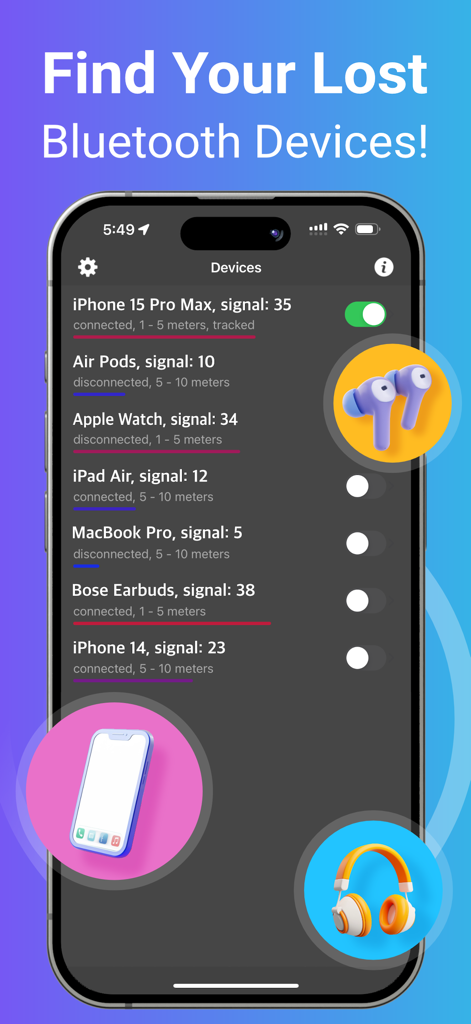
주변 기기 목록과 신호 강도를 보여주는 블루투스 BLE 기기 찾기 앱 인터페이스.
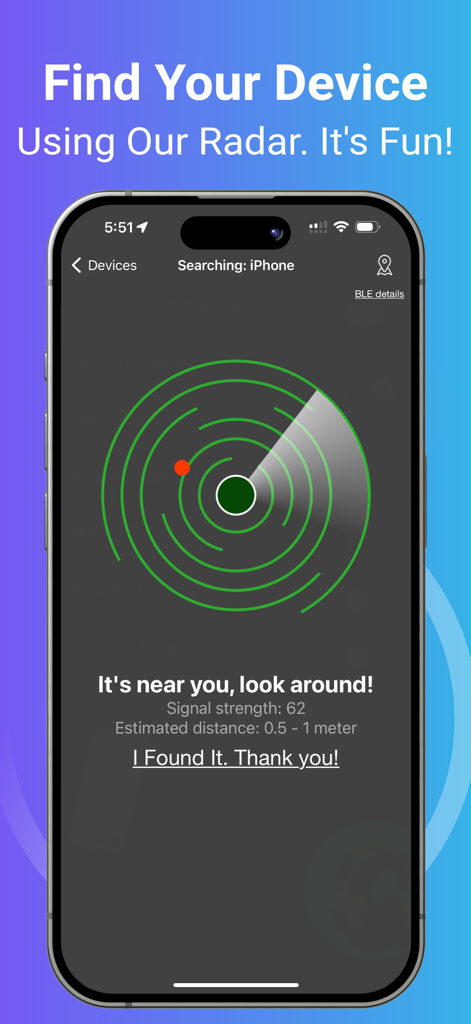
잃어버린 블루투스 기기의 근접성을 나타내는 빨간 점이 있는 레이더 인터페이스를 보여주는 스마트폰
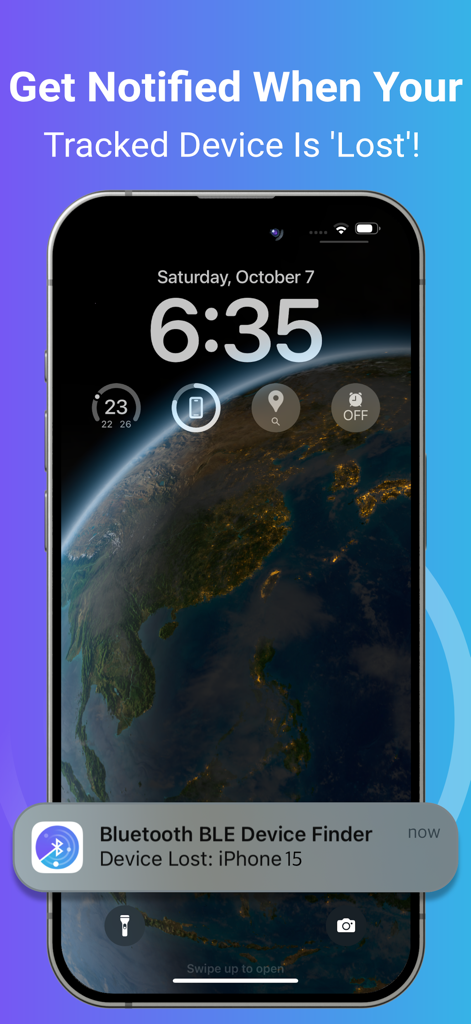
잃어버린 블루투스 기기에 대한 알림을 보여주는 아이폰 잠금 화면
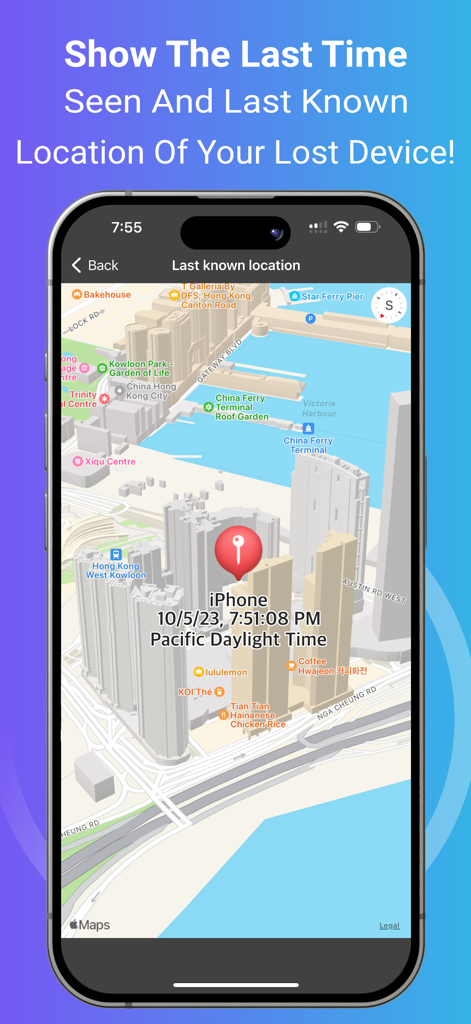
잃어버린 블루투스 기기의 마지막 위치와 시간을 보여주는 지도 보기
소중한 기기를 다시는 잃어버리지 마세요
이 앱을 돋보이게 하는 도구, 2M+ 명의 사용자가 선택.
🎯
고정밀 레이더
아이폰을 전문가용 추적기로 바꾸세요. 실시간 신호 강도를 사용하여 좌석 아래나 벽 뒤에 숨겨진 기기라도 정확한 위치를 찾아내세요.
🔔
사전 분실 알림
기기 연결이 끊어지는 순간 즉시 알림을 받으세요. 통신 기술을 항상 곁에 두고 싶은 바쁜 여행자와 통근자에게 완벽합니다.
📍
최종 위치 기록
어디에 두었는지 기억나지 않으세요? 기기가 마지막으로 감지된 정확한 시간과 위치를 지도에서 확인하여 즉시 검색 범위를 좁히세요.
리뷰 분석
사용자 리뷰 인사이트.
감정 점수
26%
부정적
요약
The app garners highly polarized feedback. Many users laud its exceptional ability to successfully locate lost Bluetooth devices, such as earbuds, Fitbits, and phones, often praising its signal tracking for leading them directly to their missing items where other apps had failed. Conversely, a significant portion of reviews criticize the app for its aggressive paywall and mandatory subscription model, which many find too expensive and renders the free version largely useless. Common complaints also highlight misleading "radar" advertising and a general lack of precision or difficulty in identifying specific devices in tech-dense environments, suggesting that the premium version often doesn't deliver sufficient added value.
주요 테마
Lost Item Recovery(13)
Signal Strength Guidance(6)
Overall App Effectiveness(5)
Free Version Utility(3)
Competitive Performance(2)
Premium Version Consideration(1)
앱 소개
에 대해 알아야 할 모든 것 Bluetooth BLE Device Finder.
설명
*** Now you can find your lost Bluetooth device quickly, before its battery runs out!
*** This app can help you Find Your Lost AirPods, iPhone, iPad, AirTag, Apple Watch, and many other Bluetooth devices in seconds. Use it when you or your family misplace the device – and save the money you'd otherwise need to spend on a new one!
HOW TO USE IT:
1. Run the app. Find and select your lost device in the list.
2. Move around slowly and keep watching the data (i.e., the signal strength and estimated distance) on the radar screen. When you get close to your lost device, the spot will turn red on the radar screen.
3. When the signal strength is over 90 and the estimated distance is 0 - 0.5m, look around. Your device won't be far away!
Note: When you try to find your device, please walk slowly and watch the radar carefully. Find your device ASAP, or its battery will run out.
Note: Your Bluetooth device must be powered on and within a detectable range.
TRACKING FUNCTION:
You may enable tracking for devices in the background by turning on the switch next to the device on the list. You will receive a notification when your tracked device is disconnected/lost. The application will ping the tracked devices from time to time and remember the last location and time the device was seen.
KEY FEATURES:
• Find your lost Bluetooth device (with BLE signal advertising). The app is easy to use!
• Track your device constantly in the background with this app. A notification will tell you when your tracked device is 'Lost' (i.e., Disconnected). Also, the last detected time and location will be recorded for you. It's very useful when you’re travelling and want to keep your devices safe. ^
• Find your device using our radar. It's fun! No need to read a manual. ^
• Show hints, signal strength and the estimated distance between you and your lost device to help you find it quickly. ^
• Show the last seen (detected) time and last known location of your lost device on a map. ^
• Show your device's BLE (Bluetooth Low Energy) details such as UUID, RSSI, Services, etc. ^
• The following devices can be found/tracked by this app:
- AirPods 1/2/3/4, AirPods Pro 1/2, AirPods Max
- AirTag
- iPhone 5/6/7/8/X/11/12/13/14/15/16, iPad 3/4/5/6/7/8/9/10/A16, iPad mini 2/3/4/5/6/A17Pro, iPad Air 1/2/3/4/5/M2/M3, iPad Pro 1/2/3/4/5/6/M4, iPod Touch 6/7
- Apple Watch Series 1/2/3/4/5/6/7/8/9/10/SE1/SE2/Ultra1/Ultra2
- Apple Pencil 1/2/Pro
- MacBook, MacBook Air, MacBook Pro, iMac, iMac Pro, Mac Pro, Mac Mini, Mac Studio
- Microsoft Gear, Band 1 & 2
- Samsung Earbuds, Galaxy Watch
- JBL Tune, Vibe, Tour Pro, Charge, Flip 3
- Bellabeat Leaf
- Garmin Watches
- Many other Bluetooth headphones, earphones, and speakers (e.g. Bose, Sony, Google, Jabra, Logitech, Anker, Sennheiser, Technics, etc.)
NOTE: The app can locate any BLE (Bluetooth Low Energy) device that is broadcasting a Bluetooth signal.
^ Requires In-App Purchase.
Please contact support if you need help.
Thank you!
Privacy Policy:
http://www.99mobileapp.com/pp.html
Terms:
http://www.99mobileapp.com/terms/index.html
최신 버전
2.2.7
크기
2.7 MB
출시일
2019년 5월 29일
배터리가 다 떨어지기 전에 잃어버린 기기 찾기
2백만 사용자와 함께 몇 초 만에 에어팟, 애플워치, 기기를 찾아 교체 비용을 절약하세요. 오늘 디지털 보험을 다운로드하세요.
FAQ
자주 묻는 질문
에 대해 알아야 할 모든 것 Bluetooth BLE Device Finder
Bluetooth BLE Device Finder는 분실된 기기를 찾는 데 어떻게 도움이 되나요?
Bluetooth BLE Device Finder는 레이더 화면에 신호 강도와 추정 거리를 표시하여 분실된 기기를 찾는 데 도움을 줍니다. 근접성을 나타내며, 매우 가까우면 빨간색으로 바뀌고 범위 내에 있을 때는 0-0.5m를 표시합니다.
Bluetooth BLE Device Finder는 어떤 Apple 기기를 찾을 수 있나요?
Bluetooth BLE Device Finder는 AirPods, AirTag, Apple Watch, iPhone, iPad, iPod Touch, Apple Pencil 및 Mac 기기를 찾습니다. 최신 iPhone 16 및 Apple Watch Series 10을 포함한 각 기기의 다양한 모델을 지원합니다.
Bluetooth BLE Device Finder는 백그라운드에서 기기를 추적할 수 있나요?
예, Bluetooth BLE Device Finder는 기기에 대한 백그라운드 추적을 제공합니다. 사용자는 기기 목록의 스위치를 통해 이 기능을 활성화하고, 추적 중인 기기가 연결이 끊어지거나 분실된 경우 알림을 받습니다.
Bluetooth BLE Device Finder는 분실된 기기의 마지막 위치를 보여주나요?
예, Bluetooth BLE Device Finder는 지도에서 분실된 기기의 마지막 감지 시간과 마지막으로 알려진 위치를 보여줍니다. 이 기능은 사용자가 기기의 마지막 감지 위치를 추적하는 데 도움이 됩니다.
이 앱과 관련하여 Bluetooth Low Energy(BLE)는 무엇인가요?
Bluetooth BLE Device Finder는 Bluetooth Low Energy(BLE) 신호를 사용하여 기기를 찾습니다. 앱은 신호를 브로드캐스팅하는 모든 BLE 기기를 찾을 수 있으며 UUID 및 RSSI와 같은 BLE 세부 정보를 표시합니다.
Bluetooth BLE Device Finder의 모든 기능을 무료로 사용할 수 있나요?
아니요, Bluetooth BLE Device Finder의 일부 주요 기능은 인앱 구매가 필요합니다. 여기에는 백그라운드 추적, 레이더, 힌트, 신호 강도, 추정 거리 및 마지막 감지 위치 표시가 포함됩니다.
Bluetooth BLE Device Finder는 전원이 꺼진 기기를 찾을 수 있나요?
아니요, Bluetooth BLE Device Finder는 기기를 찾기 위해 기기가 켜져 있고 감지 가능한 Bluetooth 범위 내에 있어야 합니다. 이 앱은 활성 BLE 신호 브로드캐스팅에 의존합니다.
Bluetooth BLE Device Finder는 어떤 종류의 비 Apple Bluetooth 기기를 찾을 수 있나요?
Bluetooth BLE Device Finder는 Microsoft Gear/Band, Samsung Earbuds/Galaxy Watch, JBL 스피커/헤드폰, Bellabeat Leaf, Garmin 시계, Bose, Sony, Google, Jabra, Logitech, Anker 및 Sennheiser 기기와 같은 비 Apple 기기를 찾을 수 있습니다.
Bluetooth BLE Device Finder의 레이더는 기기를 찾는 데 어떻게 도움이 되나요?
Bluetooth BLE Device Finder의 레이더는 분실된 기기에 대한 신호 강도와 추정 거리를 시각적으로 나타냅니다. 사용자를 안내하는 데 도움이 되며, 기기가 매우 가까우면(0-0.5m) 빨간색으로 바뀌어 근처에 있음을 나타냅니다.
App information, icons, screenshots, and descriptions displayed on this page are sourced from the Apple App Store and are the property of their respective developers. Download estimates and rankings are based on MWM's proprietary models and may not reflect actual figures. This page is provided for informational and analytical purposes only.
Believe this page infringes your intellectual property? File a dispute