방해받지 않는 연습, 고급 분석, 만족스러운 기계식 사운드로 WPM을 향상시키세요. 온디바이스 AI로 구동되고 Apple 생태계를 위해 제작된 궁극의 데이터 기반 타이핑 트레이너를 경험하세요.
개발사
Alfian Losari
카테고리
Games
다운로드
48K+
사용자 평점
4.5/5
총 평가 수
600
지원 언어
20
내부 살짝 보기
이 인터페이스를 사용하는 48K+ 명의 사용자.
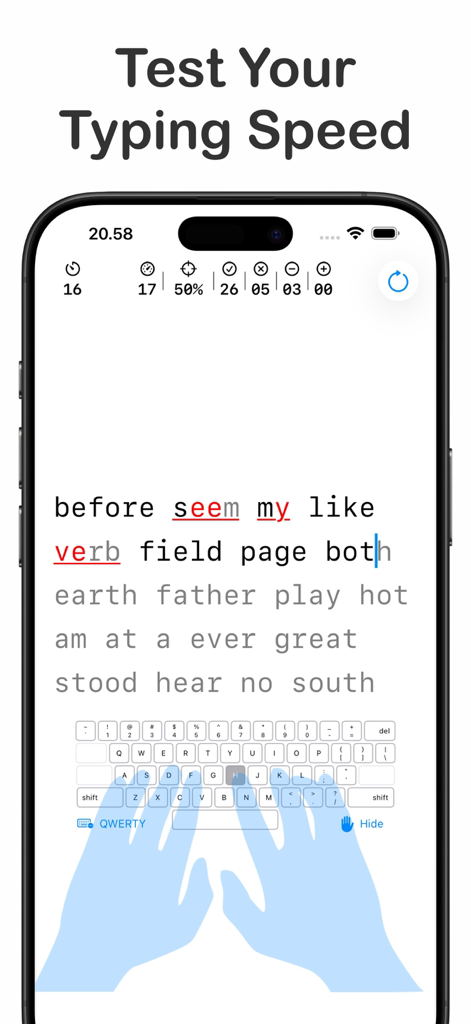
가상 손 가이드와 실시간 메트릭이 있는 타이핑 속도 테스트 인터페이스
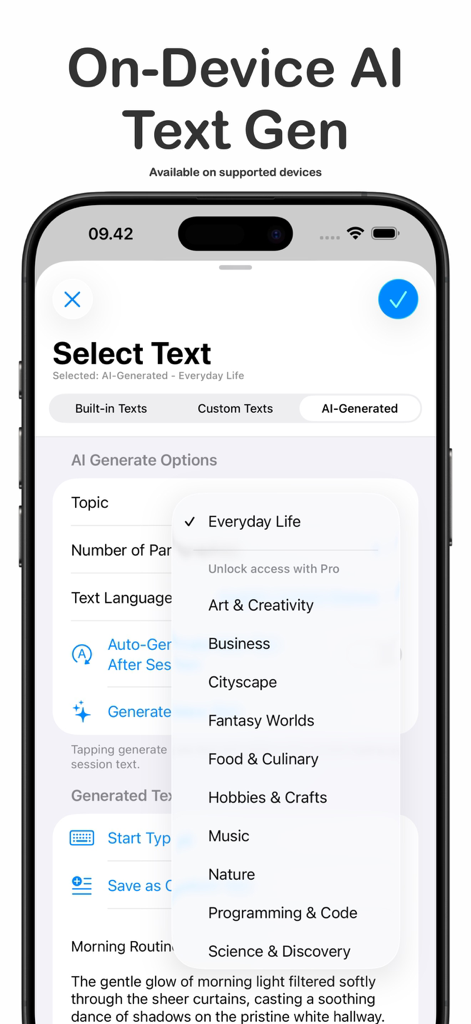
개인 맞춤형 타이핑 연습을 위한 온디바이스 AI 텍스트 생성 옵션을 보여주는 ClickClack 앱 인터페이스
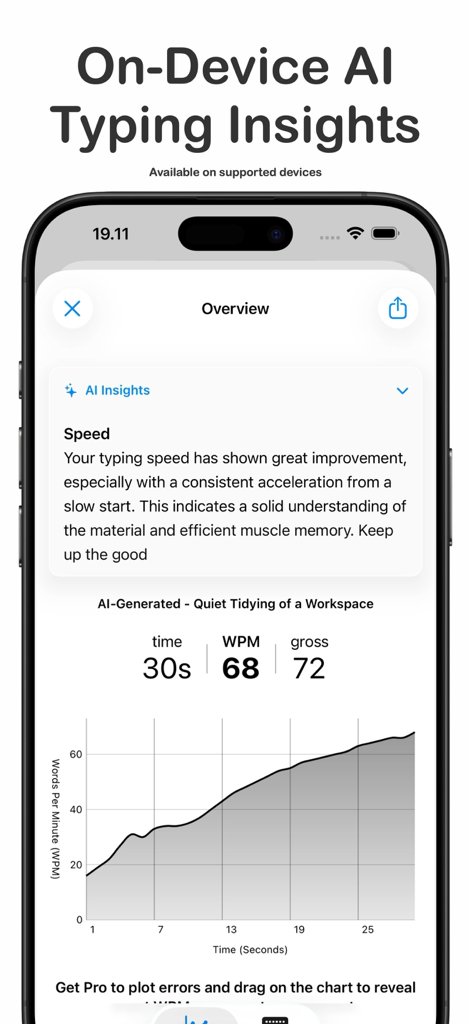
성능 피드백과 WPM 진행률 그래프가 있는 ClickClack 타이핑 트레이너 AI 인사이트를 보여주는 스마트폰 화면
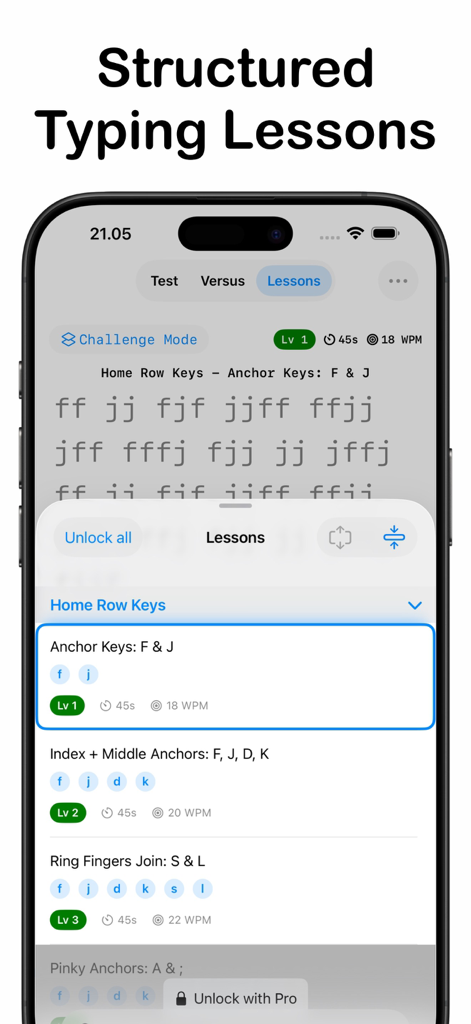
홈 행 키 연습과 레벨 진행 상황을 보여주는 ClickClack 앱의 구조화된 타이핑 수업 인터페이스
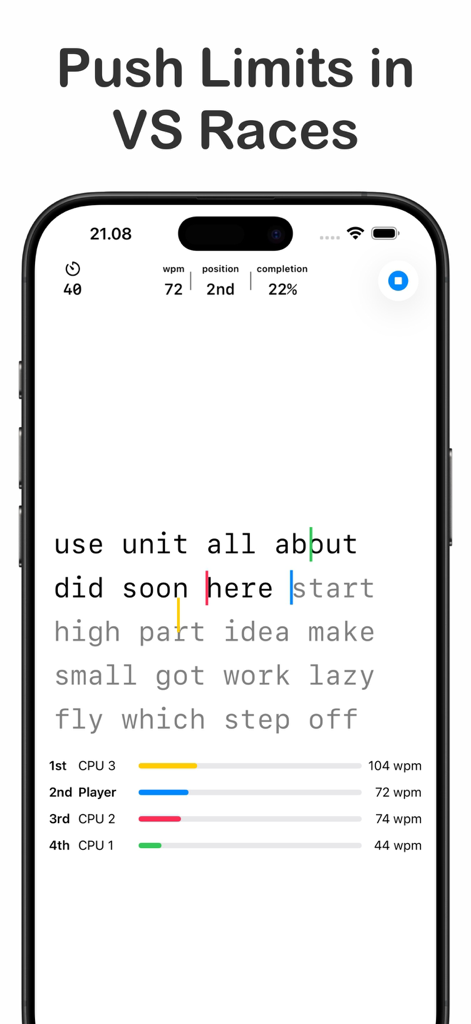
실시간 WPM 통계 및 진행률 표시줄을 통해 AI 상대방과 경쟁하는 모바일 인터페이스
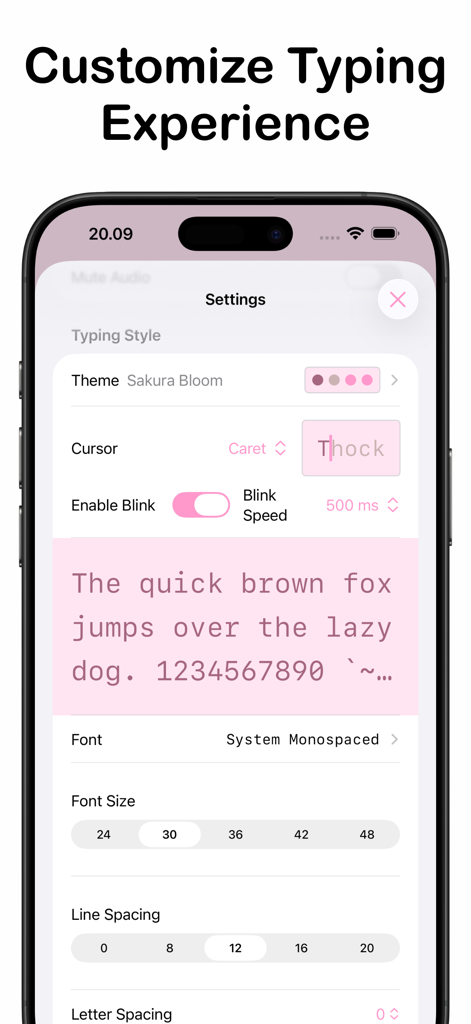
테마 및 글꼴을 사용자 정의하기 위한 ClickClack 타이핑 트레이너의 설정 화면
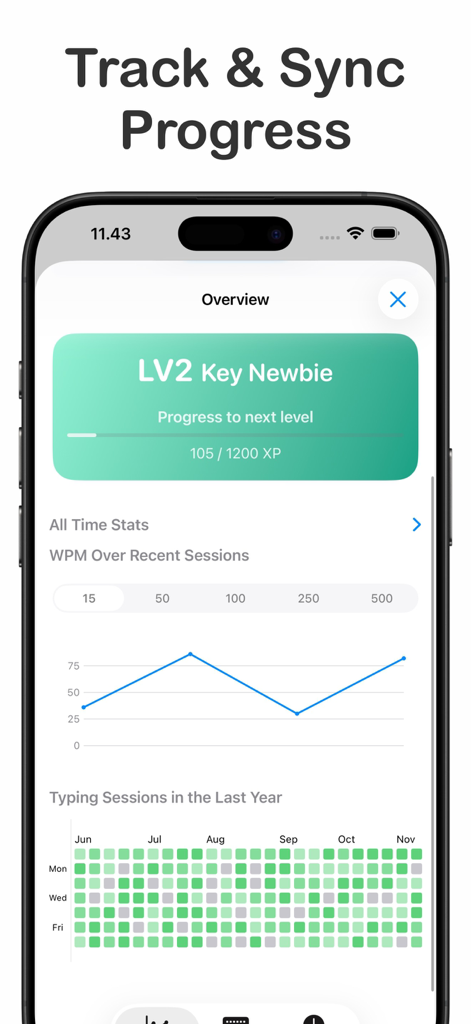
타이핑 속도 그래프 및 활동 히트맵 진행률 추적을 보여주는 ClickClack 앱 대시보드
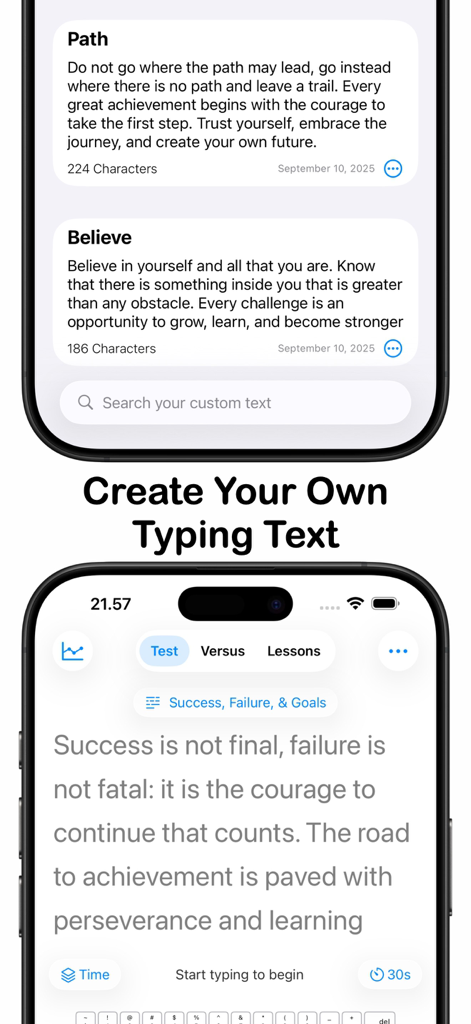
사용자 지정 타이핑 텍스트 선택 및 타이핑 테스트 화면을 보여주는 ClickClack 앱 인터페이스
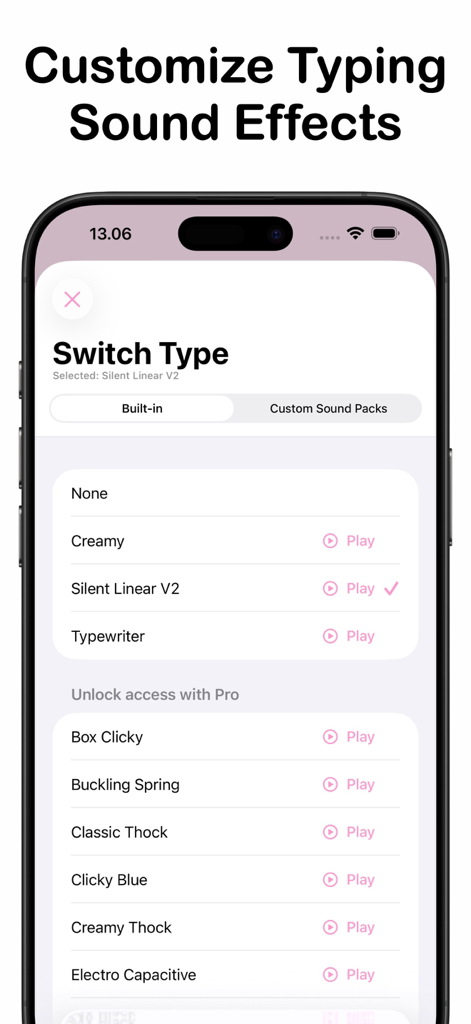
사용자 정의 가능한 기계식 키보드 타이핑 사운드 효과 목록을 보여주는 ClickClack 앱 인터페이스
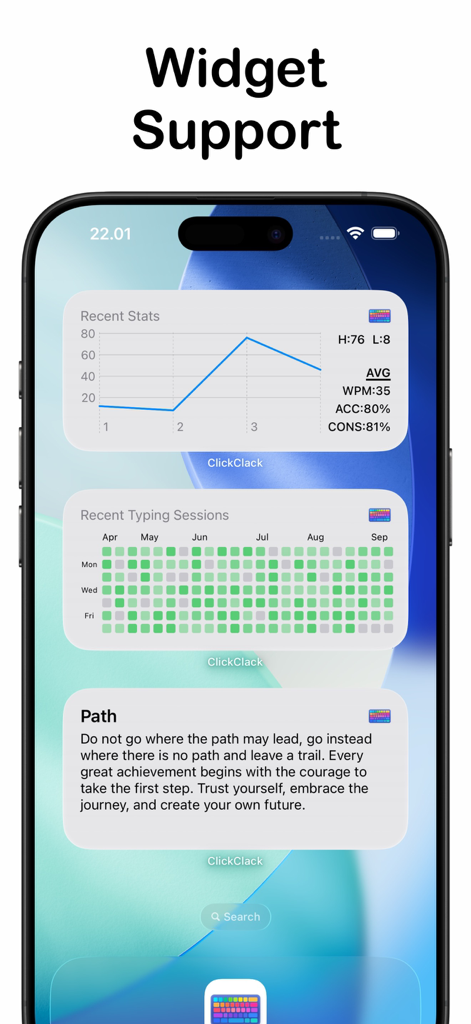
성능 통계 및 활동 히트맵을 보여주는 ClickClack 타이핑 트레이너용 iOS 위젯
속도의 기술을 마스터하세요
이 앱을 돋보이게 하는 도구, 48K+ 명의 사용자가 선택.
📈
심층 성능 인사이트
히트맵과 N-Gram 분석을 통해 WPM을 넘어서, 미세한 개선을 위해 특정 타이핑 패턴과 약점을 파악하세요.
⌨️
촉각 감각 몰입
기계식 스위치 또는 타자기 사운드 중에서 선택하여 창의적인 집중력을 높이는 만족스럽고 ASMR과 같은 환경을 만드세요.
🛡️
안전한 온디바이스 AI
Apple Intelligence를 활용하여 로컬에서 무한한 연습 구절을 생성하여 데이터 개인 정보를 보호하고 워크플로우를 중단 없이 유지하세요.
앱 소개
에 대해 알아야 할 모든 것 ClickClack - Typing Trainer.
설명
Boost your typing speed with a distraction-free and clean UI. Upgrade to Pro for extra challenges, stats & unlimited custom text.
Key Features
Typing Speed Test:
• Timer-Based Session.
• Word Count-Based Session.
Lessons Practice Mode:
• Structured Learning: Improve your typing with guided lessons covering the home row, top row, bottom row, symbols, and number keys.
• Progress Tracking: Monitor your accuracy, WPM, and high scores over time for each lesson to see your growth at a glance.
On-Device AI Text Generator & Typing Insights (Requires iOS 26 & Apple Intelligence Enabled)
• Infinite Content: Instantly generate unique, high-quality practice passages from various topics and supported languages.
• Typing Insights: Receive on-device AI analysis of your typing results, including speed insights, with deeper accuracy and consistency analysis available in Pro.
• Privacy First: All AI generation and analysis run locally on-device with zero data collection.
Detailed Typing Analytics:
• Performance Metrics: Calculates WPM (Net & Gross), Accuracy, and Consistency.
• Error Tracking: Tracks correct, incorrect, and missed characters.
• Level Progression Tracking: Earn XP from each typing session and unlock new levels as you improve.
• WPM Graph: Displays a graph over sessions to track your progress over time.
• Mistyped Keys & N-Gram Analysis: View a heatmap of your most frequent key errors and charts showing missing bigram/trigram sequences, helping you target weaknesses across keys.
Multiplayer Mode:
• Real-Time Matches: Compete in 60-second typing challenges with English text against 2–4 players.
• Play With Anyone: Invite friends directly or use automatch to quickly find opponents worldwide.
• Game Center Integration: Earn achievements and climb multiplayer leaderboards as you win matches.
VS CPU Mode:
• Race Simulated Opponents: Sharpen your typing skills by racing against AI opponents with adjustable difficulty. Choose how many CPUs to face, set their individual speeds, or let Smart Difficulty auto-tune the challenge based on your recent typing performance.
Custom Typing Text:
• Personalized Practice: Create and manage your own typing texts using your favorite quotes, song lyrics, or any text. Import directly from URL webpage
Customizable Style:
• Typography: Choose your favorite font, adjust font size, line spacing, letter spacing, line break mode, and text alignment for a personalized experience.
• Themes: Select from a curated collection to match your mood and enhance your focus.
Keyboard & Hand Guide Overlay:
• Activate the Keymap Overlay to visualize your keystrokes and next key targets in real time.
• Enable the new Hand Guide to see virtual hands showing correct finger placement — perfect for mastering 10-finger typing.
Typing Sound Effects:
• Enhance your typing experience with satisfying sound effects that simulate real keyboards. Choose from a variety of styles like mechanical switches, typewriters, or use your own sound packs.
iCloud Sync:
• Sync your comprehensive typing stats across iPhone, iPad, and macOS. Enjoy a unified experience and access your data anywhere, anytime.
Upgrade to Pro: Unlock advanced features with a one-time in-app purchase:
• Extended sessions timer and word count.
• Access All Levels in Lessons Mode.
• Access All CPU Counts, Match Duration, Difficulties, Smart Difficulty options.
• Comprehensive All-Time Stats: Gain deep insights into your performance, including total typing sessions, duration, highest & average net/gross WPM, accuracy, and consistency.
• More WPM Stats Graph over session data points selection.
• More Mistyped Keys Heatmap data points range.
• AI Gen Feature Unlock: Access all topics, full insights, and enable the auto-generate toggle for seamless, non-stop practice.
• Extended Custom Text Limit.
• More Overlay keyboard layout.
• Extra Themes, Fonts, Typing Sound Effects: Enhance your experience with an expanded selection of themes, fonts, and typing sound effects.
최신 버전
3.5.2
크기
17.0 MB
출시일
2025년 2월 6일
플로우를 마스터하고 WPM을 향상시키세요.
수천 명의 생산성 해커 및 기계식 키보드 애호가와 함께하세요. 상세한 분석, 만족스러운 촉각 사운드, 온디바이스 AI를 모두 방해받지 않는 단일 앱에서 경험하세요.
FAQ
자주 묻는 질문
에 대해 알아야 할 모든 것 ClickClack - Typing Trainer
ClickClack - Typing Trainer는 무엇인가요?
ClickClack - Typing Trainer는 방해 없는 인터페이스로 타이핑 속도를 높이기 위해 설계된 앱입니다. Apple 기기 전반에 걸쳐 속도 테스트, 체계적인 레슨, AI 인사이트, 멀티플레이어 레이스 및 광범위한 사용자 정의 옵션을 제공합니다.
ClickClack - Typing Trainer는 타이핑 레슨을 제공하나요?
예, ClickClack - Typing Trainer는 홈 로우, 상단 로우, 하단 로우, 기호 및 숫자 키를 다루는 체계적인 레슨을 제공합니다. 사용자는 각 레슨의 정확도, WPM 및 최고 점수를 모니터링하여 진행 상황을 추적할 수 있습니다.
ClickClack - Typing Trainer에서 AI를 사용하여 연습 텍스트를 생성할 수 있나요?
예, ClickClack - Typing Trainer에는 온디바이스 AI 텍스트 생성기가 포함되어 있습니다. 다양한 주제와 지원되는 언어로 고유한 연습 구절을 만듭니다. 이 기능을 사용하려면 iOS 26 및 Apple Intelligence가 필요합니다.
ClickClack - Typing Trainer에 멀티플레이어 모드가 있나요?
예, ClickClack - Typing Trainer에는 멀티플레이어 모드가 있습니다. 사용자는 2-4명의 플레이어와 실시간 60초 타이핑 대결에서 경쟁할 수 있습니다. 친구를 초대하거나 자동 매치를 사용하는 옵션이 있으며 Game Center가 통합되어 있습니다.
ClickClack - Typing Trainer는 타이핑 진행 상황을 어떻게 추적하나요?
ClickClack - Typing Trainer는 WPM (네트 & 총), 정확도, 일관성 및 오류 추적을 포함한 상세한 분석을 제공합니다. 또한 XP로 레벨 진행 상황을 추적하고, WPM 그래프를 제공하며, 잘못 입력된 키와 N-그램을 분석합니다.
ClickClack - Typing Trainer의 Pro 버전이 있나요?
예, ClickClack - Typing Trainer는 Pro 업그레이드를 제공합니다. Pro 기능에는 추가 챌린지, 고급 통계, 무제한 사용자 정의 텍스트, 더 깊은 AI 정확도 분석 및 추가 사운드 팩 액세스가 포함됩니다.
ClickClack - Typing Trainer는 AI 기능에 사용자 데이터를 수집하나요?
아니요, ClickClack - Typing Trainer는 사용자 개인 정보를 우선시합니다. 타이핑 인사이트에 대한 모든 AI 생성 및 분석은 온디바이스에서 로컬로 실행됩니다. 앱은 이러한 기능에 대해 데이터 수집을 전혀 수행하지 않습니다.
App information, icons, screenshots, and descriptions displayed on this page are sourced from the Apple App Store and are the property of their respective developers. Download estimates and rankings are based on MWM's proprietary models and may not reflect actual figures. This page is provided for informational and analytical purposes only.
Believe this page infringes your intellectual property? File a dispute