ClipGlider-video speed control

ClipGlider-video speed control

다운로드: App Store
로고: ClipGlider-video speed control

ClipGlider: 소셜 미디어 및 웹의 모든 동영상 속도 높이기

느린 콘텐츠에 시간을 낭비하지 마세요. Instagram Reels, YouTube Shorts 및 TikTok에서 최대 16배 속도로 전체 제어권을 확보하세요. 핸즈프리 자동 스크롤 및 0.01배 정밀 재생으로 생산성을 높이세요.

개발사

Vladislav Kharchev

카테고리

Productivity

다운로드

376K+

사용자 평점

2.9/5

총 평가 수

500

지원 언어

2

완전한 제어 경험하기

이 인터페이스를 사용하는 376K+ 명의 사용자.

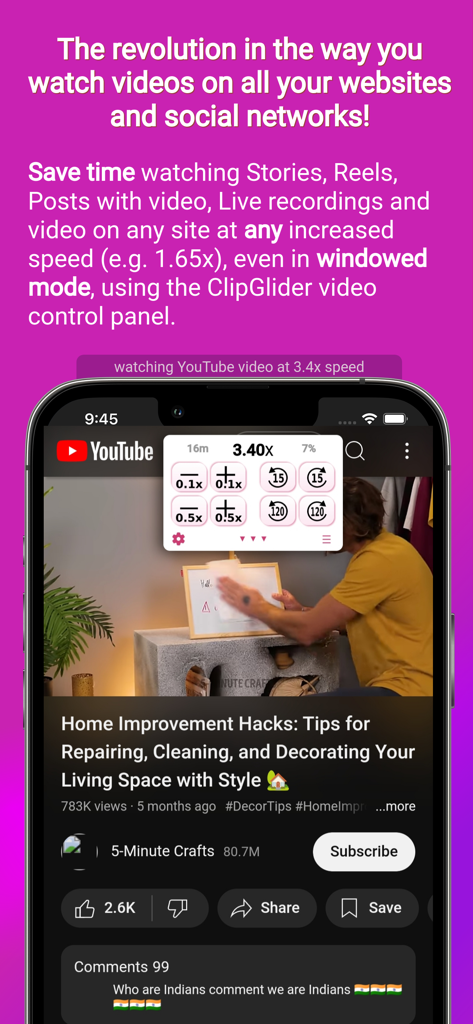
ClipGlider 앱 오버레이가 YouTube 동영상에서 3.40배 동영상 속도 제어를 보여주고 있습니다.

ClipGlider 앱 오버레이가 YouTube 동영상에서 3.40배 동영상 속도 제어를 보여주고 있습니다.

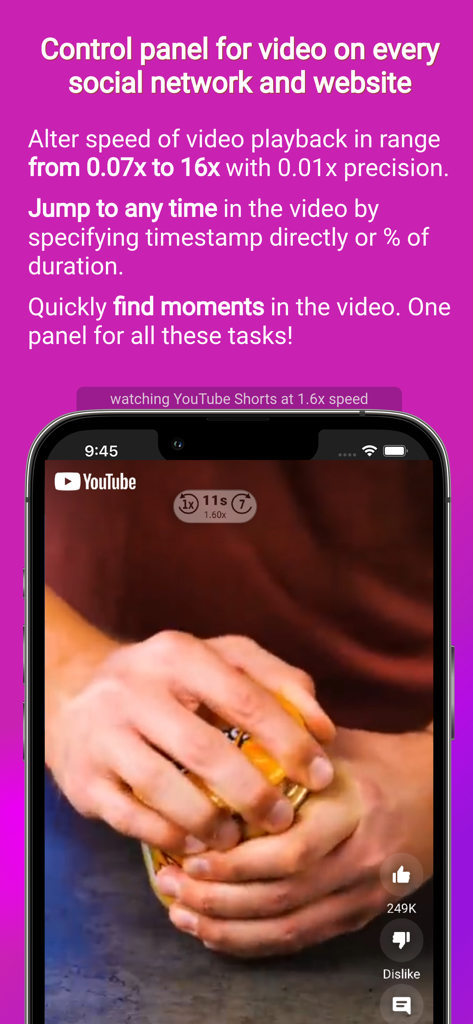
ClipGlider 앱 인터페이스가 iPhone에서 YouTube Shorts 클립의 조절 가능한 동영상 재생 속도를 보여주고 있습니다.

ClipGlider 앱 인터페이스가 iPhone에서 YouTube Shorts 클립의 조절 가능한 동영상 재생 속도를 보여주고 있습니다.

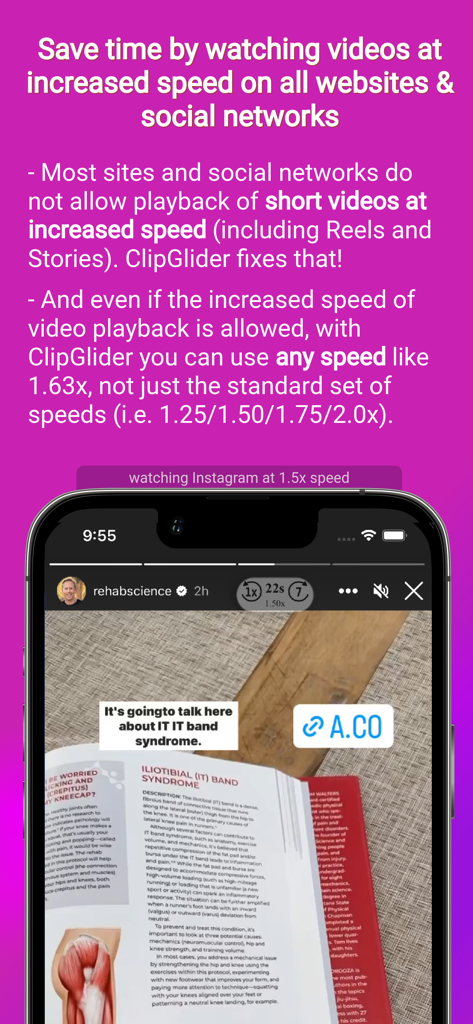
ClipGlider 앱 인터페이스가 더 빠른 소비를 위해 1.5배 속도로 재생되는 Instagram 스토리를 보여주고 있습니다.

ClipGlider 앱 인터페이스가 더 빠른 소비를 위해 1.5배 속도로 재생되는 Instagram 스토리를 보여주고 있습니다.

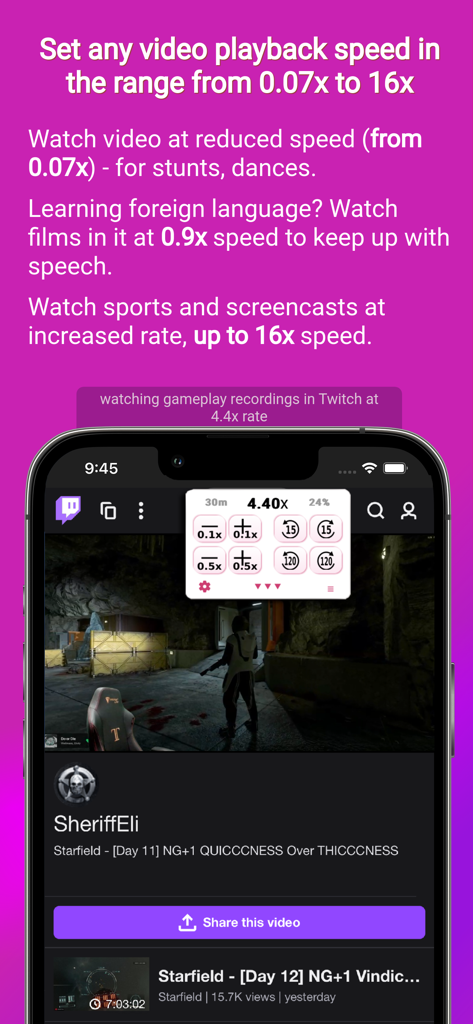
ClipGlider 앱이 Twitch 게임 동영상에서 조절 가능한 동영상 재생 속도를 보여주고 있습니다.

ClipGlider 앱이 Twitch 게임 동영상에서 조절 가능한 동영상 재생 속도를 보여주고 있습니다.

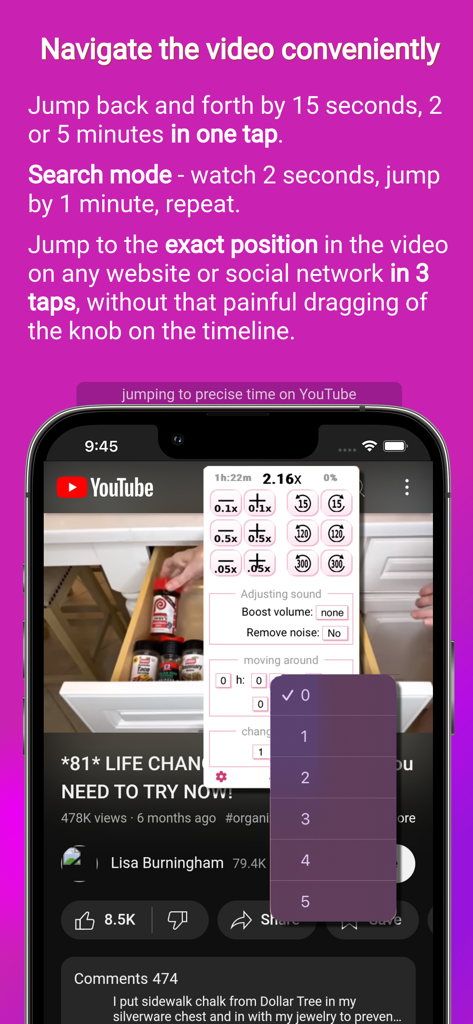
ClipGlider 앱 인터페이스가 iPhone에서 YouTube 동영상에 대한 정밀 탐색 및 시간 점프 컨트롤을 보여주고 있습니다.

ClipGlider 앱 인터페이스가 iPhone에서 YouTube 동영상에 대한 정밀 탐색 및 시간 점프 컨트롤을 보여주고 있습니다.

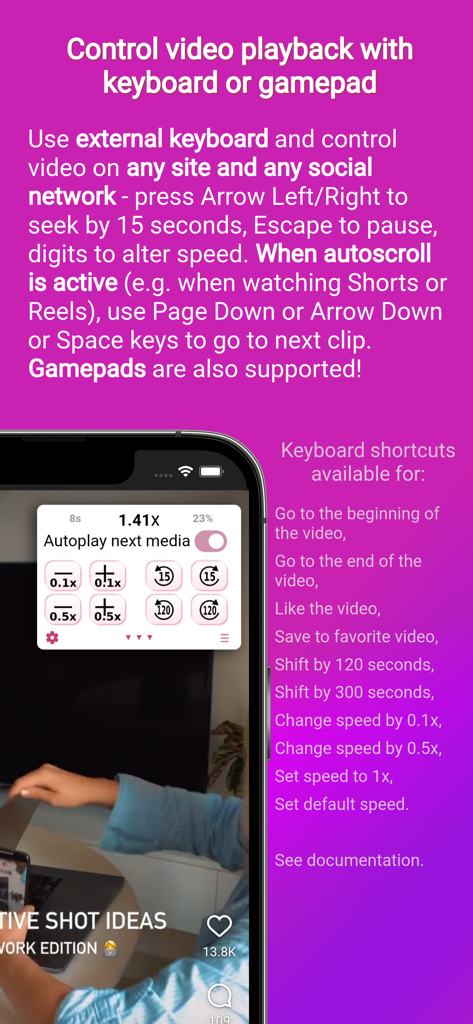
ClipGlider 앱 화면이 키보드 또는 게임패드로 동영상 재생을 제어하는 방법을 설명하고 있습니다.

ClipGlider 앱 화면이 키보드 또는 게임패드로 동영상 재생을 제어하는 방법을 설명하고 있습니다.

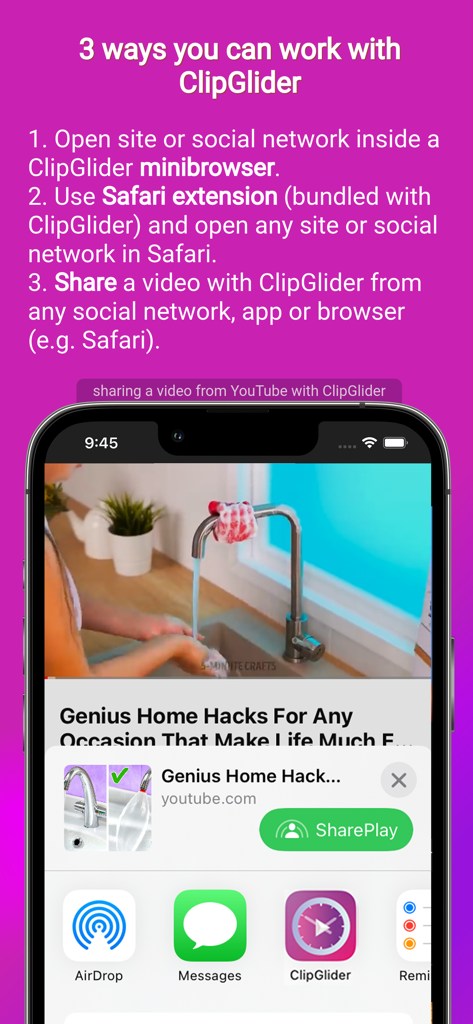
ClipGlider의 미니 브라우저, Safari 확장 프로그램 및 동영상 공유 기능을 보여주는 튜토리얼.

ClipGlider의 미니 브라우저, Safari 확장 프로그램 및 동영상 공유 기능을 보여주는 튜토리얼.

콘텐츠 제어하기

이 앱을 돋보이게 하는 도구, 376K+ 명의 사용자가 선택.

잠금 해제된 속도 제어

2배 속도 이상으로. Instagram Reels, Facebook Stories, TikTok을 포함한 모든 사이트에서 0.01배 정밀도로 완벽한 속도를 설정하세요.

📱

핸즈프리 자동 스크롤

짧은 형식의 동영상 피드에 '자동 스와이프'를 사용하세요. 식사하거나 운동하는 동안 좋아하는 콘텐츠가 자동으로 이동하는 것을 편안하게 시청하세요.

🎯

정밀 탐색

빠른 스캔으로 불필요한 부분을 건너뛰거나 특정 타임스탬프로 이동하세요. ClipGlider는 전화가 오거나 페이지를 새로고침해도 시청 위치를 기억합니다.

앱 소개

에 대해 알아야 할 모든 것 ClipGlider-video speed control.

설명

ClipGlider - the revolution in video playback on websites and social networks! Now you can watch videos at increased speed (e.g. 1.3x) on all social networks and websites. If you use Video Speed Control browser plugin on desktop, then you will enjoy using ClipGlider. It displays a video control panel that allows you to use any playback speed except the usual 1.25х / 1.5х / 1.75x and 2х, and it allows you to quickly navigate inside the video with a few taps. Also, for some videos it allows to increase the volume (useful if the speakers in the video speak quietly) and decrease the noise (if the video was recorded in a noisy environment such as a street or a noisy room). All this is available on popular social networks and on any website. This video speed control panel is displayed while watching any video, including Stories, Reels and Posts on Instagram and Facebook, Shorts on YouTube, Clips on X, Videos on Twitch, Spotlight on Snapchat, or Movies on Netflix and on any site, or even video ads on any site. When you view Instagram or Facebook Reels, YouTube Shorts, or videos in X (Twitter), the next video automatically appears (called autoswipe or autoscroll) - so you can watch them without touching your device ▶ SAVE TIME Spend less time viewing the same number of social media stories and posts by viewing them at an increased rate, e.g. 2x. ▶ WATCH LECTURES AND CONFERENCES WITH COMFORT Save a lot of time watching recordings of talks, conferences, Live recordings and lectures at a speed that is comfortable for you; do not be limited to the standard set of speeds (1.25x, 1.5x, 1.75x and 2x) - you can set the speed to 1.37x or 2.19x! ▶ DO NOT LOSE IMPORTANT MOMENTS ClipGlider offers to resume playback from the position where you left it (e.g. due to an incoming call). ▶ LESS "HASSLE" WHEN TRYING TO FIND A MOMENT IN THE VIDEO Quickly find key moments in the video (such as a new speaker appearing in the conference recording) using the Quick Scan mode. Detailed description: ▼ WATCH STORIES AND REELS IN SOCIAL MEDIA Watch stories in Instagram and Facebook, clips in TikTok, Likee and VK, and video in posts in any social media at increased speed, saving time, with the ability to quickly switch to 1x speed in on tap. Watch 2 times more video in the same amount of time you currently spend, at 2x speed. ▼ WATCH STUNTS AND FIGHTS AT SPEEDS AS LOW AS 0.07X. Analyze sports and dances in slow motion at a speed as low as 0.07x on any website or social network. ▼ FAST SKIP MODE for a quick overview of the video. Very useful to find out when a conference starts or a new speaker appears without any hassle - in this mode the video plays for 1 second and then rewinds for 1 minute. ▼ COMFORTABLE AND PRECISE NAVIGATION IN LONG VIDEOS Jump to the exact minute with a few taps by selecting the timestamp from the lists. You can skip an exact percentage of the video too. ▼ SAVE A LOT OF TIME BY SETTING THE MAXIMUM SPEED YOU CAN ACCEPT, WITH UP TO 0.01X PRECISION, FROM 0.07X TO 16X Change speeds quickly with 0.05X accuracy. Do not be limited by standard speeds of 1.25X / 1.5X / 1.75X and 2X. ▼ QUICKLY RECALL THE POSITION WHERE YOU'VE STOPPED PLAYBACK. Now you won't spend time searching around the video, trying to find the position where you stopped playback due to incoming call or browser reloading the tab. ClipGlider is free to download and use, but an offer to purchase Premium will appear periodically. We offer monthly, 3 month and 6 month, 1 year and lifetime plans: * Payment will be charged to your iTunes account upon purchase confirmation. * All plans are not subscriptions. You must renew your plan when it expires by making another purchase. * If you don't choose to purchase Premium, you can continue to use and enjoy ClipGlider for free. Terms of Use: https://www.apple.com/legal/internet-services/itunes/dev/stdeula/ Privacy Policy: https://clipglider.com/privacy.html

최신 버전

2.3.2

크기

8.6 MB

출시일

2023년 3월 14일

오늘 동영상 슈퍼 파워를 잠금 해제하세요

매주 몇 시간씩 절약하는 376,000명 이상의 효율성 추구자에 동참하세요. 지금 바로 좋아하는 모든 소셜 앱에 대한 정밀 속도 제어 및 자동 스크롤을 이용하세요.

다운로드: App Store
FAQ

자주 묻는 질문

에 대해 알아야 할 모든 것 ClipGlider-video speed control

ClipGlider는 무엇인가요?

ClipGlider는 웹사이트 및 소셜 네트워크에서 비디오 재생 속도를 조절할 수 있는 비디오 속도 제어 앱입니다. 다양한 플랫폼에서 정밀한 속도 조절, 볼륨 증폭 및 노이즈 감소를 위한 제어 패널을 제공합니다.

ClipGlider는 비디오 재생 속도를 어떻게 제어하나요?

ClipGlider는 사용자가 0.01x 정밀도로 0.07x에서 16x까지 재생 속도를 설정할 수 있는 비디오 제어 패널을 표시합니다. 표준 속도 이상의 빠른 조절을 지원합니다.

ClipGlider는 인기 있는 소셜 미디어 플랫폼에서 작동하나요?

네, ClipGlider는 Instagram, Facebook, YouTube, X (Twitter), Twitch, Snapchat 등 인기 있는 소셜 네트워크에서 작동합니다. 또한 Netflix 및 기타 웹사이트에서도 작동합니다.

ClipGlider는 소셜 피드에서 다음 비디오를 자동으로 재생할 수 있나요?

네, ClipGlider는 Instagram 또는 Facebook Reels, YouTube Shorts 및 X (Twitter)의 비디오에 대해 자동 스와이프 또는 자동 스크롤 기능을 제공합니다. 이를 통해 수동 상호 작용 없이 콘텐츠를 시청할 수 있습니다.

ClipGlider는 무료인가요?

네, ClipGlider는 무료로 다운로드하여 사용할 수 있습니다. 주기적으로 프리미엄 기능 구매 제안이 표시되지만, 계속 무료로 사용하는 것도 가능합니다.

ClipGlider 프리미엄의 결제 옵션은 무엇인가요?

ClipGlider는 월간, 3개월, 6개월, 1년 및 평생 기간의 프리미엄 플랜을 제공합니다. 이는 구독이 아니므로 만료 시 갱신해야 합니다.

ClipGlider는 제가 멈춘 지점에서 비디오 재생을 다시 시작할 수 있나요?

네, ClipGlider는 걸려온 전화나 탭 새로고침 등으로 인해 중지된 정확한 위치에서 재생을 빠르게 다시 호출하고 재개할 수 있는 기능을 제공합니다.

ClipGlider의 빠른 스캔 모드는 무엇인가요?

ClipGlider의 빠른 스캔 모드를 사용하면 사용자가 비디오의 주요 순간을 빠르게 찾을 수 있습니다. 이 모드에서는 비디오가 1초 동안 재생된 후 1분 동안 되감깁니다.

ClipGlider의 속도 제어는 얼마나 정밀한가요?

ClipGlider는 사용자가 0.07x에서 16x까지의 범위에서 최대 0.01x 정밀도로 비디오 재생 속도를 설정할 수 있도록 합니다. 0.05x 정확도로 빠른 변경이 가능합니다.

키보드나 게임패드로 ClipGlider를 제어할 수 있나요?

네, ClipGlider는 외부 키보드 또는 게임패드로 제어하는 것을 지원합니다. 사용자는 화살표 키로 탐색, Esc 키로 일시 정지, Page Down/Arrow Down 또는 Space로 다음 클립을 사용할 수 있습니다.

ClipGlider를 사용하는 방법은 무엇인가요?

사용자는 ClipGlider를 세 가지 방법으로 사용할 수 있습니다: ClipGlider 미니 브라우저에서 사이트 또는 소셜 네트워크를 열거나, 번들로 제공되는 Safari 확장 프로그램을 사용하거나, 모든 앱에서 ClipGlider로 비디오를 공유하는 방법입니다.

추천

비슷한 앱

유사한 기능과 사용자 경험을 가진 앱

App information, icons, screenshots, and descriptions displayed on this page are sourced from the Apple App Store and are the property of their respective developers. Download estimates and rankings are based on MWM's proprietary models and may not reflect actual figures. This page is provided for informational and analytical purposes only.

Believe this page infringes your intellectual property? File a dispute