Cutout Pro - Passport ID Photo

Cutout Pro - Passport ID Photo


다운로드: App Store
로고: Cutout Pro - Passport ID Photo

Cutout Pro - 여권 사진 ID: 전문가 수준의 서류 사진을 쉽게 만드세요

약국 방문을 건너뛰고 몇 초 만에 규정을 준수하는 여권, 비자, 이력서 사진을 만드세요. AI를 사용하여 품질을 향상시키고, 배경을 제거하고, 심지어 전문 의상을 추가하여 항상 완벽한 증명사진을 만드세요.

다운로드: App Store

개발사

Ion Danilov

카테고리

Photo & Video

다운로드

357K+

사용자 평점

4.7/5

총 평가 수

6K+

지원 언어

1

모든 픽셀의 정밀함

이 인터페이스를 사용하는 357K+ 명의 사용자.

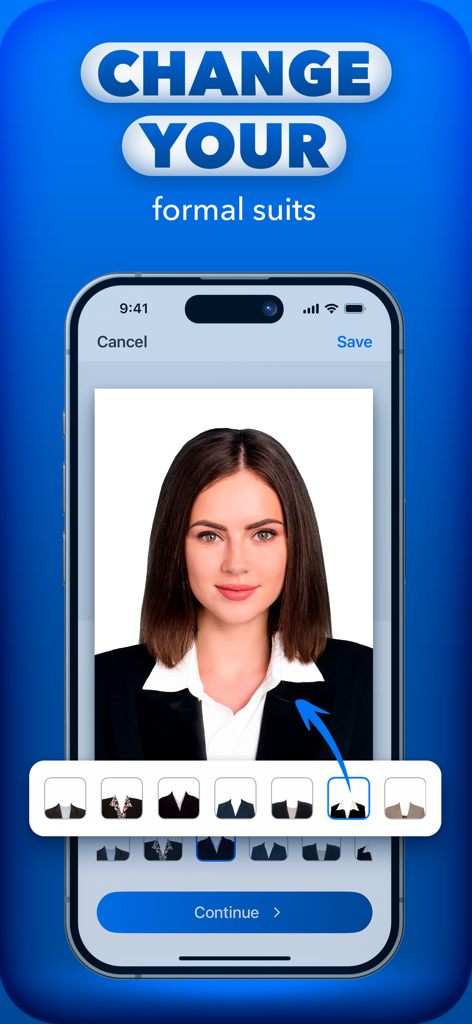
AI를 사용하여 여권 또는 ID 사진에 전문적인 정장을 추가하는 방법을 보여주는 모바일 앱 인터페이스.

AI를 사용하여 여권 또는 ID 사진에 전문적인 정장을 추가하는 방법을 보여주는 모바일 앱 인터페이스.

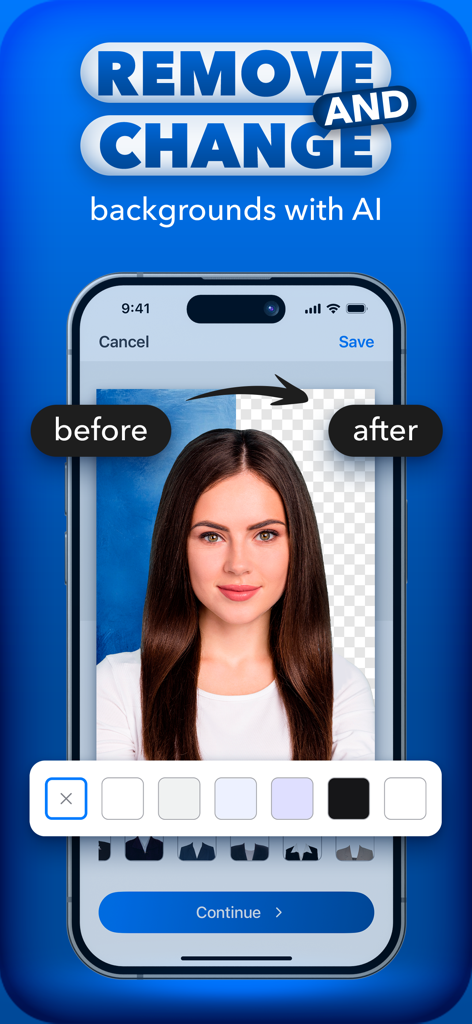
전문 서류 사진의 전후 비교를 보여주는 AI 배경 제거 기능

전문 서류 사진의 전후 비교를 보여주는 AI 배경 제거 기능

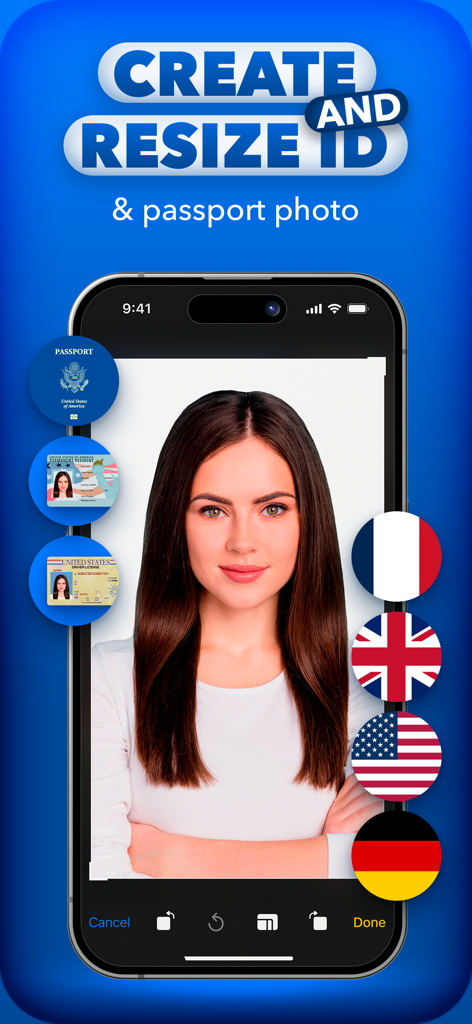
다양한 국가의 여권 및 ID 사진을 만들고 크기를 조정하기 위해 Cutout Pro를 사용하는 스마트폰 화면의 여성 초상화

다양한 국가의 여권 및 ID 사진을 만들고 크기를 조정하기 위해 Cutout Pro를 사용하는 스마트폰 화면의 여성 초상화

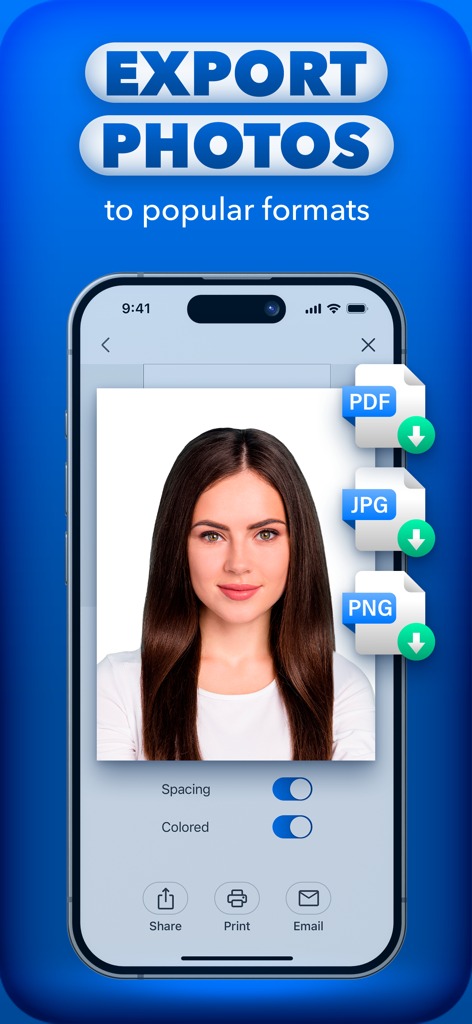
PDF, JPG 및 PNG 형식의 여권 사진 내보내기 옵션을 보여주는 모바일 앱 인터페이스

PDF, JPG 및 PNG 형식의 여권 사진 내보내기 옵션을 보여주는 모바일 앱 인터페이스

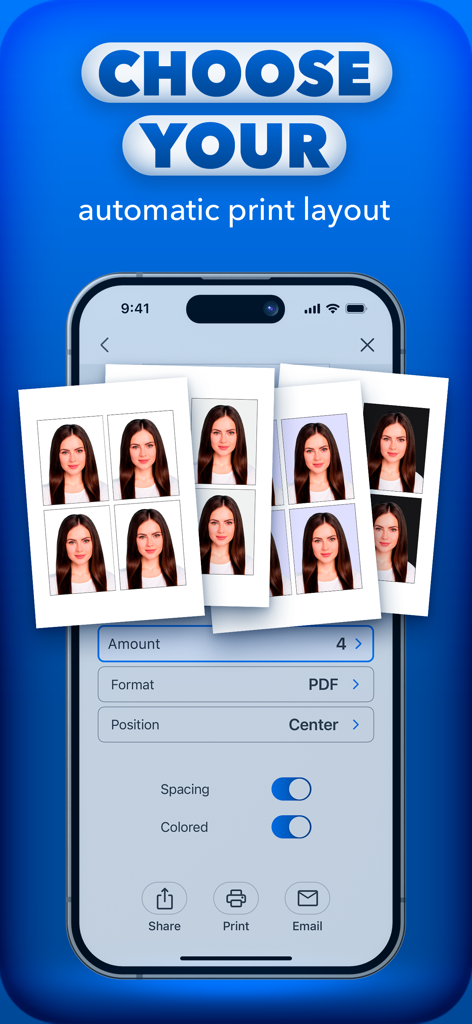
여권 ID 사진 자동 인쇄 레이아웃을 선택하는 인터페이스

여권 ID 사진 자동 인쇄 레이아웃을 선택하는 인터페이스

완벽한 ID 사진을 위한 모든 것

이 앱을 돋보이게 하는 도구, 357K+ 명의 사용자가 선택.

🛂

규정 준수 보장

미국 여권(2x2인치), 비자, 주 신분증에 대한 공식 템플릿에 액세스하세요. 사진이 엄격한 정부 요구 사항을 충족한다는 사실을 알고 안심하세요.

👔

AI 기반 전문성

캐주얼한 셀카를 전문가 수준의 증명사진으로 바꾸세요. AI 정장 도구를 사용하여 의상을 바꾸고, 향상 도구를 사용하여 선명하고 깔끔한 모습을 보장하세요.

✂️

스마트 배경 제거

공식 서류 표준을 충족하도록 어수선한 배경을 즉시 제거하고 단색 흰색 또는 파란색으로 바꾸세요. 픽셀 단위의 완벽한 정밀도를 제공합니다.

앱 소개

에 대해 알아야 할 모든 것 Cutout Pro - Passport ID Photo.

설명

Cutout Pro is the ultimate mobile app for creating, editing, and printing document photos with perfect sizes for passports, visas, CVs, and more. It's your all-in-one tool to handle document photos directly from your smartphone, making the process fast, professional, and simple. Key Features: - Mobile Passport: Capture and print compliant passport and visa photos with ease. - Photo Quality Enhancement: Improve old, blurry, or poorly lit photos, making them sharp and professional. - Object Removal: Instantly remove unwanted objects from photos or upload existing images from your gallery for editing. - Photo Editor: Enhance your images with easy-to-use tools. - Background Remover: Change or remove the background to match specific document requirements. - Custom Sizes & Standard Formats: Choose from standard sizes for countries like the US (2x2 inches) or create custom sizes (e.g., 3x4 cm). - Save & Share: Save your photos directly to your smartphone gallery or share them via email, social media, or messaging apps in PDF, PNG, or JPG formats. - Mockup Creation: Add a suit to your image for professional use, even if you're not dressed appropriately in the original photo. - Multiple Export Options: Export your photos in various formats, including high-quality PDFs for easy printing. Cutout Pro is your go-to app for quick, high-quality document photos. Try it now and keep your legal papers on your smartphone. Upgrade to Premium: - AI Photo Enhancement - Ad-Free Experience - Suit Collection Updates Subscription Details: Payment will be charged to iTunes Account at confirmation of purchase. Subscription with a free trial period will automatically renew to a paid subscription. Subscription automatically renews unless auto-renew is turned off at least 24 hours before the end of the current period. Account will be charged for renewal within 24 hours prior to the end of the current period at the rate of the selected plan. Subscriptions and auto-renewal may be managed by going to Account Settings after purchase. You can cancel your subscription or free trial in the iTunes settings at least 24-hours before the end of the free trial period. The cancellation will take effect the day after the last day of the current subscription period and you will be downgraded to the free service. Subscription Options: - Weekly: $2.99 - Annual: $19.99 For other currencies, the price corresponds to the same tier on the App Store Pricing Matrix. https://sites.google.com/view/cutout-pro-app/home/privacy-policy https://sites.google.com/view/cutout-pro-app/home/terms-conditions https://sites.google.com/view/cutout-pro-app/home/support

최신 버전

2.2

크기

289.8 MB

출시일

2024년 6월 14일

약국 줄을 건너뛸 준비가 되셨나요?

몇 분 안에 전문가 수준의 2x2 여권 사진이나 이력서 증명사진을 받으세요. 지금 바로 시간과 비용을 절약하며 AI로 향상된 완벽한 서류 사진을 사용하는 357,000명 이상의 사용자와 함께하세요.

다운로드: App Store
FAQ

자주 묻는 질문

에 대해 알아야 할 모든 것 Cutout Pro - Passport ID Photo

Cutout Pro는 무엇인가요?

Cutout Pro는 스마트폰에서 여권, 비자, 이력서에 적합한 규격 사진을 직접 만들고 편집하고 인쇄할 수 있는 모바일 앱입니다.

Cutout Pro는 사진 배경을 제거할 수 있나요?

네, Cutout Pro는 특정 문서 요구 사항에 맞게 사진 배경을 제거하거나 변경할 수 있습니다. 이 기능을 위해 AI를 사용합니다.

Cutout Pro는 여러 나라의 여권 사진 맞춤 설정을 제공하나요?

네, Cutout Pro는 미국(2x2인치)과 같은 다양한 국가의 표준 사진 크기를 제공하며, 국제 문서 사진 요구 사항을 충족하는 사용자 지정 크기도 허용합니다.

Cutout Pro에서 사진을 내보내는 옵션은 무엇인가요?

Cutout Pro를 사용하면 PDF, PNG 또는 JPG 형식으로 사진을 저장하고 공유할 수 있습니다. 또한 인쇄용 고품질 PDF 내보내기도 지원합니다.

Cutout Pro로 사진에 양복을 추가할 수 있나요?

네, Cutout Pro의 "Mockup Creation" 도구를 사용하면 이미지에 정장 양복을 추가할 수 있습니다. 이를 통해 문서 사진에 전문적인 외모를 연출할 수 있습니다.

Cutout Pro 구독료는 얼마인가요?

Cutout Pro는 주간 구독료 $2.99와 연간 구독료 $19.99를 제공합니다. 다른 통화 가격은 App Store 가격 책정 매트릭스에 해당합니다.

Cutout Pro 구독을 취소하려면 어떻게 해야 하나요?

사용자는 현재 기간이 종료되기 최소 24시간 전에 iTunes 설정을 통해 Cutout Pro 구독 또는 무료 체험을 취소해야 합니다. 계정 설정에서 자동 갱신을 관리하세요.

Cutout Pro는 사진 품질을 향상시키나요?

네, Cutout Pro에는 사진 품질 향상 기능이 포함되어 있습니다. 오래되거나 흐릿하거나 조명이 좋지 않은 사진을 개선하여 문서 사용에 적합하도록 선명하고 전문적으로 만듭니다.

Cutout Pro에서 사용할 수 있는 프리미엄 기능은 무엇인가요?

Cutout Pro Premium은 AI 사진 향상, 광고 없는 경험, 전문적인 이미지 목업을 위한 양복 컬렉션 업데이트를 제공합니다.

Cutout Pro는 사진에서 원치 않는 물체를 제거할 수 있나요?

네, Cutout Pro에는 물체 제거 도구가 있습니다. 사용자의 갤러리에서 업로드한 이미지를 포함하여 사진에서 원치 않는 물체를 즉시 제거합니다.

App information, icons, screenshots, and descriptions displayed on this page are sourced from the Apple App Store and are the property of their respective developers. Download estimates and rankings are based on MWM's proprietary models and may not reflect actual figures. This page is provided for informational and analytical purposes only.

Believe this page infringes your intellectual property? File a dispute