Final Draft Go

Final Draft Go

다운로드: App Store
로고: Final Draft Go

Final Draft Go: 이동 중에도 가능한 시나리오 작성의 업계 표준

영감이 떠오르는 곳 어디든 최고의 판매 시나리오 작성 소프트웨어를 가져가세요. iPhone 및 iPad에서 완벽한 업계 페이지 나누기를 통해 전문 .fdx 스크립트를 작성, 편집 및 형식화하세요.

다운로드: App Store

개발사

Cast & Crew Production Software, LLC

카테고리

Productivity

다운로드

61K+

사용자 평점

3.9/5

총 평가 수

1K+

지원 언어

2

어디서든 가능한 업계 표준

이 인터페이스를 사용하는 61K+ 명의 사용자.

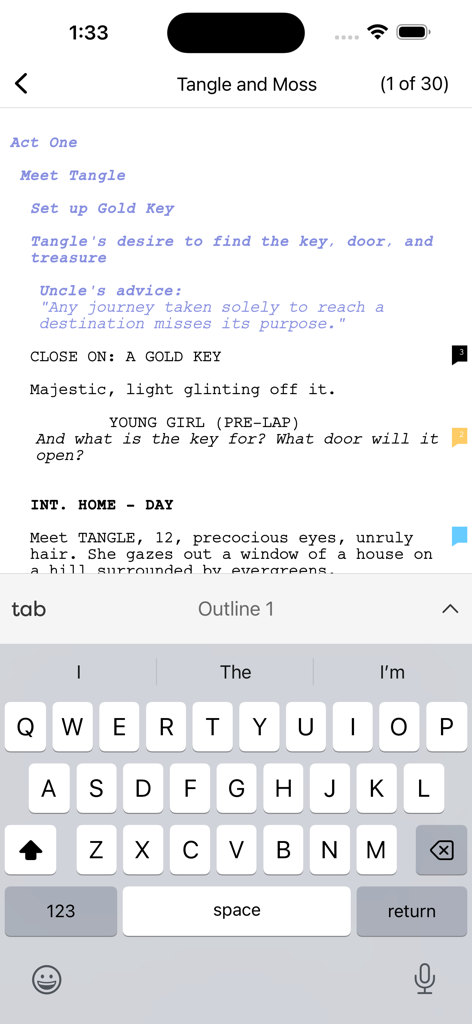
Final Draft Go 모바일 시나리오 작성 인터페이스로, 키보드가 있는 전문 스크립트가 표시됩니다.

Final Draft Go 모바일 시나리오 작성 인터페이스로, 키보드가 있는 전문 스크립트가 표시됩니다.

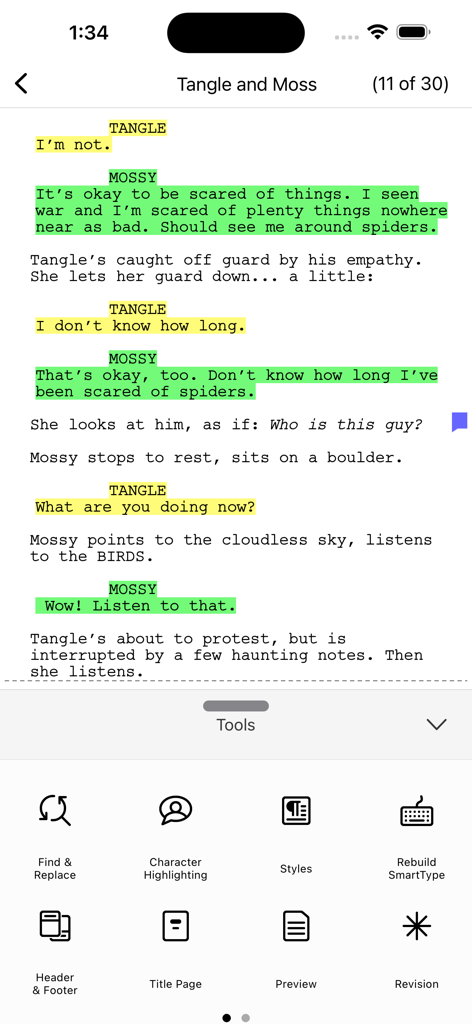
Final Draft Go 모바일 인터페이스에 색상으로 구분된 캐릭터 강조 표시 및 제작 도구 메뉴가 있는 시나리오가 표시됩니다.

Final Draft Go 모바일 인터페이스에 색상으로 구분된 캐릭터 강조 표시 및 제작 도구 메뉴가 있는 시나리오가 표시됩니다.

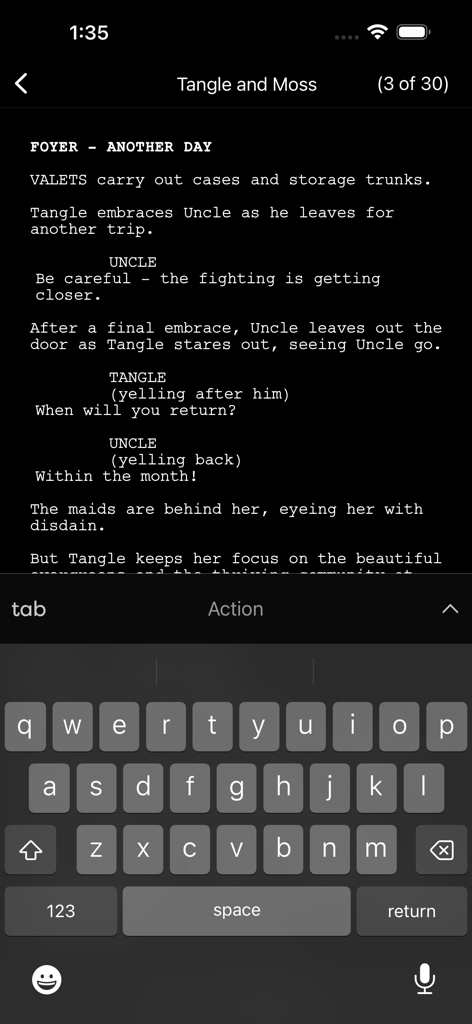
iPhone의 Final Draft Go 인터페이스에 온스크린 키보드와 함께 야간 모드에서 편집 중인 시나리오가 표시됩니다.

iPhone의 Final Draft Go 인터페이스에 온스크린 키보드와 함께 야간 모드에서 편집 중인 시나리오가 표시됩니다.

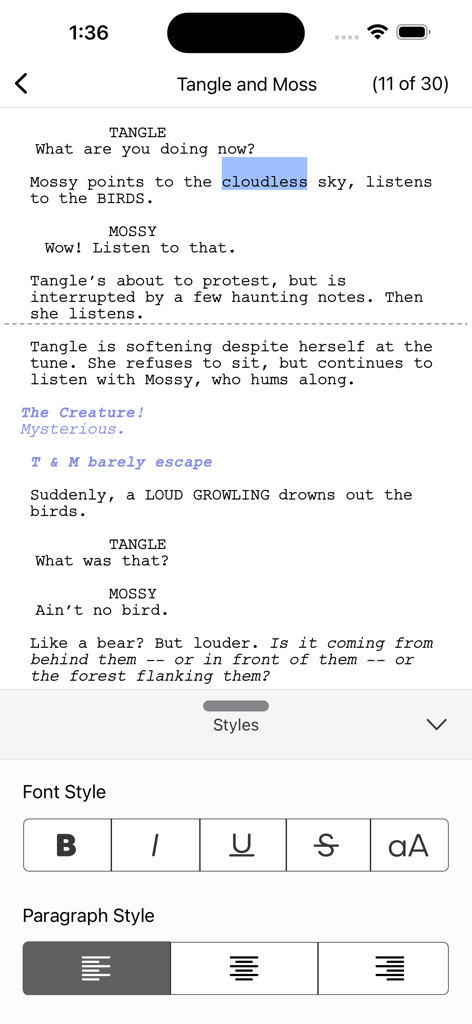
Final Draft Go 모바일 인터페이스에 글꼴 및 단락 스타일을 위한 시나리오 작성 텍스트와 형식 도구가 표시됩니다.

Final Draft Go 모바일 인터페이스에 글꼴 및 단락 스타일을 위한 시나리오 작성 텍스트와 형식 도구가 표시됩니다.

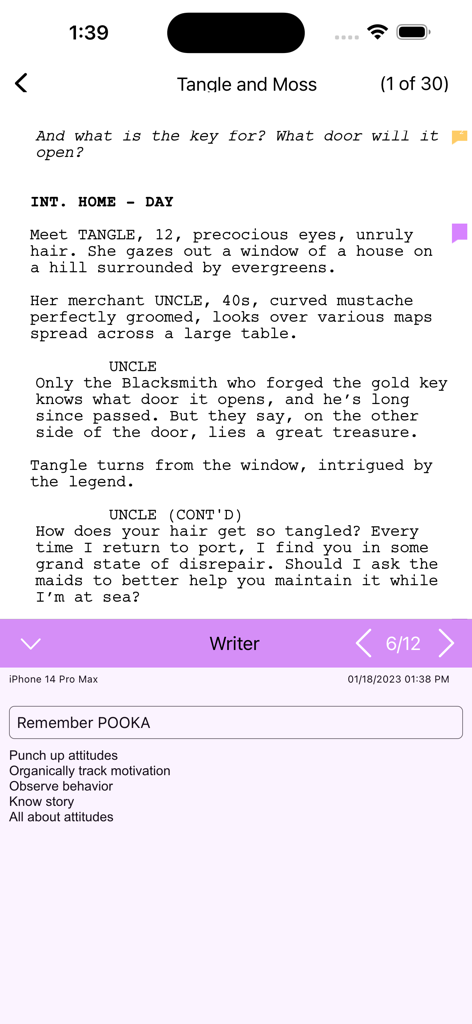
Final Draft Go 앱의 시나리오 인터페이스에 iPhone에서 전문 스크립트 형식 및 노트가 표시됩니다.

Final Draft Go 앱의 시나리오 인터페이스에 iPhone에서 전문 스크립트 형식 및 노트가 표시됩니다.

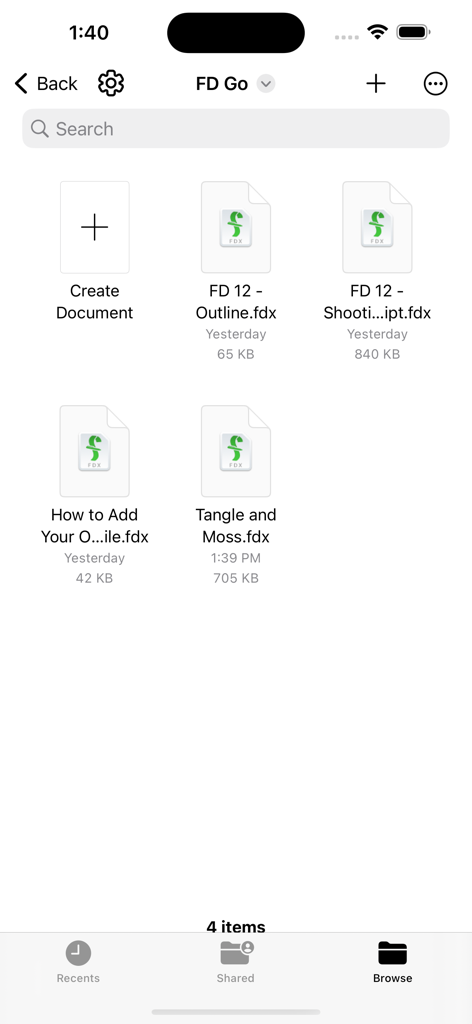
Final Draft Go 앱 인터페이스에 브라우저 보기에서 스크립트 파일 목록이 표시됩니다.

Final Draft Go 앱 인터페이스에 브라우저 보기에서 스크립트 파일 목록이 표시됩니다.

어디서든 스크립트를 마스터하세요

이 앱을 돋보이게 하는 도구, 61K+ 명의 사용자가 선택.

📱

원활한 클라우드 동기화

iCloud 및 Dropbox 지원으로 데스크톱과 모바일 장치 간에 즉시 전환하세요. 작가실에 있든 이동 중이든 관계없이 항상 최신 상태를 유지합니다.

✍️

전문가 수준의 형식 지정

형식 지정 스트레스를 제거하세요. Final Draft Go는 여백, Tab 및 Enter 탐색, 페이지 나누기를 완벽하게 처리하여 스크립트가 항상 할리우드 전문 표준을 충족하도록 보장합니다.

🎭

제작 수준의 도구

장면 탐색기, 캐릭터 강조 표시 및 ScriptNotes로 세트장에서 정리 상태를 유지하세요. 노트북을 열 필요 없이 개정을 추적하고 제작 보고서를 관리하세요.

리뷰 분석

사용자 리뷰 인사이트.

감정 점수

28%
부정적

요약

The Final Draft Go mobile app garners predominantly negative reviews, with users frequently reporting critical issues such as data loss, unreliable syncing across devices, and persistent login problems that demand constant re-authentication. Many users express frustration over numerous bugs, including frequent app crashes, the inability to perform basic functions like copy/pasting from notes, and glitches when creating new files. While some praise its convenience and flexibility for on-the-go writing, especially when paired with an iPad keyboard, these positive aspects are overshadowed by the app's instability and a widely disliked subscription model, which many consider a "money grab" given their existing desktop software purchases. Customer support is also frequently criticized for being unresponsive and unhelpful.

주요 테마

Login & Account Issues(16)
Crashes & Bugs(15)
Subscription & Pricing Model(12)
Basic Functionality Issues(11)
Data Loss & Syncing(8)
On-the-go Writing(5)
Customer Support(5)

앱 소개

에 대해 알아야 할 모든 것 Final Draft Go.

설명

Final Draft Go Final Draft™ – the #1-selling screenwriting software in the world – brings you Final Draft Go for iPhone and iPad. With this convenient, subscription-based app, you can write, edit and read Final Draft scripts on your iPhone or iPad. Go paperless and carry all your scripts with you everywhere you go, create new scripts or edit existing ones with easy-to-use features such as Tab and Enter navigation, ScriptNotes, SmartType, and more. Easily move your Final Draft scripts from desktop to iPhone or iPad and back again via iCloud, Dropbox, or email. Your scripts will appear perfectly paginated and formatted to industry standards every time. NEW FEATURES INCLUDE: ENHANCED UI New and improved user interface PINCH TO ZOOM Use multi-touch gestures to zoom in and out and customize the text size of your script view IMPROVED NIGHT MODE Change from day to night mode easily without having to leave the app UNIVERSAL CONTROL SUPPORT Work seamlessly between your iPad and Mac, using your Mac keyboard, mouse, or trackpad GRAMMARLY INTEGRATION Use the Grammarly app with FD Go to edit and proofread your work Creativity is truly portable with Final Draft Go. - Send or share your Final Draft FDX file between all your devices and computers and always be on the same page with Dropbox, OneDrive, or iCloud - Easily change script elements with classic Tab and Enter functionality or through the Elements bar (iPad) or Menu (iPhone) - Use SmartType to remember your character names, scene headings and more - Multi-language support – Write in over 95 different languages - Bluetooth keyboard support - Character Highlighting allows you to keep track of your characters for table reads or character development - Add, color-code, label, and edit ScriptNotes - Perfectly paginates to US Letter and standard European (A4) page sizes - Send feedback directly through the app - Professionally formatted TV, Film, and Stage Play templates to help get you started - Search your entire script for characters, locations, or other script elements - Export scripts to PDF via Dropbox, iCloud or email - Saves the last page you’re working on to get back to work quickly - iPhone Page View shows 100% accurate Final Draft pagination, formatting and line breaking - Automatic More’s and Continued’s - Multi-page Title Pages are supported for TV production scripts - Includes production features like Scene Numbering, Omit Scenes, Colored and Locked Pages - Shows Active or Collated Revisions with Colored Pages - Quickly switch from one revision set to another - Track key information with Cast Reports, Scene Reports, Location Reports, and more - iPhone Scene Navigator allows you to easily jump to different scenes in your script - Access all of the tools you need while maintaining context in your script in the iPhone Tools Menu - Edit your Header and Footer TESTIMONIALS: “Where has this been all my career?!? I put it through its paces doing a rewrite on the go-go-go. Does a great job. This is a real step forward! What more do you need on the road? (Maybe a chauffeur?).” David Seidler – Writer/Academy Award® winner The King’s Speech, By Dawn’s Early Light, Tucker: The Man and His Dream.

최신 버전

7.3.2

크기

195.4 MB

출시일

2023년 5월 4일

다음 수상작이 될 스크립트가 탭 한 번으로 완성됩니다

세계 최고의 시나리오 작가들과 함께 iPhone 및 iPad에서 업계 표준을 경험하세요. 작가실이든 촬영 현장이든, 영감이 떠오르는 순간을 낭비하지 않고 제작 준비 상태를 유지하세요.

다운로드: App Store

App information, icons, screenshots, and descriptions displayed on this page are sourced from the Apple App Store and are the property of their respective developers. Download estimates and rankings are based on MWM's proprietary models and may not reflect actual figures. This page is provided for informational and analytical purposes only.

Believe this page infringes your intellectual property? File a dispute