Heart Rate Plus Monitor PRO

Heart Rate Plus Monitor PRO


다운로드: App Store
로고: Heart Rate Plus Monitor PRO

Heart Rate Plus Monitor PRO: 손끝에서 이루어지는 전문적인 심박수 추적

iPhone을 강력한 맥박 모니터로 변신시키세요. 웨어러블 없이도 즉각적이고 정확한 심박수 측정값을 확인하세요. 실시간 PPG 그래프와 전문적인 건강 보고서로 생체 신호를 추적하세요.

개발사

Ngo Na

카테고리

Health & Fitness

다운로드

181K+

사용자 평점

4.2/5

총 평가 수

100

지원 언어

20

시각화된 당신의 맥박

이 인터페이스를 사용하는 181K+ 명의 사용자.

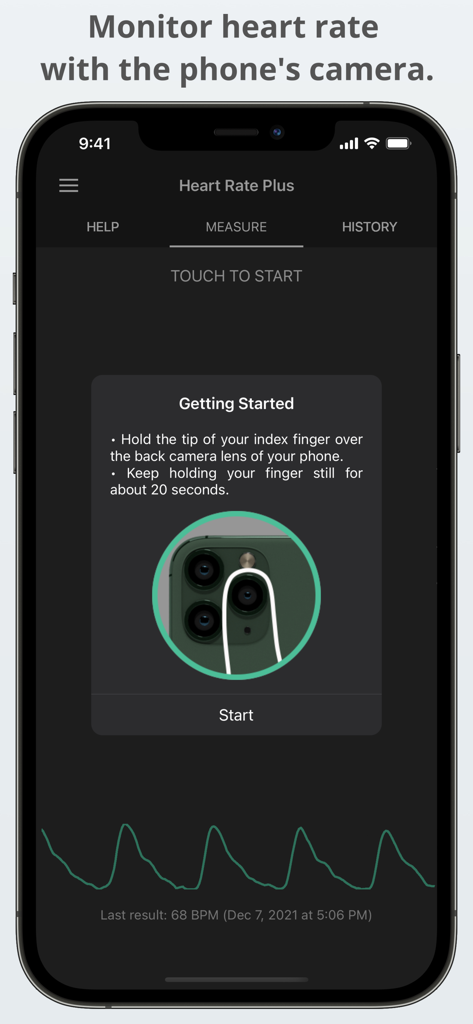
휴대폰 카메라 렌즈를 사용하여 심박수를 측정하는 방법을 설명하는 Heart Rate Plus 앱의 인터페이스

휴대폰 카메라 렌즈를 사용하여 심박수를 측정하는 방법을 설명하는 Heart Rate Plus 앱의 인터페이스

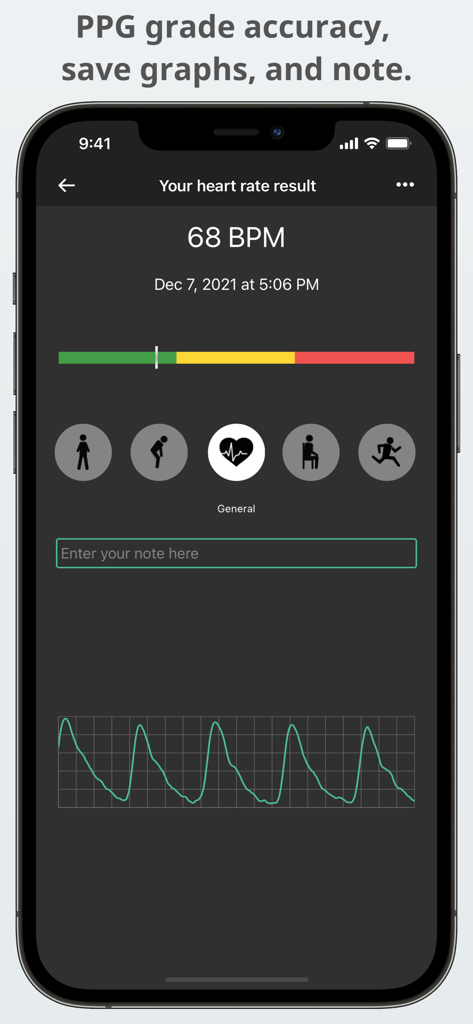
실시간 맥박 파형 그래프와 활동 태그가 포함된 68 BPM 심박수 측정 화면

실시간 맥박 파형 그래프와 활동 태그가 포함된 68 BPM 심박수 측정 화면

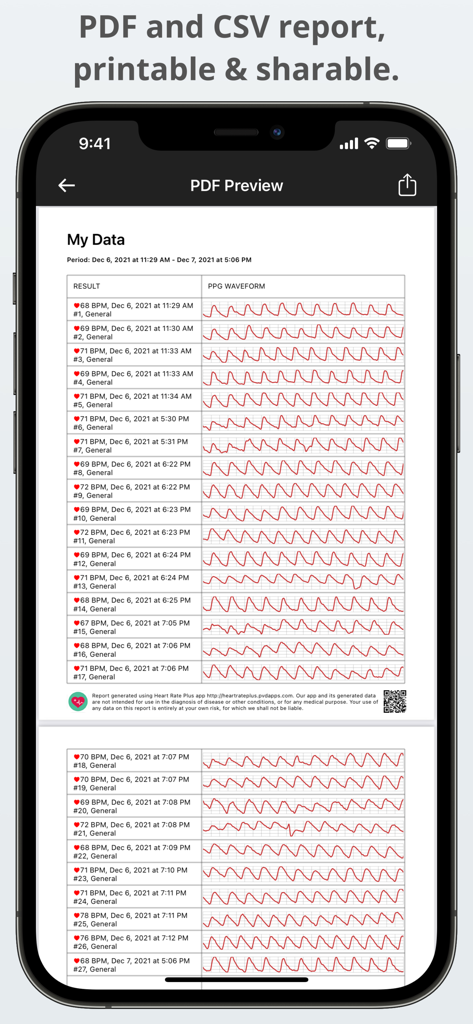
심박수 기록 및 PPG 맥박 그래프의 PDF 미리보기

심박수 기록 및 PPG 맥박 그래프의 PDF 미리보기

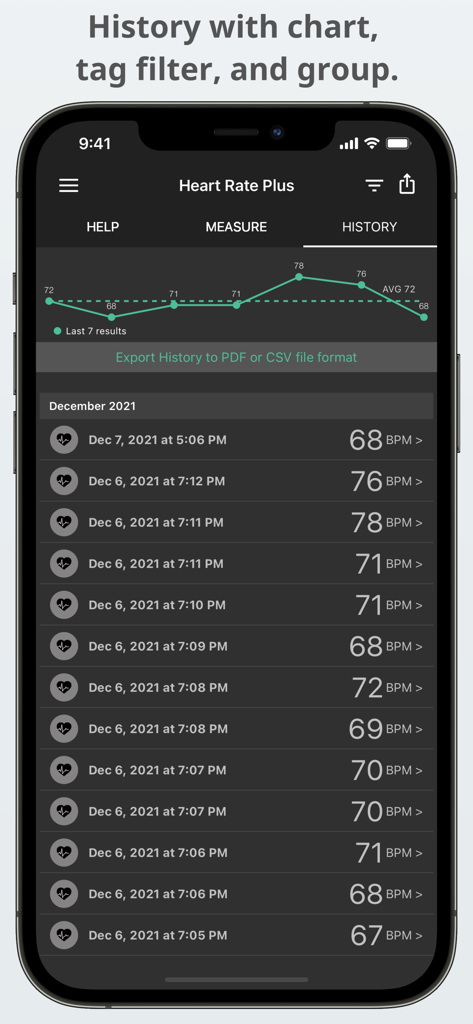
추세 차트와 BPM 측정 로그를 보여주는 심박수 기록 화면

추세 차트와 BPM 측정 로그를 보여주는 심박수 기록 화면

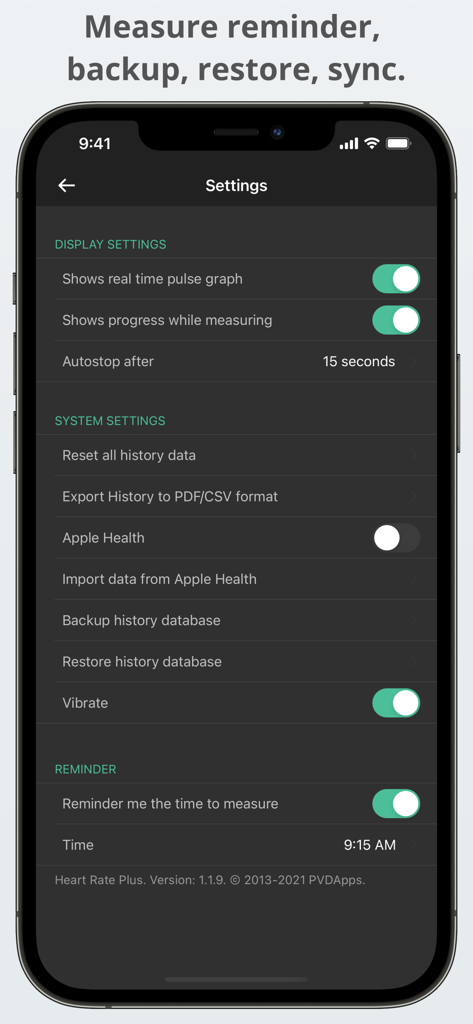
데이터 백업, PDF 내보내기 및 Apple 건강 통합 옵션이 표시된 Heart Rate Plus 앱의 설정 화면

데이터 백업, PDF 내보내기 및 Apple 건강 통합 옵션이 표시된 Heart Rate Plus 앱의 설정 화면

심장 건강 여정에 힘을 실어주세요

이 앱을 돋보이게 하는 도구, 181K+ 명의 사용자가 선택.

📸

웨어러블 없는 즉각적인 모니터링

비싼 스마트워치가 필요 없습니다. iPhone 카메라를 고정밀 맥박 센서로 바꾸어 단 10초 만에 정확한 측정값을 확인하세요.

📈

전문적인 보고서 및 내보내기

다음 병원 방문을 위해 데이터를 정리해 두세요. 한 번의 탭으로 심박수 기록과 PPG 그래프를 깔끔한 PDF 또는 CSV 파일로 내보낼 수 있습니다.

🍎

완벽한 Apple 건강 통합

데이터를 Apple 건강과 원활하게 동기화하여 다른 의료 기록과 함께 피트니스 추세를 포괄적으로 파악하세요.

앱 소개

에 대해 알아야 할 모든 것 Heart Rate Plus Monitor PRO.

설명

Check your heart rate anytime, anywhere with the Heart Rate Plus app - at your home or office - when you wake up, relax, before and after exercise. AMAZING FUNCTION The Heart Rate Plus app will measure your heartbeat using your smartphone's camera by processing the images of your pulse on your finger! The app detects color changes in your fingertip when your heart beats and uses an advanced algorithm to count the heart rate, similar to how a pulse oximeter works. FAST RESULTS Instant, accurate, and excellent for monitoring your fitness and wellness. Use your smartphone's camera; this app can be your heart rate monitor anywhere while being physically active. APP FEATURES - Fast, continuous, and accurate measurement. - Save unlimited results with tags for access later. - Real-time pulse graph (PPG - photoplethysmogram). - Reminder: Automatically reminds you to measure your heartbeat every day. - Share your heart rate screenshot to Facebook, Twitter, or Instagram. - Export history to CSV or PDF file format; PDF file includes PPG graph. (Premium) - Apple Health support (optional, check on Settings). - Back up, restore and transfer your data. (Premium) USER GUIDE - Hold the tip of your index finger over the back camera lens of your phone. Do not press too hard, or you will restrict circulation, which will result in an inaccurate reading. - After a second or two, you should see your heart pulse graph. Hold your finger still for five more seconds to compute your heart rate and update the number. Hold your finger for 10 seconds to get a stable and accurate heart rate. DISCLAIMER - Our app should not be used as a medical device or product; designed for general fitness and wellness purposes only. Consult your doctor or primary care physician if you require medical purposes. - Our app is not intended for use in diagnosing disease or other conditions or in the cure, mitigation, treatment, or prevention of disease. *** If you like this app, you can remove ads and unlock pro features from the menu by purchasing Premium. *** This app is Pro / Premium version of the "Heart Rate Plus: Pulse Monitor" app, only difference is all feature unlocked and no ads. If you already use that app and purchased in-app, do not need to purchase this again. *** We welcome your ideas and suggestions; please email us at: support+heartrate@pvdapps.com Follow our official Facebook page: https://www.facebook.com/HeartRatePlusApp or Twitter account: https://twitter.com/pvdapps.

최신 버전

2.0.6

크기

17.9 MB

출시일

2016년 11월 6일

당신의 건강은 전문적인 정밀함을 누릴 자격이 있습니다

180,000명 이상의 건강을 생각하는 사용자와 함께하세요. Heart Rate Plus Monitor PRO를 다운로드하여 별도의 하드웨어 없이 즉각적이고 정확한 생체 신호와 원활한 Apple 건강 통합 기능을 누려보세요.

다운로드: App Store
FAQ

자주 묻는 질문

에 대해 알아야 할 모든 것 Heart Rate Plus Monitor PRO

Heart Rate Plus Monitor PRO는 심박수를 어떻게 측정하나요?

Heart Rate Plus Monitor PRO 앱은 스마트폰 카메라를 사용하여 심장 박동을 측정합니다. 손가락 끝의 색상 변화를 감지하고 고급 알고리즘을 사용하여 맥박 산소 측정기와 유사하게 심박수를 계산합니다.

Heart Rate Plus Monitor PRO는 의료용으로 사용되나요?

아니요, Heart Rate Plus Monitor PRO 앱은 의료 기기나 제품이 아닙니다. 일반적인 피트니스 및 웰빙 목적만을 위해 설계되었습니다. 의료 목적의 경우 의사와 상담하십시오.

Heart Rate Plus Monitor PRO 앱의 주요 기능은 무엇인가요?

Heart Rate Plus Monitor PRO는 빠른 측정, 태그를 사용한 무제한 결과 저장, 실시간 맥박 그래프(PPG), 일일 알림, 심박수 스크린샷 공유 기능을 제공합니다. 또한 기록을 CSV/PDF(프리미엄) 및 Apple Health로 내보내는 기능도 지원합니다.

Heart Rate Plus Monitor PRO를 사용하여 정확하게 심박수를 측정하려면 어떻게 해야 하나요?

심박수를 측정하려면 검지 손가락 끝을 휴대폰 뒷면 카메라 렌즈 위에 올려놓으세요. 너무 세게 누르지 마세요. 맥박 그래프가 나타난 후 10초 동안 손가락을 움직이지 않고 그대로 두면 안정적이고 정확한 판독값을 얻을 수 있습니다.

Heart Rate Plus Monitor PRO에서 심박수 데이터를 내보낼 수 있나요?

네, Heart Rate Plus Monitor PRO는 사용자가 심박수 기록을 내보낼 수 있도록 허용합니다. 이 기능은 프리미엄 사용자가 사용할 수 있으며, CSV 또는 PDF 파일 형식으로 데이터를 내보낼 수 있고, PDF 파일에는 PPG 그래프가 포함됩니다.

Heart Rate Plus Monitor PRO는 Apple Health와 통합되나요?

네, Heart Rate Plus Monitor PRO는 Apple Health 통합을 지원합니다. 이는 사용자가 앱 설정 내에서 활성화하여 심박수 데이터를 동기화할 수 있는 선택적 기능입니다.

Heart Rate Plus Monitor PRO 앱에는 광고가 없나요?

네, Heart Rate Plus Monitor PRO는 Pro/프리미엄 버전이므로 광고가 전혀 없습니다. 구매 시 모든 기능이 잠금 해제되며 추가적인 인앱 구매가 필요하지 않습니다.

Heart Rate Plus Monitor PRO는 심박수 측정 알림을 제공하나요?

네, Heart Rate Plus Monitor PRO에는 알림 기능이 포함되어 있습니다. 매일 심박수를 측정하도록 자동으로 알림을 보낼 수 있습니다. 사용자는 앱 설정에서 이러한 알림을 받을 특정 시간을 구성할 수 있습니다.

Heart Rate Plus Monitor PRO는 이전 심박수 측정값을 저장하나요?

네, Heart Rate Plus Monitor PRO는 심박수 결과를 저장합니다. 이 앱은 무제한 측정을 저장할 수 있으며 기록 섹션에서 더 쉽게 정리하고 액세스할 수 있도록 태그를 추가하는 옵션도 포함합니다.

App information, icons, screenshots, and descriptions displayed on this page are sourced from the Apple App Store and are the property of their respective developers. Download estimates and rankings are based on MWM's proprietary models and may not reflect actual figures. This page is provided for informational and analytical purposes only.

Believe this page infringes your intellectual property? File a dispute