영사관 방문 및 14시간 비행을 건너뛰세요. 스마트폰으로 직접 부동산 또는 기업 서류를 안전하게 열람하고, 신고 상태를 모니터링하며, 한국 공식 등기 신청을 처리하세요.
개발사
National Court Administration
카테고리
Lifestyle
다운로드
0
사용자 평점
1.4/5
총 평가 수
0
지원 언어
2
한눈에 보는 등기소
이 인터페이스를 사용하는 0 명의 사용자.
한국 인터넷 등기소 모바일 앱의 스플래시 화면, 공식 법원 로고와 집 아이콘이 특징입니다.
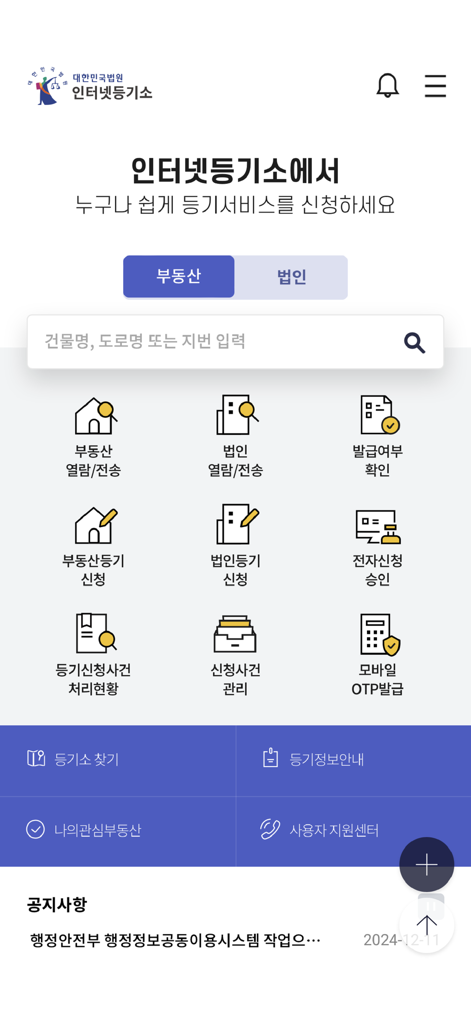
한국 인터넷 등기소 앱의 메인 화면, 부동산 및 기업 서비스 아이콘 표시.
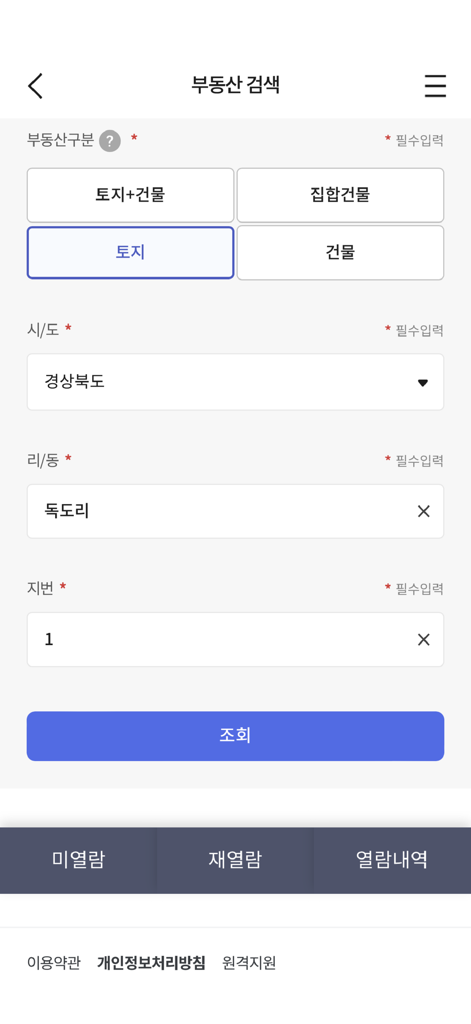
한국 인터넷 등기소 앱의 부동산 검색 인터페이스, 부동산 유형 및 위치에 대한 검색 필터 표시.
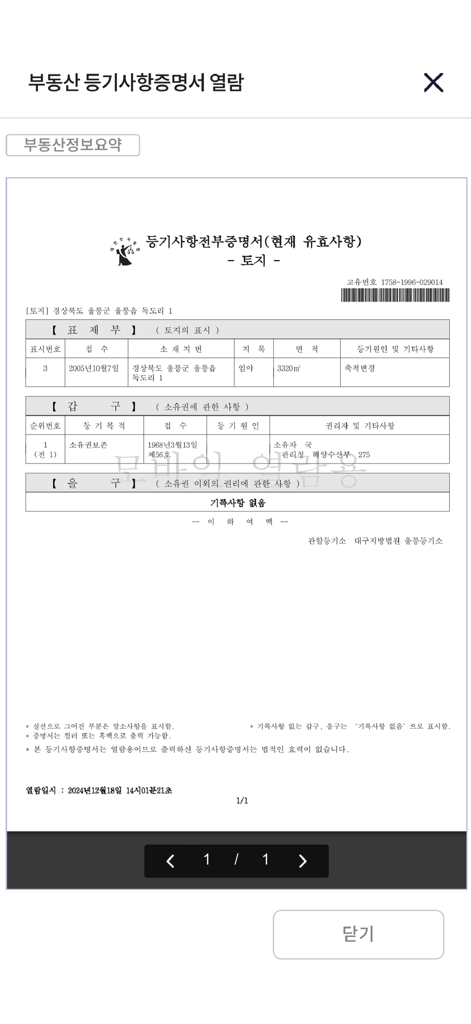
인터넷 등기소 앱에 표시된 부동산 등기 증명서.
미국에서 한국 자산을 관리하세요
이 앱을 돋보이게 하는 도구, 0 명의 사용자가 선택.
📄
즉시 서류 발급
안전한 모바일 결제 옵션으로 부동산 또는 기업 등록 증명서(등본)를 즉시 검색, 열람 및 발급하세요.
📍
실시간 신청 추적
국제 전화 없이도 등기 신고 및 법률 처리 상태에 대한 실시간 업데이트로 정보를 얻으세요.
🔐
원격 전자 서명
모바일 OTP 및 디지털 인증서를 사용하여 모바일 기기에서 직접 법률 서류를 승인하고 신원을 안전하게 확인하세요.
앱 소개
에 대해 알아야 할 모든 것 인터넷등기소.
설명
[Service Details]
The Mobile Internet Registration Office allows you to conveniently use the main services provided on the Supreme Court's Internet Registration Office website on your smartphone.
In the 'Real Estate Inquiry/Transmission' and 'Corporate Inquiry/Transmission' menus, you can quickly inquire about and issue registration records through searching for inquiry/issuance targets and electronic payment.
In the 'Check Issuance Status' menu, you can check whether a registration certificate has been issued.
In the 'Real Estate Registration Application' and 'Corporate Registration Application' menus, you can quickly and conveniently apply for registration online from anywhere without visiting the registration office.
In the 'Electronic Application Approval' menu, you can electronically sign 'Application Details and Attached Documents' for real estate/corporate registration applications.
In the 'Registration Application Case Processing Status' and 'Application Case Management' menus, you can check the current processing status of your application cases.
In the 'Mobile OTP Issuance' menu, you can issue/re-issue a mobile OTP as a secondary authentication medium for electronic certificates.
The 'Authentication Center' allows you to copy your joint certificate from PC to mobile and from mobile to PC.
Through other menus, you can check the location of registration offices/unmanned kiosks, registration information, announcements, etc.
[Detailed Description of Main Menus]
1. Real Estate Inquiry/Transmission
- Search for Inquiry/Issuance Target: You can search for inquiry/issuance targets by entering simple search terms, location address, road name address, or unique number.
- Electronic Payment: You can pay via credit card, mobile phone, prepaid electronic payment instrument, or simple payment.
- View Registration Certificate: You can view the registration certificate of the paid real estate.
- Unmanned Issuance Reservation: You can reserve to issue the registration certificate of the paid real estate at an unmanned kiosk.
- Electronic Issuance (Government24 Electronic Document Wallet): You can electronically issue the registration certificate of the paid real estate.
- Unviewed/Unissued: You can check the list of items that have been paid for but not viewed/issued and can view/issue them within 3 months.
- Re-view: You can check and view the list of items that can be re-viewed within 1 hour of the first viewing.
- Real Estate Information Summary Table: You can view summarized real estate information for the inquiry target.
- Fixed Date: You can search for and view the status of fixed date assignments for housing.
2. Corporate Inquiry/Transmission
- Search for Inquiry/Issuance Target: You can search for inquiry/issuance targets by entering the company name, registration number, business registration number, or Roman alphabet.
- Electronic Payment: You can pay via credit card, mobile phone, prepaid electronic payment instrument, or simple payment.
- View Registration Certificate: You can view the registration certificate of the paid corporation.
- Unmanned Issuance Reservation: You can reserve to issue the registration certificate of the paid corporation at an unmanned kiosk.
- Electronic Issuance (Government24 Electronic Document Wallet): You can electronically issue the registration certificate of the paid corporation.
- Unviewed/Unissued: You can check the list of items that have been paid for but not viewed/issued and can view/issue them within 3 months.
- Re-view: You can check and view the list of items that can be re-viewed within 1 hour of the first viewing.
3. Check Issuance Status
- You can check whether a registration certificate has been issued by entering the issuance confirmation number for real estate, corporate, movable collateral, or other registration certificates.
- You can check whether a corporate seal certificate has been issued by entering the issuance confirmation number.
4. Real Estate Registration Application
- Application Creation/Submission: After entering information such as real estate details, debtor information, creditor information, and applicant information, you can submit the application.
- Application/Withdrawal Approval: You can approve attached documents such as electronic power of attorney collectively, and approve after selecting a withdrawal request.
- Application Processing History: You can view the processing history after applying for registration.
- Receipt of Registration Information: You can receive registration information by searching for your name and resident/corporate registration number.
5. Corporate Registration Application
- Application Creation/Submission: After entering information such as the type of registration, applicant corporation, registration details, registration tax/fees, attached documents, and applicant information, you can submit the application.
- Application/Withdrawal Approval: You can approve attached documents such as electronic power of attorney collectively, and approve after selecting a withdrawal request.
- Application Processing History: You can view the processing history after applying for registration.
6. Electronic Application Approval
- For real estate/corporate registration electronic applications, you can review application details such as attached documents and electronically sign with a joint certificate, financial certificate, or electronic certificate.
7. Registration Application Case Processing Status
- Real Estate Registration: You can check the current processing status of your application case by entering simple search terms, location address, road name, or receipt number.
- Corporate Registration: You can check the current processing status of your application case by entering the company name, registration number, Roman alphabet, or receipt number.
8. Application Case Management
- You can view the current processing status of all real estate and corporate registration electronic standard form applications submitted by you.
9. Mobile OTP Issuance
- Issuance: You can obtain a mobile OTP by entering your access number, name, and resident registration number and completing mobile phone authentication.
- Re-issuance: You can re-issue your issued mobile OTP.
10. Authentication Center
- You can copy your joint certificate between your smartphone and PC.
* Access Permissions
- Optional Access Permissions
Camera: Used for scanning and uploading attached documents for real estate/corporate electronic applications.
Album: Used for scanning and uploading attached documents for real estate/corporate electronic applications.
Phone: Used for automatic input of device's mobile phone number information during mobile payment and for calling the user support center.
* Even if you do not agree to the optional access permissions, you can use the main services of the Internet Registration Office app (such as viewing registration records and checking application case processing status), but there may be limitations on the use of some functions that require permissions.
* You can set permissions in Settings > Internet Registration Office.
* This program is optimized for iOS 13.0 and above.
최신 버전
3.0.3
크기
107.4 MB
출시일
2015년 3월 30일
미국 어디서든 한국 자산을 관리하세요
영사관 방문을 건너뛰세요. 스마트폰으로 직접 부동산 및 기업 등기소에 접속하고, 증명서를 발급하며, 법률 신고 사항을 모니터링하세요.
App information, icons, screenshots, and descriptions displayed on this page are sourced from the Apple App Store and are the property of their respective developers. Download estimates and rankings are based on MWM's proprietary models and may not reflect actual figures. This page is provided for informational and analytical purposes only.
Believe this page infringes your intellectual property? File a dispute