LifeSight Pension GB

LifeSight Pension GB


다운로드: App Store
로고: LifeSight Pension GB

LifeSight 연금 GB: 간편해진 은퇴 여정

저축액을 추적하고, ageOmeter로 은퇴 시기를 시각화하고, 모든 계정을 한 곳에서 안전하게 관리하세요.

개발사

Towers Watson Limited

카테고리

Finance

다운로드

68K+

사용자 평점

4.6/5

총 평가 수

1K+

지원 언어

1

손끝에서 펼쳐지는 은퇴

이 인터페이스를 사용하는 68K+ 명의 사용자.

붉은 배경에 '미래를 위한, 그리고 그 사이의 모든 순간을 위해'라는 슬로건이 적힌 스마트폰을 들고 있는 여성

붉은 배경에 '미래를 위한, 그리고 그 사이의 모든 순간을 위해'라는 슬로건이 적힌 스마트폰을 들고 있는 여성

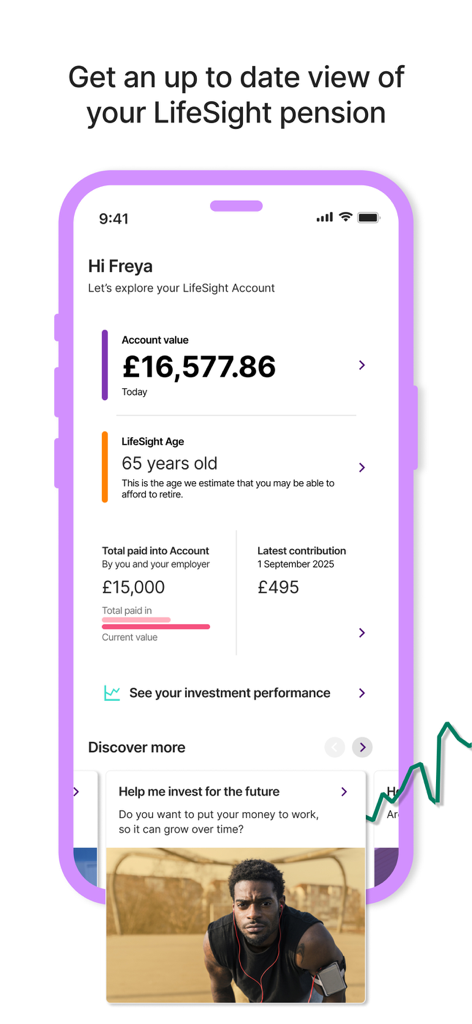
계정 잔액과 예상 은퇴 연령을 보여주는 LifeSight 연금 GB 앱 대시보드

계정 잔액과 예상 은퇴 연령을 보여주는 LifeSight 연금 GB 앱 대시보드

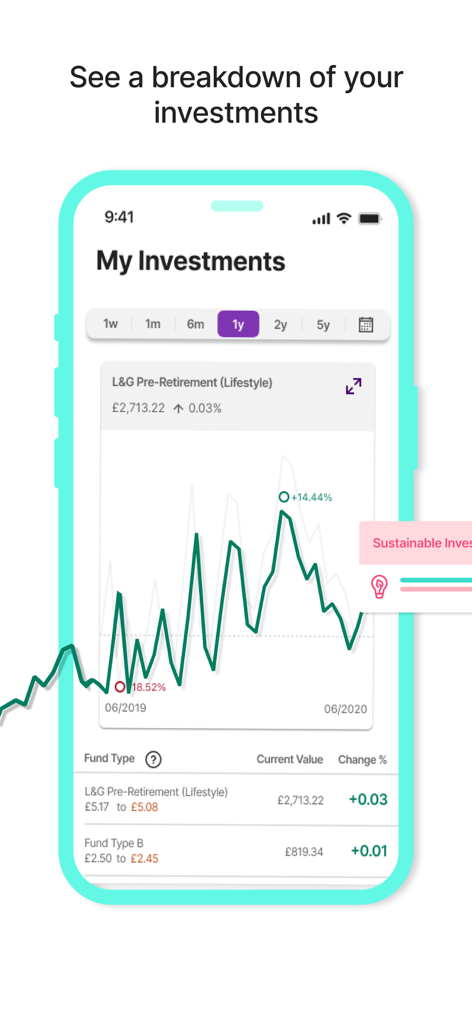
투자 성과 차트와 펀드 가치 내역을 보여주는 LifeSight 연금 앱 인터페이스

투자 성과 차트와 펀드 가치 내역을 보여주는 LifeSight 연금 앱 인터페이스

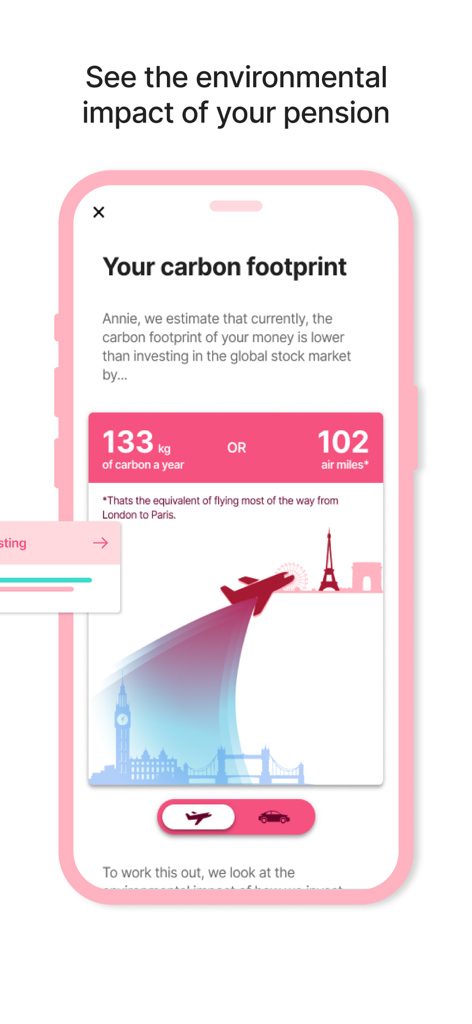
은퇴 투자의 탄소 발자국 및 환경 영향을 표시하는 LifeSight 연금 앱

은퇴 투자의 탄소 발자국 및 환경 영향을 표시하는 LifeSight 연금 앱

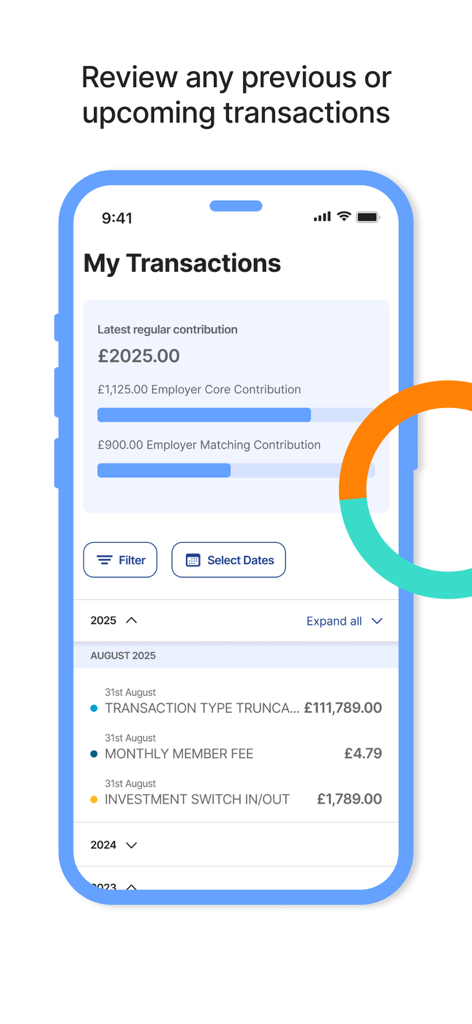
최근 거래 및 기여금 세부 정보를 보여주는 LifeSight 연금 GB 앱 인터페이스

최근 거래 및 기여금 세부 정보를 보여주는 LifeSight 연금 GB 앱 인터페이스

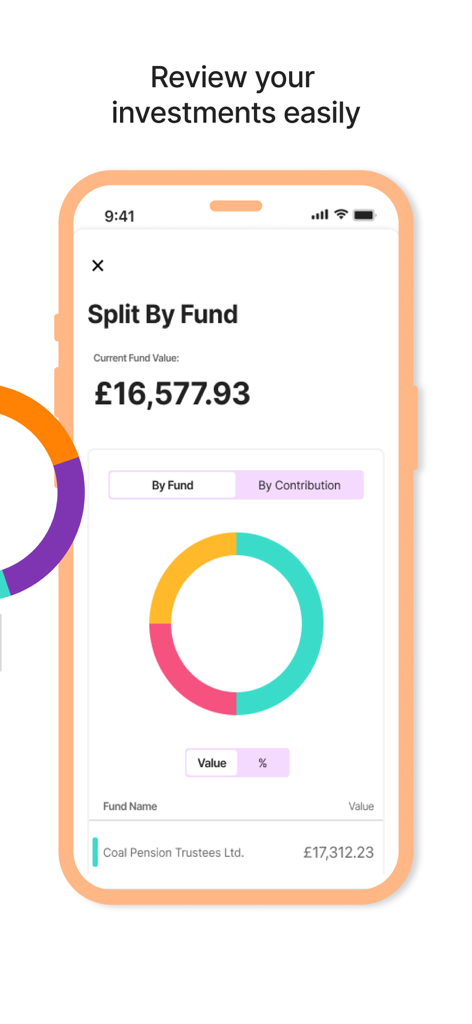
색상이 있는 도넛 차트와 계정 가치로 펀드별 투자 분배를 보여주는 LifeSight 연금 앱 인터페이스

색상이 있는 도넛 차트와 계정 가치로 펀드별 투자 분배를 보여주는 LifeSight 연금 앱 인터페이스

미래를 바라보는 전문적인 여성이 등장하는 LifeSight 연금 GB 앱 다운로드 화면

미래를 바라보는 전문적인 여성이 등장하는 LifeSight 연금 GB 앱 다운로드 화면

명확한 기준으로 은퇴를 마스터하세요

이 앱을 돋보이게 하는 도구, 68K+ 명의 사용자가 선택.

은퇴 날짜 찾기

현재 저축액과 목표를 기반으로 언제 은퇴할 수 있는지 정확하게 시각화하려면 대화형 ageOmeter를 사용하세요.

📈

성장 및 매칭 추적

총 잔액을 모니터링하고 고용주 기여금이 은퇴 자금을 늘리는 실시간 영향을 확인하세요.

💼

모든 계정을 한 곳에서 관리

현재 또는 이전 고용주로부터 여러 LifeSight 연금을 보유하고 있다면, 단일 보안 앱 내에서 모두 확인하고 전환하세요.

앱 소개

에 대해 알아야 할 모든 것 LifeSight Pension GB.

설명

The LifeSight App aims to make saving to and through retirement as easy and understandable as possible. Working alongside your online LifeSight Account, the app is the most convenient way for you to engage with your pension savings to help you plan for your future. FEATURES + View your account value and compare it to how much you and your employer have paid in. + Access the ageOmeter tool to understand when you might be able to afford to retire. + View a breakdown of your account by contribution type - the source of the savings in your account - or by the funds your savings are invested in. + View your current investment decisions. + View your recent transactions such as the amount of your latest regular contribution. + View the investment performance of funds you are invested in and compare that to other funds available within LifeSight. + Easily click through to your online LifeSight account to action any changes. + Set up notifications to remind you to check the LifeSight app. + If you have multiple accounts within LifeSight, you are able to add them all to the app and easily switch between them. GET STARTED - Download the ‘LifeSight Pension GB’ app - Using a web browser, log in* to your online LifeSight Account - In the top-right hand corner (or in the footer of the page on mobile), click on Settings -> LifeSight App - Generate a secure token to be entered into the app the first time you log in - That's it! You'll then be asked to enable Touch or Face ID, or set up a PIN for future access. *IMPORTANT You must have an account with LifeSight GB to be able to use this application. This will be the case if your employer, or a past employer, has selected LifeSight as their chosen pension arrangement. Alternatively, you may have selected LifeSight as your drawdown provider in retirement. If you've never logged in before, you should be able to get to your online LifeSight account through your employer’s HR portal if you still work at the company. If your LifeSight pension savings are from a past employment, you will need to request login details if you do not already have them, and then log in online at http://lifesight-epa.com/. SECURITY The LifeSight mobile app has been tested extensively by independent specialists to make sure it’s secure, so you can use the LifeSight App with confidence. The data used is encrypted to ensure privacy, and the app will only use a trusted secure channel for communication with LifeSight services. It also automatically logs you out after a set period of time if the app is in the background. As mentioned above, you’ll use a secure token to log in to the app for the first time, after which you can create a PIN or choose to use Touch or Face ID, ensuring nobody else will be able to access your account. FEEDBACK We're always keen to hear your feedback on ways to improve things. If there’s anything you’d like to see in the app that isn’t already there, or any bugs you come across, please send your feedback to lifesightsupport@willistowerswatson.com.

최신 버전

2.8.1

크기

108.6 MB

출시일

2020년 4월 1일

미래를 오늘 확보하세요

68,000명 이상의 전문가와 함께 은퇴를 관리하세요. 지금 LifeSight를 다운로드하여 ageOmeter에 액세스하고 이동 중에 저축액을 추적하세요.

다운로드: App Store

App information, icons, screenshots, and descriptions displayed on this page are sourced from the Apple App Store and are the property of their respective developers. Download estimates and rankings are based on MWM's proprietary models and may not reflect actual figures. This page is provided for informational and analytical purposes only.

Believe this page infringes your intellectual property? File a dispute