LingoView-Perfect Translate

LingoView-Perfect Translate


다운로드: App Store
로고: LingoView-Perfect Translate

LingoView-완벽한 번역: 언제 어디서든 언어 장벽을 즉시 허무세요

끊김 없는 온라인 및 오프라인 모드로 실시간 번역의 속도를 경험하세요. 국경 없는 안정적인 원터치 통신이 필요한 여행객과 전문가에게 완벽합니다.

개발사

ABDURRAHMAN YAURI ALIYU

카테고리

Entertainment

다운로드

7K+

사용자 평점

1.0/5

총 평가 수

0

지원 언어

1

한눈에 보는 번역

이 인터페이스를 사용하는 7K+ 명의 사용자.

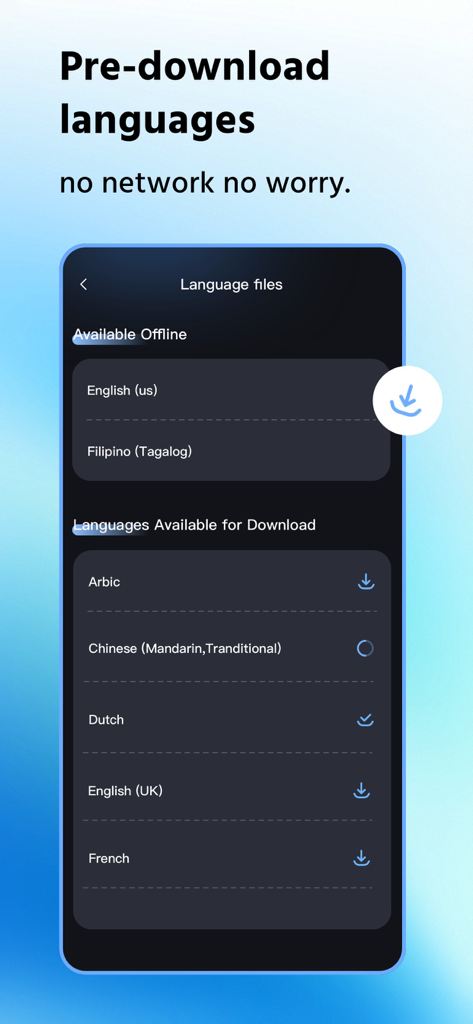
오프라인 번역을 위한 사용 가능한 언어 파일과 다운로드 가능한 언어 파일을 보여주는 LingoView 앱 인터페이스

오프라인 번역을 위한 사용 가능한 언어 파일과 다운로드 가능한 언어 파일을 보여주는 LingoView 앱 인터페이스

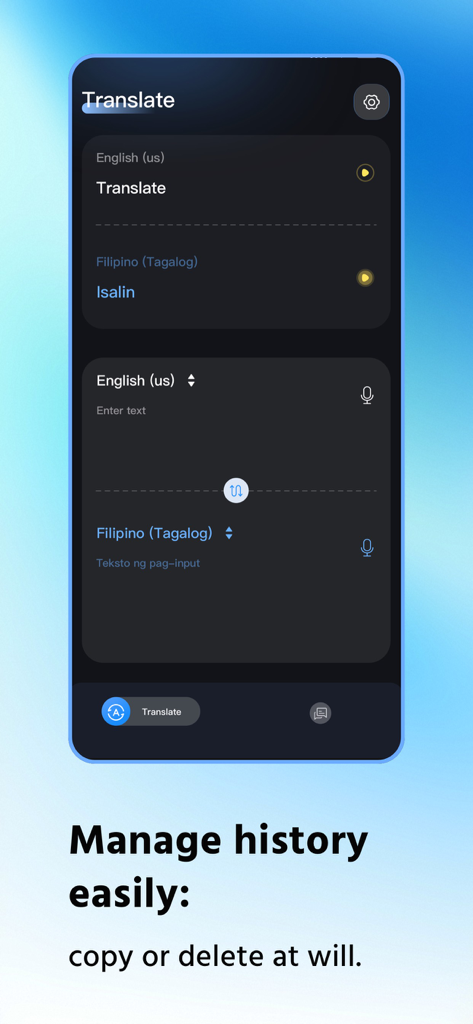
영어와 필리핀어의 번역 기록 및 언어 선택을 보여주는 LingoView 앱 인터페이스

영어와 필리핀어의 번역 기록 및 언어 선택을 보여주는 LingoView 앱 인터페이스

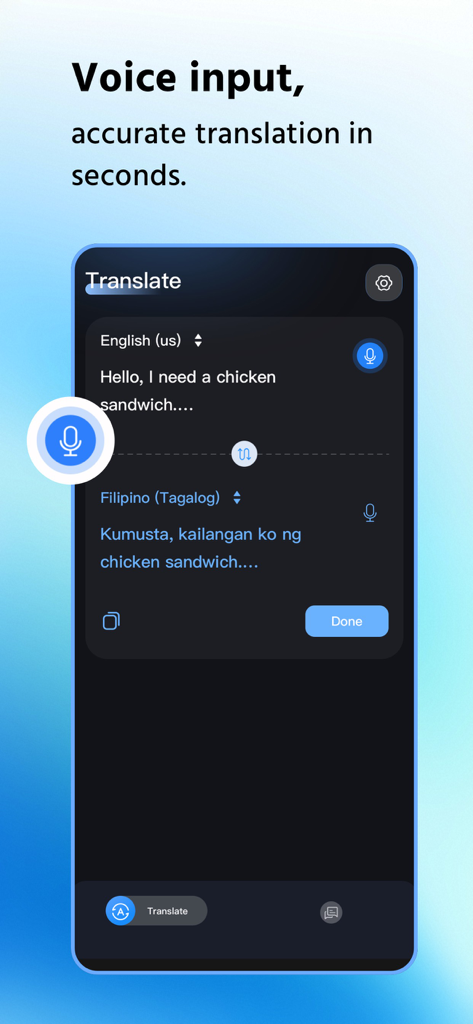
영어에서 필리핀어로 음성 입력 번역을 보여주는 LingoView 모바일 앱 인터페이스

영어에서 필리핀어로 음성 입력 번역을 보여주는 LingoView 모바일 앱 인터페이스

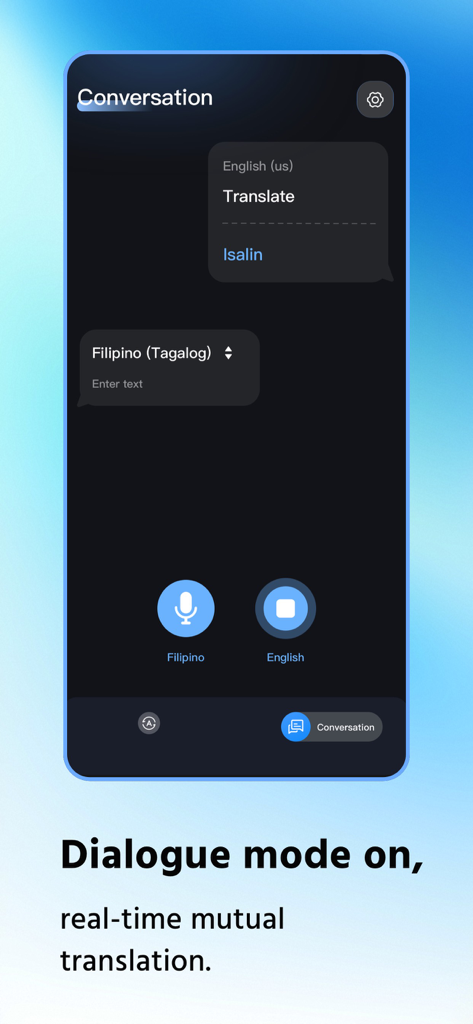
영어와 필리핀어 간의 실시간 번역 대화 모드를 보여주는 LingoView 앱의 인터페이스

영어와 필리핀어 간의 실시간 번역 대화 모드를 보여주는 LingoView 앱의 인터페이스

국경 없는 번역을 경험하세요

이 앱을 돋보이게 하는 도구, 7K+ 명의 사용자가 선택.

즉각적인 실시간 미리보기

입력하는 대로 결과를 확인하세요. 확인 클릭이나 기다림 없이 필요한 정보를 정확히 필요할 때 얻을 수 있습니다.

✈️

안정적인 오프라인 액세스

자신 있게 여행하세요. 데이터 연결 없이 통신을 유지하기 위해 외딴 지역이나 비행기에서 오프라인 모드로 전환하세요.

🔄

한 번의 탭으로 언어를 즉시 전환하고 한 손 사용에 최적화된 정리된 카드 레이아웃으로 기록을 관리하세요.

앱 소개

에 대해 알아야 할 모든 것 LingoView-Perfect Translate.

설명

LingoView Translation App: Instant Efficiency Without Boundaries, Effortless Operation for Total Peace of Mind Tired of wasting time on cumbersome translation steps? Frustrated by language barriers caused by network restrictions? LingoView Translation App zeroes in on users' core translation needs with its core design philosophy of "Instant Response, Simple Operation". It delivers a dual-mode translation service supporting both online and offline use, seamlessly adapting to diverse scenarios such as daily communication, cross-border interactions, overseas travel, and business negotiations—breaking down language barriers once and for all. The moment you input text, LingoView's Instant Preview feature springs into action. Translation results appear in real time right below the original text, requiring no extra clicks for confirmation. Key information is crystal clear at a glance, drastically boosting information acquisition efficiency. After confirming the content, the translated text is automatically saved in a stacked card format. The well-organized layout ensures every translation is traceable, making future reference and management a breeze. LingoView supports free switching between online/offline dual modes to meet translation needs in different scenarios. In online mode, backed by robust cloud data support, it not only guarantees translation accuracy but also covers 18 globally popular languages including English, Indonesian, and Vietnamese, handling both professional terminology and colloquial expressions with ease. When you’re in areas without internet access—such as outdoors, on an airplane, or in remote regions—the offline mode kicks in instantly, fulfilling basic translation requirements, eliminating scenario limitations, and enabling translation anytime, anywhere. LingoView fully understands the importance of efficient operation and crafts a user-friendly interface with meticulous care. The one-tap language swap button in the middle of the screen allows seamless switching of translation directions with just a single click. Translating from Chinese to English or vice versa no longer requires repeated trips to the settings page, maximizing operational fluency. For stacked translation cards, LingoView supports a left-swipe to delete function, letting you clear unwanted content in one go and free up storage space. With user experience as its top priority, LingoView redefines the new paradigm of efficient translation through sleek design and powerful features. Choose LingoView, and make language communication simpler than ever!

최신 버전

1.0.2

크기

114.7 MB

출시일

2025년 12월 24일

언제 어디서든 국경 없는 번역을 경험하세요.

LingoView를 통해 즉각적이고 오프라인에서도 사용할 수 있는 통신을 신뢰하는 수천 명의 탐험가들과 함께하세요. 지금 다운로드하여 '번역 때문에 길을 잃는' 일을 과거의 일로 만드세요.

다운로드: App Store
FAQ

자주 묻는 질문

에 대해 알아야 할 모든 것 LingoView-Perfect Translate

LingoView 번역 앱의 핵심 기능은 무엇인가요?

LingoView 번역 앱은 실시간으로 온라인 및 오프라인 이중 모드 번역을 제공합니다. 일상적인 소통, 여행, 비즈니스 협상 시 언어 장벽을 허물기 위해 효율성과 사용 편의성에 중점을 둡니다.

LingoView 번역 앱을 인터넷 연결 없이 사용할 수 있나요?

네, LingoView는 오프라인 모드를 지원합니다. 사용자는 특정 언어 파일을 미리 다운로드하여 인터넷 접속이 불가능한 지역, 예를 들어 외딴 지역이나 비행 중에도 기본적인 번역 기능을 사용할 수 있습니다.

LingoView 번역 앱은 번역 결과를 어떻게 표시하나요?

LingoView는 즉석 미리보기 기능을 제공합니다. 입력하는 대로 원문 텍스트 바로 아래에 실시간으로 번역 결과가 나타납니다. 이를 통해 추가 클릭이 필요 없고 정보 습득 효율성이 크게 향상됩니다.

LingoView 번역 앱은 온라인 번역에 어떤 언어를 지원하나요?

LingoView는 온라인 모드에서 영어, 인도네시아어, 베트남어를 포함한 18개 인기 있는 전 세계 언어를 지원합니다. 강력한 클라우드 데이터 지원으로 전문 용어와 구어체 표현 모두를 처리합니다.

사용자는 LingoView에서 번역 기록을 어떻게 관리하나요?

LingoView는 번역된 텍스트를 쌓인 카드 형식으로 자동 저장합니다. 사용자는 왼쪽으로 스와이프하여 원치 않는 콘텐츠를 삭제함으로써 이 기록을 관리할 수 있어 향후 참조 및 저장 공간 관리가 간편합니다.

LingoView-Perfect Translate는 음성 입력을 지원하나요?

네, LingoView-Perfect Translate는 음성 입력을 지원합니다. 사용자는 앱에 말하면 몇 초 안에 정확한 번역 결과를 얻을 수 있습니다. 이 기능은 번역 인터페이스의 마이크 아이콘으로 표시됩니다.

LingoView 앱에는 실시간 대화 모드가 있나요?

네, LingoView 앱에는 '대화 모드'가 포함되어 있습니다. 이 기능은 두 화자 간의 실시간 상호 번역을 가능하게 하여, 인터페이스에 표시된 것처럼 서로 다른 언어를 사용하는 사람들 간의 원활한 의사소통을 촉진합니다.

LingoView는 언어 전환을 어떻게 쉽게 만드나요?

LingoView는 화면 중앙에 위치한 원탭 스왑 버튼으로 언어 전환을 쉽게 할 수 있도록 합니다. 사용자는 단 한 번의 클릭으로 번역 방향을 즉시 변경할 수 있어 작동 유창성을 향상시킵니다.

App information, icons, screenshots, and descriptions displayed on this page are sourced from the Apple App Store and are the property of their respective developers. Download estimates and rankings are based on MWM's proprietary models and may not reflect actual figures. This page is provided for informational and analytical purposes only.

Believe this page infringes your intellectual property? File a dispute