Mental Note for iPad ๛

Mental Note for iPad ๛

다운로드: App Store
로고: Mental Note for iPad ๛

Mental Note for iPad: 당신의 아이디어를 위한 궁극의 디지털 캔버스

선형적인 노트 필기에서 벗어나세요. 스케치, 음성 메모, 사진, 텍스트를 한 페이지에 완벽하게 결합하여 진정으로 유기적인 브레인스토밍 경험을 만끽하세요.

개발사

Zymbiotic Technologies

카테고리

Productivity

다운로드

158K+

사용자 평점

3.1/5

총 평가 수

500

지원 언어

1

천재의 엿보기

이 인터페이스를 사용하는 158K+ 명의 사용자.

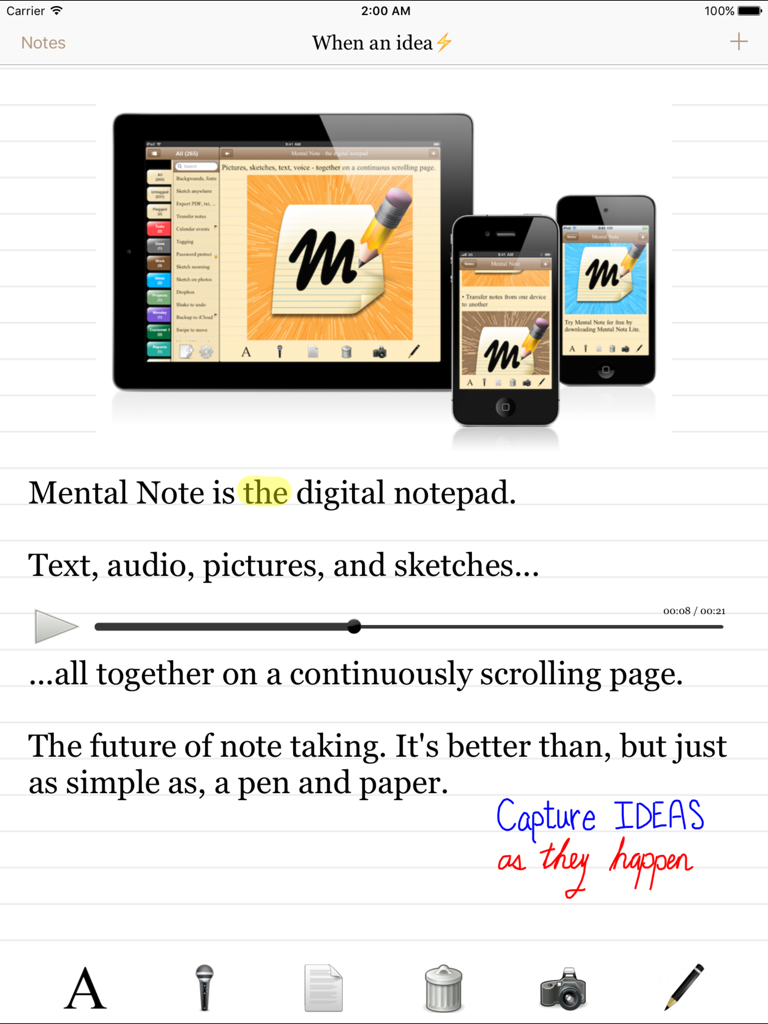
텍스트, 오디오 녹음, 손으로 그린 스케치가 디지털 노트패드에 포함된 Mental Note for iPad 앱 인터페이스.

텍스트, 오디오 녹음, 손으로 그린 스케치가 디지털 노트패드에 포함된 Mental Note for iPad 앱 인터페이스.

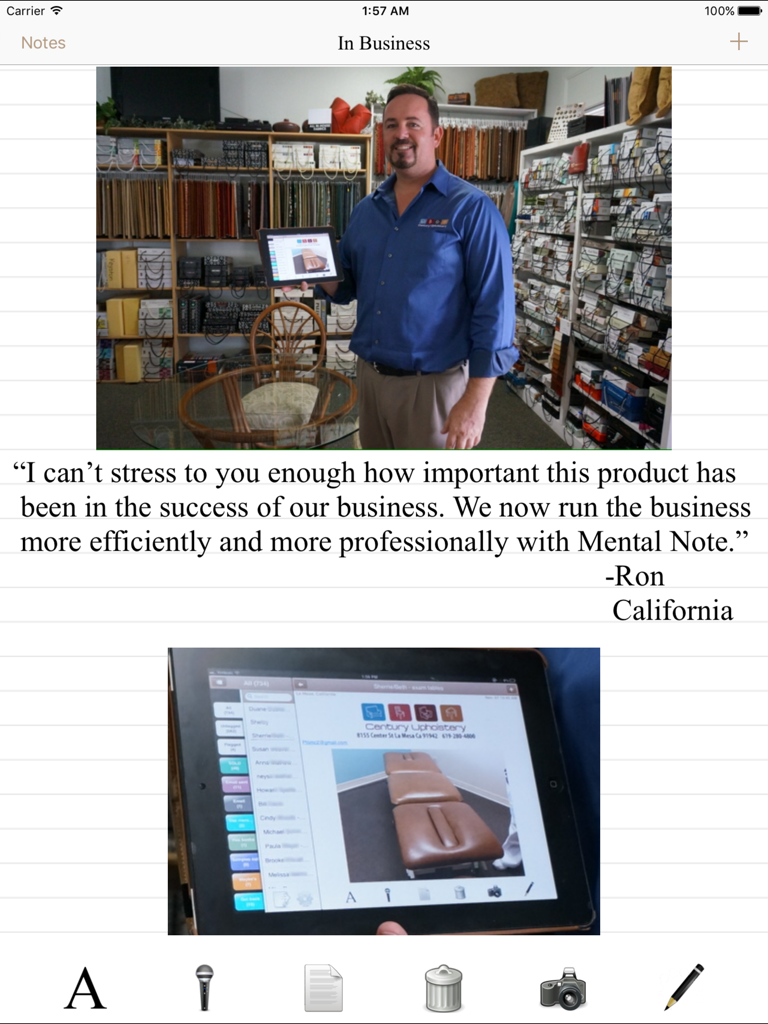
Ron이라는 사업가가 Mental Note for iPad를 사용하여 실내 장식 사업을 효율적으로 관리하는 방법을 보여주는 추천사.

Ron이라는 사업가가 Mental Note for iPad를 사용하여 실내 장식 사업을 효율적으로 관리하는 방법을 보여주는 추천사.

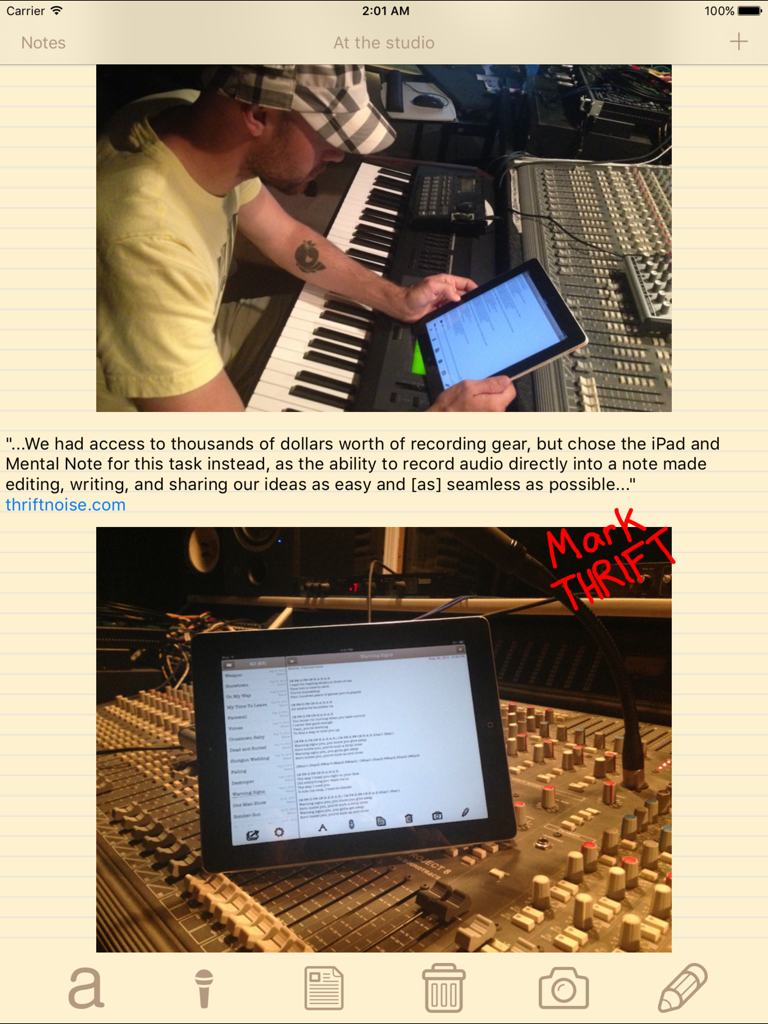
음악가가 녹음 스튜디오에서 iPad의 Mental Note 앱을 사용하여 노래 가사와 오디오 노트를 정리하는 모습.

음악가가 녹음 스튜디오에서 iPad의 Mental Note 앱을 사용하여 노래 가사와 오디오 노트를 정리하는 모습.

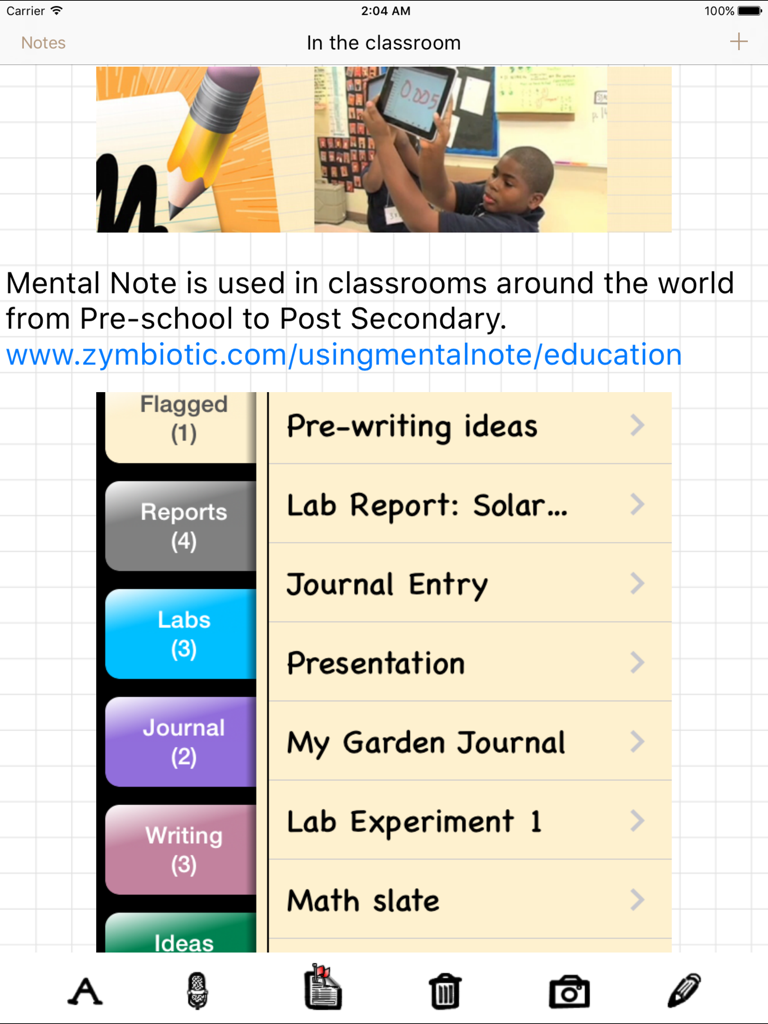
교실에서 실험 보고서 및 저널을 포함한 노트 정리를 보여주는 다채로운 탭이 있는 Mental Note for iPad 인터페이스.

교실에서 실험 보고서 및 저널을 포함한 노트 정리를 보여주는 다채로운 탭이 있는 Mental Note for iPad 인터페이스.

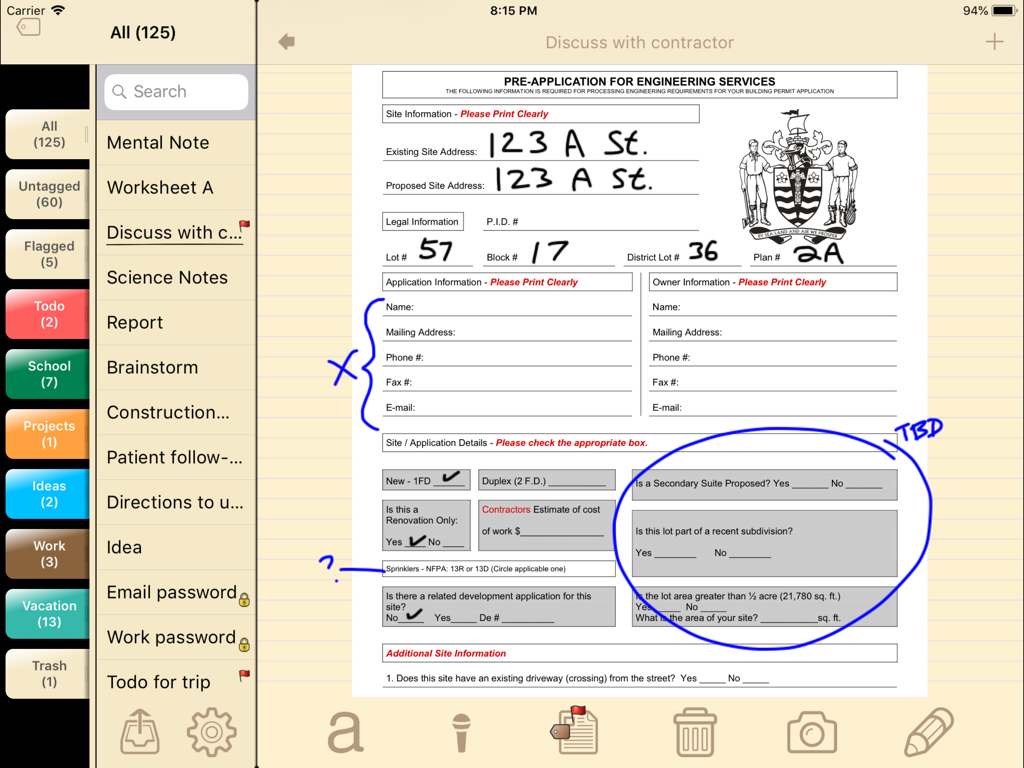
파란색 손글씨 주석과 스케치가 있는 디지털 엔지니어링 양식을 보여주는 Mental Note for iPad 앱의 스크린샷.

파란색 손글씨 주석과 스케치가 있는 디지털 엔지니어링 양식을 보여주는 Mental Note for iPad 앱의 스크린샷.

당신의 빛나는 아이디어를 위한 궁극의 캔버스

이 앱을 돋보이게 하는 도구, 158K+ 명의 사용자가 선택.

💡

완벽한 감각 포착

단순히 쓰는 것을 넘어 보여주고 말하세요. 오디오 노트, 손으로 그린 스케치, 사진을 한 페이지에 혼합하여 모든 아이디어의 전체 맥락을 보존하세요.

✏️

촉각적 디지털 스케칭

정밀하게 사진에 주석을 달거나 세부 사항을 스케치하세요. iPad와 Apple Pencil에 최적화된 직관적이고 유연한 종이 경험입니다.

📂

전문적인 정리

태그와 캘린더 통합으로 당신의 천재적 발상을 체계적으로 관리하고, PDF 또는 Dropbox로 내보내어 완벽한 전문 워크플로우를 완성하세요.

앱 소개

에 대해 알아야 할 모든 것 Mental Note for iPad ๛.

설명

"...a true notepad experience that may help you make a clean break from the pencil-and-paper era." -New York Times. Users describe Mental Note as "the only notepad app... that's actually better than, and as simple as, a pen and paper." It's "the future of note taking", and "a big sketchpad... [to] free-associate and put stuff down in any format". Mental Note for iPad brings the future closer with an even bigger sketchpad for you to capture your ideas on. Turn your iPad into a digital notepad.  Combine pictures, voice recordings, drawings and text - all on the same page, in any order you choose. An idea... a flash - a moment of genius.  When a thought hits, and you have to remember it, why limit how you record it?  The more context and sensory details you can capture, the clearer the idea can be put down. Use pictures, audio, sketching and text together on the same page... a digital page that can be shared with anyone. Mental Note allows you to capture ideas as they happen: use pictures, dictate, add text, sketch on anything.  Ideas clarified. Creativity captured. FEATURES - Draw with your finger using multiple colours and widths on top of pictures, text, or anywhere else on the page. Zoom in to sketch fine details. - Choose a picture from your album and add it to the page. - Add audio to the page by recording with the built-in microphone. Continue to edit your note while recording. - Organize your notes using tags. - Password protect your private notes and flag your important ones. - Attach Calendar events to your notes. - Undo, redo anything in the note by shaking the device. - Delete note sections using the toolbar button or by swiping any note section. - Move a note section by swiping and then dragging it to its new location. - Length of a note is limited only by device memory. - Export in a variety of formats including PDF, text, Mental Note format, and more. Send using email, iCloud, Dropbox, and more. * Send a note in Mental Note format so the note may be imported into another person's Mental Note app. * Using email, export a complete note directly from Mental Note as either a PDF document or a picture (each audio recording is attached to the email as a separate file). You can also email just the text from your note. - Export your notes and backups to your iCloud and/or Dropbox account. - Share a note with your friends using most installed apps. - Map the location a note was created at (if location services are enabled). - Change the size and font of the text in your notes. - Change the color and background of your notes. - Numerous other configuration options. THIS VERSION IS OPTIMIZED FOR iPad. FOR iPhone, PLEASE SEE Mental Note - the digital notepad. Read more: www.zymbiotic.com X @zymbiotic facebook.com/zymbiotic

최신 버전

3.17.2

크기

17.0 MB

출시일

2010년 4월 1일

당신의 다음 천재적 순간을 포착하세요

158,000명 이상의 시각적 사고가 및 전문가들이 종이 노트를 버리고 궁극의 디지털 스케치패드를 선택했습니다. 지금 바로 iPad용 Mental Note를 다운로드하세요.

다운로드: App Store
FAQ

자주 묻는 질문

에 대해 알아야 할 모든 것 Mental Note for iPad ๛

아이패드용 멘탈 노트란 무엇인가요?

아이패드용 멘탈 노트는 텍스트, 사진, 음성 녹음, 그림을 같은 페이지에 결합할 수 있는 디지털 메모장 애플리케이션입니다. 아이패드 기기에 최적화된 노트 필기 경험을 제공합니다.

아이패드용 멘탈 노트는 한 메모에 여러 미디어 유형을 결합할 수 있나요?

네, 아이패드용 멘탈 노트는 사진, 음성 녹음, 그림, 텍스트를 모두 같은 디지털 페이지에 결합할 수 있습니다. 이를 통해 아이디어를 포괄적으로 기록할 수 있습니다.

아이패드용 멘탈 노트는 어떤 내보내기 옵션을 제공하나요?

아이패드용 멘탈 노트는 PDF, 텍스트 및 자체 멘탈 노트 형식을 포함한 다양한 내보내기 형식을 제공합니다. 사용자는 이메일, iCloud, Dropbox 및 기타 설치된 공유 앱을 통해 노트를 보낼 수 있습니다.

아이패드용 멘탈 노트에서 메모를 비밀번호로 보호할 수 있나요?

네, 아이패드용 멘탈 노트에는 개인 메모를 비밀번호로 보호하는 기능이 포함되어 있습니다. 사용자는 쉽게 식별할 수 있도록 중요한 메모에 플래그를 지정할 수도 있습니다.

사용자는 아이패드용 멘탈 노트 앱 내에서 메모를 어떻게 정리할 수 있나요?

사용자는 태그를 사용하여 아이패드용 멘탈 노트에서 메모를 정리할 수 있습니다. 이 기능을 통해 애플리케이션 내에서 다양한 메모를 효율적으로 분류하고 관리할 수 있습니다.

멘탈 노트는 아이패드 기기에 특별히 최적화되어 있나요?

네, 이 버전의 멘탈 노트는 아이패드에 특별히 최적화되어 있습니다. 아이폰 사용자의 경우 별도의 "멘탈 노트 - 디지털 메모장" 앱이 제공됩니다.

아이패드용 멘탈 노트로 만든 메모를 공유할 수 있나요?

네, 아이패드용 멘탈 노트는 대부분의 설치된 앱을 사용하여 친구와 메모를 공유할 수 있습니다. 사용자는 이메일, iCloud 및 Dropbox를 통해 노트를 내보낼 수도 있습니다.

아이패드용 멘탈 노트는 그림 그리기 및 스케치를 지원하나요?

네, 아이패드용 멘탈 노트는 여러 색상과 굵기를 사용하여 손가락으로 그림 그리기를 지원합니다. 사용자는 사진, 텍스트 또는 페이지의 어떤 부분에도 스케치할 수 있으며, 세부 사항을 위해 확대할 수도 있습니다.

아이패드용 멘탈 노트에 캘린더 이벤트를 메모에 첨부할 수 있나요?

네, 아이패드용 멘탈 노트는 캘린더 이벤트를 메모에 직접 첨부하는 기능을 제공합니다. 이를 통해 특정 메모를 예정된 활동과 연결하는 데 도움이 됩니다.

아이패드용 멘탈 노트의 메모 길이 제한은 어떻게 되나요?

아이패드용 멘탈 노트의 메모 길이는 기기의 메모리에 의해서만 제한됩니다. 이를 통해 방대하고 상세한 메모 필기가 가능합니다.

App information, icons, screenshots, and descriptions displayed on this page are sourced from the Apple App Store and are the property of their respective developers. Download estimates and rankings are based on MWM's proprietary models and may not reflect actual figures. This page is provided for informational and analytical purposes only.

Believe this page infringes your intellectual property? File a dispute