Nearpod

Nearpod

다운로드: App Store
로고: Nearpod

Nearpod: 모든 수업에서 100% 학생 참여 유도

대화형 슬라이드, 실시간 통찰력, 22,000개 이상의 표준 연계 리소스로 교실에 힘을 실어주세요. VR 현장 학습부터 게임화된 평가까지, 모든 학생에게 목소리를 주면서 수업 계획 시간을 절약하세요.

개발사

NEARPOD INC

카테고리

Education

다운로드

3M+

사용자 평점

3.6/5

총 평가 수

5K+

지원 언어

1

실시간 교실 마법

이 인터페이스를 사용하는 3M+ 명의 사용자.

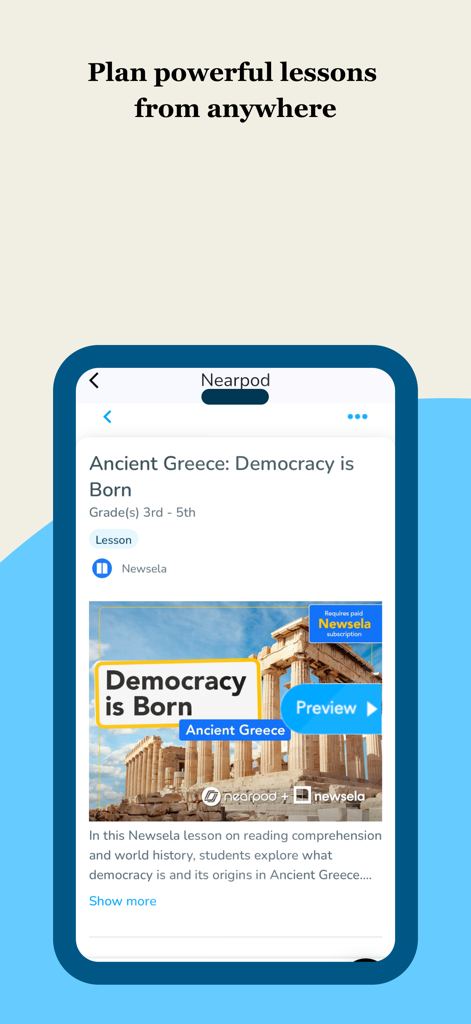
Nearpod 앱 인터페이스는 고대 그리스에 대한 대화형 수업 계획을 보여줍니다.

Nearpod 앱 인터페이스는 고대 그리스에 대한 대화형 수업 계획을 보여줍니다.

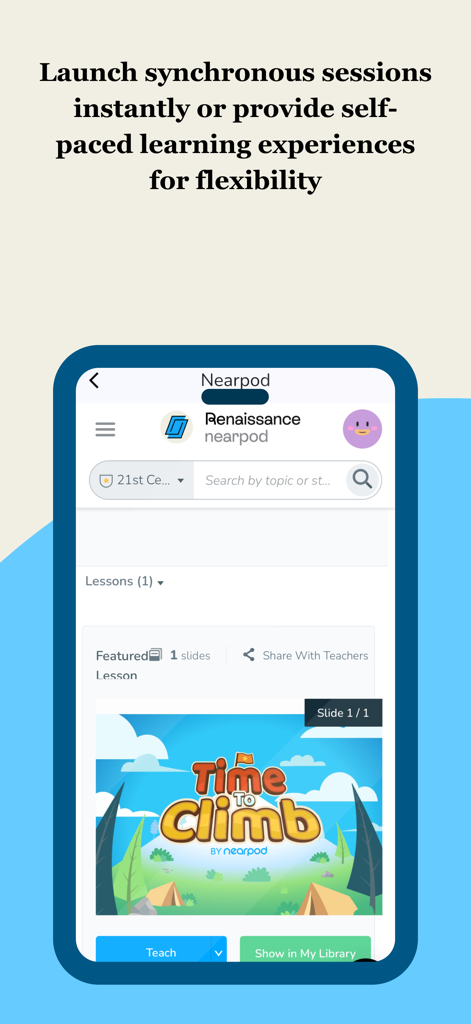
Nearpod 모바일 앱 인터페이스는 Time to Climb 게임화된 활동을 특징으로 하는 동기식 또는 자기 주도형 수업을 시작하는 옵션을 보여줍니다.

Nearpod 모바일 앱 인터페이스는 Time to Climb 게임화된 활동을 특징으로 하는 동기식 또는 자기 주도형 수업을 시작하는 옵션을 보여줍니다.

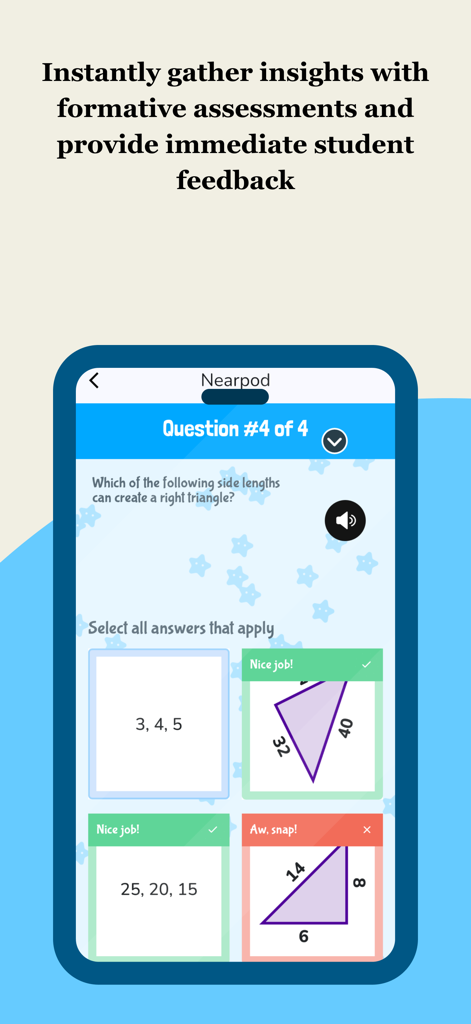
Nearpod 모바일 앱 인터페이스는 학생 피드백과 함께 수학 형성 평가를 보여줍니다.

Nearpod 모바일 앱 인터페이스는 학생 피드백과 함께 수학 형성 평가를 보여줍니다.

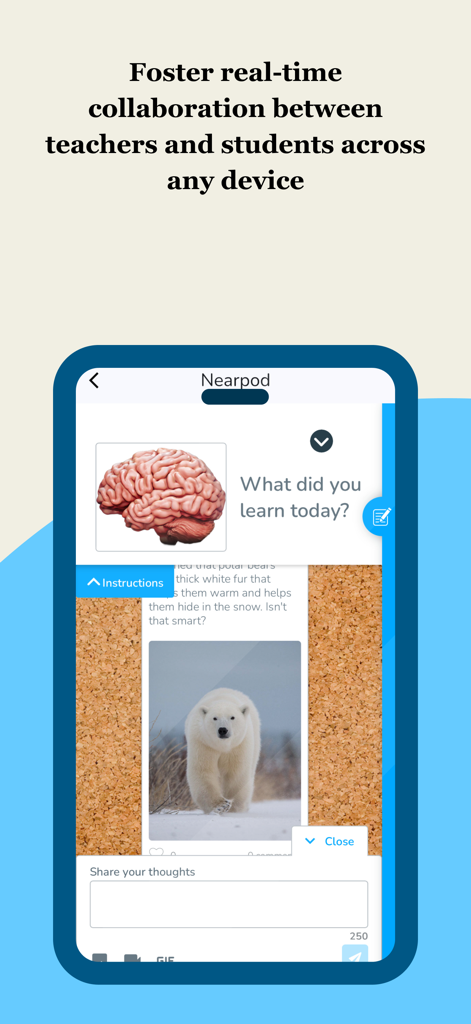
Nearpod 앱 인터페이스는 학생 피드백 및 실시간 참여를 위한 대화형 협업 보드를 보여줍니다.

Nearpod 앱 인터페이스는 학생 피드백 및 실시간 참여를 위한 대화형 협업 보드를 보여줍니다.

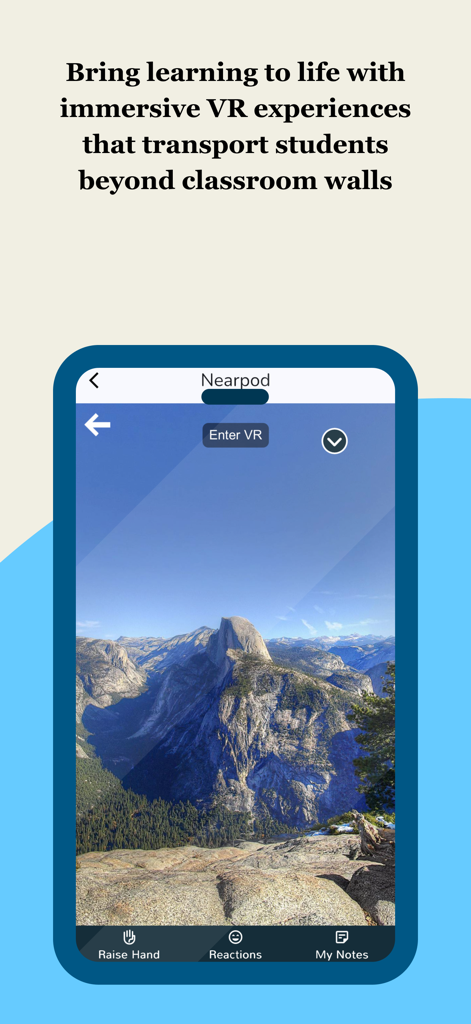
Nearpod 앱 화면은 산봉우리의 몰입형 VR 현장 학습과 VR 입장 버튼을 보여줍니다.

Nearpod 앱 화면은 산봉우리의 몰입형 VR 현장 학습과 VR 입장 버튼을 보여줍니다.

모든 수업을 능동적인 경험으로 바꿔보세요

이 앱을 돋보이게 하는 도구, 3M+ 명의 사용자가 선택.

🚀

100% 학생 참여

비참여라는 '블랙홀'을 제거하세요. 대화형 슬라이드, VR 현장 학습, 게임화된 활동을 사용하여 수줍은 학생을 포함한 모든 학생이 목소리를 낼 수 있도록 하세요.

📊

즉각적인 통찰력, 제로 채점

실시간 형성 평가 데이터를 사용하여 수동 채점의 번거로움 없이 수업을 조정하면서 모든 학생의 이해도를 '슈퍼파워' 시각으로 파악하세요.

⏱️

22,000개 이상의 표준 연계 수업

준비된 리소스 라이브러리로 주말을 되찾거나 기존 Google 슬라이드를 원활하게 가져와 몇 분 안에 계획에서 수업으로 전환하세요.

앱 소개

에 대해 알아야 할 모든 것 Nearpod.

설명

Nearpod: Interactive Lessons That Engage Every Student 

 Nearpod helps K–12 teachers create engaging, student-centered learning experiences that drive participation and deepen understanding. Whether you're teaching math, science, ELA, or any other subject, Nearpod gives you the tools to bring your lessons to life. 
Use interactive features like polls, quizzes, and virtual reality to spark curiosity and keep students involved. Monitor progress with real-time formative assessments and adjust instruction based on instant feedback. With flexible teaching modes, you can lead live lessons or assign student-paced activities that fit your classroom flow. Why Teachers Love Nearpod: 

 Interactive slides, videos, and activities that promote active learning 
 Real-time insights to support data-informed instruction 

 Seamless integration with Google Slides, YouTube, and your LMS 
 Access to 22,000+ standards-aligned lessons and resources 

 Tools for differentiation and student voice 

 
 Nearpod works with the platforms you already use and adapts to your teaching style. Whether you're enhancing your curriculum or building lessons from scratch, Nearpod helps you deliver instruction that sticks. How Nearpod works: 1. Learning experiences are created by teachers from scratch, uploading slides, with AI (on tablet or web), or selected from a catalogue of over 22,000 experiences found in the Nearpod Library.

 2. Students join synchronous learning experiences led by their teachers or learn at their own pace.
 3. Students actively engage in interactive media, formative assessments, and activities such as videos, quizzes, polls, 3D objects, virtual reality, drawing tools, and more. 4. Teachers receive immediate insights into student learning, allowing them to provide feedback, correct misconceptions, and adjust instruction.

5. Students are introduced to content through dynamic multimedia that includes VR Field trips, 3D objects, PhET simulations, BBC videos and more.
 
 
To make your technology integration as seamless as possible, Nearpod has partnered with: Apple Google Microsoft Canvas Schoology Brightspace by D2L Blackboard Moodle Clever ClassLink 
What teachers are saying: 
"Nearpod provides me and my teachers with an excellent tool for engaging students. Activities and the different functions offer opportunities for differentiation and collection of assessment data. Nearpod is a game changer for teachers and students." - Matthew M., Assistant Principal 
"Nearpod gives teachers a wonderful superpower. It allows us to see the answer every students would give to every question we ask in class and allows students to feel more comfortable taking risks with their learning and growth." - Ann K., Instructional Coach 

Nearpod consistently gets me 90-100% engagement by keeping students active in their learning while helping build a stronger learning environment. - Amanda D., High school teacher

 SUBSCRIBING IN-APP: - Subscribe to Nearpod Gold Edition annually ($159.99). You will be charged in your local currency at the prevailing exchange rate as defined by the App Store. - Payment will be charged to your Apple ID account at confirmation of purchase. - Subscription automatically renews unless auto-renew is turned off at least 24-hours before the end of the current period. - Account will be charged for renewal within 24-hours prior to the end of the current period, and identify the cost of the renewal. - Subscriptions may be managed by the user and auto-renewal may be turned off by going to the user’s Account Settings after purchase. - No cancellation of the current subscription is allowed during the active subscription period. - Privacy policy: nearpod.com/privacy-policy - Terms of use: nearpod.com/terms-conditions - Any unused portion of a free trial period, if offered, will be forfeited when the user purchases a subscription. 
 Download Nearpod now and sign up for a FREE account or log in to start experiencing the magic of Nearpod!

최신 버전

14.1.2

크기

23.1 MB

출시일

2012년 5월 10일

지금 바로 여러분의 교수법 슈퍼파워를 잠금 해제하세요

3백만 명 이상의 교육자와 함께 학생들이 좋아하는 대화형 수업 만들기를 시작하세요. Nearpod를 다운로드하여 모든 슬라이드를 발견의 순간으로 바꾸세요.

다운로드: App Store
FAQ

자주 묻는 질문

에 대해 알아야 할 모든 것 Nearpod

Nearpod란 무엇이며 어떤 기능을 하나요?

Nearpod는 설문 조사, 퀴즈, 가상 현실과 같은 기능을 사용하여 참여를 유도하는 수업을 만드는 K-12 교사를 위한 대화형 학습 플랫폼입니다. 실시간 평가 및 유연한 수업 모드를 위한 도구를 제공합니다.

Nearpod는 학생들을 위한 가상 현실 경험을 제공하나요?

예, Nearpod는 몰입형 가상 현실 경험을 제공하며, VR 현장 학습 및 3D 객체를 포함하여 학생들이 교실 밖으로 이동하고 학습에 생동감을 불어넣도록 합니다.

교사는 Nearpod에서 자신의 자료를 사용할 수 있나요?

예, 교사는 자신의 슬라이드를 업로드하여 처음부터 학습 경험을 만들 수 있습니다. 또한 AI를 사용하여 수업 제작을 지원하거나 Nearpod 라이브러리에서 선택할 수 있습니다.

Nearpod는 교사가 학생의 진행 상황을 모니터링하는 데 어떻게 도움이 되나요?

Nearpod는 실시간 형성 평가와 학생 학습에 대한 즉각적인 통찰력을 제공합니다. 이를 통해 교사는 피드백을 제공하고, 오해를 수정하며, 효과적으로 수업을 조정할 수 있습니다.

Nearpod는 어떤 통합을 지원하나요?

Nearpod는 Google Slides, YouTube 및 Canvas, Schoology, Moodle과 같은 다양한 학습 관리 시스템(LMS)과 같은 인기 있는 플랫폼과 원활하게 통합됩니다.

Nearpod Gold Edition 구독료는 얼마인가요?

Nearpod Gold Edition 구독료는 연간 $159.99입니다. 자동 갱신이 꺼져 있지 않은 한 결제는 Apple ID 계정으로 청구되며 자동으로 갱신됩니다.

Nearpod를 무료로 사용할 수 있나요?

예, 사용자는 Nearpod를 다운로드하고 무료 계정에 가입하여 즉시 비용 없이 기능을 경험할 수 있습니다.

Nearpod는 학생 주도 학습 활동을 지원하나요?

예, Nearpod는 교사가 학생 주도 활동을 할당할 수 있는 유연한 수업 모드를 제공하여 학생들이 자신의 속도와 편의에 맞춰 학습할 수 있도록 합니다.

학생들은 Nearpod 수업 및 기능과 어떻게 상호 작용하나요?

학생들은 비디오, 퀴즈, 설문 조사, 3D 객체, 가상 현실 및 그리기 도구를 포함한 대화형 미디어, 형성 평가 및 활동을 통해 Nearpod 수업에 적극적으로 참여합니다.

Nearpod 수업은 교육 표준에 맞춰져 있나요?

예, Nearpod는 라이브러리 내에서 22,000개 이상의 표준에 맞춰진 수업 및 자료에 대한 액세스를 제공합니다. 교사는 교육 과정을 위해 이러한 사전 제작된 경험을 선택할 수 있습니다.

App information, icons, screenshots, and descriptions displayed on this page are sourced from the Apple App Store and are the property of their respective developers. Download estimates and rankings are based on MWM's proprietary models and may not reflect actual figures. This page is provided for informational and analytical purposes only.

Believe this page infringes your intellectual property? File a dispute