무거운 바인더는 버리고 악보를 정리, 주석, 연주하는 가장 신뢰할 수 있는 방법을 경험하세요. 구독료, 광고, 제한 없이 – 당신과 당신의 음악만을 위한 것입니다.
개발사
Agilstream, LLC
카테고리
Music
다운로드
24K+
사용자 평점
4.8/5
총 평가 수
1K+
지원 언어
1
연주를 마스터하세요
이 인터페이스를 사용하는 24K+ 명의 사용자.
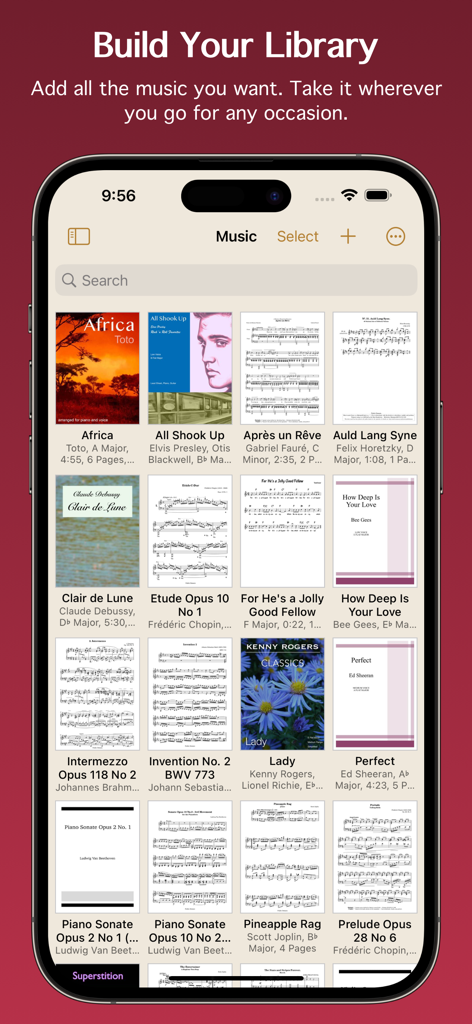
Paperless Music 앱의 디지털 음악 라이브러리 그리드로 다양한 악보 표지와 악보를 표시합니다.
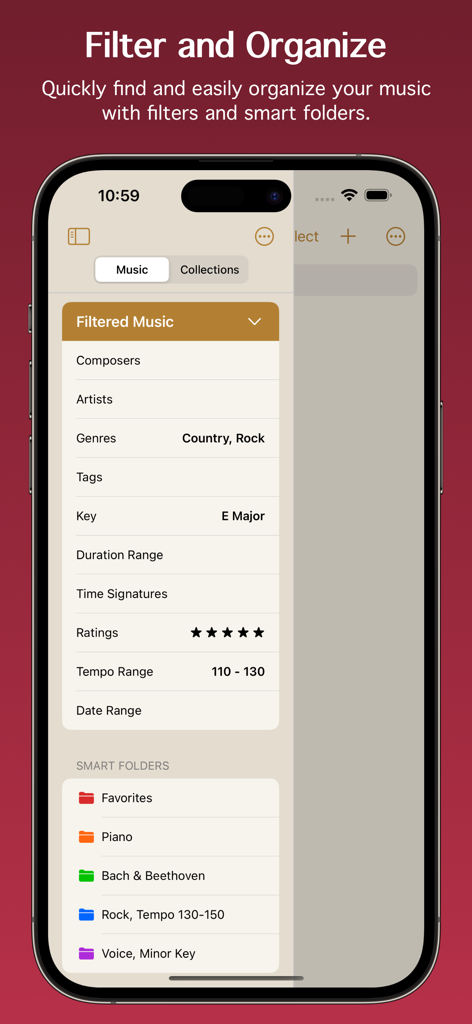
Paperless Music 앱 인터페이스는 디지털 악보 정리를 위한 음악 필터와 스마트 폴더를 보여줍니다.
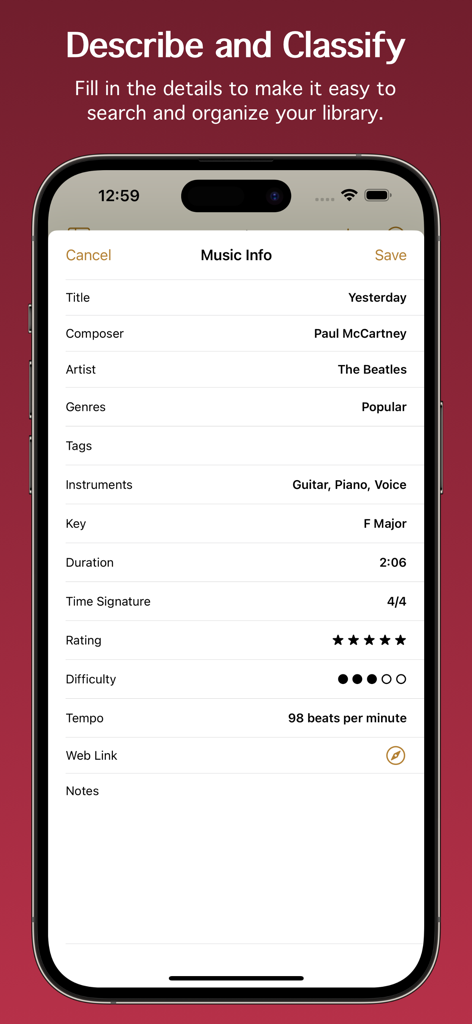
Yesterday 곡의 제목, 작곡가, 키, 템포와 같은 메타데이터 필드를 보여주는 Paperless Music 앱의 음악 정보 화면 스크린샷입니다.
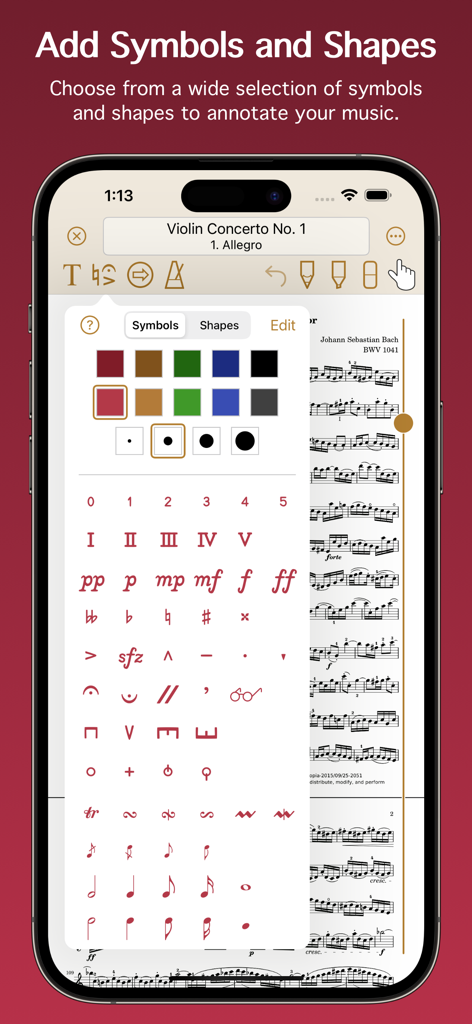
Paperless Music의 모바일 인터페이스로, 디지털 악보 주석을 위한 광범위한 음악 기호, 다이내믹 및 도형 모음을 보여줍니다.
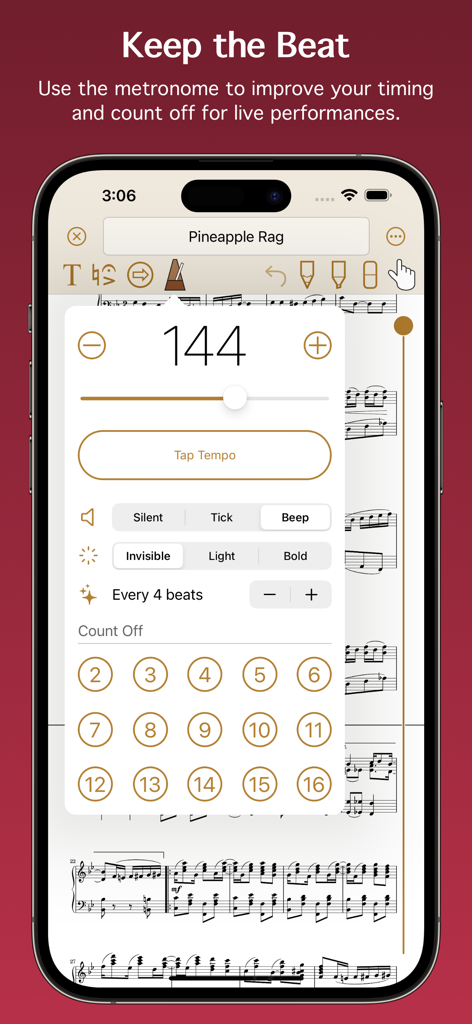
템포 및 카운트 오프 설정을 위한 Paperless Music 앱의 메트로놈 인터페이스입니다.
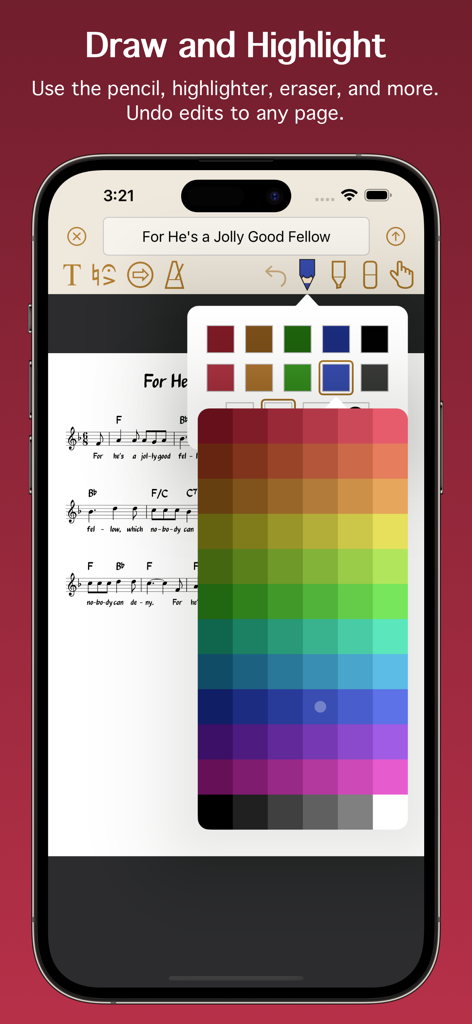
주석 도구와 색상 선택 팔레트가 있는 디지털 악보를 보여주는 인터페이스입니다.
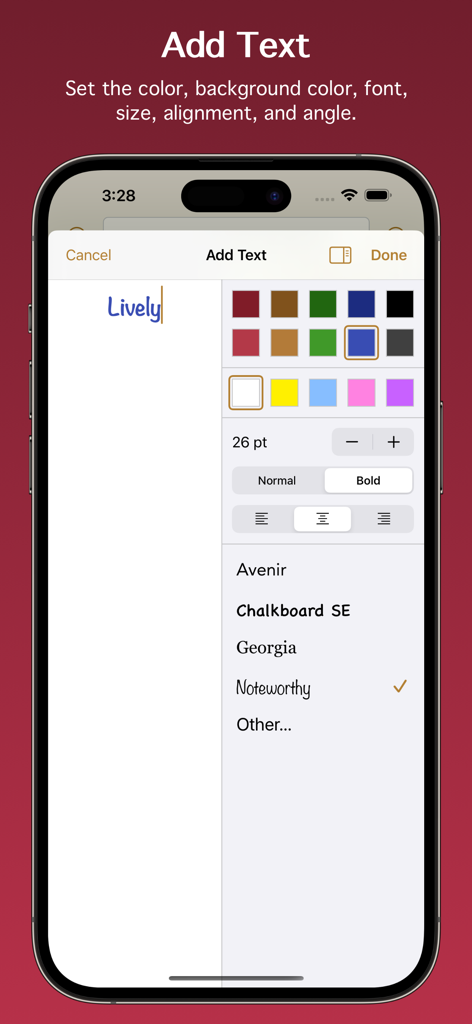
Paperless Music 앱에서 텍스트 주석을 추가하고 서식을 지정하는 인터페이스입니다.
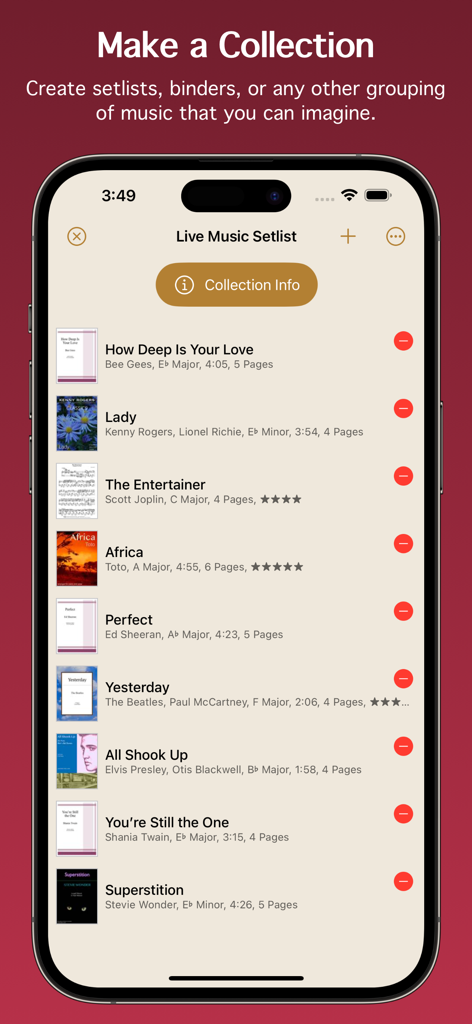
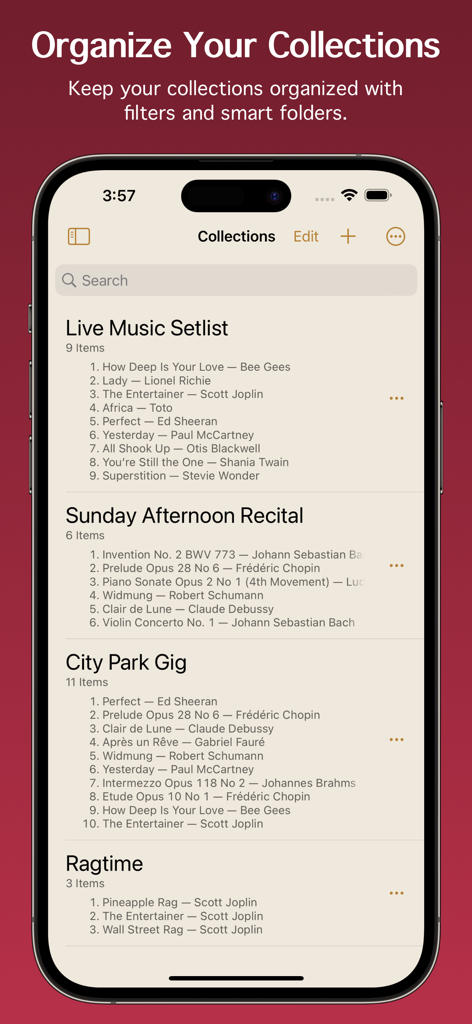
곡 제목과 세부 정보가 있는 정리된 라이브 음악 세트리스트를 보여주는 Paperless Music 앱 스크린샷입니다.
Paperless Music 앱 인터페이스에 표시된 정리된 음악 세트리스트 및 컬렉션입니다.
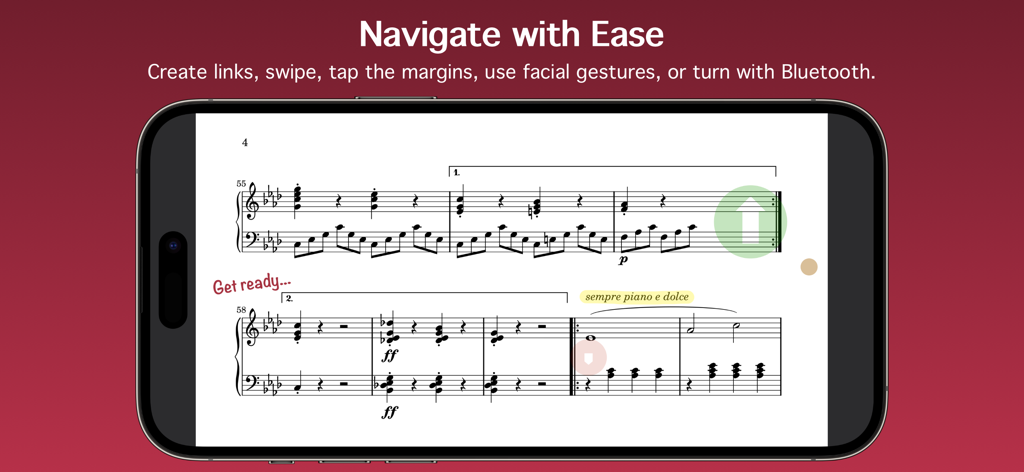
Paperless Music 앱이 스마트폰에서 탐색 링크와 주석이 있는 디지털 악보를 표시하고 있습니다.
최고의 연주를 위한 모든 것
이 앱을 돋보이게 하는 도구, 24K+ 명의 사용자가 선택.
📂
고급 스마트 라이브러리
키, 템포, 길이에 대한 메타데이터로 수천 개의 악보를 정리하세요. 스마트 폴더와 강력한 필터를 사용하여 몇 초 안에 필요한 정확한 곡을 찾으세요.
✨
손을 대지 않는 연주
얼굴 제스처 또는 블루투스 페달을 통한 원활한 페이지 넘김으로 음악에 완전히 집중하세요. 신뢰성을 위해 제작되어 무대에서 걱정 없이 연주할 수 있습니다.
✏️
정밀한 디지털 마크업
Apple Pencil 지원으로 악보에 자연스럽게 주석을 달세요. 음악 기호, 강조 표시 또는 텍스트를 추가하고 내장된 메트로놈 및 튜너를 사용하여 모든 세션을 완벽하게 만드세요.
앱 소개
에 대해 알아야 할 모든 것 Paperless Music.
설명
Free 90-day trial!
Add your sheet music, guitar tabs, fake books, and scores, and leave your paper behind. Organize, annotate, practice, and perform with the most powerful yet easy-to-use music viewer and manager.
Whether you’re a student or teacher, whether you play in a band, sing in a choir, or gig on the weekends, and no matter what your style of music is, you can count on the app’s reliability for live performances and go paperless with confidence.
Build Your Library
• Import PDF files from the Files app, a web browser, or from many other apps and sources.
• Scan your music with the camera-based document scanner.
• Import images from the Photos app.
Organize Your Music
• Describe and classify your music in great detail with information like title, composer, artist, genres, tags, instruments, key, duration, time signature, rating, difficulty, tempo, web link, and notes.
• Add scores with multiple movements or books with multiple songs, then organize them into sections.
• Create collections to make groups of music, such as setlists, virtual binders, or books.
• Easily find the music and collections you’re looking for with filters. With a few taps, for example, you can see all music that’s in a major key with a 4/4 or 6/8 time signature, having a tempo between 120 - 135 beats per minute.
• Create smart folders to automatically keep your music and collections organized.
Add Audio Tracks
• Add tracks from the Music app.
• Record your own audio.
• Import audio files.
• Adjust pitch and playback speed.
• Turn pages automatically while audio plays.
Stay In Tune
• Tune your instrument using the device microphone.
• Generate a tone using a variety of instruments and sounds.
• Adjust the A4 frequency.
• Select from 10 temperaments to customize the tuning.
Practice and Perform
• View music in portrait or landscape mode.
• Scroll music horizontally or vertically.
• Turn pages by swiping, moving the slider, using a Bluetooth page turner, tapping the edge of the screen, following a link, making a facial gesture, or playing audio that has automatic page turning enabled. (Facial gestures require a device with a TrueDepth camera.)
• Create links to jump or scroll to another page. Links are great for music with repeats or codas. They also allow music to be automatically scrolled with precise timing.
• Use the pencil and highlighter tools to write on music with your finger or with the Apple Pencil. All Apple Pencil settings are supported.
• Add text with options for size, rotation, color, font, and justification.
• Choose from a wide selection of symbols and shapes to add fingerings, dynamics, accidentals, and more.
• Use the low-latency metronome with options for sound, visuals, accent, and count off.
See More with Second Screen
• Connect two devices and see more of your music.
• When viewing music on the main device, it will extend onto the other device’s screen.
Share and Back Up
• Share your music and collections with other Paperless Music users, with or without your annotations or audio tracks.
• Share music in native format to preserve all information, or share in PDF format for general sharing and printing.
• Create a backup of your library to keep your data extra safe and to easily transfer everything to other devices.
And Much More
• Set the page color of your music.
• Undo changes made to any page while the viewer is open.
• Choose from six library view modes for music and three modes for collections.
• Batch edit genres, tags, and instruments.
• Adjust the text size in the Settings app to boost or shrink the size of text throughout Paperless Music.
• Search using Spotlight. Find and launch right into your music even when the app isn’t running.
Learn more by reading the integrated, searchable user guide, accessible from the app’s home screen and from the website.
Paperless Music has no ads and no subscriptions. There is no sign-in and there are no accounts.
www.paperlessmusic.com
최신 버전
7.0.1
크기
7.1 MB
출시일
2015년 1월 3일
당신의 전체 라이브러리가 무대 중앙에 준비되었습니다
자신감을 가지고 연주하는 수천 명의 음악가들과 함께하세요. 지금 90일 무료 체험을 시작하고 구독료와 광고 없이 전문적인 작업 공간을 경험하세요.
App information, icons, screenshots, and descriptions displayed on this page are sourced from the Apple App Store and are the property of their respective developers. Download estimates and rankings are based on MWM's proprietary models and may not reflect actual figures. This page is provided for informational and analytical purposes only.
Believe this page infringes your intellectual property? File a dispute