Piano Partner 2

Piano Partner 2

다운로드: App Store
로고: Piano Partner 2

Piano Partner 2: 롤랜드 피아노를 위한 최고의 인터랙티브 파트너

모바일 기기에서 바로 스마트 반주, 디지털 악보, 맞춤형 진행 상황 추적 기능을 통해 음악 여정을 변화시켜 보세요.

개발사

Roland Corporation

카테고리

Music

다운로드

339K+

사용자 평점

2.2/5

총 평가 수

1K+

지원 언어

1

둘러보기

이 인터페이스를 사용하는 339K+ 명의 사용자.

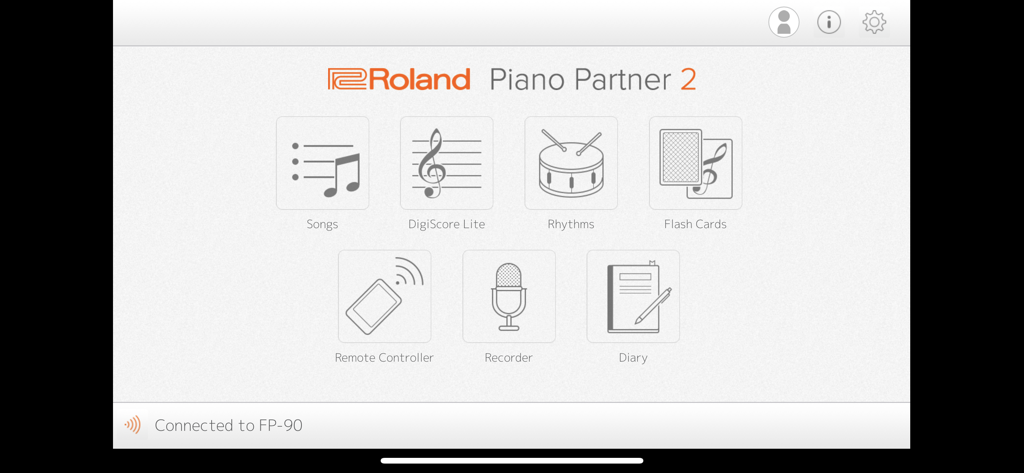
곡(Songs), DigiScore Lite, 리듬(Rhythms), 플래시 카드(Flash Cards), 리모컨(Remote Controller), 레코더(Recorder), 일기(Diary) 아이콘이 표시된 롤랜드 Piano Partner 2 앱의 메인 메뉴.

곡(Songs), DigiScore Lite, 리듬(Rhythms), 플래시 카드(Flash Cards), 리모컨(Remote Controller), 레코더(Recorder), 일기(Diary) 아이콘이 표시된 롤랜드 Piano Partner 2 앱의 메인 메뉴.

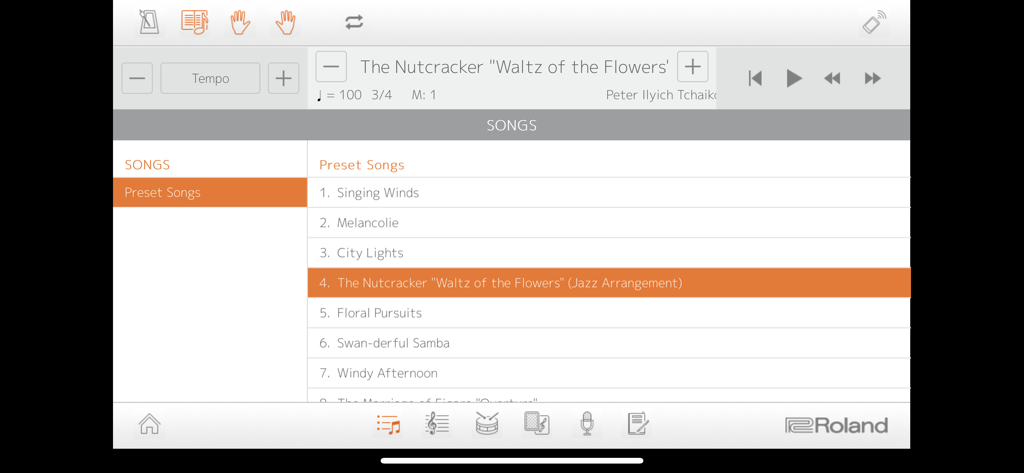
롤랜드 디지털 피아노를 위한 내장곡 라이브러리가 표시된 Piano Partner 2 앱의 인터페이스.

롤랜드 디지털 피아노를 위한 내장곡 라이브러리가 표시된 Piano Partner 2 앱의 인터페이스.

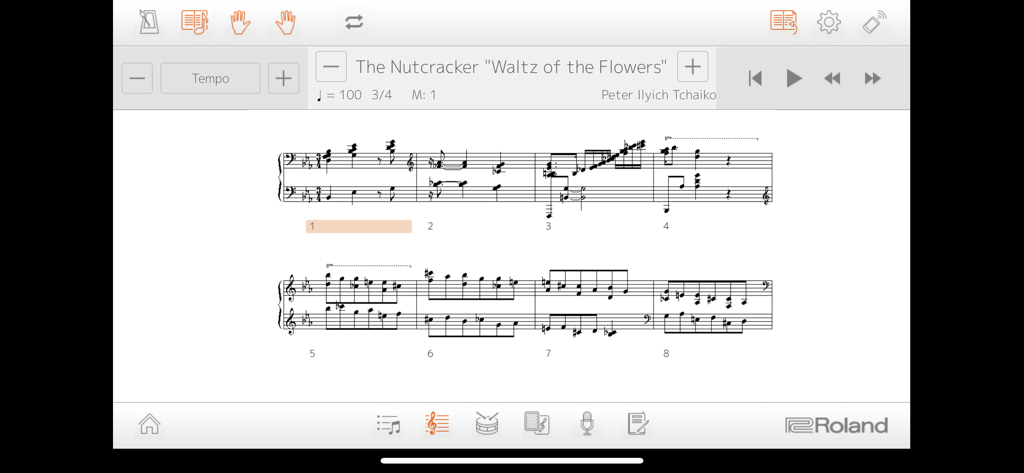
Piano Partner 2 앱 인터페이스에 표시된 호두까기 인형 '꽃의 왈츠' 디지털 악보

Piano Partner 2 앱 인터페이스에 표시된 호두까기 인형 '꽃의 왈츠' 디지털 악보

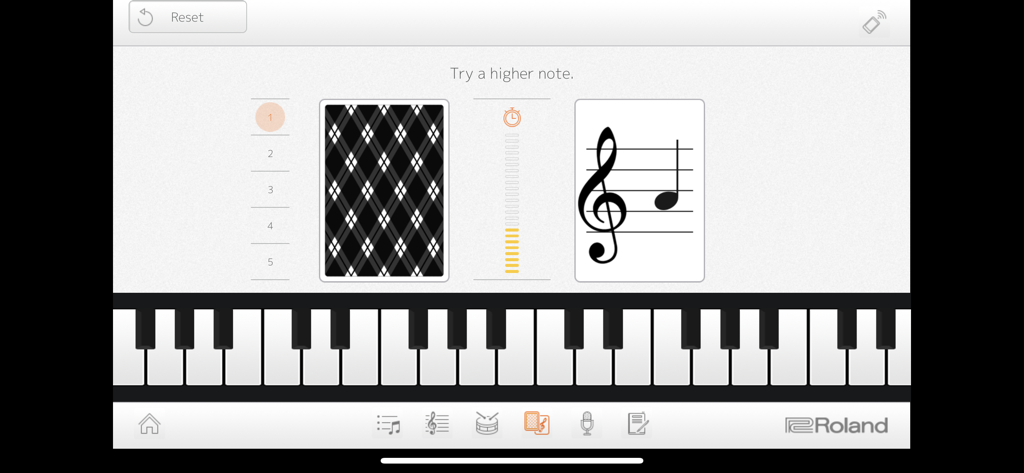
독보 연습을 위한 Piano Partner 2 앱의 플래시 카드 게임

독보 연습을 위한 Piano Partner 2 앱의 플래시 카드 게임

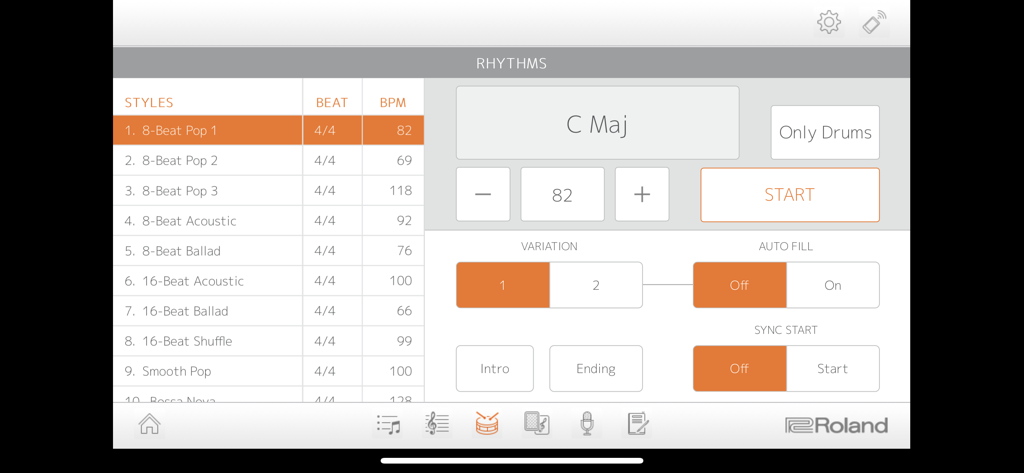
8비트 팝과 같은 다양한 음악 스타일과 코드 반주 및 BPM 설정이 표시된 Piano Partner 2 앱의 리듬 화면.

8비트 팝과 같은 다양한 음악 스타일과 코드 반주 및 BPM 설정이 표시된 Piano Partner 2 앱의 리듬 화면.

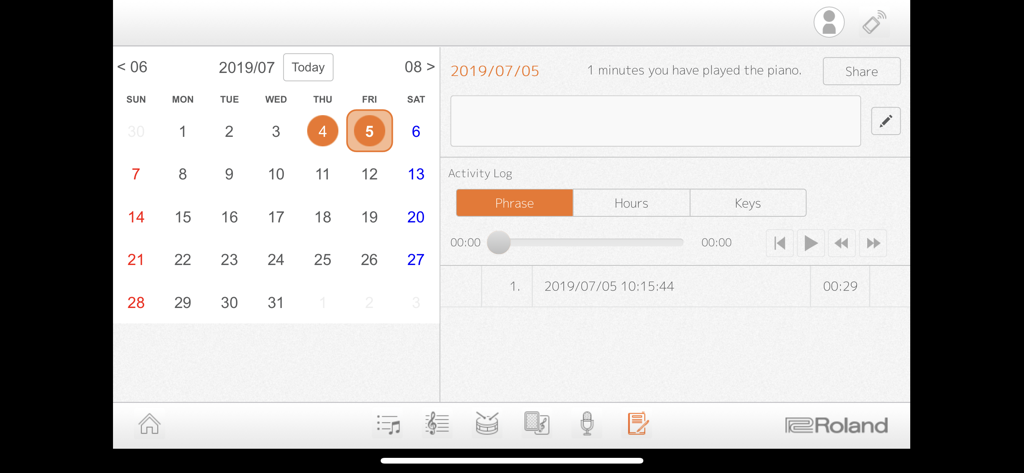
일일 연습 시간과 녹음 기록이 표시된 Piano Partner 2 앱의 캘린더 및 활동 로그.

일일 연습 시간과 녹음 기록이 표시된 Piano Partner 2 앱의 캘린더 및 활동 로그.

인터랙티브한 혁신으로 피아노 마스터하기

이 앱을 돋보이게 하는 도구, 339K+ 명의 사용자가 선택.

🎹

인터랙티브 학습 게임

Flash Cards와 DigiScore Lite를 통해 연습을 놀이로 바꾸어 보세요. 학생과 취미 연주자들이 게임화된 챌린지를 통해 독보와 청음 훈련을 마스터하도록 도와줍니다.

📱

원활한 원격 제어

복잡한 하드웨어 버튼 대신 iPad나 iPhone의 아름답고 직관적인 인터페이스를 통해 피아노의 음색, 리듬, 설정을 제어하세요.

📈

개인화된 연습 일기

연주 시간과 녹음 기록이 포함된 자동 로그로 진행 상황을 추적하고, 선생님이나 가족과 성과를 쉽게 공유해 보세요.

앱 소개

에 대해 알아야 할 모든 것 Piano Partner 2.

설명

Compatible Pianos: GP609、GP607、LX-17、LX-7、HP605、HP603A/HP603、HP601、RP501R、RP102、KIYOLA KF-10、DP603、F-140R、FP-90、FP-60、FP-30、FP-10、GO:PIANO(GO-61P)*、GP:PIANO88(GO-88P)、GO:PIANO with Alexa Built-in(GO-61P-A)*、 *Incompatible with iPad Pro 9.7 inch. Make sure your Roland digital piano is updated with the most current system program. The latest system program and setup instructions can be found at the support pages at www.roland.com. Introduction: The Piano Partner 2 app provides a friendly, interactive way to help you learn and enjoy music with your Roland digital piano. Songs and DigiScore Lite show the piano’s internal music collection on your device’s display, while Rhythm and Flash Card allow you to build skills with intelligent accompaniment and engaging music exercises. Piano Partner 2 also enables your iPad/iPhone to work as a remote controller for your Roland piano, offering an intuitive graphic interface for even easier operation. Recorder and Diary functions help you progress more quickly, allowing you to evaluate performances and keep track of your daily practice activities. The Diary logs stats about playing time, which keys you played, and more, and it’s even possible to share them with your family, friends, and teachers directly from the app. To use Piano Partner 2, connect your device and a compatible Roland piano wirelessly via Bluetooth®, or wired with a USB cable. -Songs—browse and select music from your Roland digital piano’s onboard song library -DigiScore Lite—display music notation for the onboard songs -Rhythm—develop your sense of rhythm with accompaniment that follows the chords you play -Flash Card game—fun challenges to develop ear-training and note-reading skills -Remote Controller—control Roland digital piano functions from your mobile device -Recorder—capture daily performances and listen back instantly -Diary—track your daily activities and share progress statistics on social media such as Twitter -Profiles—multiple users can track individual Diary data on one device Notes: - A connection with the compatible model is required to use this application except for the part of Flash Card. - The compatible model and an iPad or iPhone need Bluetooth connection or a wired connection by a USB cable. - When connecting an iPad or iPhone to the piano via a USB cable, a USB cable and Apple’s iPad Camera connection Kit or Lightning-USB Camera Adapter are required. - When using Piano Partner 2 with a compatible piano for the first time, an Internet connection for the tablet is required. - Songs and DigiScore Lite corresponds to only a built-in song of the piano. Log Retention Policies The Piano Partner 2 app collects information when it is used, including the device type and how the app is used (the functions used, date and time of use, etc.). We will never use this data for the purpose of collecting any personal information or identifying a specific person. We use the collected data for the following purposes only: • To improve the functionality of Piano Partner 2 and future related apps. • To create statistical analysis about how the app is used. When you download and use the Piano Partner 2 app, it is accepted that you agree with the above policies. If you do not accept these policies, we recommend that you do not use the app.

최신 버전

2.0.16

크기

25.2 MB

출시일

2016년 5월 27일

롤랜드 피아노를 마스터할 준비가 되셨나요?

매일의 연습 시간을 변화시킨 339,000명 이상의 음악가 및 학부모와 함께하세요. 지금 Piano Partner 2를 다운로드하여 연습 진행 상황을 추적하고, 게임처럼 즐겁게 배우며, 악기의 잠재력을 최대한 끌어내 보세요.

다운로드: App Store
FAQ

자주 묻는 질문

에 대해 알아야 할 모든 것 Piano Partner 2

Piano Partner 2 앱이란 무엇인가요?

Piano Partner 2는 사용자가 Roland 디지털 피아노로 음악을 배우고 즐길 수 있도록 도와주는 모바일 애플리케이션입니다. 곡 탐색, 악보 표시, 리듬 연습, 연주 기록 등의 기능을 제공합니다.

어떤 Roland 디지털 피아노와 Piano Partner 2를 호환할 수 있나요?

Piano Partner 2는 GP609, GP607, LX-17, HP605, RP501R, F-140R, FP-90 등을 포함한 다수의 Roland 디지털 피아노와 호환되며, 앱 설명에 나열된 다른 모델과도 호환됩니다. 피아노 펌웨어는 최신 상태여야 합니다.

Roland 피아노를 Piano Partner 2 앱에 어떻게 연결하나요?

Roland 디지털 피아노를 Piano Partner 2 앱에 무선 Bluetooth 또는 USB 케이블을 사용한 유선 연결로 연결할 수 있습니다. USB 연결 시 Apple Camera Connection Kit가 필요합니다.

Piano Partner 2에서 곡의 악보를 볼 수 있나요?

네, Piano Partner 2 앱에는 DigiScore Lite 기능이 있어 Roland 디지털 피아노의 내장 곡 라이브러리의 악보를 모바일 기기에서 직접 볼 수 있습니다.

Piano Partner 2가 리듬 훈련에 도움이 되나요?

네, Piano Partner 2 앱에는 리듬 기능이 포함되어 있습니다. 이 기능은 연주하는 코드에 맞춰 지능적으로 반주를 제공하여 리듬 감각을 키우는 데 도움을 줍니다.

Piano Partner 2의 플래시 카드 게임은 무엇인가요?

Piano Partner 2의 플래시 카드 게임은 사용자의 청음 및 음표 읽기 능력을 향상시키는 재미있는 도전을 제공합니다. 피아노에 연결하지 않고도 사용할 수 있습니다.

Piano Partner 2가 피아노 연주를 녹음할 수 있나요?

네, Piano Partner 2에는 레코더 기능이 있습니다. 일상적인 연주를 녹음하고 즉시 다시 들을 수 있어 진행 상황 평가에 도움이 됩니다.

Piano Partner 2의 다이어리 기능은 어떻게 작동하나요?

Piano Partner 2의 다이어리 기능은 일상적인 연습 활동을 추적합니다. 연주 시간 및 연주한 건반과 같은 통계를 기록하며, 앱 내에서 이 진행 상황 데이터를 공유할 수 있습니다.

Piano Partner 2가 개인 사용자 데이터를 수집하나요?

아니요, Piano Partner 2는 개인 정보를 수집하거나 특정 개인을 식별하지 않습니다. 기능 개선 및 통계 분석을 위해 기기 유형 및 앱 사용과 같은 익명화된 데이터만 수집합니다.

Piano Partner 2를 사용하려면 인터넷 연결이 필요한가요?

호환되는 피아노와 함께 Piano Partner 2를 처음 사용할 때만 인터넷 연결이 필요합니다. 이후에는 인터넷 연결이 필요하지 않습니다.

App information, icons, screenshots, and descriptions displayed on this page are sourced from the Apple App Store and are the property of their respective developers. Download estimates and rankings are based on MWM's proprietary models and may not reflect actual figures. This page is provided for informational and analytical purposes only.

Believe this page infringes your intellectual property? File a dispute