Rivercast - Levels & Forecasts

Rivercast - Levels & Forecasts

다운로드: App Store
로고: Rivercast - Levels & Forecasts

Rivercast - 수위 및 예보: 실시간 강 정보 및 홍수 경보

대화형 지도와 그래프로 강 수위, 유량 및 공식 NOAA 예보를 추적하세요. 정밀한 데이터와 마음의 평화를 손끝에서 원하는 보트 타는 사람, 낚시꾼 및 부동산 소유자를 위해 제작되었습니다.

개발사

Juggernaut Technology, Inc.

카테고리

Weather

다운로드

190K+

사용자 평점

4.7/5

총 평가 수

10K+

지원 언어

1

강, 시각화

이 인터페이스를 사용하는 190K+ 명의 사용자.

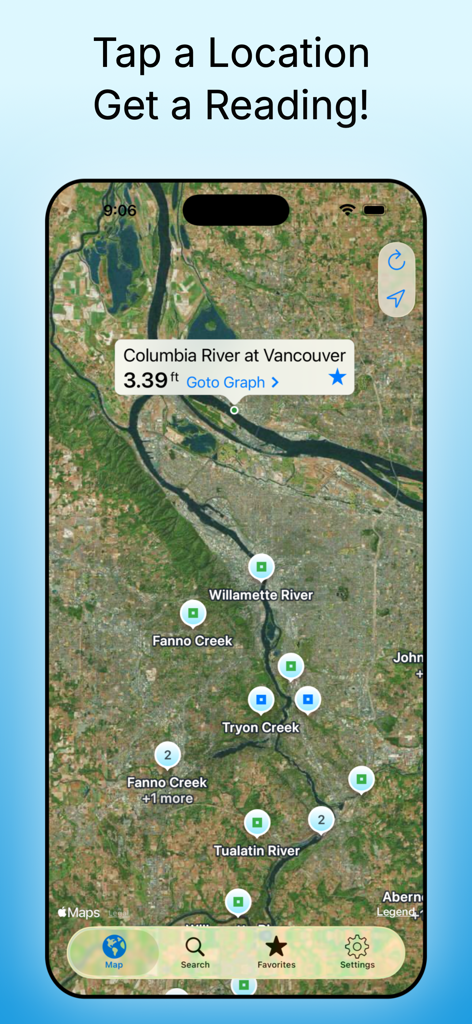
Rivercast 앱이 컬럼비아 강과 윌라멧 강에 대한 강 수위 게이지 판독값이 있는 대화형 지도를 보여줍니다.

Rivercast 앱이 컬럼비아 강과 윌라멧 강에 대한 강 수위 게이지 판독값이 있는 대화형 지도를 보여줍니다.

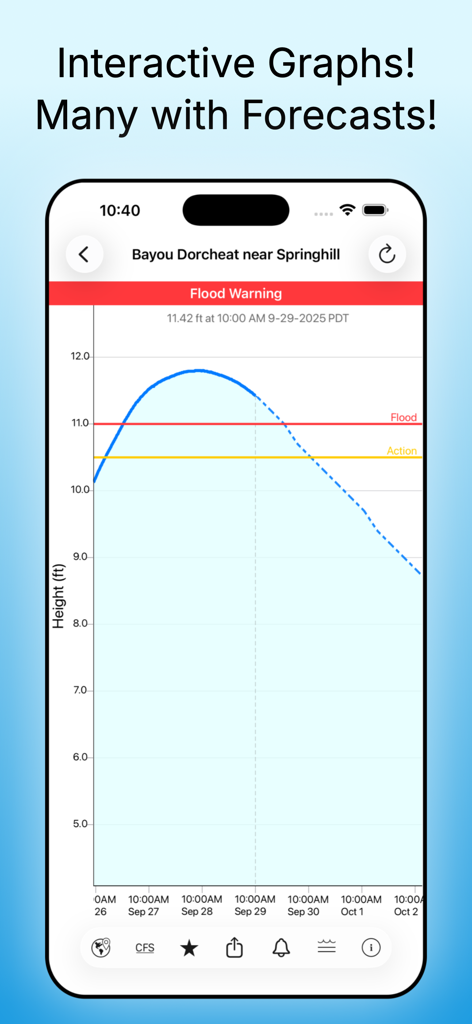
Bayou Dorcheat의 수위 예측 및 홍수 경고 표시기가 있는 대화형 강 수위 그래프를 보여주는 Rivercast 앱 스크린샷

Bayou Dorcheat의 수위 예측 및 홍수 경고 표시기가 있는 대화형 강 수위 그래프를 보여주는 Rivercast 앱 스크린샷

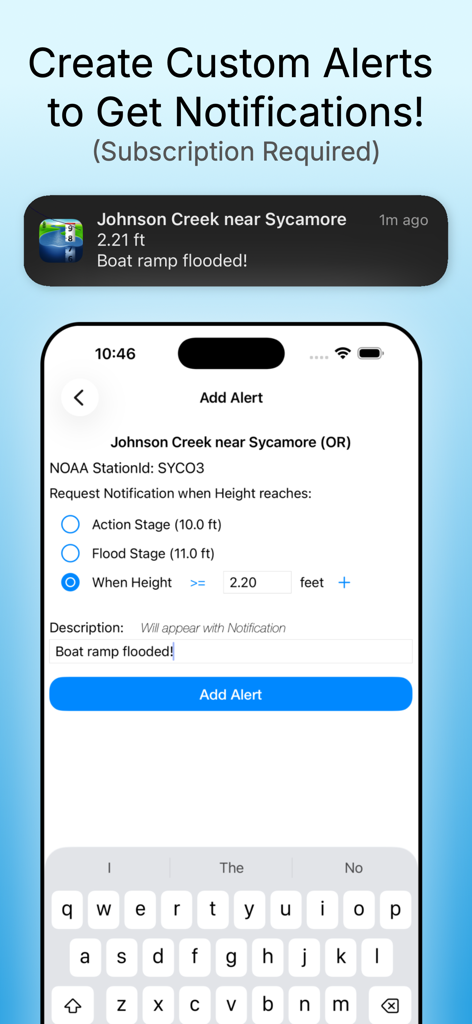
Rivercast 앱에서 사용자 정의 강 수위 알림 설정을 위한 인터페이스

Rivercast 앱에서 사용자 정의 강 수위 알림 설정을 위한 인터페이스

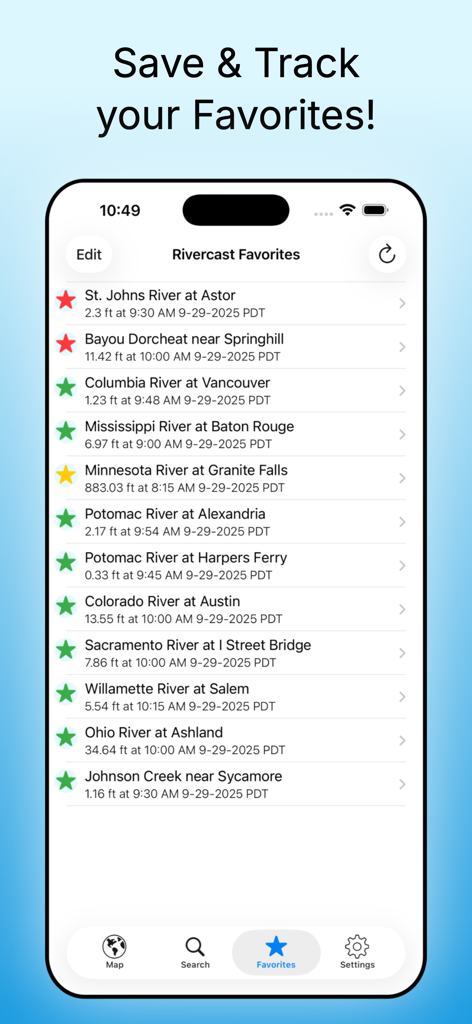
Rivercast 앱 즐겨찾기 화면에는 실시간 강 수위 및 수위 데이터가 표시됩니다.

Rivercast 앱 즐겨찾기 화면에는 실시간 강 수위 및 수위 데이터가 표시됩니다.

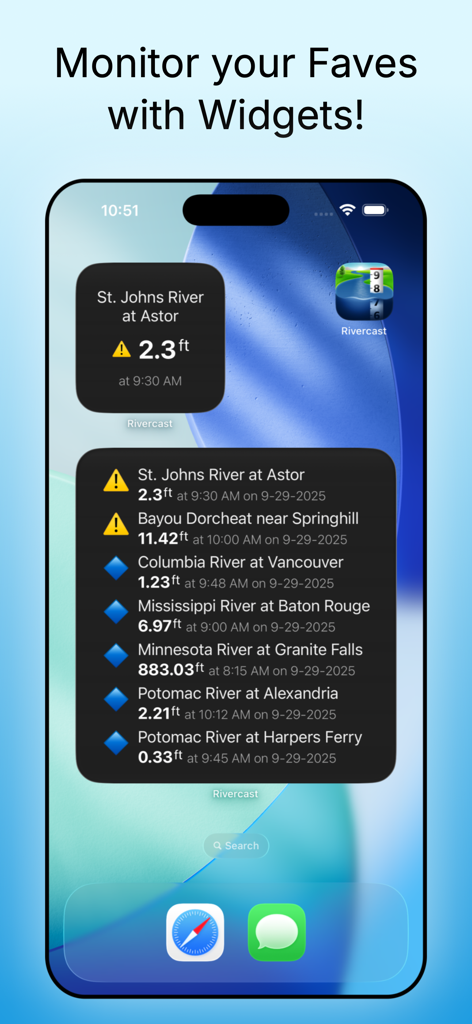
Rivercast iOS 홈 화면 위젯은 실시간 강 수위 및 홍수 경보를 표시합니다.

Rivercast iOS 홈 화면 위젯은 실시간 강 수위 및 홍수 경보를 표시합니다.

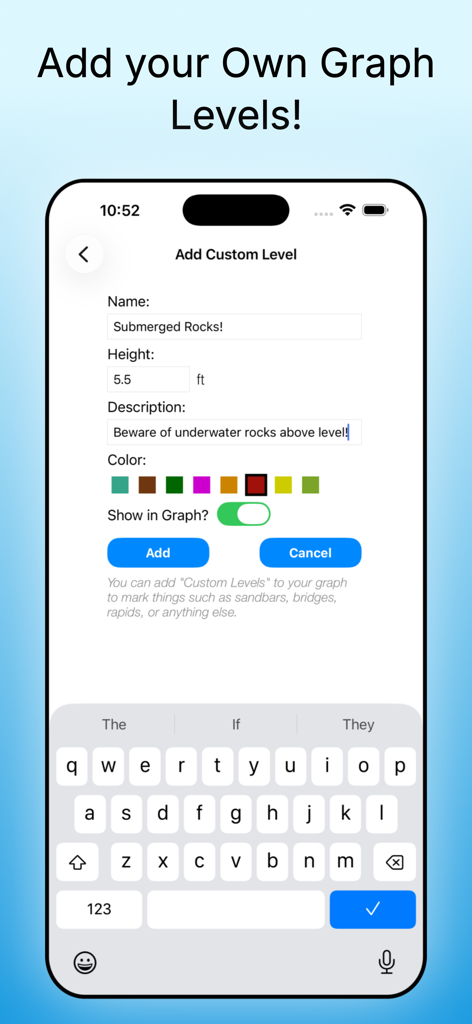
Rivercast 앱 인터페이스는 높이와 색상 옵션으로 잠긴 바위에 대한 사용자 정의 강 수위를 추가하는 방법을 보여줍니다.

Rivercast 앱 인터페이스는 높이와 색상 옵션으로 잠긴 바위에 대한 사용자 정의 강 수위를 추가하는 방법을 보여줍니다.

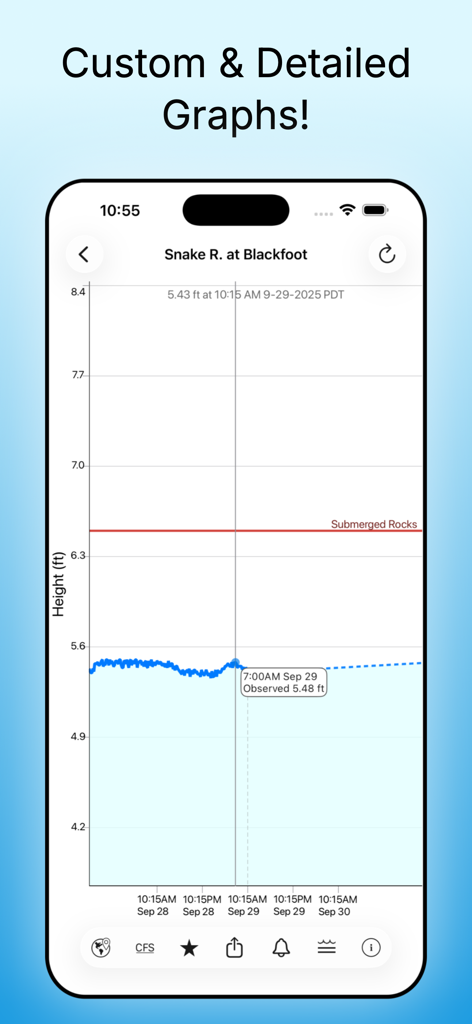
Rivercast 앱의 상세 강 수위 그래프는 사용자 정의 참조선과 함께 시간에 따른 수위를 보여줍니다.

Rivercast 앱의 상세 강 수위 그래프는 사용자 정의 참조선과 함께 시간에 따른 수위를 보여줍니다.

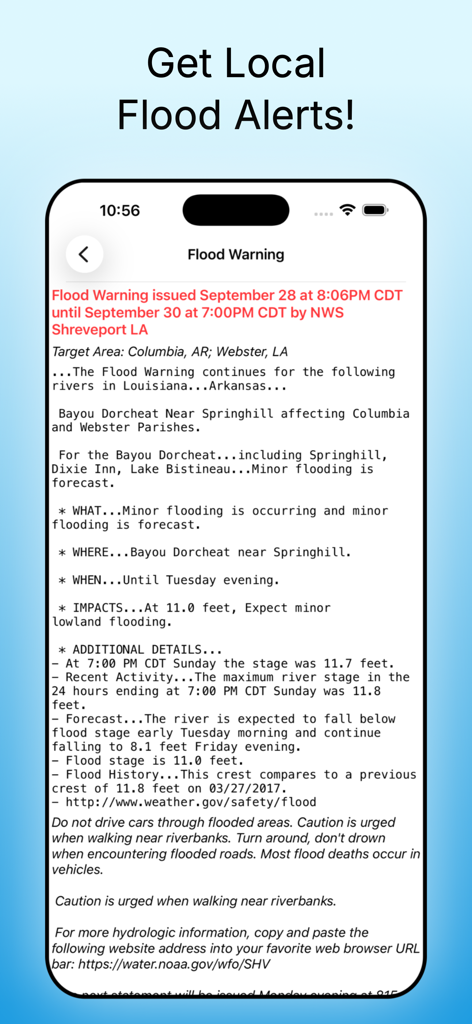
iPhone 화면에 Rivercast 앱 내의 상세한 NWS 홍수 경고 메시지가 표시됩니다.

iPhone 화면에 Rivercast 앱 내의 상세한 NWS 홍수 경고 메시지가 표시됩니다.

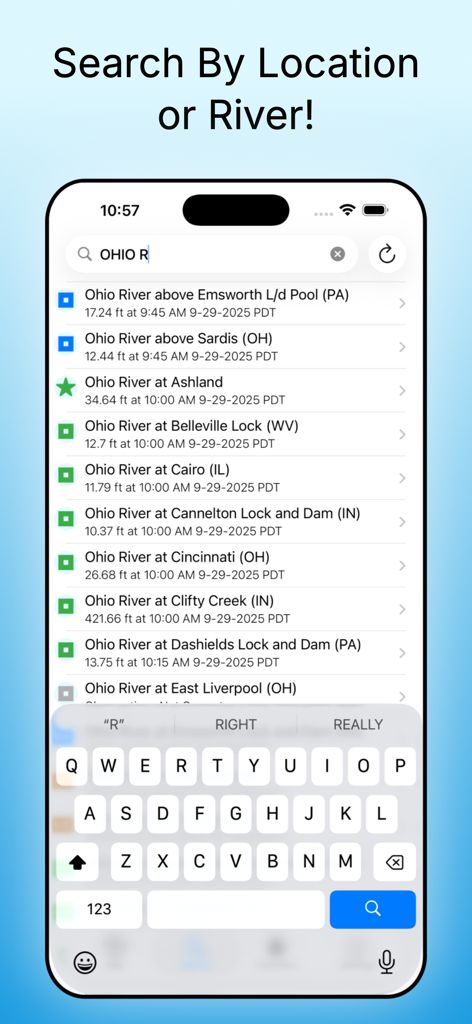
Rivercast 앱 검색 인터페이스에는 오하이오 강 주변 여러 위치의 실시간 수위 및 데이터가 표시됩니다.

Rivercast 앱 검색 인터페이스에는 오하이오 강 주변 여러 위치의 실시간 수위 및 데이터가 표시됩니다.

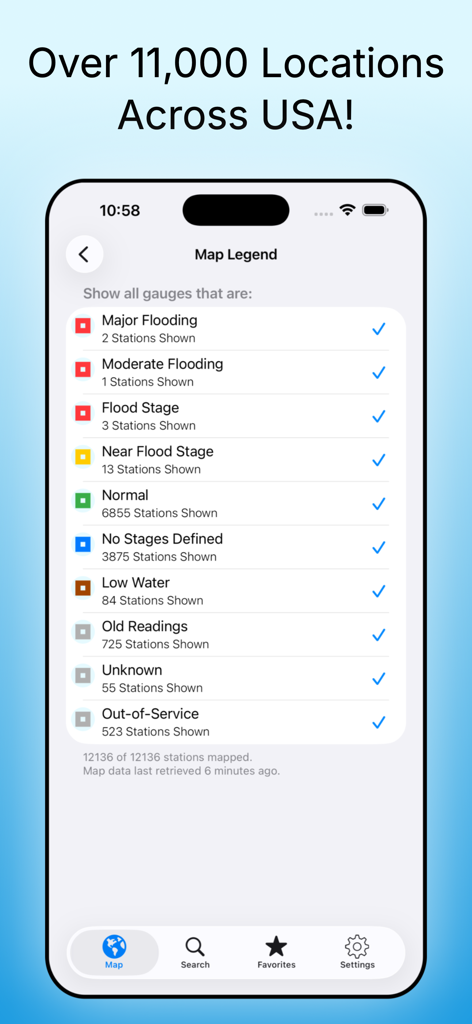
Rivercast 앱 인터페이스는 미국 전역의 색상 코드로 구분된 강 수위 상태가 있는 지도 범례를 보여줍니다.

Rivercast 앱 인터페이스는 미국 전역의 색상 코드로 구분된 강 수위 상태가 있는 지도 범례를 보여줍니다.

실시간 강 정보

이 앱을 돋보이게 하는 도구, 190K+ 명의 사용자가 선택.

🚨

스마트 홍수 경보

물이 오르기 전에 경고하는 사용자 정의 푸시 알림과 공식 NWS 홍수 경보로 귀하의 부동산을 보호하세요.

📈

정밀 유량 및 예보

실시간 CFS 및 수위 데이터를 포함한 대화형 수문 그래프에 액세스하여 물이 안전하거나 항해 가능한 시점을 정확히 파악하세요.

📱

한눈에 모니터링

잠금 화면 위젯을 사용하여 좋아하는 게이지를 즉시 추적하고 다리 또는 모래톱에 대한 개인 참조 표시기를 추가하세요.

앱 소개

에 대해 알아야 할 모든 것 Rivercast - Levels & Forecasts.

설명

Rivercast™ puts the river level data you need at your fingertips with our intuitive and interactive maps and graphs. Whether you’re a boater, paddler, property owner, or just curious about your local waterways, Rivercast makes it easy to see exactly what’s happening on the rivers that matter to you. Rivercast features include: • Official flood warnings and alerts from the National Weather Service • River stage height in feet • River flow rate in CFS (when available) • Color indicators showing when a river is normal, rising, or flooding • Current observations and recent history • Custom push notification alerts when a river reaches your chosen level (subscription required) • NOAA river forecasts (when available) • Interactive map showing all nearby river gauges • Search by waterway name, state, or NOAA 5-digit station ID • Zoomable, pannable, interactive graphs • Add your own reference lines for landmarks or safety levels • Favorites list for quick access to your key locations • Share graphs via iMessage, Email, Facebook, and more • Full Dark Mode support • Home Screen, Lock Screen, and StandBy Mode Widgets to monitor your favorites Rivercast’s map not only shows where gauges are located, but color-codes them to indicate whether each station is at normal levels, approaching flood stage, or above flood stage. Tap any location to view the latest observations or open an interactive graph for detailed trends. Pinch or drag to zoom and pan, or tap and hold for precise readings using the crosshair tool. Customize your hydrographs with personal level markers for bridges, sandbars, rocks, or safe navigation levels. Add favorite gauges for quick monitoring anytime. Rivercast uses official NOAA observation and forecast data and requires an internet connection for data access. Data is displayed in feet or cubic feet per second (CFS) when available, always shown in your local time. A trusted tool for boaters, fishermen, property owners, paddlers, scientists, and marine professionals who need clear, reliable river information. River gauges reported are USA only. We take our accuracy seriously! * * * * * * * * * * * * * * * * * * * * * * * Some Frequently Asked Questions: Where does Rivercast get its data? This app uses NOAA sources for its raw data for our custom graphing and mapping solutions. Some locations available only from other agencies (such as USGS) may not appear in this app. Why does Rivercast sometimes show slightly different flow data (CFS) than USGS? CFS is a calculated estimate derived from stage height. NOAA and USGS use different data models, so results can vary slightly—usually within a few percent. Stage height is always identical between NOAA and USGS, and designated flood stages are based on height in feet. Why does Rivercast only show observations, but not forecasts, for my river? NOAA provides forecasts for many, but not all, monitored rivers. Some forecasts are seasonal or only issued during high-water events. My river gauge was there yesterday, but it’s gone today. Why? River gauges occasionally have technical issues transmitting data or may even be washed out during flooding. Some are also seasonal. NOAA typically restores data within a few days or weeks. Can you add location XYZ to your app? We wish we could! If NOAA doesn’t report data for that location, we unfortunately can’t include it. Rivercast displays all stations that NOAA provides for public use. For more information, visit www.RivercastApp.com Terms of Use: https://www.apple.com/legal/internet-services/itunes/dev/stdeula

최신 버전

5.36

크기

22.3 MB

출시일

2012년 11월 17일

실시간 데이터로 수로를 마스터하세요

정밀한 수위, 사용자 정의 경보 및 완전한 마음의 평화를 위해 Rivercast를 신뢰하는 190,000명 이상의 보트 타는 사람 및 부동산 소유자와 함께하세요. 지금 다운로드하고 흐름을 앞서가세요.

다운로드: App Store

App information, icons, screenshots, and descriptions displayed on this page are sourced from the Apple App Store and are the property of their respective developers. Download estimates and rankings are based on MWM's proprietary models and may not reflect actual figures. This page is provided for informational and analytical purposes only.

Believe this page infringes your intellectual property? File a dispute