SAP SuccessFactors Mobile

SAP SuccessFactors Mobile


다운로드: App Store다운로드: Google Play
로고: SAP SuccessFactors Mobile

SAP SuccessFactors 모바일: 직원 경험 향상

목표 관리, 휴가 요청, 승인 가속화를 위한 원활한 소비자 등급 HR 플랫폼으로 직원을 지원하세요.

개발사

SAP SE

카테고리

Business

다운로드

8M+

사용자 평점

4.7/5

총 평가 수

45K+

지원 언어

41

귀하의 직장, 시각화

이 인터페이스를 사용하는 8M+ 명의 사용자.

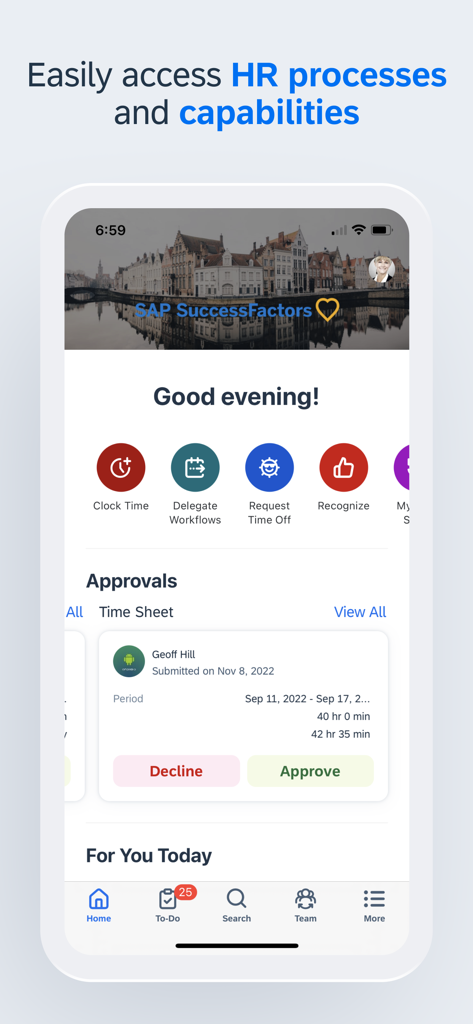
SAP SuccessFactors 앱 대시보드를 보여주는 모바일 화면으로, 빠른 HR 작업 및 보류 중인 타임 시트 승인이 표시됩니다.

SAP SuccessFactors 앱 대시보드를 보여주는 모바일 화면으로, 빠른 HR 작업 및 보류 중인 타임 시트 승인이 표시됩니다.

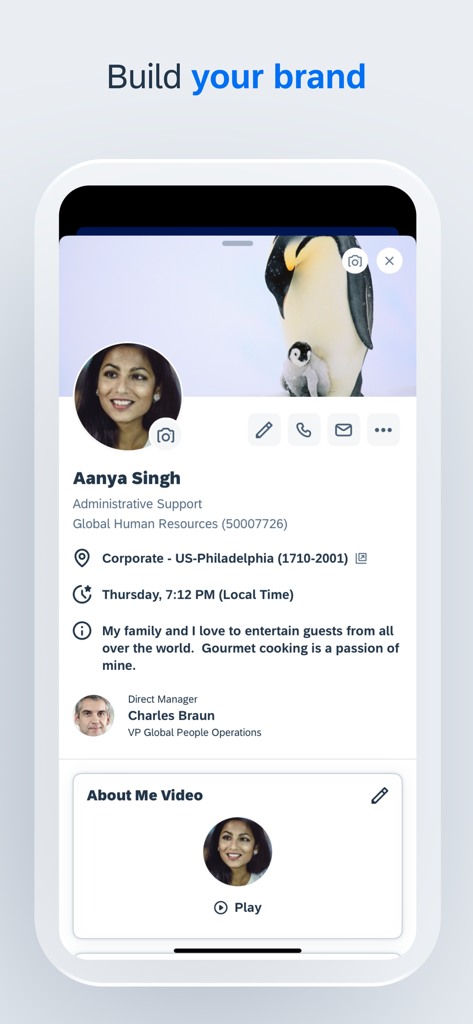
SAP SuccessFactors 모바일 앱의 직원 프로필 화면으로, 사용자 정보와 '브랜드 구축' 제목 아래 개인화된 콘텐츠가 표시됩니다.

SAP SuccessFactors 모바일 앱의 직원 프로필 화면으로, 사용자 정보와 '브랜드 구축' 제목 아래 개인화된 콘텐츠가 표시됩니다.

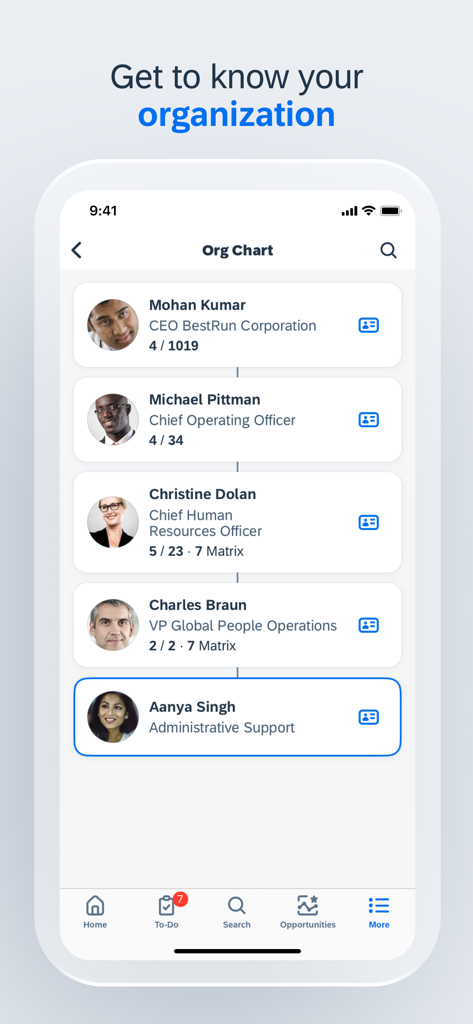
SAP SuccessFactors 앱 내 조직도를 보여주는 모바일 화면

SAP SuccessFactors 앱 내 조직도를 보여주는 모바일 화면

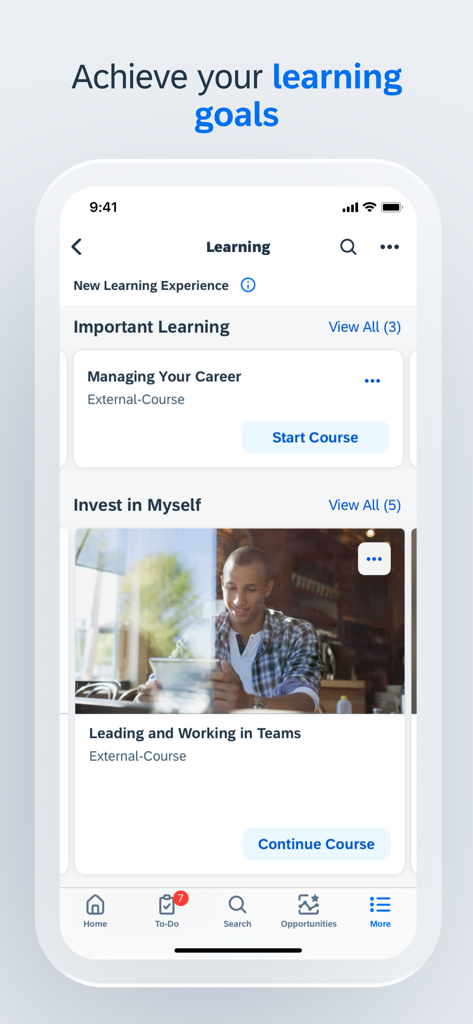
SAP SuccessFactors 모바일 앱이 '경력 관리' 및 '팀 리더십 및 협업'과 같은 과정 옵션이 있는 학습 모듈을 표시합니다.

SAP SuccessFactors 모바일 앱이 '경력 관리' 및 '팀 리더십 및 협업'과 같은 과정 옵션이 있는 학습 모듈을 표시합니다.

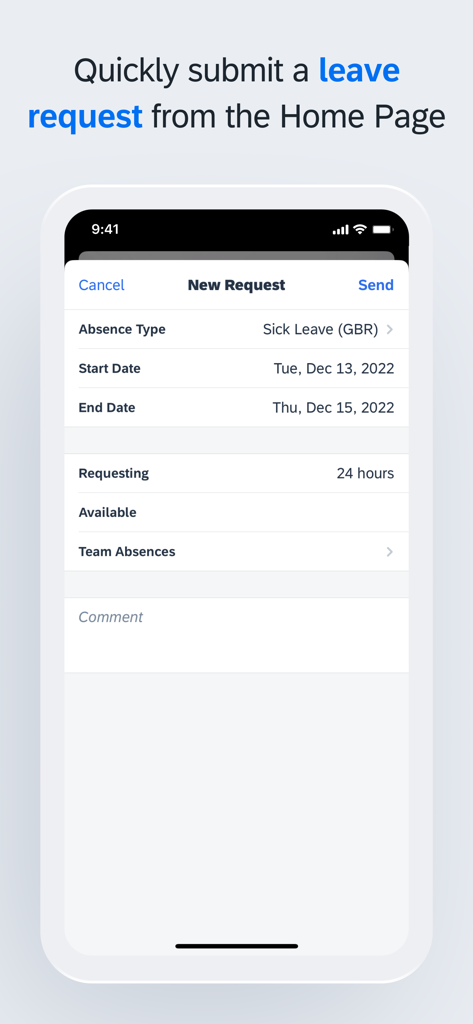
SAP SuccessFactors 모바일 앱에서 휴가 요청 제출

SAP SuccessFactors 모바일 앱에서 휴가 요청 제출

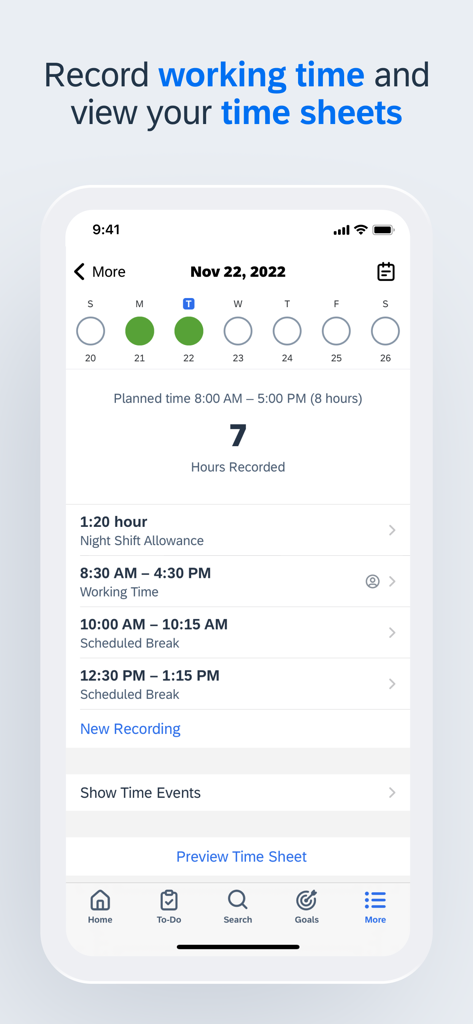
SAP SuccessFactors 모바일 앱 인터페이스 스크린샷으로, 기록된 근무 시간 및 일일 타임 시트가 표시됩니다.

SAP SuccessFactors 모바일 앱 인터페이스 스크린샷으로, 기록된 근무 시간 및 일일 타임 시트가 표시됩니다.

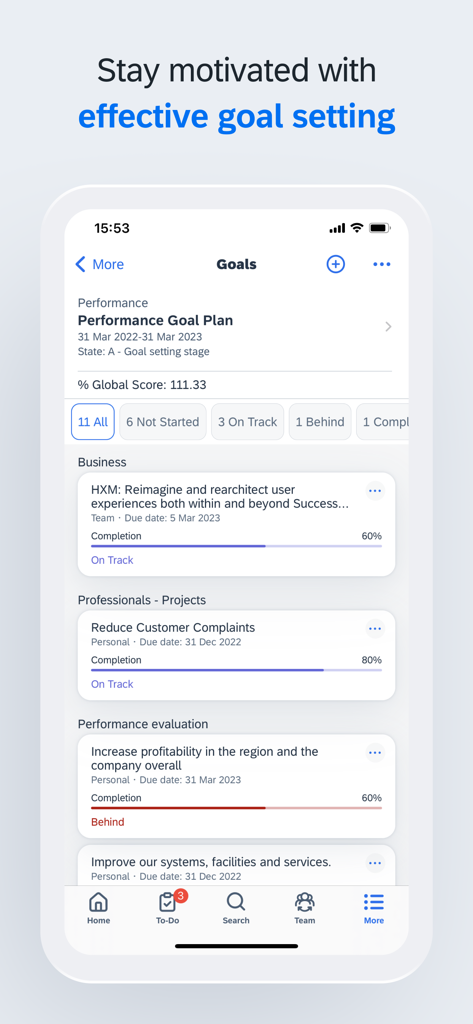
SAP SuccessFactors 모바일 앱 성과 목표 대시보드로 프로젝트 완료 상태 표시

SAP SuccessFactors 모바일 앱 성과 목표 대시보드로 프로젝트 완료 상태 표시

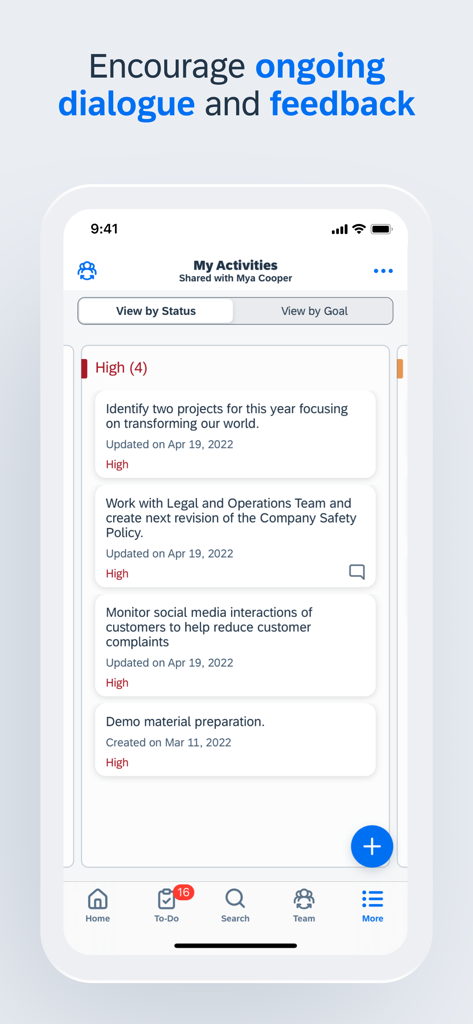
SAP SuccessFactors 모바일 앱 인터페이스로 공유된 작업 활동 및 피드백 목록 표시

SAP SuccessFactors 모바일 앱 인터페이스로 공유된 작업 활동 및 피드백 목록 표시

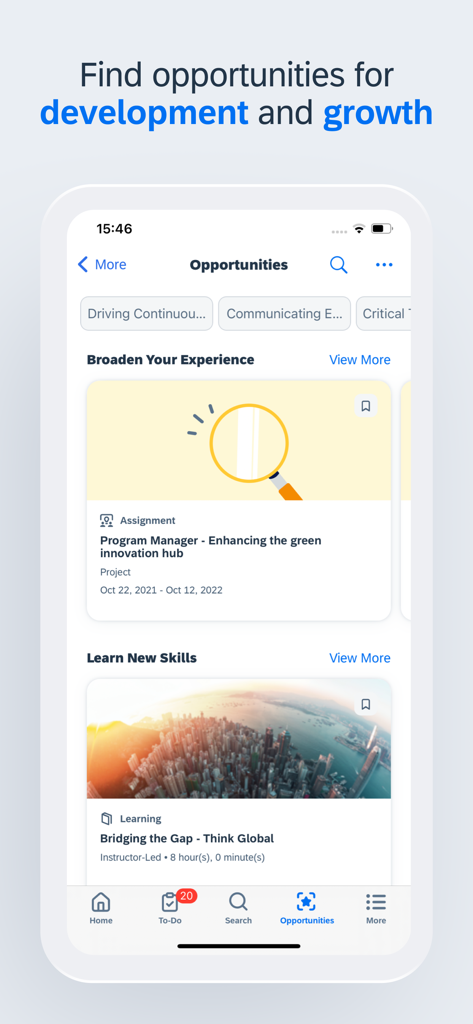
SAP SuccessFactors 앱 인터페이스로 경력 개발 및 기술 구축 기회 제공

SAP SuccessFactors 앱 인터페이스로 경력 개발 및 기술 구축 기회 제공

이동 중 경력 개발 지원

이 앱을 돋보이게 하는 도구, 8M+ 명의 사용자가 선택.

✈️

원활한 휴가 관리

잔여 휴가 일수를 확인하고 몇 초 만에 휴가 요청을 제출하세요. 노트북을 열지 않고도 즉시 일과 삶의 균형을 관리하세요.

원터치 경영진 승인

기업의 병목 현상을 제거하세요. 이동 중에 요청, 문서 및 팀 요청을 검토하고 승인하세요.

📈

학습 및 목표 추적

앞서 나가세요. 출퇴근 시간이나 짧은 휴식 시간에 교육 모듈에 액세스하고 성과 목표를 업데이트하세요.

리뷰 분석

사용자 리뷰 인사이트.

감정 점수

16%
부정적

요약

The mobile app receives overwhelmingly negative feedback, primarily due to persistent and widespread login issues. Many users report being unable to access the app after updates, experiencing crashes, constant logouts, and "service unavailable" messages, especially on iOS devices and after recent updates. Users also widely criticize the app's limited functionality, noting that many essential features like payroll access, module management, and benefits are unavailable, forcing them to revert to desktop versions. While a few users find the app efficient and functional, the majority highlight significant usability problems and bugs, with updates frequently exacerbating existing issues rather than resolving them.

주요 테마

Login Issues(24)
App Instability(7)
Overall Poor Quality(7)
Problematic Updates(6)
Limited Mobile Functionality(5)
Positive Feedback(4)

앱 소개

에 대해 알아야 할 모든 것 SAP SuccessFactors Mobile.

설명

SAP SuccessFactors Mobile helps businesses bring HR closer to their employees, so they are more engaged, more productive, and much smarter about the way they work. SAP SuccessFactors Mobile provides a native, consumer-like experience, ability to meet strict security standards, manageability of features and functionalities in mobile devices and optimized procedures for mobile performance. Use SAP SuccessFactors Mobile to: · View employee profiles and call, text, or email them directly · Approve all your requisitions within seconds · View your company’s organization chart to see how everyone is connected, including direct reports, matrix reports and new hires · Post your own text, photo and video updates · View and add comments to entire documents, presentations, videos and links · Sign up for courses, connect with experts and complete entire classes · Manage your active goal plans and update your goal status and progress towards completion · View your time off balance, submit time off requests to your manager and let colleagues know when you will be away from work To make the most of the mobile app, we recommend that you grant the following permissions: · (Optional) Camera – For scanning QR codes and taking photos. · (Optional) Contact – For adding people to your device’s contact list. · (Optional) Calendar – For registering courses or class events in your calendar. · (Optional) Fingerprint/Face ID – As secondary user validation means. · (Optional) Location – For obtaining your location when you clock in or clock out. · (Optional) Notification – For receiving notifications. · (Optional) Photos – For uploading photos as attachments. (Note: This is a read-only permission and your photos are never modified. It is granted by default and can’t be denied by users.) You can use the app without granting optional permissions, except the specific features they enable. To deny the permissions, go to App > Settings > Permissions on your device. Important: If you are an SAP SuccessFactors customer and are having trouble logging in, contact your SAP SuccessFactors administrator. About SAP SuccessFactors SAP SuccessFactors provides the leading cloud-based SAP SuccessFactors HCM Suite, which helps HR drive business execution with solutions that are complete, beautiful, and flexible enough to start anywhere – optimizing your workforce today and preparing them for tomorrow. SAP SuccessFactors solutions are supported by a global partner ecosystem and the experience and commitment of SAP.

최신 버전

16.0.3

크기

482.8 MB

출시일

2011년 4월 13일

어디서든 업무를 처리하세요

기업 경험을 간소화하는 8백만 명 이상의 전문가들과 함께하세요. SAP SuccessFactors 모바일을 다운로드하여 몇 초 만에 승인, 휴가 및 경력 목표를 처리하세요.

다운로드: App Store다운로드: Google Play
FAQ

자주 묻는 질문

에 대해 알아야 할 모든 것 SAP SuccessFactors Mobile

SAP SuccessFactors Mobile이란 무엇인가요?

SAP SuccessFactors Mobile은 HR을 직원과 더 가깝게 연결하여 참여와 생산성을 향상시킵니다. 최적화된 절차와 기능을 갖춘 네이티브의 안전한 모바일 환경을 제공합니다.

SAP SuccessFactors Mobile을 사용하여 직원 프로필을 볼 수 있나요?

네, SAP SuccessFactors Mobile을 통해 사용자는 직원 프로필을 볼 수 있습니다. 여기에는 직접 전화, 문자 또는 이메일을 보낼 수 있는 연락처 정보가 포함됩니다. 또한 직속 상사 및 개인 정보도 표시됩니다.

SAP SuccessFactors Mobile이 채용 승인을 지원하나요?

네, SAP SuccessFactors Mobile을 통해 사용자는 모든 채용을 승인할 수 있습니다. 이 앱은 모바일 장치에서 직접 승인 워크플로를 빠르고 효율적으로 관리할 수 있도록 합니다.

SAP SuccessFactors Mobile은 회사 조직도를 어떻게 표시하나요?

SAP SuccessFactors Mobile은 회사의 조직도를 표시합니다. 사용자는 직속 보고자, 매트릭스 보고자, 신규 입사자를 포함하여 동료들이 어떻게 연결되어 있는지 볼 수 있으며, 명확한 계층 구조를 제공합니다.

SAP SuccessFactors Mobile에서 목표 관리가 가능한가요?

네, SAP SuccessFactors Mobile을 통해 사용자는 활성 목표 계획을 관리할 수 있습니다. 사용자는 목표 상태를 업데이트하고 완료를 향한 진행 상황을 추적하여 효과적인 성과 관리를 지원합니다.

SAP SuccessFactors Mobile로 휴가 신청을 제출할 수 있나요?

네, 사용자는 SAP SuccessFactors Mobile을 통해 휴가 잔액을 확인하고 관리자에게 휴가 신청을 제출할 수 있습니다. 또한 동료에게 부재 사실을 알릴 수도 있습니다.

SAP SuccessFactors Mobile은 어떤 선택적 권한을 요구하나요?

SAP SuccessFactors Mobile은 카메라, 연락처, 캘린더, 지문/얼굴 인식 ID, 위치, 알림과 같은 선택적 권한을 요청합니다. 이러한 권한은 앱 내의 특정 기능을 활성화합니다.

SAP SuccessFactors Mobile의 사진 권한은 읽기 전용인가요?

네, SAP SuccessFactors Mobile의 사진 권한은 읽기 전용입니다. 사진을 첨부 파일로 업로드하는 데 사용되며, 앱은 사용자 사진을 수정하지 않습니다. 이 권한은 기본적으로 부여됩니다.

SAP SuccessFactors Mobile 로그인 문제는 누구에게 연락해야 하나요?

모바일 앱 로그인에 어려움이 있는 SAP SuccessFactors 고객은 SAP SuccessFactors 관리자에게 문의해야 합니다. 관리자가 액세스 문제에 대한 직접적인 지원을 제공합니다.

SAP SuccessFactors Mobile에서 근무 시간을 기록하고 볼 수 있나요?

네, SAP SuccessFactors Mobile을 통해 사용자는 근무 시간을 기록할 수 있습니다. 또한 앱에서 직접 근태 기록부를 확인하여 근무 시간을 효율적으로 관리하고 검토할 수 있습니다.

SAP SuccessFactors Mobile에서 학습 과정을 제공하나요?

네, SAP SuccessFactors Mobile을 통해 사용자는 과정에 등록하고 전체 수업을 완료할 수 있습니다. 또한 전문가와 연결되어 지속적인 학습과 개발을 지원합니다.

SAP SuccessFactors Mobile이 경력 개발에 도움이 될 수 있나요?

네, SAP SuccessFactors Mobile은 개발 및 성장 기회를 보여줍니다. 사용자는 과제 및 학습 모듈을 탐색하여 경험을 확장하고 새로운 기술을 습득할 수 있습니다.

App information, icons, screenshots, and descriptions displayed on this page are sourced from the Apple App Store and are the property of their respective developers. Download estimates and rankings are based on MWM's proprietary models and may not reflect actual figures. This page is provided for informational and analytical purposes only.

Believe this page infringes your intellectual property? File a dispute