Strong Motion Monitor Viewer

Strong Motion Monitor Viewer

다운로드: App Store
로고: Strong Motion Monitor Viewer

강진 모니터 뷰어: 일본 최고의 실시간 지진 데이터를 당신의 손안에

NIED의 Kyoshin Monitor에 직접 액세스하여 지진파 전파와 지반 가속도를 시각화하세요. 전문가 수준의 정확도와 최소한의 지연 시간으로 지표면 및 시추공 강도를 추적하세요.

개발사

Thirdocean, Ltd.

카테고리

Weather

다운로드

157K+

사용자 평점

3.7/5

총 평가 수

600

지원 언어

2

한눈에 보는 정밀 데이터

이 인터페이스를 사용하는 157K+ 명의 사용자.

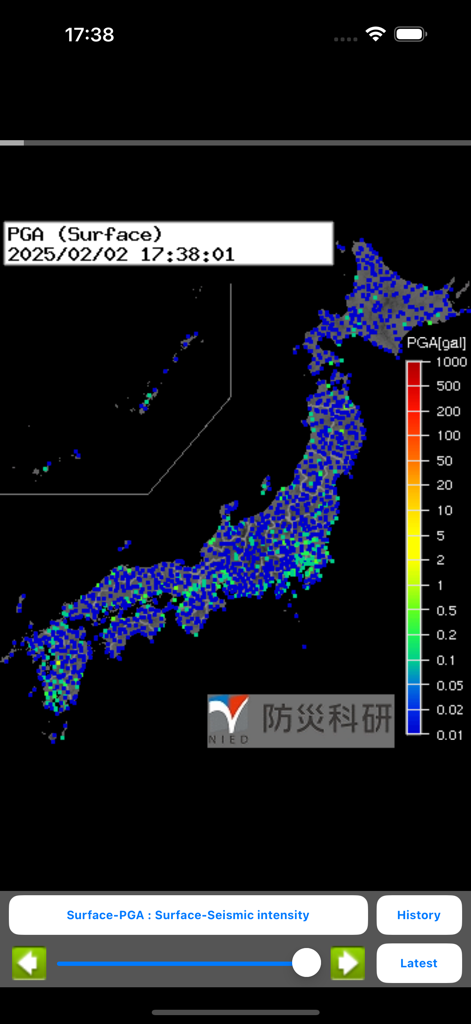
강진 모니터 뷰어 앱에서 지표면 최대 지반 가속도 데이터를 보여주는 일본의 실시간 지진 강도 지도

강진 모니터 뷰어 앱에서 지표면 최대 지반 가속도 데이터를 보여주는 일본의 실시간 지진 강도 지도

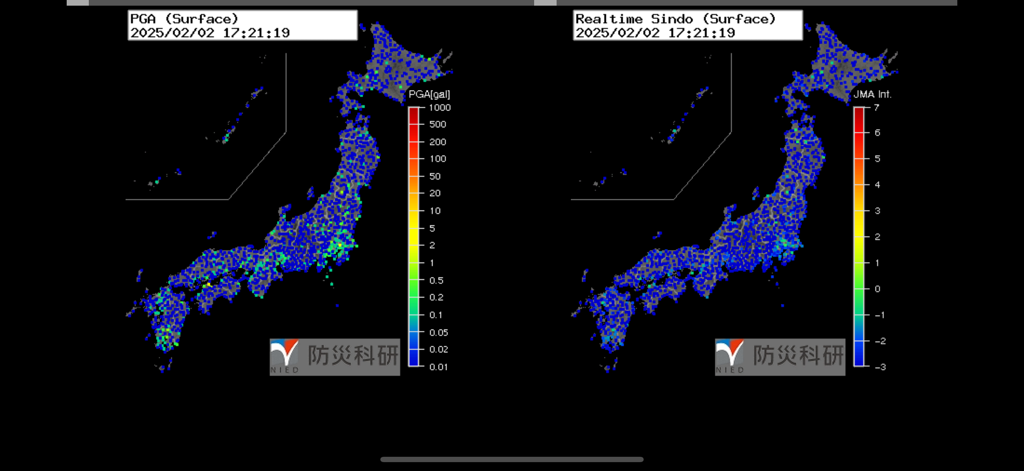
일본의 지표면 PGA 및 신도 강도를 보여주는 이중 실시간 지진 모니터링 지도

일본의 지표면 PGA 및 신도 강도를 보여주는 이중 실시간 지진 모니터링 지도

실시간으로 뛰어난 지진 통찰력

이 앱을 돋보이게 하는 도구, 157K+ 명의 사용자가 선택.

📡

실시간 PGA 및 강도 매핑

파동 전파를 실시간으로 시각화하세요. 일본 방재과학기술연구소(NIED)의 원시 데이터 피드를 사용하여 지표면 및 시추공 PGA(최대 지반 가속도)를 모니터링하세요.

🔍

이중 레이어 지질 분석

버튼 탭 한 번으로 지표면 대 시추공 지진 강도를 비교하세요. 고강도 이벤트 중 다양한 토양층과 깊이가 어떻게 반응하는지 이해하는 데 필수적입니다.

정밀한 과거 재생

밀리초 수준의 정밀도로 지난 60분간의 지진 활동을 되돌려 보세요. 가능한 최저 지연 시간을 위해 수동 서버 오프셋 컨트롤로 이벤트 패턴과 파동 움직임을 분석하세요.

앱 소개

에 대해 알아야 할 모든 것 Strong Motion Monitor Viewer.

설명

I own app to Strong Motion Monitor the site found in the National Research Institute for Earth Science and Disaster Prevention, Japan. The URL hard-coded, such as might not see the site design changes. You can enter the setting screen from Settings app. The items that can be set, • Sleep invalid setting • background map, white / black / Appearance interlocking(iOS13 or higher) selection • Type setting of the screen next to the time left map and portrait screen time • Type setting of the screen next to the time right map in landscape screen(or portrait screen of iPad) • Server data acquisition offset time ※ Please try to adjust when the blank map is frequently displayed, processing of server is heavy (for example, -4 seconds to -6 seconds) • selection of Strong Motion Monitor server Should be done than notification items in the Settings app notification settings. The following operations are possible in the portrait screen display. • In the lower left button, the type of setting horizontal screen when left map and vertical screen time • At the bottom right button, the type of setting right next to the screen during map • In slide bar at the bottom left and display the data for up to one hour past • In button on the slide bar left and right to move data around 2 seconds • The return to the latest data displayed in a button press on the bottom right in the past at the time data display • In iOS6 or more, you can send the image to Twitter, such as by pressing and holding the map. • You can switch the type of map by swiping left and right on the map. (Left:Surface PGA -> Surface -Seismic intensity -> Borehole-PGA -> Borehole-Seismic intensity -> Surface PGA, Right:Surface PGA -> Borehole-Seismic intensity -> Borehole-PGA -> Surface -Seismic intensity -> Surface PGA)

최신 버전

1.8.4

크기

28.6 MB

출시일

2013년 7월 22일

최고 수준의 지진 데이터에 액세스하세요

일본 NIED 네트워크를 모니터링하는 지질학자 및 파워 유저 엘리트 네트워크에 참여하세요. 최소 지연 시간 PGA 및 시추공 강도 데이터를 장치로 바로 받아보세요.

다운로드: App Store

App information, icons, screenshots, and descriptions displayed on this page are sourced from the Apple App Store and are the property of their respective developers. Download estimates and rankings are based on MWM's proprietary models and may not reflect actual figures. This page is provided for informational and analytical purposes only.

Believe this page infringes your intellectual property? File a dispute