Voice Translator: Translate AI

Voice Translator: Translate AI

다운로드: App Store
로고: Voice Translator: Translate AI

음성 번역기: AI 번역: 원활한 글로벌 커뮤니케이션을 위한 나만의 AI 통역사

최첨단 AI로 즉시 언어 장벽을 허물어 보세요. 자연스러운 대면 대화부터 실시간 카메라 번역까지, 어디를 가든 150개 이상의 언어로 연결 상태를 유지하세요.

개발사

AVIRISE LIMITED

카테고리

Productivity

다운로드

2M+

사용자 평점

4.6/5

총 평가 수

15K+

지원 언어

51

모든 상호작용에 담긴 혁신

이 인터페이스를 사용하는 2M+ 명의 사용자.

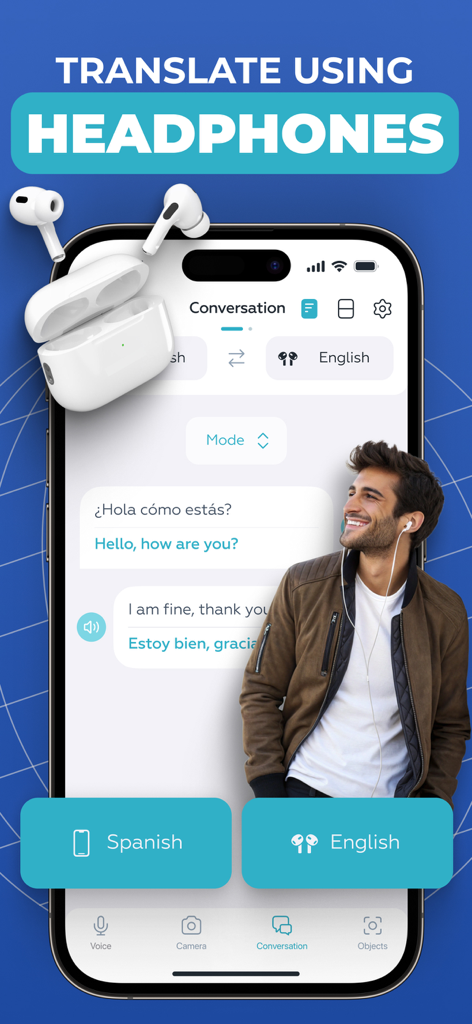
음성 번역기 앱 인터페이스가 대화 모드에서 헤드폰을 사용하여 번역을 표시하는 모습

음성 번역기 앱 인터페이스가 대화 모드에서 헤드폰을 사용하여 번역을 표시하는 모습

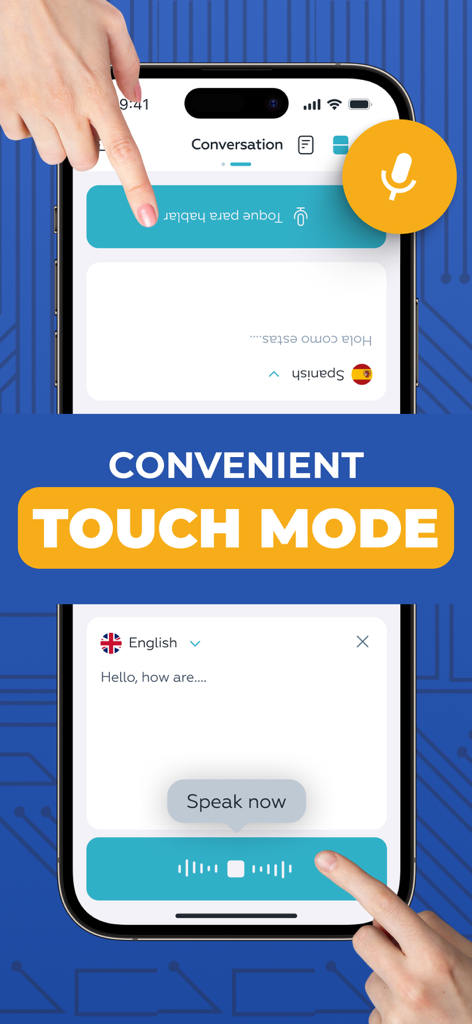
실시간 분할 화면 음성 번역을 위한 터치 모드를 보여주는 모바일 앱 스크린샷

실시간 분할 화면 음성 번역을 위한 터치 모드를 보여주는 모바일 앱 스크린샷

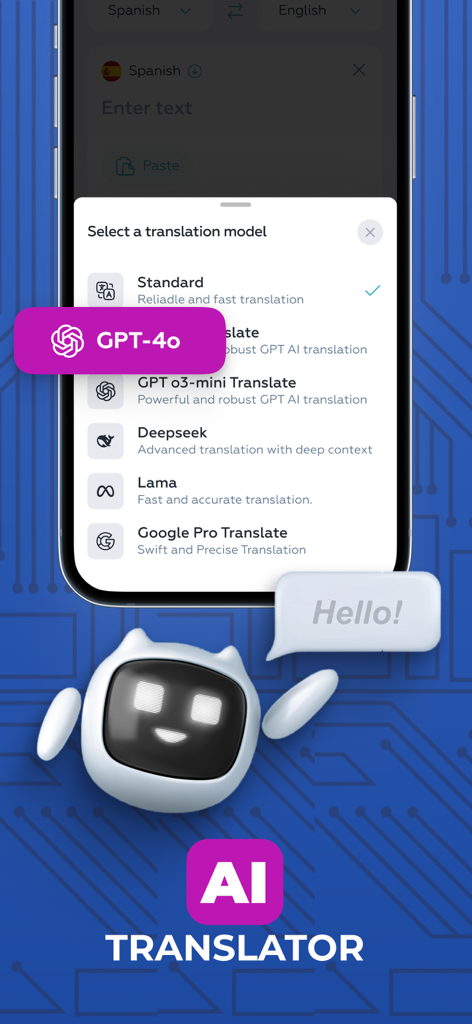
음성 번역기 앱 내에서 GPT-4o 및 Deepseek를 포함한 AI 번역 모델 목록을 표시하는 스마트폰 화면

음성 번역기 앱 내에서 GPT-4o 및 Deepseek를 포함한 AI 번역 모델 목록을 표시하는 스마트폰 화면

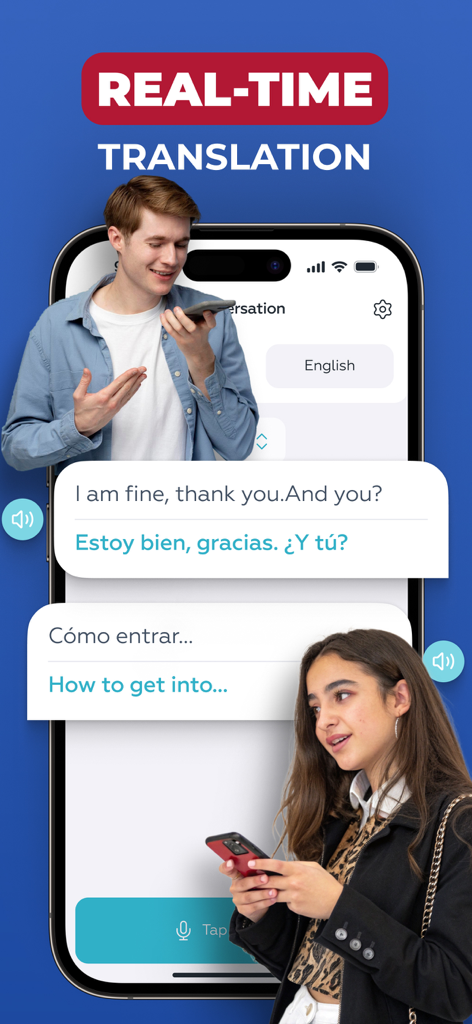
스마트폰 화면이 영어와 스페인어 간 실시간 음성 번역을 보여주는 모습

스마트폰 화면이 영어와 스페인어 간 실시간 음성 번역을 보여주는 모습

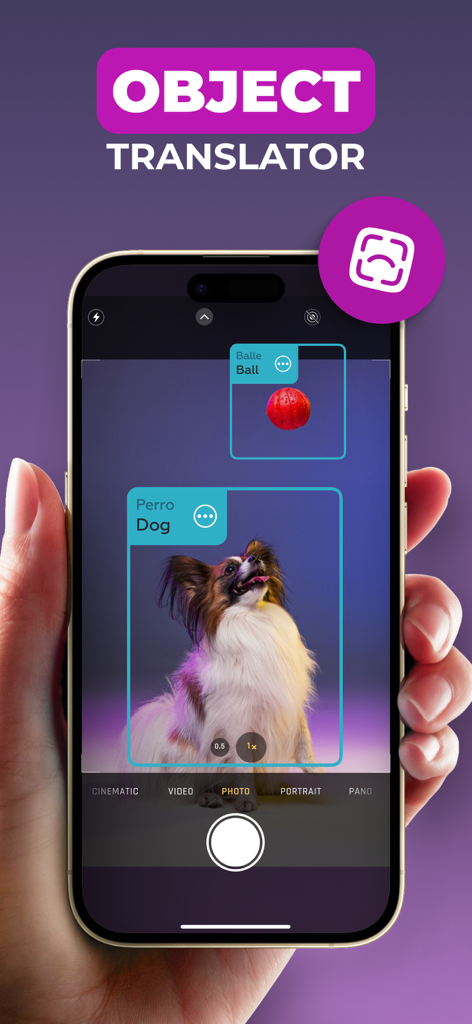
AR을 사용하여 개와 공을 실시간으로 식별하고 번역하는 AI 객체 번역기능을 보여주는 스마트폰

AR을 사용하여 개와 공을 실시간으로 식별하고 번역하는 AI 객체 번역기능을 보여주는 스마트폰

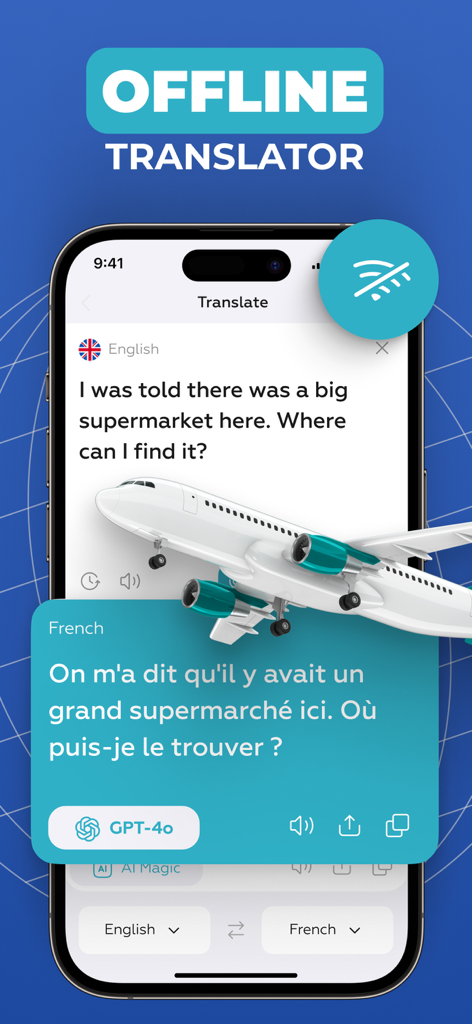
비행기 일러스트와 함께 GPT-4o를 사용하여 영어를 프랑스어로 번역하는 음성 번역기 앱의 오프라인 모드를 보여주는 스마트폰 화면

비행기 일러스트와 함께 GPT-4o를 사용하여 영어를 프랑스어로 번역하는 음성 번역기 앱의 오프라인 모드를 보여주는 스마트폰 화면

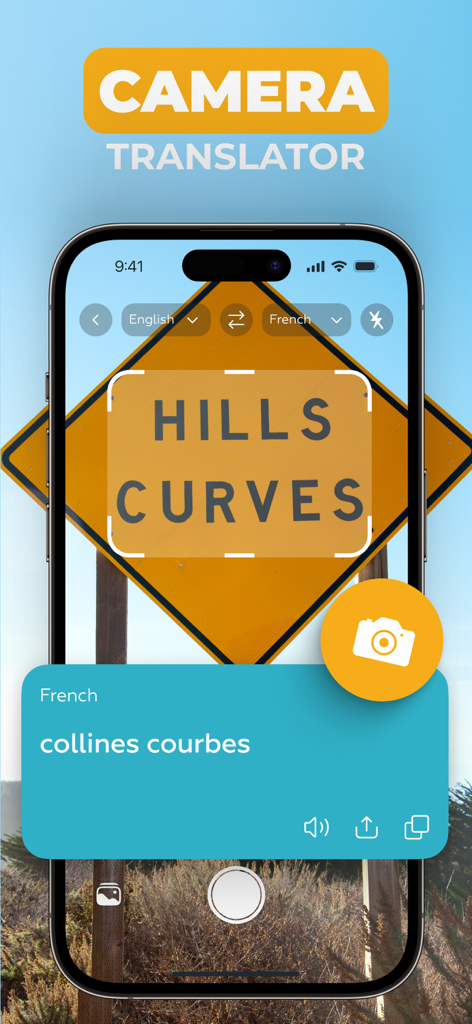
음성 번역기 앱이 카메라를 사용하여 도로 표지판을 영어에서 프랑스어로 번역하는 스크린샷

음성 번역기 앱이 카메라를 사용하여 도로 표지판을 영어에서 프랑스어로 번역하는 스크린샷

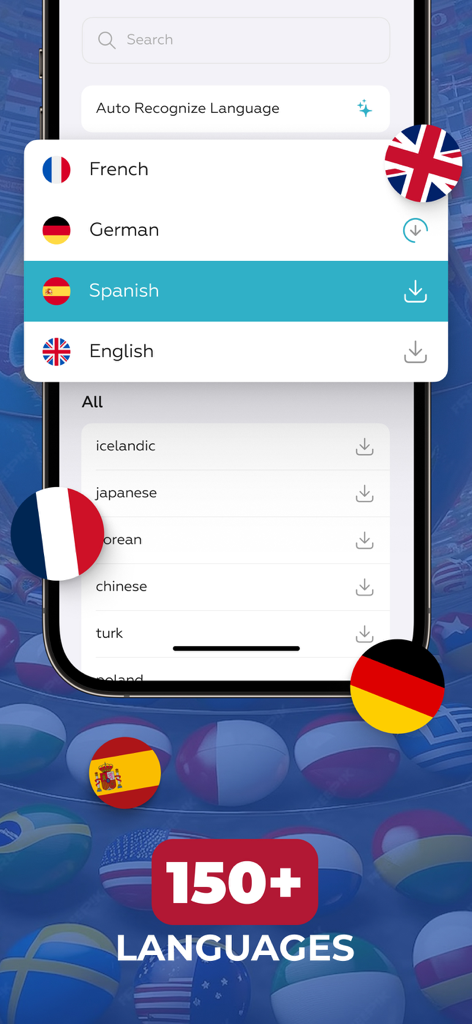
음성 번역기 앱 화면이 국가별 국기와 함께 지원되는 150개 이상의 언어 선택 목록을 보여주는 모습

음성 번역기 앱 화면이 국가별 국기와 함께 지원되는 150개 이상의 언어 선택 목록을 보여주는 모습

한계 없는 소통

이 앱을 돋보이게 하는 도구, 2M+ 명의 사용자가 선택.

🤝

원활한 대면 채팅

터치 모드로 간극을 좁히세요. 분할 화면 인터페이스는 1:1 대화를 자연스럽고 빠르며 완벽하게 만들어 줍니다.

🎧

개인 AI 통역사

헤드폰을 연결하여 눈에 띄지 않게 실시간 오디오 번역을 받으세요. 이동 중 비즈니스 회의 및 개인 대화에 이상적입니다.

👁️

즉각적인 시각 정보

카메라를 향해 간판, 메뉴, 물체를 즉시 번역하세요. AR 기술을 사용하여 어떤 환경에서도 자신 있게 탐색하세요.

앱 소개

에 대해 알아야 할 모든 것 Voice Translator: Translate AI.

설명

Voice Translator AI is the perfect tool for seamless communication with people from around the world. Whether you're traveling, working, or making new connections, this app offers fast, accurate, and natural translations in real time. With advanced AI technology, it transforms your device into a personal interpreter. Key features: - AI translation with model selection - Headphones Mode - Real Talk Mode - Touch Mode - Camera Translator - Object Translator - Supports more than 150 languages AI Voice Translator. Choose from multiple advanced AI translation models to get the most accurate and natural-sounding results. The app allows you to select the voice engine that best fits your needs - whether you're aiming for speed, nuance, or clarity. This flexibility ensures that your spoken words are translated with maximum precision, preserving tone and meaning across languages. Headphones Mode. This feature helps you stay focused during conversations by providing live audio translation directly through your own headphones. Simply connect your headphones, speak in your language, and hear the translation without disturbing others. It’s perfect for traveling, public spaces, or private discussions. Touch Mode. This mode is designed for face-to-face conversations where two people sit across from each other. The voice input buttons appear on opposite sides of the screen - one for each speaker - so each person can simply tap their side to talk. It’s a natural and convenient way to communicate using just one device. For added flexibility, you can also switch to a layout with both buttons at the bottom of the screen - whichever feels more comfortable. Real Talk Mode. Perfect for longer conversations, this mode allows you to start the dialogue with just a single tap. Once activated, you can speak freely without pressing the button again after each phrase. The app continuously captures the conversation and translates phrases as you go - ensuring a smooth experience. Camera Translator. Instantly translate printed text, menus, signs, documents using your phone's camera. The app uses smart OCR to detect and recognize text in various languages, delivering quick and accurate translations on screen. Object Translator. Identify and translate objects around you in real time using AR technology. Just point your camera at an item, and the app will recognize and display its name or description in your selected language - perfect for navigating unfamiliar environments or learning new vocabulary visually. Wide Language Support. The app includes a large selection of languages from globally spoken ones to more specific regional dialects - ensuring you’re covered in almost any situation, anywhere in the world. Auto-Renewable Subscription Terms: - Your subscription will automatically renew on a weekly, monthly, or annual basis according to the plan you choose, and the charge will be processed via your Apple ID. - Free trials automatically switch to paid subscriptions unless canceled at least 24 hours before the trial period ends. - If you purchase a premium plan during a free trial, any remaining trial time will be forfeited. - You can manage or cancel your subscription anytime in your iTunes account settings. Changes will apply after the current billing period ends. Terms Of Use - https://docs.google.com/document/d/1o074NELkqmPFKd1jRvL5cG_Pp-xw5eIiLwNkCNS0UY8

최신 버전

4.5.0

크기

243.9 MB

출시일

2020년 8월 17일

전 세계 어디서든 한계 없이 소통하세요

최첨단 AI 통역사를 사용하는 200만 명 이상의 글로벌 시민 및 전문가와 함께하세요. 지금 음성 번역기 AI를 다운로드하고 모든 대화를 연결로 바꾸세요.

다운로드: App Store
FAQ

자주 묻는 질문

에 대해 알아야 할 모든 것 Voice Translator: Translate AI

Voice Translator: Translate AI는 무엇인가요?

Voice Translator: Translate AI는 고급 AI 기술을 사용하여 빠르고 정확하며 자연스러운 실시간 번역을 제공하는 앱입니다. 전 세계적인 커뮤니케이션을 위한 개인 통역사 역할을 합니다.

Voice Translator: Translate AI는 이미지에서 텍스트를 번역할 수 있나요?

네, Voice Translator: Translate AI에는 카메라 번역 기능이 있습니다. 휴대폰 카메라와 스마트 OCR 기술을 사용하여 인쇄된 텍스트, 메뉴, 간판 및 문서를 즉시 번역합니다.

Voice Translator: Translate AI에는 객체 번역 기능이 포함되어 있나요?

네, Voice Translator: Translate AI에는 객체 번역 기능이 포함되어 있습니다. AR 기술을 사용하여 객체를 실시간으로 식별하고 번역하여 선택한 언어로 이름이나 설명을 표시합니다.

Voice Translator: Translate AI는 몇 개의 언어를 지원하나요?

Voice Translator: Translate AI는 전 세계적으로 사용되는 언어와 특정 지역 방언을 포함하여 150개 이상의 언어를 지원합니다. 이를 통해 다양한 커뮤니케이션 요구에 대한 포괄적인 지원을 보장합니다.

Voice Translator: Translate AI는 AI 번역 모델 선택을 허용하나요?

네, Voice Translator: Translate AI는 사용자가 GPT-4o, Deepseek, Lama, Google Pro Translate와 같은 여러 고급 AI 번역 모델 중에서 선택하여 정확한 결과를 얻을 수 있도록 합니다.

Voice Translator: Translate AI의 헤드폰 모드는 어떻게 작동하나요?

Voice Translator: Translate AI의 헤드폰 모드는 연결된 헤드폰을 통해 실시간 오디오 번역을 제공합니다. 사용자는 자신의 언어로 말하고 다른 사람을 방해하지 않고 번역된 내용을 듣습니다.

Voice Translator: Translate AI의 터치 모드는 무엇에 사용되나요?

Voice Translator: Translate AI의 터치 모드는 얼굴을 맞대고 하는 대화를 촉진합니다. 화면 반대편에 두 개의 입력 버튼이 나타나 각 사람이 탭하여 말할 수 있습니다.

Voice Translator: Translate AI의 실시간 대화 모드의 장점은 무엇인가요?

Voice Translator: Translate AI의 실시간 대화 모드는 연속적이고 원활한 대화를 가능하게 합니다. 사용자는 한 번 탭하면 자유롭게 말할 수 있으며, 앱은 추가 버튼 누름 없이 구문을 지속적으로 캡처하고 번역합니다.

Voice Translator: Translate AI는 오프라인 번역을 제공하나요?

네, Voice Translator: Translate AI는 오프라인 번역 기능을 제공합니다. 이를 통해 사용자는 앱의 시각 자료에 표시된 대로 인터넷 연결 없이도 대화를 번역할 수 있습니다.

Voice Translator: Translate AI의 구독은 어떻게 작동하나요?

Voice Translator: Translate AI의 구독은 주간, 월간 또는 연간 단위로 자동 갱신됩니다. 구독 약관에 따라 요금은 사용자의 Apple ID를 통해 처리됩니다.

Voice Translator: Translate AI의 무료 체험판을 이용할 수 있나요?

네, Voice Translator: Translate AI는 무료 체험판을 제공합니다. 이 체험판은 체험 기간이 끝나기 최소 24시간 전에 취소하지 않으면 유료 구독으로 자동 전환됩니다.

Voice Translator: Translate AI 구독을 어떻게 취소하나요?

사용자는 언제든지 iTunes 계정 설정에서 Voice Translator: Translate AI 구독을 관리하거나 취소할 수 있습니다. 변경 사항은 현재 결제 기간이 종료된 후 적용됩니다.

Voice Translator: Translate AI의 이용 약관은 어디에서 찾을 수 있나요?

Voice Translator: Translate AI의 이용 약관은 다음 링크에서 확인할 수 있습니다: https://docs.google.com/document/d/1o074NELkqmPFKd1jRvL5cG_Pp-xw5eIiLwNkCNS0UY8.

App information, icons, screenshots, and descriptions displayed on this page are sourced from the Apple App Store and are the property of their respective developers. Download estimates and rankings are based on MWM's proprietary models and may not reflect actual figures. This page is provided for informational and analytical purposes only.

Believe this page infringes your intellectual property? File a dispute