Dote Timer - Time Management

Dote Timer - Time Management

Baixar no App Store
Logo de Dote Timer - Time Management

Dote Timer: Vire para Focar, Planeje com Precisão e Doe

Conquiste distrações com nosso timer de virar único, visualize seu progresso com um planejador de pontos de 10 minutos e transforme suas sessões de trabalho profundo em doações reais para estudantes necessitados.

Editor

Smartdong School

Categoria

Productivity

Downloads

56K+

Avaliação

4.6/5

Total de avaliações

1K+

Idiomas

18

Domine Seu Fluxo

Descubra a interface usada por 56K+ usuários.
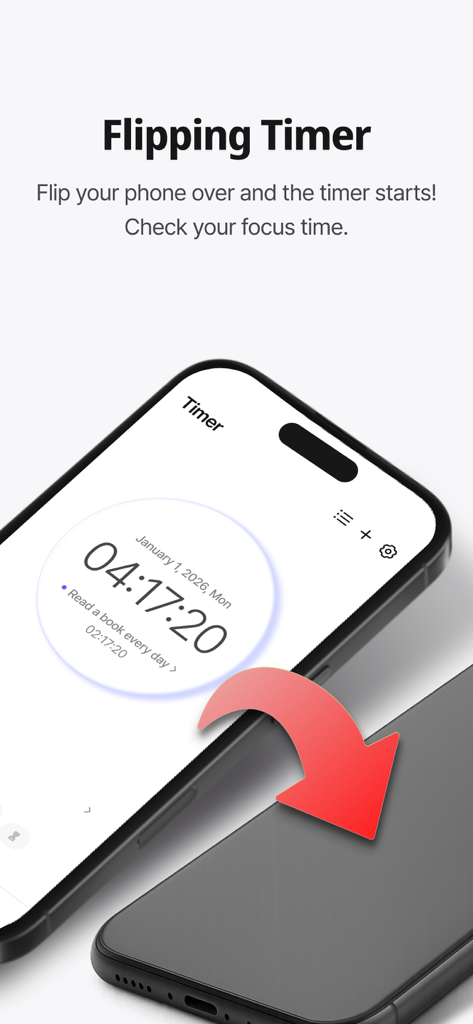
Um smartphone sendo virado para baixo para ativar o recurso de timer de foco no aplicativo Dote Timer.

Um smartphone sendo virado para baixo para ativar o recurso de timer de foco no aplicativo Dote Timer.

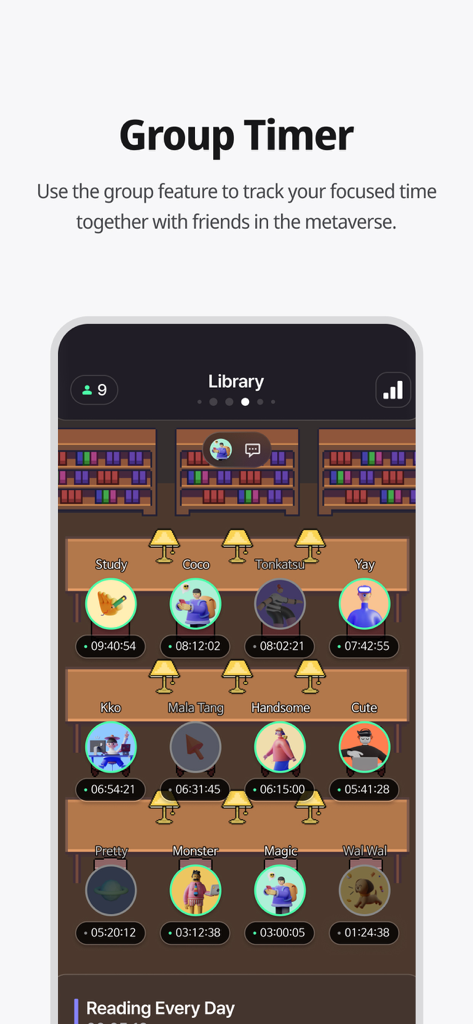
Uma captura de tela do aplicativo Dote Timer mostrando o recurso Group Timer com um ambiente de biblioteca virtual onde os usuários estudam juntos.

Uma captura de tela do aplicativo Dote Timer mostrando o recurso Group Timer com um ambiente de biblioteca virtual onde os usuários estudam juntos.

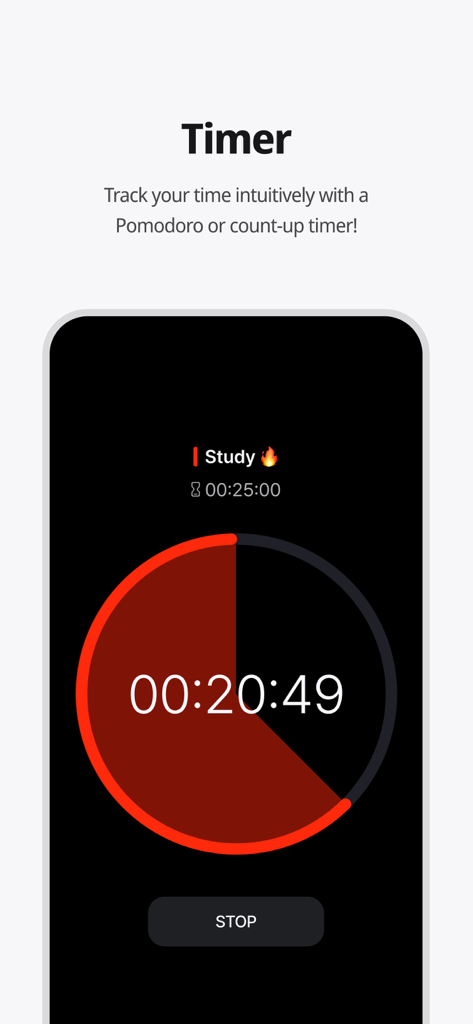
Interface do aplicativo Dote Timer mostrando uma contagem regressiva circular do timer de estudo Pomodoro.

Interface do aplicativo Dote Timer mostrando uma contagem regressiva circular do timer de estudo Pomodoro.

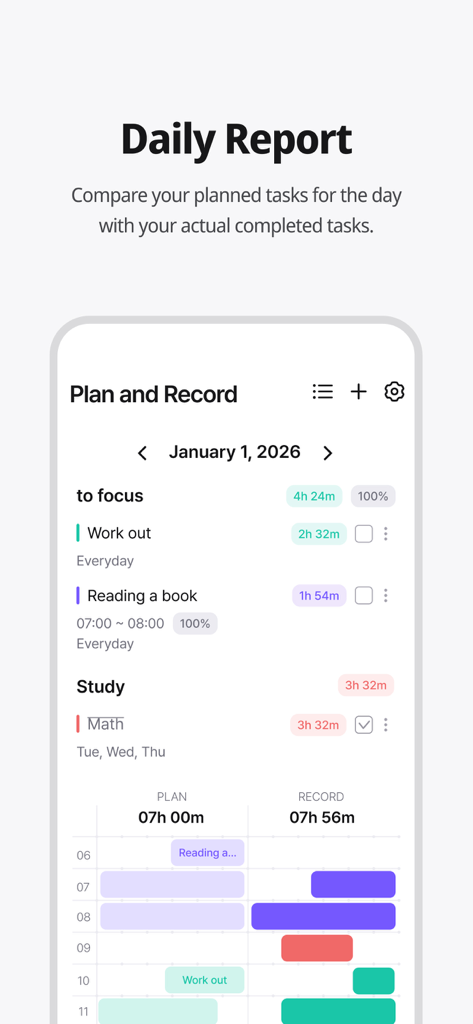
Tela de relatório diário do Dote Timer comparando tarefas planejadas e tempo gravado real.

Tela de relatório diário do Dote Timer comparando tarefas planejadas e tempo gravado real.

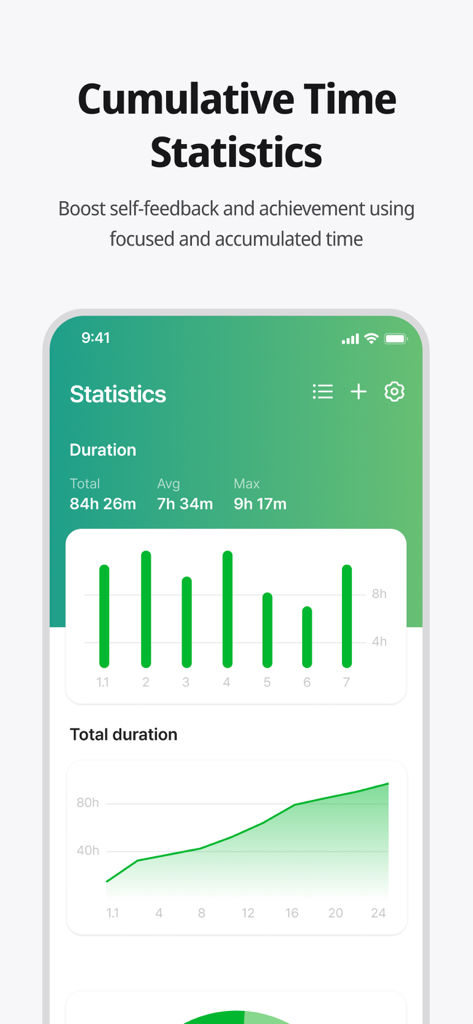
Tela do aplicativo Dote Timer mostrando estatísticas e gráficos de tempo de foco cumulativo.

Tela do aplicativo Dote Timer mostrando estatísticas e gráficos de tempo de foco cumulativo.

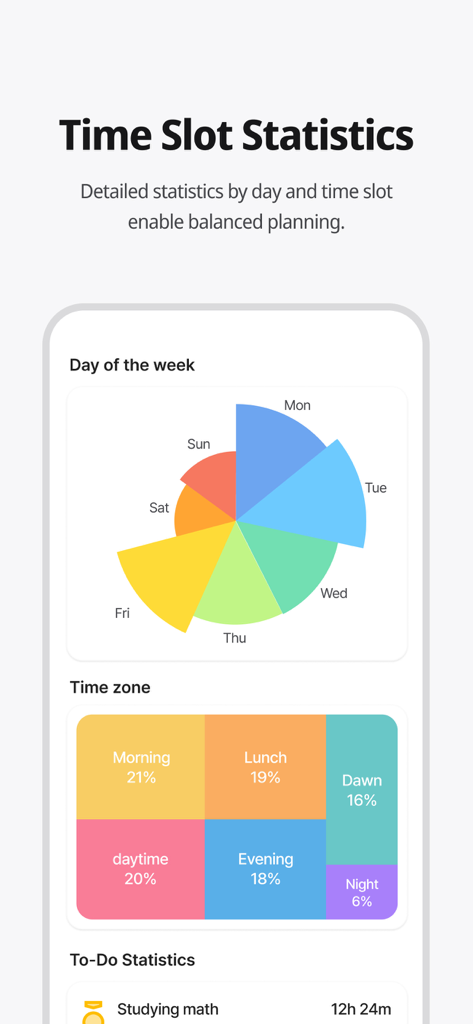
Um painel de análise colorido mostrando estatísticas de gerenciamento de tempo por dia da semana e hora do dia.

Um painel de análise colorido mostrando estatísticas de gerenciamento de tempo por dia da semana e hora do dia.

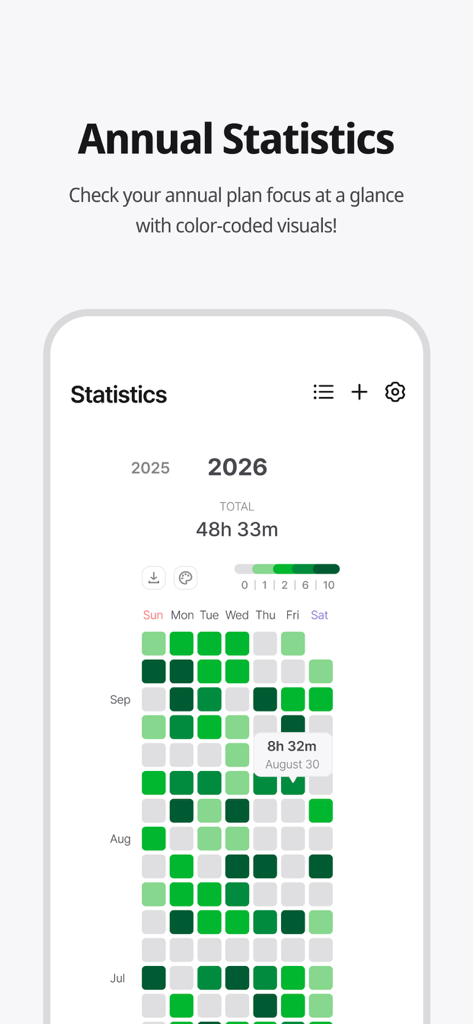
Mapa de calor de estatísticas de foco anual codificado por cores no aplicativo Dote Timer.

Mapa de calor de estatísticas de foco anual codificado por cores no aplicativo Dote Timer.

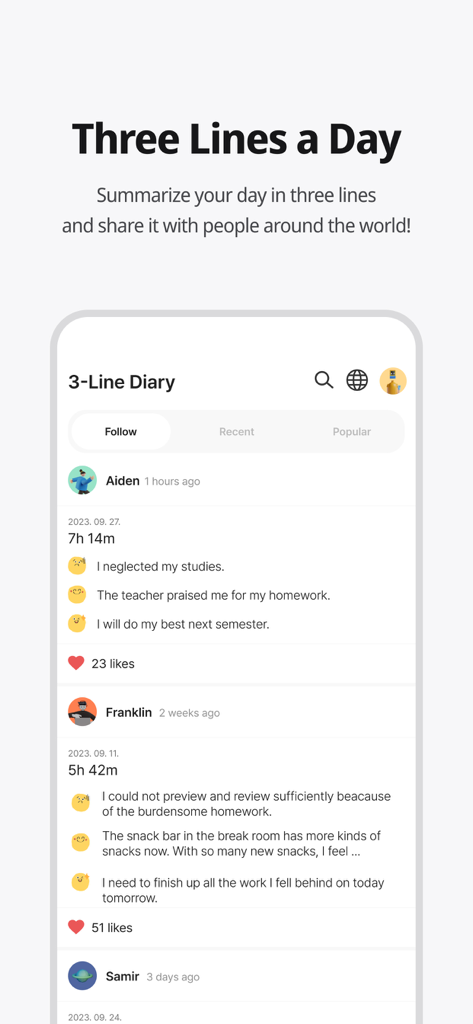
Recurso de diário comunitário Three Lines a Day no aplicativo Dote Timer mostrando resumos de usuários e tempos de foco.

Recurso de diário comunitário Three Lines a Day no aplicativo Dote Timer mostrando resumos de usuários e tempos de foco.

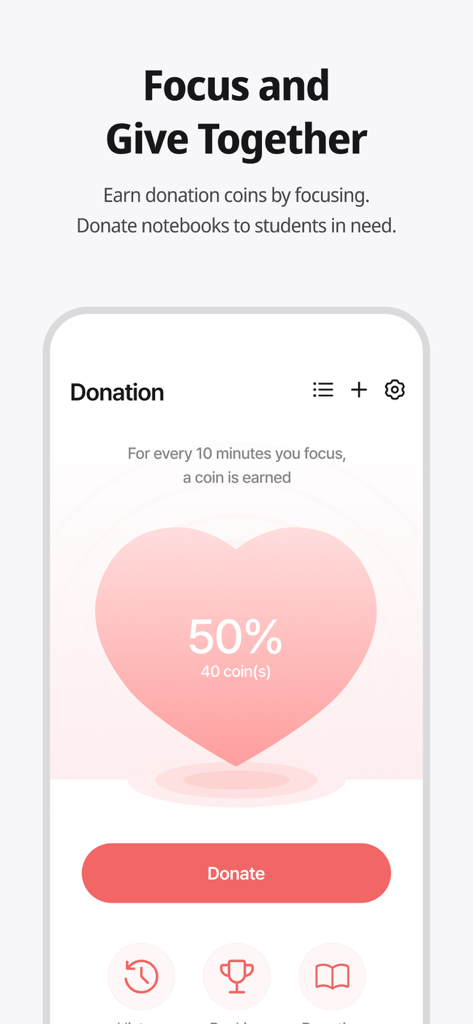
Tela do aplicativo Dote Timer mostrando o recurso de doação onde os usuários podem ganhar moedas focando e doá-las para estudantes necessitados.

Tela do aplicativo Dote Timer mostrando o recurso de doação onde os usuários podem ganhar moedas focando e doá-las para estudantes necessitados.

Eleve Sua Produtividade com Propósito

As ferramentas que destacam este app, escolhido por 56K+ usuários.

📱

Vire para Foco Profundo

Elimine o vício em smartphones com um timer que só funciona quando seu celular está virado para baixo. Recupere sua atenção e entre em um estado de fluxo instantaneamente.

📈

Planeje vs. Realidade - Análises

Compare suas metas com seu tempo de foco real com precisão de 10 minutos. Use mapas de calor visuais para identificar suas horas mais produtivas.

🌍

Produtividade com Impacto

Transforme sua concentração em uma força para o bem. Ganhe moedas enquanto trabalha para financiar materiais educacionais para estudantes carentes em todo o mundo.

Sobre o app

Tudo o que você precisa saber sobre Dote Timer - Time Management.

Descrição

#Time Management Secret of Successful People# Try Dot Timer now, the king of time management! Are you having trouble managing your time? Need to concentrate, but your smartphone is distracting you? Organizing your work or even recording your study time, everything can be done with Dot Timer! ##Flip Timer UP your concentration with a timer that runs when your flip your smartphone! Let's get away from smartphone addiction! Get donation coins every 10 minutes of concentration ##Time Table Unique time table that allows you to compare your plans with the actual records at a glance! Maximize time utilization with a 10-minute dot-separated planner ##Various statistical charts It's not end with record! Analyze your concentration time in detail with various graphs and charts! Identify your improvement with daily statistics, annual statistics, cumulative statistics, weekly statistics, hourly statistics and plan leaderboards at a glance ##Donation Program You can donate the collected coins to gift notes for underprivileged students! Donation rangking are changing in real time basis ##Three Lines a Day How are you today? Share your diary in three lines. Motivate each other with friends around the world ‍##Study Group 'Study With' Try taking notes with your friends in real time! There are various themes such as classrooms, libraries, offices, fitness places and others. Group member statistics. ##Premium Features Try premium features that are constantly being updated. More efficient time management developed by time management experts How to Use Dote Timer Apple Watch 1. Add a to-do in the Dote timer app. 2. Open the Dote Timer Apple Watch app and select a task by pressing the ‘Select Task’ button. 3. Press the START button to start recording. 4. When the recording is finished, press the STOP button to save the recording and end it. Caution : 1. The Apple Watch must be connected to the iPhone. 2. The Dote timer must be installed on the iPhone. * Notice * First, You need to click To Do List and create category to use this app. reporting translation errors -> skyktc75@gmail.com Your review can help a lot for your developer. Thank you. When we try to concentrate on something, there are so many distractions. One of the biggest distractions is the smartphone. You need to focus on the book. But I find myself looking at the phone. The plan was to study for 5 hours But you actually spent only 1 hour on the book? Dote Timer is the answer! Let’s start with the special proprietary features of Dote Timer. First, Dote Timer starts only when you flip the device (screen facing down). It will automatically stop when you use or move the phone after activating the timer. Thus, you can concentrate on study or work. Second, you can compare the plan with your actual concentration record. Set up the D-Day of your task. And categorize it into A, B, or C depending on the importance to set up a precise plan. The actual length of concentration is recorded and can be compared with your original plan. Third, the thickness of color denotes how much you concentrated. Thus, you can easily find out the days when you concentrated on your tasks. Especially the app shows in different colors the days of concentration and the days you failed to concentrate throughout the year. So you can compare how you fared yesterday and today to make your day more productive. In addition, collect coins by using the timer and donate them for underserved people. My accumulated time of concentration is converted into coins. When they reach a certain threshold, Dote Planner and Dote Book will be donated to underserved students. There are also the standings of donation, Which motivates the users to compete in the donation of coins. Dote Timer can be set up as desired. Just focus on what you have to do to contribute to society. The most efficient time management app for the perfect time allocation. Download Dote Timer now!

Última versão

2.6.6

Tamanho

103.5 MB

Data de lançamento

6 de jul. de 2021

Transforme Seu Tempo de Tela em Impacto Social

Pronto para vencer a procrastinação? Junte-se a milhares de estudantes e profissionais que viram seus celulares para encontrar o foco. Baixe o Dote Timer hoje e comece a transformar seu trabalho profundo em doações reais.

Baixar no App Store

App information, icons, screenshots, and descriptions displayed on this page are sourced from the Apple App Store and are the property of their respective developers. Download estimates and rankings are based on MWM's proprietary models and may not reflect actual figures. This page is provided for informational and analytical purposes only.

Believe this page infringes your intellectual property? File a dispute