Home Theater SPL
Home Theater SPL
Baixar no App Store

Esta página não é uma página oficial do aplicativo ou de seu desenvolvedor, mas uma publicação editorial independente criada para fins informativos e de comentário. Salvo indicação expressa em contrário, nem o aplicativo nem seu desenvolvedor são afiliados, endossados, patrocinados, autorizados ou oficialmente conectados à MWM, Apple, Google Play, ao editor do aplicativo ou ao desenvolvedor do aplicativo, e nada nesta página implica que o aplicativo foi desenvolvido utilizando os serviços da MWM. Todas as marcas comerciais, logotipos, capturas de tela e outros conteúdos permanecem propriedade de seus respectivos proprietários.

Logo de Home Theater SPL
Baixar no App Store

Home Theater SPL

Alcance o palco sonoro perfeito e diálogos cristalinos com o medidor de decibéis de precisão projetado para entusiastas de home theater sérios e calibradores DIY.

Números Chave

Downloads

3K+

Avaliação

1.0/5

Total de avaliações

0

Editor

J.S. Technology Ltd.

Categoria

Utilities

Idiomas

1

Última versão

1.26

Tamanho

9.2 MB

Data de lançamento

24 de jun. de 2015
Recursos

Aperfeiçoe o Áudio do seu Home Cinema

Pare de adivinhar seus níveis. Calibre seus alto-falantes como um profissional com medição SPL de alta precisão projetada para sistemas surround 5.1 e 7.1.

Equilíbrio de Som de Precisão

Alcance o 'palco sonoro centralizado' definitivo igualando os níveis individuais dos alto-falantes com precisão de decibéis de nível profissional.

Otimização de Sistemas 7.1

Calibre facilmente layouts complexos, incluindo canais Central, Surround e LFE, usando uma interface dedicada construída para home theaters.

As capturas de tela e a descrição a seguir são provenientes diretamente da listagem oficial da loja do aplicativo e são propriedade do desenvolvedor.

App Store

Capturas
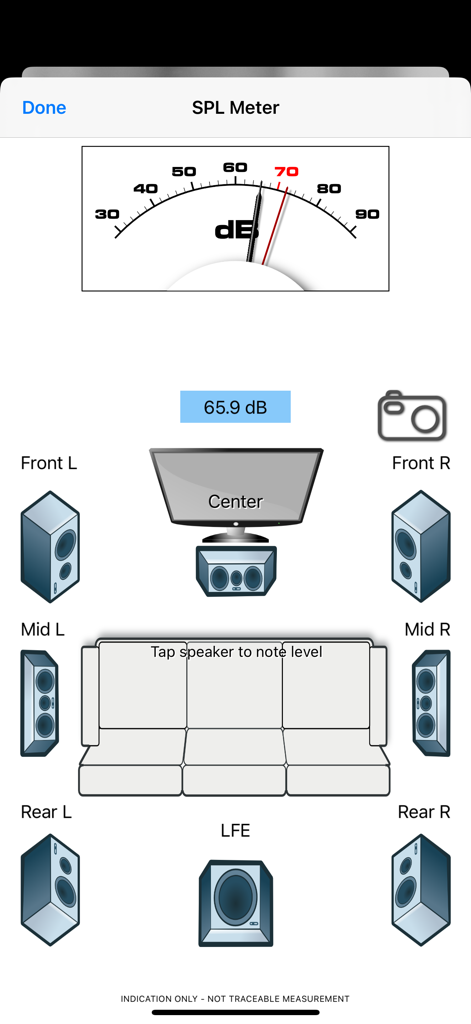
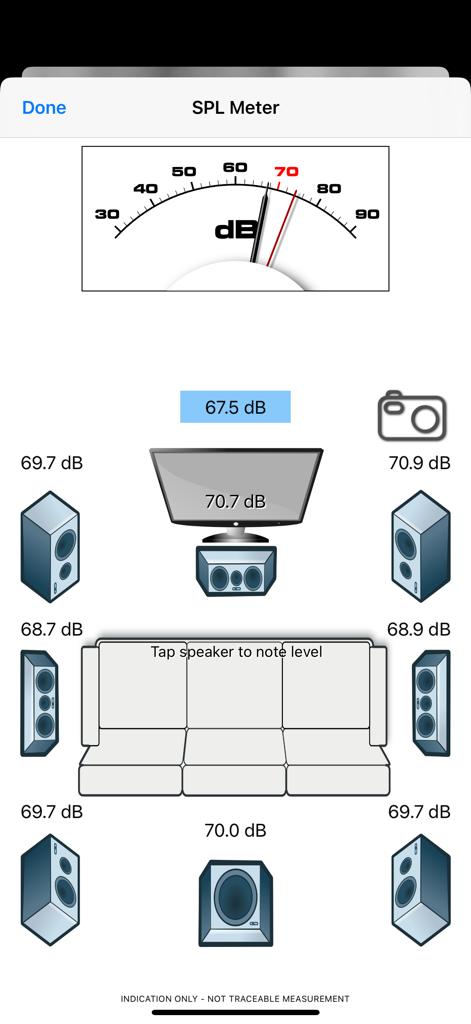
Home Theater SPL - Interface do aplicativo Home Theater SPL mostrando um medidor de decibéis e um layout de alto-falantes de som surround 7.1 para calibração de áudio.
Interface do aplicativo Home Theater SPL mostrando um medidor de decibéis e um layout de alto-falantes de som surround 7.1 para calibração de áudio.

Home Theater SPL - Tela de carregamento do aplicativo Home Theater SPL apresentando um tubo de vácuo vintage e botões de navegação
Tela de carregamento do aplicativo Home Theater SPL apresentando um tubo de vácuo vintage e botões de navegação

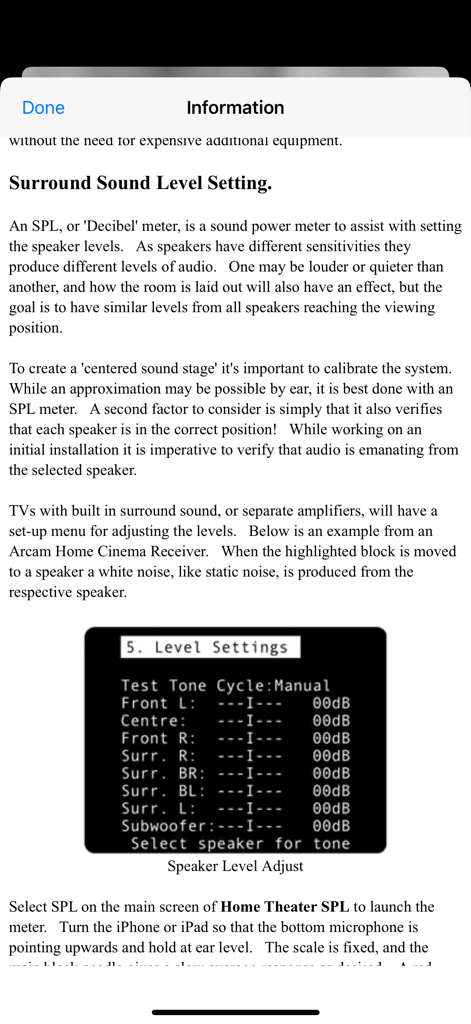
Home Theater SPL - Tela de informações explicando a calibração do nível dos alto-falantes de som surround com um exemplo de menu de receptor.
Tela de informações explicando a calibração do nível dos alto-falantes de som surround com um exemplo de menu de receptor.

Home Theater SPL - Interface do aplicativo Home Theater SPL mostrando uma calibração de sistema de som surround 7.1 com medidor de decibéis e leituras de nível de alto-falante

Interface do aplicativo Home Theater SPL mostrando uma calibração de sistema de som surround 7.1 com medidor de decibéis e leituras de nível de alto-falante

Descrição

Home Theater SPL Information   Professionals use SPL meters to calibrate audio reproduction systems in cinemas, so why shouldn’t Home Theaters or Home Cinemas owners use them too? Now the very same SPL meter that’s in our TestCard ProHD app is available separately.   An SPL or “decibel” meter is an essential tool when setting up surround sound systems.   Home Theater SPL a solution for calibrating the audio level of surround sound systems within the home without the need for additional equipment. Our app TestCard ProHD is the innovative means to calibrating your screen and audio to ensure a consistent and correct representation of display media and surround sound and includes an SPL meter. If you wish to calibrate both audio and visual aspects of your Home Theater then please consider TestCard ProHD.   Surround Sound Level Setting.   An SPL, or “Decibel” meter, is a sound power meter to assist with setting the speaker levels.   As speakers have different sensitivities they produce different levels of audio.   One may be louder or quieter than another, and how the room is laid out will also have an effect, but the goal is to have similar levels from all speakers reaching the viewing position.   To create that “centered sound stage” it’s important to calibrate the system.   While an approximation may be possible by ear, it is best done with an SPL meter.   A second factor to consider is simply that it also verifies that each speaker is in the correct position!   While working on an initial installation it is imperative to verify that audio is emanating from the selected speaker.   Select SPL on the main screen of Home Theater SPL to launch the meter.   Turn the iPhone or iPad so that the bottom microphone is pointing upwards and hold at ear level.   The scale is fixed, and the main black needle gives a slow average response as desired.   A red needle is provided for peak noise level information and is not required during calibration. Start with the front left speaker and allow it to set the benchmark level; the target for all other speakers to be set to.   Typically the audio will be in the 70-80dB range and as a guide 70dB is marked in red on dial.   With Home Theater SPL it is possible to note the current sound level by tapping on respective speaker, making it easier to recall where individual speakers were.   Move to the center speaker and adjust its level to closely match the first.   It is normal for amplifiers to increase or decrease sound levels by 1dB increments and it may not be possible to get an exact match.   Move to the next speaker in the list and repeat.   Variance of 1 or 2dB during calibration is normal, but it will settle around a value.   Some systems will have 5 speakers and some will also have the LFE, or bass effects, speaker to give the “0.1” to make 5.1 audio.   With the SPL meter there are 7 main speakers shown with one LFE to make 7.1.   With a 5.1 system the Mid speakers will not be present and therefore can be skipped. To check it’s always advisable to run round checking the speaker levels again, perhaps even adjusting the initial left speaker if it was not possible to set others within the range allowed by the amplifier.   When complete ensure that you save the settings within the amplifier if they’re not automatically saved.   For reference a screen shot of the SPL meter on Home Theater SPL can be taken to record any stored audio level by pressing the camera button.

Download

Baixar no App Store

Esta página não é uma página oficial do aplicativo ou de seu desenvolvedor, mas uma publicação editorial independente criada para fins informativos e de comentário. Salvo indicação expressa em contrário, nem o aplicativo nem seu desenvolvedor são afiliados, endossados, patrocinados, autorizados ou oficialmente conectados à MWM, Apple, Google Play, ao editor do aplicativo ou ao desenvolvedor do aplicativo, e nada nesta página implica que o aplicativo foi desenvolvido utilizando os serviços da MWM. Todas as marcas comerciais, logotipos, capturas de tela e outros conteúdos permanecem propriedade de seus respectivos proprietários.








