iCatcher! Podcast Player

iCatcher! Podcast Player


Baixar no App Store
Logo de iCatcher! Podcast Player

iCatcher! A Ferramenta Definitiva para Usuários Avançados de Podcasts

Assuma o controle total da sua experiência de audição com configurações de reprodução granulares, automação avançada e sincronização perfeita em todos os seus dispositivos Apple.

Editor

Joe Graf

Categoria

News

Downloads

86K+

Avaliação

5.0/5

Total de avaliações

0

Idiomas

1

Controle em um Piscar de Olhos

Descubra a interface usada por 86K+ usuários.
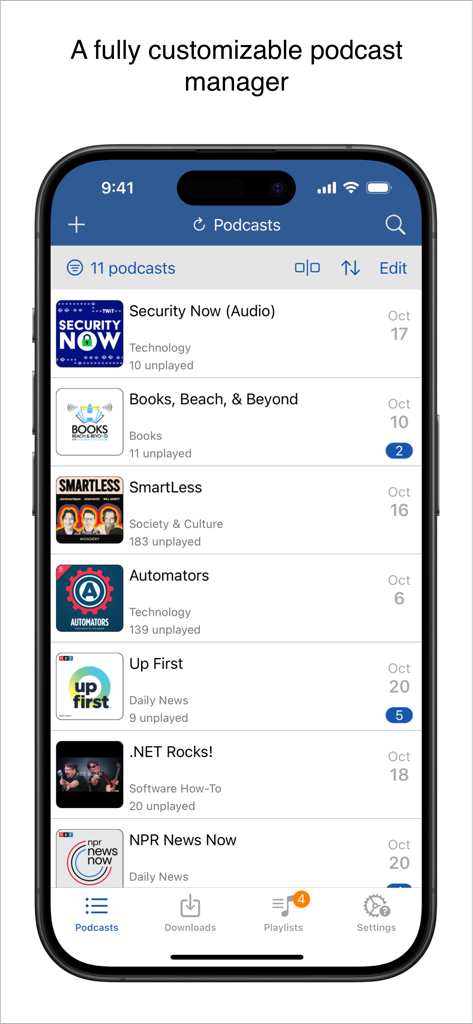
Interface do player de podcast iCatcher mostrando uma lista de programas assinados e episódios não reproduzidos em um iPhone

Interface do player de podcast iCatcher mostrando uma lista de programas assinados e episódios não reproduzidos em um iPhone

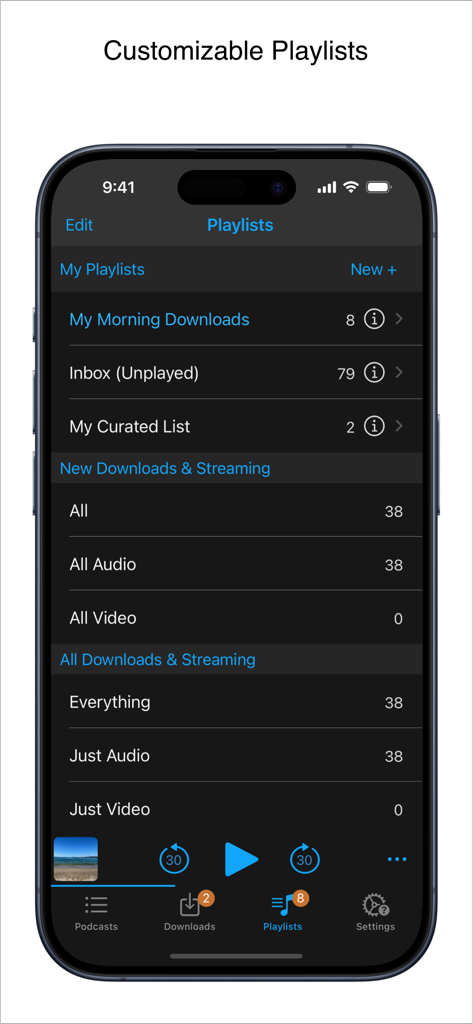
Interface do iCatcher Podcast Player mostrando gerenciamento de playlists personalizáveis no iPhone.

Interface do iCatcher Podcast Player mostrando gerenciamento de playlists personalizáveis no iPhone.

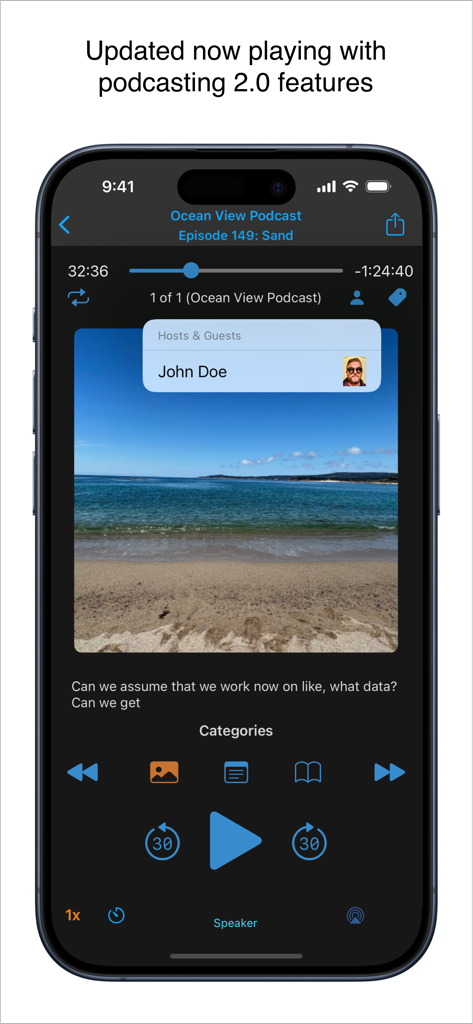
Tela 'Reproduzindo Agora' do iCatcher Podcast Player no iPhone com recursos do Podcasting 2.0, como informações do host e controles de reprodução.

Tela 'Reproduzindo Agora' do iCatcher Podcast Player no iPhone com recursos do Podcasting 2.0, como informações do host e controles de reprodução.

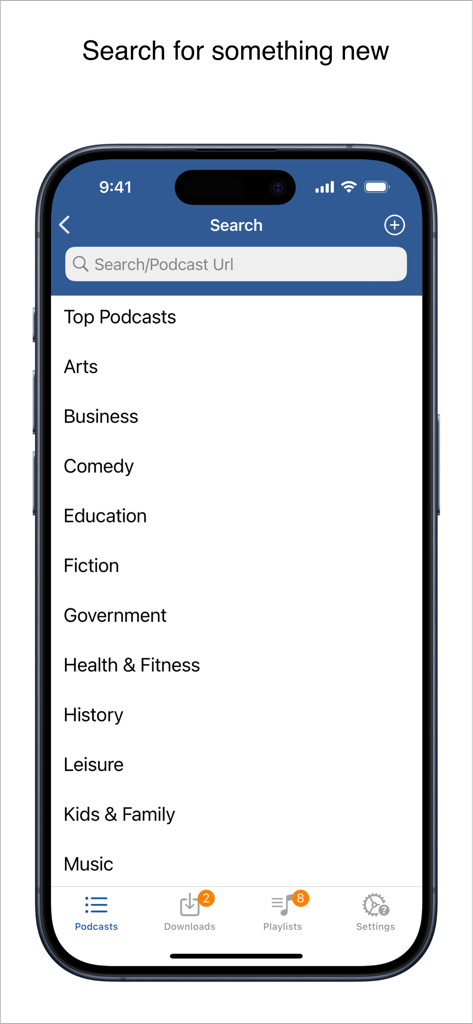
Interface de busca do iCatcher Podcast Player mostrando uma lista de categorias de podcast e uma barra de busca por palavras-chave ou URLs.

Interface de busca do iCatcher Podcast Player mostrando uma lista de categorias de podcast e uma barra de busca por palavras-chave ou URLs.

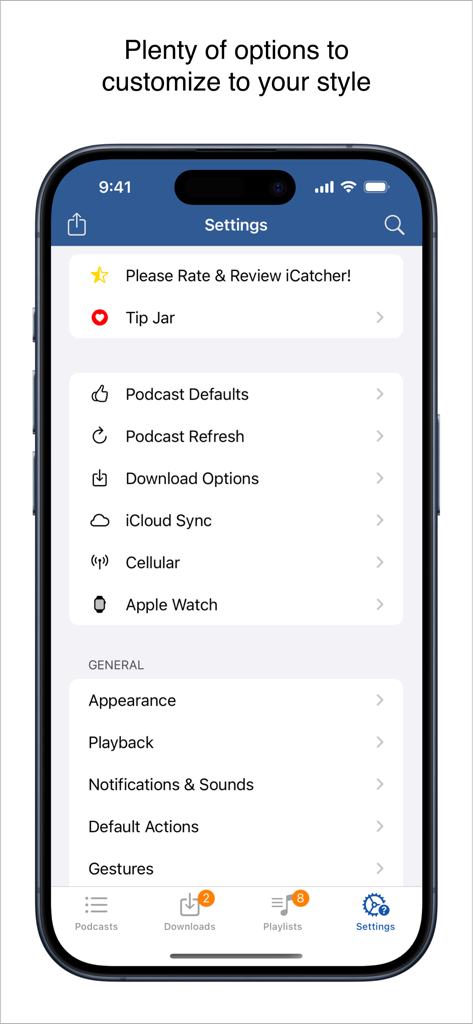
Menu de configurações do aplicativo iCatcher! Podcast Player com opções de personalização granular para usuários avançados

Menu de configurações do aplicativo iCatcher! Podcast Player com opções de personalização granular para usuários avançados

Feito para o Usuário Avançado de Podcasts

As ferramentas que destacam este app, escolhido por 86K+ usuários.

🛠️

Controle de Reprodução Granular

Defina velocidades personalizadas por podcast, use gestos avançados para navegação sem as mãos e crie filtros inteligentes para a fila automatizada perfeita.

🚀

Integração Profunda com iOS

Sincronize seu progresso entre iPhone, iPad e Watch via iCloud. Use Atalhos da Apple para automatizar sua audição e permanecer eficiente em qualquer lugar.

🔒

Suporte a Feeds Privados

Gerencie feeds protegidos por senha do Patreon ou Supercast de forma integrada, com download offline robusto e opções poderosas de importação OPML.

Sobre o app

Tudo o que você precisa saber sobre iCatcher! Podcast Player.

Descrição

Download, listen, watch, and relish your favorite podcasts. FEATURES - Subscribe to your preferred podcasts within the app and manage them conveniently. - Download episodes over WiFi or Cellular (available on devices with cellular capabilities). - Support for password-protected feeds. - Background refresh and download in the background. - Sync subscriptions, episode playback positions, and playlists between your devices using iCloud. - Universal App (compatible with iPhone and iPad). - Search across all views to locate the podcast or episode you’re seeking. - Customize playlists with filtering options based on podcasts, episodes, and more. - Support for continuous playback (toggle it on the now playing screen just below the time elapsed). - Portrait and landscape orientation supporter, with a configurable option in the settings. - Unfollow podcasts and still keep them on your device. This feature is particularly useful for podcasts that don’t meet your expectations. PLAYBACK - Variable playback speed. - Remembered playback speed per podcast. - Support for podcasts with chapters and chapter images (MP3 and M4A formats). - Utilize your headset controls, including Bluetooth car controls (when paired), to play/pause, jump forward or backward 30 seconds. - Sleep timer. - Beautifully rendered show notes. - Onscreen controls for skipping ahead and skipping back. - Gesture support on the now playing screen (when the podcast logo is visible) to facilitate hands-free use. - Double-tap to play/pause. - Swipe up to adjust playback speed. - Swipe left or right to rewind or fast-forward. - Home to the L gesture for the 2-minute Leo jump. - Refer to Settings and Gestures for more information and customization options for rewind/fast-forward gestures. - AirPlay support allows you to watch or listen to podcasts on your large screen. - External display support for videos is available for devices that support an external display (use the Apple HDMI adapter). - Enjoy your favorite podcasts with a familiar layout. FIND NEW PODCASTS QUICKLY - Search for your podcasts by title, keyword, or author. - Browse the top podcasts categorized by different genres. • Manually add podcasts by entering their URLs. • Support for password-protected feeds. • Option to download a single episode. • Import podcast subscriptions for episodes already on your device from iTunes. • Import your OPML file from iTunes or other iOS podcast app. • Import media using the iTunes File Sharing feature. • Add your existing audiobooks (non-password-protected ones) using the iTunes File Sharing feature. • Add previously downloaded podcasts from your computer using the iTunes file sharing feature (see Settings and Import Media for details). SHORTCUT ACTIONS • Search your podcasts and episodes using shortcut actions. • Easily create an export from other apps into iCatcher using the subscribe action. • Control playback. • View podcast action including currently playing. • Import media directly into the app (like audiobooks). • Transfer your media to the watch via shortcut actions. • Pull chapter images. • Many more actions available. MORE • Completely customizable to suit your podcast preferences. • Swipe across a podcast or episode to access additional options. • Podcast settings allow you to set the days the podcast typically releases or the number of days between. • Specify the number of episodes to download when new ones are available. • Share podcast information via email with your friends. CONTACT Email: Tap the settings tab and select Send Questions or Feedback. Twitter/X: @Joeisanerd. PLEASE NOTE: The app doesn’t sync with iTunes. Like other podcast apps, it’s a standalone app designed for subscribing and downloading on the device. * If a feed doesn’t work, please let me know so I can investigate it. Requires iOS 17.4 or higher.

Última versão

9.3.3

Tamanho

52.1 MB

Data de lançamento

15 de mar. de 2011

Domine Sua Biblioteca de Podcasts Hoje

Junte-se a mais de 86.000 usuários avançados que exigem mais do que um player básico. Obtenha o controle granular, os atalhos avançados e a reprodução personalizada que seu hábito de ouvir merece.

Baixar no App Store

App information, icons, screenshots, and descriptions displayed on this page are sourced from the Apple App Store and are the property of their respective developers. Download estimates and rankings are based on MWM's proprietary models and may not reflect actual figures. This page is provided for informational and analytical purposes only.

Believe this page infringes your intellectual property? File a dispute